Turning innovative ideas into action requires hard work and often considerable collaboration. A kick-off meeting gives a new project a shared starting point. Here, all stakeholders, team members, and project managers get together to define a common goal. During the meeting, they brainstorm, discuss, and collaborate to flesh out details, scope and timelines.
At the end of the meeting, participants should know what the project covers, who is responsible for the next steps, and which questions still need an answer.
Hosting these meetings effectively is often a daunting task, especially for the uninitiated. In this article, we outline the essential aspects of a successful kick-off meeting. For distributed teams, a shared workspace for meetings and workshops keeps the agenda and contributions visible while the host guides the discussion.

Part 1. What Is a Project Kick-Off Meeting?
A project kick-off meeting is the first meeting at the start of a new project. Here, the entire project team and other stakeholders get together to define the project's scope, duration, and overview.
The kick-off meeting should clarify the project's goal and where each participant fits into the bigger picture. Agree on responsibilities and deadlines, and record any that cannot yet be confirmed.
This is also a place to communicate and resolve any questions or concerns that stakeholders and team members might have.
Part 2. Why Host a Kick-Off Meeting?
A kick-off meeting helps participants compare their expectations before work begins. This meeting introduces team members, project managers, and other stakeholders to each other. It further sets the tone for the project, ensuring effective communication and collaboration.
A successful kick-off meeting gives the team and other stakeholders a common goal and a way to raise disagreements.
The minutes of a kick-off meeting are a record participants can refer back to later. When questions arise during a project, these notes can guide the team toward the goal and clear up confusion.

Part 3. How to Plan Out a Kick-off Meeting
Planning is an essential key to a successful kick-off meeting. To ensure that this meeting is effective, the host must prepare adequately, find specific information and think through the details of the meeting. The host should also understand the goal of the meeting and state it clearly beforehand. Typically, this includes setting specific deadlines and deliverables, with the details being filled in during the meeting.
Here is a list of actions needed before starting the kick-off meeting:
1. Create a list of attendees.
This includes stakeholders, project managers, and team members. Stakeholders are typically customers, clients requesting the project, or any other teams or individuals directly affected by it. Ensure that this list is complete since excluding critical people from the list could decrease the meeting's effectiveness.
2. Define the project's goal and purpose.
The host should clearly understand why a project is being undertaken and its primary purpose. State these clearly in writing to avoid confusion. It will be a beacon, guiding the team toward the project's successful conclusions. At this stage, the details of project execution are typically still unclear and will be cleared up later.
3. Compile support material.
This is all information that will be helpful during the project. It includes notes, images, websites, additional research sources, and other information to help the team visualize and reach the intended result.
Once this information is in place, plan the steps you will follow during the meeting.
Here are some guidelines:
#1 Intro to project + meeting hosts
To start the kick-off meeting, introduce the project. Offer a brief overview of the project's goals and any interesting information.

Next, introduce the meeting host (this is you). Mention your name, job title, and your role in the project. This ensures that team members and stakeholders understand your responsibilities. Some meetings have multiple hosts, so be sure to introduce everyone.
If this is a cross-functional team, some participants may not know each other. Allow some time for introductions, helping team members get better acquainted.
#2 Icebreaker activity
Introduce the icebreaker activity. Here, participants take 3 minutes to answer four questions about themselves:
-
How they communicate
-
Their working style
-
Their approach to teamwork
-
How they'd like to receive feedback

This information helps the team understand each other's working styles, strengths, and weaknesses, facilitating better teamwork.
#3 Goals and topics for the meeting
Introduce the meeting's agenda. This is an overview of how the meeting will be conducted, helping attendees to orientate themselves.
Share the project's goals and purpose, facilitating buy-in from team members. A hopes and fears workshop can surface expectations and concerns at this point, helping the team discuss differences before agreeing how to work together.

#4 Project RACI
Assigning tasks and deadlines is an essential part of a successful project. Set responsibilities using the RACI (Responsible, Accountable, Consulted, Informed) method. For each deliverable, distinguish the person doing the work from the person accountable for its completion, then identify whose input is needed and who needs updates.

#5 Questions and answers
Create a space for questions and answers. Resolve what the group can answer in the meeting. For an unanswered question, record who will investigate it and when the team needs a response, rather than treating silence as agreement.

#6 Project planning board
The project planning board is where the team figures out all the details. This space tracks all activities, requirements, risks, and dependencies of the project, neatly breaking them down into segments. The planning board serves as the bird's eye view of the project.

#7 Summary of action items + next steps
At the end of the meeting, summarise the action items identified and set out the timeline.

Part 4. How to Conduct a Kick-off Meeting
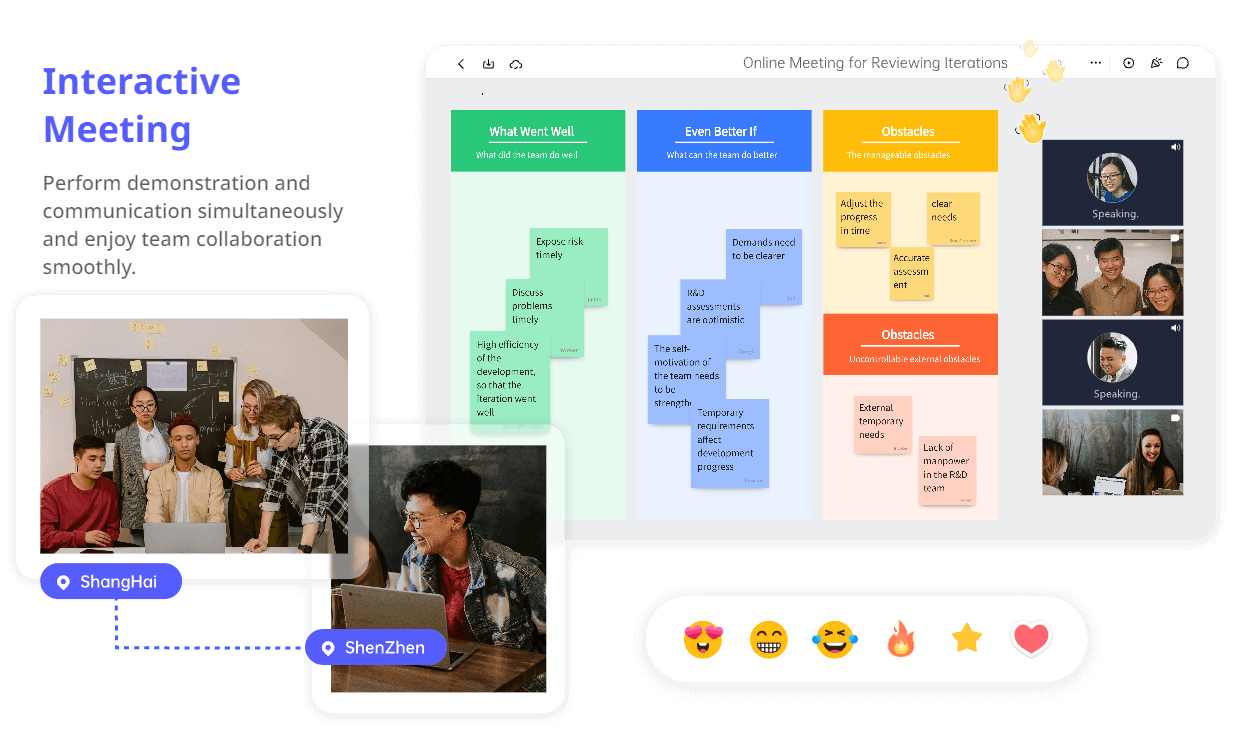
Now that all the meeting's aspects are thoroughly planned, it's time to conduct the meeting. For a remote or hybrid meeting, give participants access to the same board before discussion begins. Keep the agenda beside the notes so the host can return to the planned topic when a conversation runs long.
Boardmix lets multidisciplinary teams arrange meeting notes, resources, and deliverables on a shared whiteboard. Three useful ways to use it during a kick-off meeting are:
-
Attendees can add ideas to the same whiteboard during a remote discussion.
-
The host can use presentation mode to guide the group through the board in a planned sequence.
-
The shared board keeps the meeting material available for follow-up; version history can help recover an earlier saved version.
To collaborate using Boardmix, share the whiteboard link with all attendees. Please encourage them to familiarise themselves with the platform before the meeting to ensure effective collaboration. Ask participants to add a short test note so access or editing problems can be addressed before the discussion starts.
Once everyone is present, show the agenda and explain where participants should contribute. Use presentation mode for the overview, then leave time for the group to work on the relevant board area. Encourage attendees to add elements to the whiteboard at certain times during the meeting, ensuring effective collaboration. They can add sticky notes, text boxes, or other elements.
After the meeting, this collaborative whiteboard is a source of information and direction for the project's duration.
Example: a 45-minute website-launch kick-off
Here is a sample agenda for a team preparing a new product website. Invite the project lead, content lead, designer, developer, QA reviewer, and marketing approver. Send the existing site, the proposed launch date, and any fixed requirements beforehand. The times below are a suggested schedule, not a rule for every project.
- 0–5 minutes — Introduce the project and people. The project lead explains why the site is changing. Each person names the part of the launch they will work on, so the group can spot a missing contributor.
- 5–8 minutes — Share working preferences. Ask everyone to add one note about how they prefer to receive review requests. Agree where urgent launch questions will be raised.
- 8–15 minutes — Confirm the agenda and launch boundary. Show the pages proposed for launch. If a request for a customer portal appears, record it separately and ask the marketing approver whether it belongs in this launch.
- 15–23 minutes — Clarify responsibilities. For page copy, the content lead drafts it, the marketing approver is accountable for approval, product specialists are consulted, and the developer is informed when it is ready. Repeat this discussion for design approval and release testing.
- 23–31 minutes — Take questions. If no one knows who can change the site's DNS settings, the developer takes the action to confirm access with IT before release planning. Keep that question visible until it is answered.
- 31–40 minutes — Sequence the first work. Place content approval before page assembly and page assembly before QA. Ask each person what they need from the previous step; do not assign a date that depends on an unresolved handoff.
- 40–45 minutes — Read back the actions. Confirm that the content lead will circulate the page outline by Tuesday, the designer will identify missing assets by Wednesday, and the developer will confirm deployment access by Wednesday. Record the next review meeting and who must attend.
If a topic needs more time, name the people who will continue it and return to the agenda. To turn the agreed decisions into a lasting project reference, follow the worked example for building a shared project brief on an online whiteboard.
After the meeting
Send the board link with the agreed actions and the date of the next review. Keep unanswered questions beside their owners, and ask absent stakeholders to respond to the decisions that need their input before dependent work starts.