The question sounds technical. In practice, it is a business decision with compliance, budget, and operational consequences that outlast any product evaluation cycle.
On-premise vs private cloud — enterprise IT teams run into this fork in the road constantly when procuring collaboration infrastructure. And nowhere does the choice matter more than with whiteboard and visual collaboration software, where teams generate sensitive process maps, system architecture diagrams, product roadmaps, and strategic planning content on a daily basis.
This guide breaks down the genuine differences between on-premise and private cloud deployment, explains what each model means for data sovereignty and security posture, and shows exactly how Boardmix’s enterprise deployment options — including a third path many organizations overlook entirely — map to your organization’s specific requirements.
What “On-Premise vs Private Cloud” Actually Means
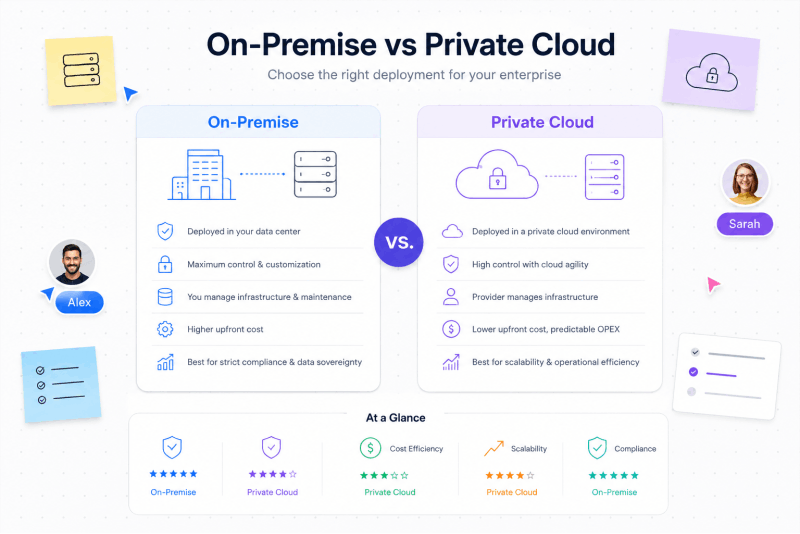
Before comparing the two, it is worth being precise. These terms get used loosely, and the distinction carries real implications for compliance, IT operations, and vendor relationships.
On-premises deployment means the entire software stack — frontend, backend, databases, file storage, real-time collaboration services — is installed and runs on physical servers that your organization owns and operates directly. Those servers sit in your data center, behind your firewall, connected to your internal network. No traffic leaves your perimeter unless you deliberately configure it to.
Private cloud deployment means the software runs on cloud infrastructure — virtual machines, managed Kubernetes clusters, object storage — that is provisioned exclusively for your organization within a public cloud provider’s environment. You access it through AWS, Azure, or Google Cloud, but under your own account, your own VPC, your own IAM policies. No other organization shares the underlying infrastructure your workloads run on.
Both models stand in contrast to public SaaS deployment, where the vendor hosts the software on shared cloud infrastructure and you access it via subscription. Miro, Notion, and most collaboration tools operate this way by default.
The core shared principle of both on-premise and private cloud: your organization controls where the data lives. The vendor’s infrastructure never touches it.
On-Premise vs Private Cloud: The Key Differences
Understanding where these two models diverge is what actually enables a good procurement decision. The differences are real, consequential, and worth mapping against your organization’s specific context.
| Dimension | On-Premises | Private Cloud |
|---|---|---|
| Infrastructure ownership | Your physical hardware | Your cloud account (AWS / Azure / GCP) |
| Data location | Your data center | Your cloud tenancy, region of your choice |
| Internet dependency | None required — fully air-gapped possible | Configurable — can restrict external access |
| Scalability | Limited by hardware capacity | Elastic — scale up or down on demand |
| Capital expenditure | Higher upfront (hardware procurement) | Lower upfront — pay-as-you-go model |
| Operational overhead | Higher — your team manages hardware | Lower — cloud provider handles physical layer |
| Network latency | Lowest — data never leaves LAN | Low — depends on VPC configuration |
| Compliance fit | Strongest for strict data localization | Strong — supports most compliance frameworks |
| Disaster recovery | Requires separate DR infrastructure | Built-in cloud redundancy options |
| Best for | Regulated industries, air-gapped environments | Enterprises already on cloud with sovereignty needs |
Neither model is universally superior. The right choice depends on where your organization’s infrastructure investment already sits, what your regulatory framework actually requires, and how much operational complexity your IT team can sustain.
Why the Comparison Matters Specifically for Whiteboard Software
General infrastructure decisions about on-premise vs private cloud are well-documented. But the choice becomes notably sharper when the software in question is a visual collaboration platform.
Whiteboard tools are, by nature, repositories for sensitive intellectual output. Every diagram your engineering team draws, every process map your operations team builds, every strategic planning session your leadership team runs — all of it accumulates on the platform. Unlike email or calendar, which are relatively structured, a collaborative whiteboard captures raw strategic thinking, unreleased product designs, and confidential process documentation in a format that is difficult to audit after the fact.
This creates specific deployment pressure in three categories of organization:
Regulated industries with data handling obligations. Financial services firms, healthcare organizations, and government agencies operate under frameworks — HIPAA, FINRA, GDPR, FedRAMP — that require demonstrated control over where sensitive data is processed and stored. A vendor’s compliance certifications address the vendor’s posture, not your organization’s. On-premises or private cloud deployment is the only architecture that puts your organization directly in control.
Enterprises with blanket external-service prohibitions. Many large organizations have adopted blanket information security policies that prohibit routing specific classes of data through any external service, regardless of vendor reputation. Architecture diagrams and system design documents frequently fall into this category. For these organizations, even a well-certified SaaS whiteboard vendor does not satisfy the policy.
Organizations protecting unreleased intellectual property. Product teams working on pre-announcement features, engineering teams designing proprietary systems, and strategy teams planning unreleased market moves have strong incentive to keep visual collaboration output inside their own perimeter. On-premises or private cloud deployment gives them that assurance structurally, not just contractually.
Private Deployment vs SaaS: A Third Dimension to the Decision
Most comparisons frame this as a two-way choice: on-premise or cloud. But there is a third architectural model that many enterprise teams discover mid-evaluation and then find they cannot do without: embedded SDK deployment.
Rather than deploying a whiteboard as a standalone application — whether on-premises or in a private cloud — an SDK integration embeds visual collaboration capabilities directly into platforms your organization already operates. The whiteboard canvas lives inside your OA system, your engineering portal, your document management platform, or your customer-facing product. Authentication flows through your existing identity layer. All data stays inside your infrastructure.
This matters because the friction point for collaboration tool adoption is rarely capability — it is context switching. Teams that must leave one platform, open another, and then bring artifacts back are less likely to collaborate visually than teams whose whiteboard is already where they work.
Mordor Intelligence projects the collaborative whiteboard software market will grow from $3.81 billion in 2026 to $9.59 billion by 2031, with embedded and SDK-based deployment emerging as a significant growth vector as enterprises increasingly seek to integrate collaboration capability into existing workflows rather than add standalone tools.
How Boardmix Maps to Every Deployment Model
Boardmix is an enterprise visual collaboration platform designed from the ground up to support every deployment model that security-conscious organizations require. The architecture is not an afterthought — private deployment is how Boardmix approaches enterprise customers by default.
Boardmix’s enterprise solutions break into two primary categories: Private Deployment and SDK Integration. Each serves a different integration need, and both are built around the principle that your organization’s data never has to leave your infrastructure if you do not want it to.
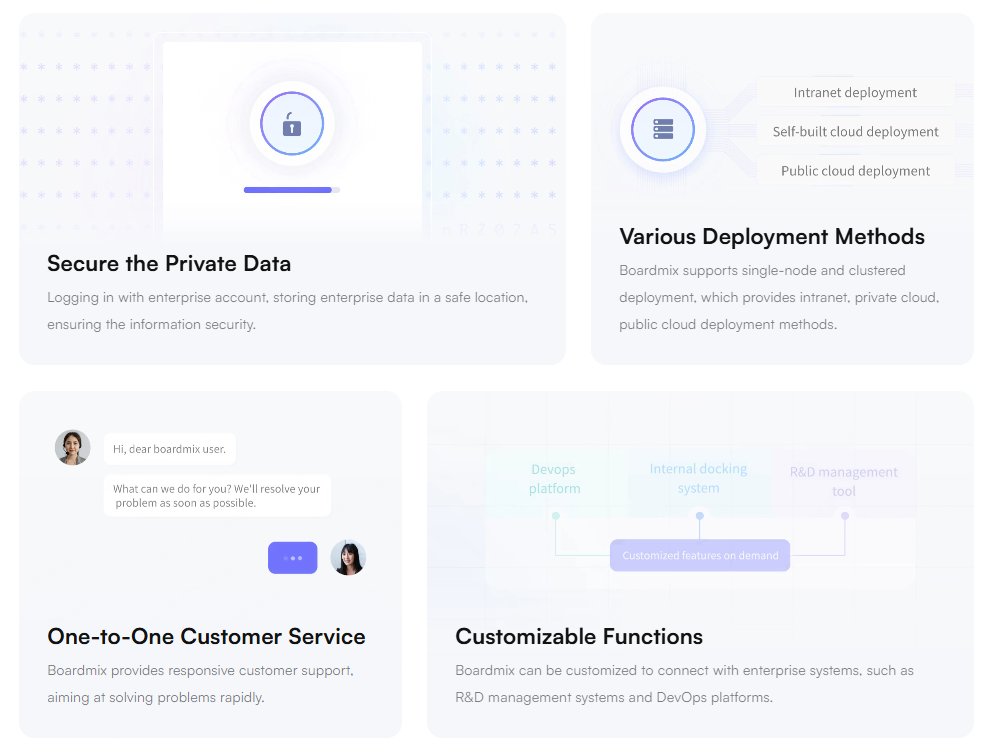
Private Deployment: On-Premises and Private Cloud
Boardmix’s private deployment option installs the complete platform — frontend, backend services, databases, and file storage — entirely on the customer’s own infrastructure. This is not a partial deployment or a thin-client setup. The full Boardmix application stack moves inside your environment.
On-Premises Deployment
Boardmix on-premises means exactly what it says. The entire platform is deployed on your organization’s own servers inside your data center. All whiteboard data — boards, files, collaboration histories, user records — is stored on your servers. Your team controls the hardware, the network, the encryption configuration, and the access policies.
This is the right model for organizations that:
- Operate under strict data localization requirements or air-gap mandates
- Have existing data center infrastructure they are committed to leveraging
- Need to satisfy compliance audits by demonstrating physical control over the environment
- Have internal policies prohibiting any internet-dependent collaboration infrastructure
Boardmix on-premises supports containerized deployment via Docker and Kubernetes. It also ships with a suite of private-deployment-specific features that go beyond what the public SaaS version offers — most notably a login module that supports multiple enterprise authentication methods, including LDAP, SAML, Active Directory, and custom SSO configurations tailored to the specific identity architectures common in regulated enterprise environments. Open APIs are also available for your IT team to operate and integrate independently, giving you programmatic control over user management, board governance, and system monitoring.
Private Cloud Deployment
For organizations already operating on AWS, Azure, or Google Cloud, Boardmix private cloud deployment runs the complete platform inside your own dedicated cloud tenancy. You provision the infrastructure under your own account — your VPC, your IAM configurations, your cloud region of choice, your encryption keys. Boardmix’s infrastructure does not enter the picture. All whiteboard data is stored on the cloud servers your organization has purchased and controls.
This model offers the same data sovereignty assurance as on-premises deployment, with the operational advantages of cloud-native infrastructure: elastic scaling, built-in redundancy, and lower hardware management overhead. It is the right choice for enterprises that have already migrated core workloads to a private cloud environment and want their collaboration tools to operate within the same governed boundary.
SDK Integration: Embed the Canvas Inside Your Existing Products
Boardmix SDK takes a fundamentally different approach. Rather than standing up Boardmix as a separate application, your development team integrates the Boardmix canvas capability directly into platforms your organization already operates.
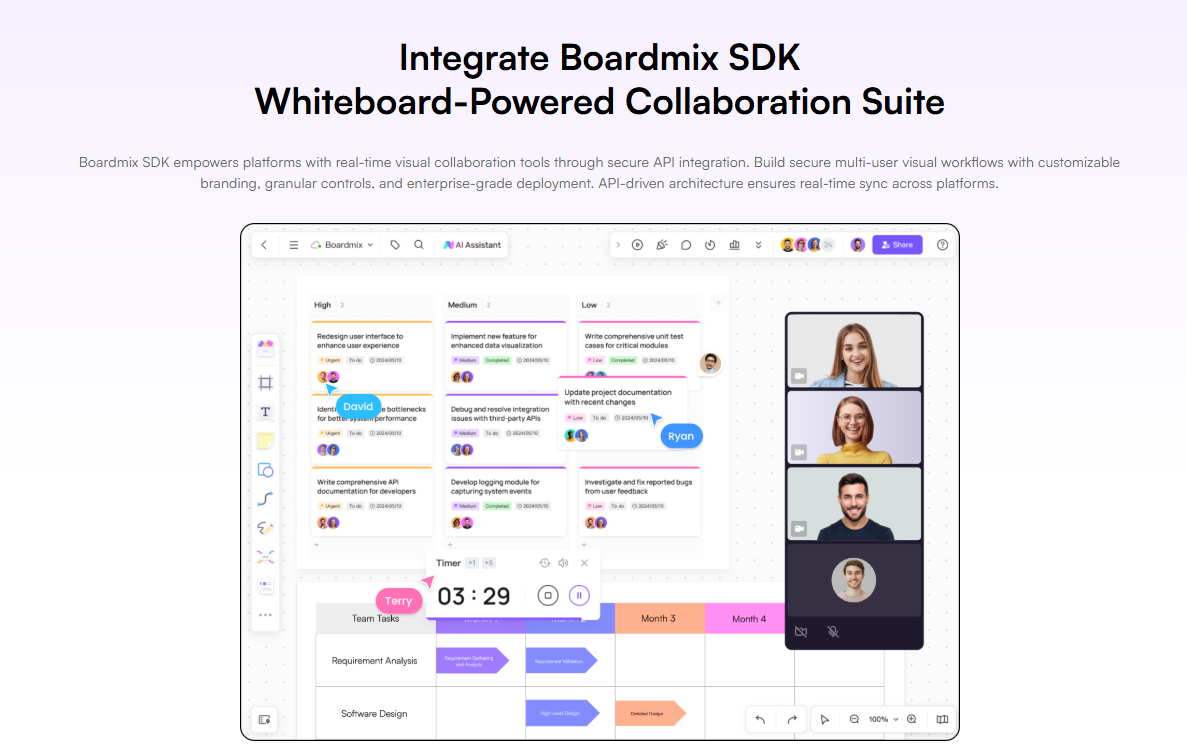
Think of it this way: your internal portal, OA system, or project management platform gains a full collaborative whiteboard canvas without becoming a different tool. Teams never leave the platform they are already working in.
SDK integration comes in two variants that mirror the broader private deployment philosophy:
Public Version (Cloud-Connected SDK)
The SDK connects to Boardmix’s online service. Feature behavior is consistent with the public Boardmix platform — teams get the full canvas experience, all AI tools, and the complete feature set. Data and services remain on Boardmix’s infrastructure. This variant is appropriate for organizations that do not have strict data residency requirements but want to embed whiteboard capability into their product without building it from scratch.
Private Version (Self-Hosted SDK)
The SDK operates entirely within your own infrastructure, behaving identically to the on-premises private deployment model. All whiteboard data is stored on your servers. The canvas is embedded in your platform, but the data governance model is the same as a full standalone private deployment. This is the architecture of choice for organizations that want embedded visual collaboration without any external data exposure — the whiteboard lives in your product, and the data never leaves your environment.
It is worth being explicit about one important nuance: both the private deployment and private SDK variants will have certain feature differences compared to the public online version. Some features are in active development for private environments, and others — like the enterprise authentication module with its extended login method support — exist exclusively in private deployment and are not available in the public SaaS version. Organizations should evaluate these differences as part of their procurement process, and Boardmix’s enterprise team can provide a detailed feature matrix for any specific deployment configuration.
Choosing the Right Model: A Decision Framework
| Your Situation | Recommended Model |
|---|---|
| Strict air-gap or data center mandate | On-premises deployment |
| Already on AWS / Azure / GCP, need sovereignty | Private cloud deployment |
| Want to embed whiteboard in your own product or portal | SDK — Private Version |
| No data residency requirements, need fast integration | SDK — Public Version |
| Hybrid: some teams on-prem, some cloud | On-premises + private cloud, with unified SSO |
The choice between on-premise and private cloud is ultimately a question of where your infrastructure investment already sits and how much operational flexibility you need. Both models satisfy the core requirement that matters most to enterprise security teams: your data stays in your environment, under your governance, with no dependency on Boardmix’s own infrastructure.
The Deployment Decision Is an Architecture Decision
Enterprise teams searching for guidance on on-premise vs private cloud are not really asking an abstract infrastructure question. They are asking: which model gives my organization the level of control we actually need, without the operational cost we cannot sustain?
The answer is rarely universal. It depends on your regulatory framework, your existing cloud posture, your IT team’s operational capacity, and whether you need a standalone application or an embedded capability inside systems you already own.
Boardmix is built to accommodate that complexity. Whether your organization needs on-premises deployment in an air-gapped data center, private cloud deployment inside your own AWS or Azure tenancy, SDK integration embedded into your own products, or some combination of the above — the architecture is there, the deployment support is there, and the enterprise team is ready to scope the right solution for your environment.
Ready to determine which deployment model fits your organization? Contact the Boardmix enterprise team to schedule a technical scoping session and request a private deployment trial configured for your infrastructure.