





In online education, low student participation and poor interaction is quite a big annoying problem. Boardmix AI, a free online whiteboard, offers five simple tricks to boost classroom engagement by 10x. These AI-powered features help teachers create more interactive, visual, and efficient lessons, whether for remote or hybrid classrooms. With Boardmix AI, educators can increase student involvement, improve connections, and save time.
In this article, we'll explore these 5 tricks in detail, from instant image generation to collaborative mind mapping, along with practical tips to get started and maximize their impact on your online teaching.
Introduction: Tackling Low Engagement in Online Teaching and Seizing Opportunities
The free online whiteboard for teaching aspect of Boardmix AI ensures accessibility for all educators, regardless of budget, allowing seamless integration into daily routines. By addressing common pain points like screen fatigue and passive listening, these tricks promote a more engaging virtual environment.
For instance, teachers can preview student contributions in real-time, adjusting lessons dynamically to maintain interest. This free online whiteboard for teaching not only enhances participation but also builds a sense of community, crucial in digital spaces where physical cues are absent.
Trick 1: 3-Second AI Image Transformation for Lesson Slides
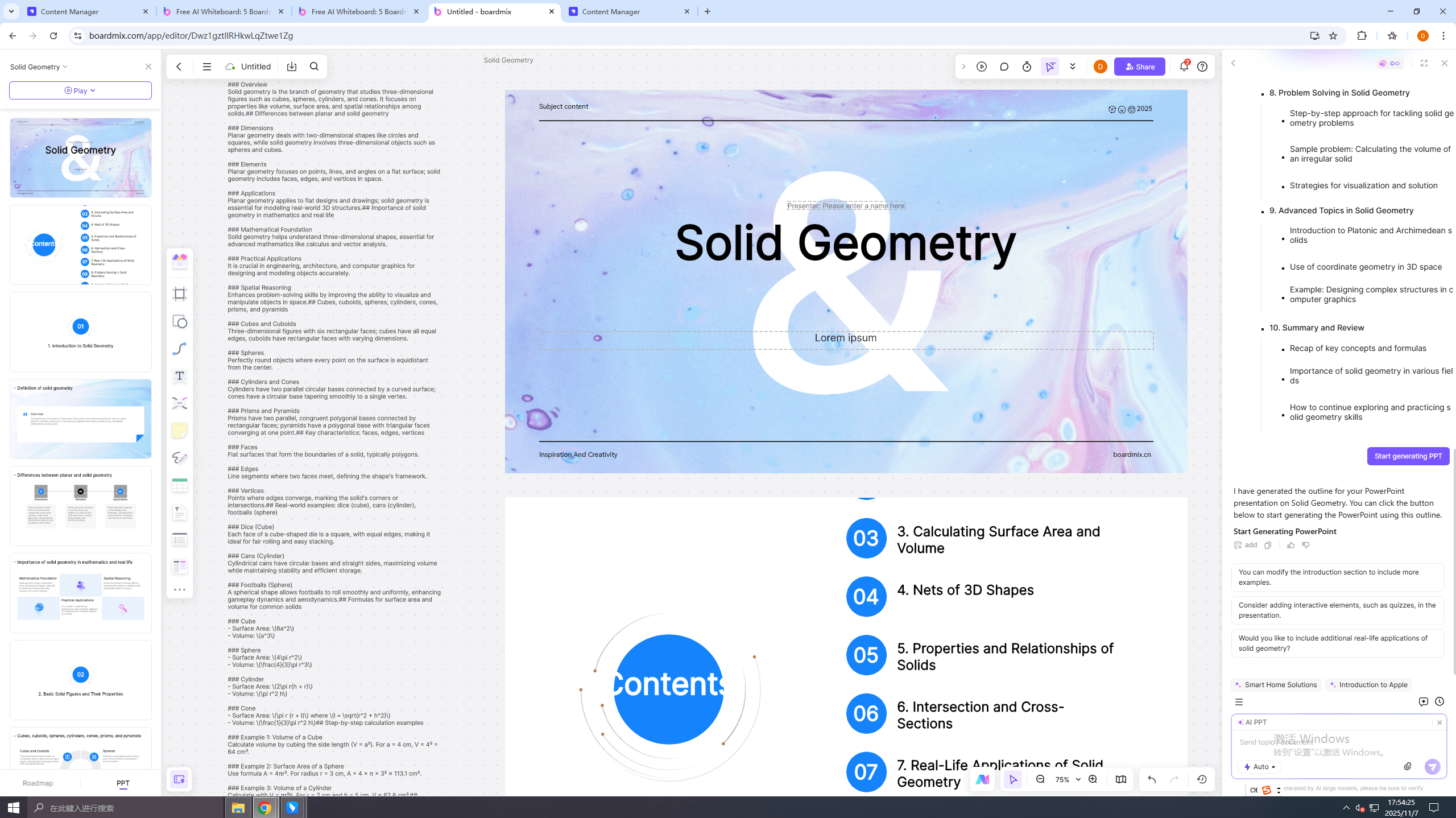
🚩Visual aids are essential for making abstract concepts tangible, but creating them from scratch can be time-consuming. Boardmix AI's first trick allows you to generate custom illustrations in just 3 seconds by simply inputting keywords, instantly visualizing topics in history, science, or any subject to help students grasp ideas faster. This feature goes further with AI auto-completion for diagrams: Students can upload their notes, and the AI intelligently fills in relevant visuals, skyrocketing interaction rates as teachers monitor progress in real-time.
For instance, in a biology class, entering "photosynthesis process" produces a detailed, editable diagram that students can annotate collaboratively. This not only elevates engagement but also integrates seamlessly with Boardmix AI's tools, turning passive online lessons into interactive visual journeys that keep students hooked.
As a free online whiteboard for teaching, Boardmix AI simplifies the process, enabling educators to focus on content delivery rather than design. Teachers can customize generated images with colors and labels, tailoring them to specific learning objectives. This trick reduces preparation time significantly, allowing more room for spontaneous discussions.
In practice, during a geography lesson, keywords like "volcanic eruption" yield animated sequences, sparking curiosity and questions. The free online whiteboard for teaching ensures that these visuals are shareable across devices, supporting hybrid learning seamlessly. Overall, this feature transforms static slides into dynamic elements, fostering deeper understanding and retention among students.
Trick 2: Real-Time SWOT Group Battles for Dynamic Discussions
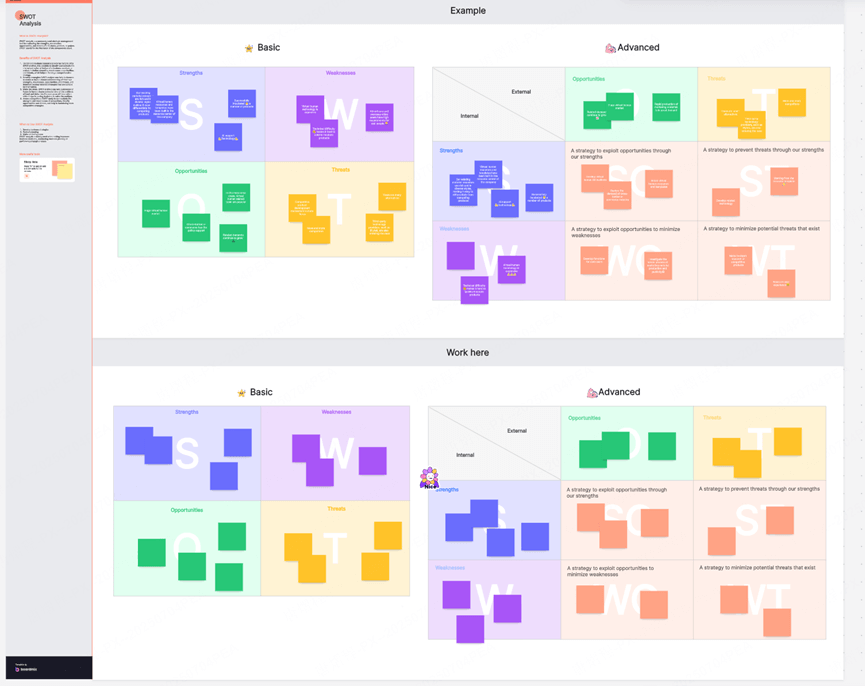
🚩Group activities often fall flat in virtual settings due to coordination issues, but Boardmix AI's second trick revolutionizes this with one-click SWOT template launches. Teachers can instantly initiate a SWOT (Strengths, Weaknesses, Opportunities, Threats) analysis board, enabling students to collaborate in real-time via their mobile devices, filling in sections simultaneously for a multiplayer experience.
This sparks lively discussions and creativity, transforming cold debates in business or strategy courses into high-energy brainstorming sessions where student contributions triple. Imagine a marketing class where groups compete to populate the SWOT grid—real-time updates and color-coded inputs prevent overlaps, fostering accountability and excitement.
As a free online whiteboard for teaching, this trick enhances online teaching engagement by making abstract planning tangible and collaborative, ensuring every voice is heard without technical hurdles. Educators can set timers for each section, adding a gamified element to maintain momentum.
Post-session, AI summaries highlight key insights, aiding review and follow-up. In an economics class, for example, students analyze market trends collaboratively, with the board evolving as ideas flow. This free online whiteboard for teaching supports unlimited participants, scaling for large classes effortlessly. By promoting equal contribution, it builds confidence in shy students, leading to more balanced and enriching discussions.
Trick 3: Six Thinking Hats for Perspective-Shifting Debates
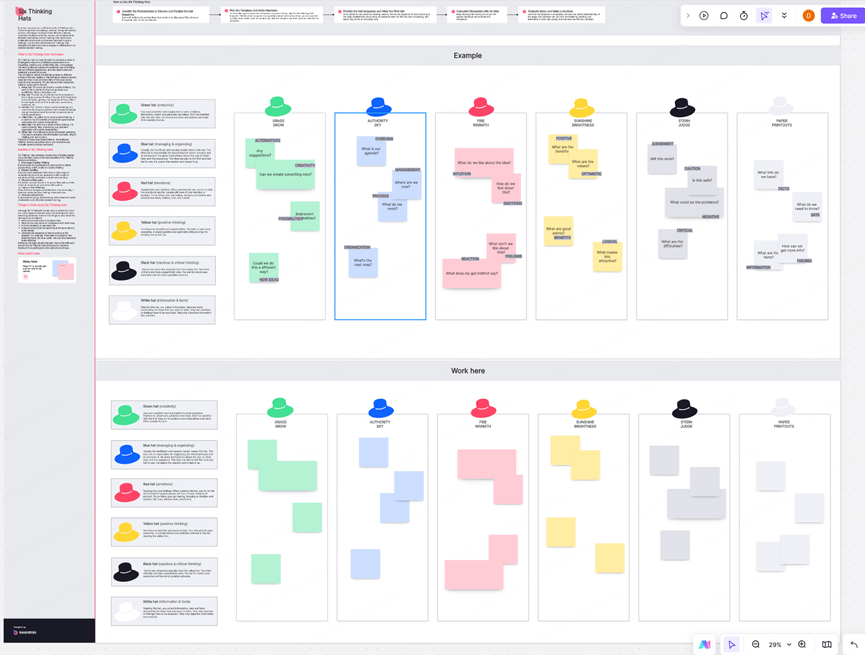
🚩Encouraging diverse viewpoints is key to critical thinking, yet online discussions can feel one-sided. Boardmix AI's third trick introduces the Six Thinking Hats method, where AI assigns each student a "hat" representing a different perspective (e.g., optimistic, critical, creative), prompting parallel inputs from varied angles to guarantee full participation.
This leads to all-hands-on-deck involvement and intense idea collisions, perfect for English, civics, or philosophy courses, where debates erupt like a "comment storm" to sharpen students' analytical skills. For example, in a literature analysis, students switch hats mid-discussion via AI prompts, enriching the conversation with balanced insights.
Boardmix AI's integration makes this seamless, boosting online teaching engagement by democratizing input and turning solitary screens into vibrant forums of thought. As a free online whiteboard for teaching, it allows random hat assignments to prevent bias, ensuring fresh perspectives each time.
Teachers can moderate by highlighting standout contributions, guiding the debate productively. In a social studies session, this method uncovers multifaceted views on historical events, deepening comprehension. The free online whiteboard for teaching records all inputs for later reference, supporting asynchronous participation. This trick cultivates empathy and critical analysis, essential skills for lifelong learning.
Trick 4: AI-Powered Instant Polls for Feedback Loops
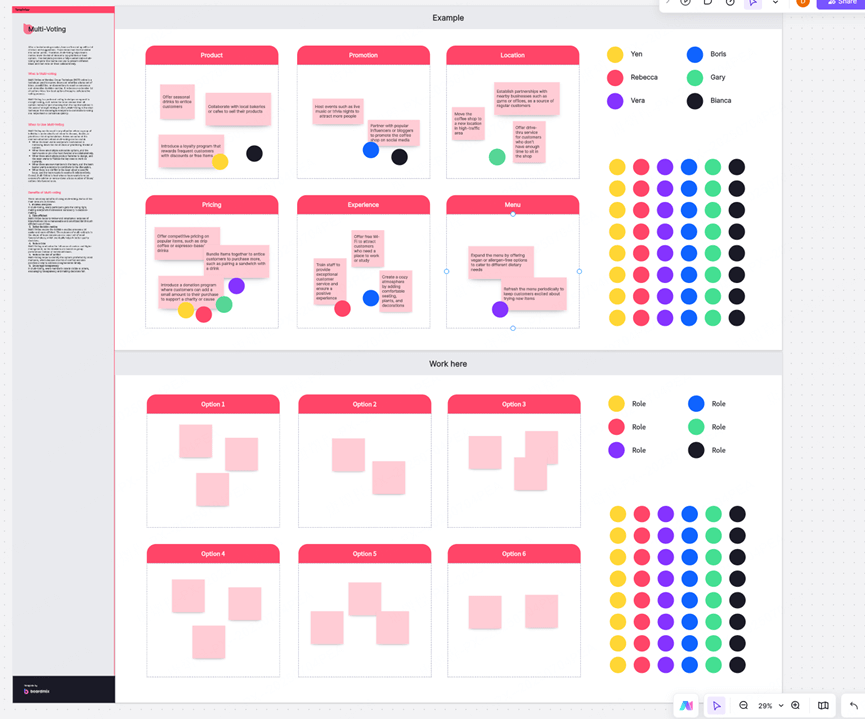
🚩Gauging student understanding in real-time is crucial for adaptive teaching, but traditional methods can disrupt flow. Boardmix AI's fourth trick offers AI-powered instant polling: Teachers input a question or topic, and the AI generates customizable polls with multiple-choice, sliders, or open-ended options, deploying them in seconds for anonymous or named responses.
Results appear live on the whiteboard, with AI analyzing trends to suggest follow-up questions or resources, increasing participation by making feedback feel effortless and inclusive. In a math or language class, for instance, a quick poll on a concept's clarity can reveal misconceptions, allowing immediate adjustments.
This feature supercharges online teaching engagement by creating responsive loops that keep students invested and help teachers refine lessons on the fly. As a free online whiteboard for teaching, Boardmix AI ensures polls are visually appealing, with charts updating dynamically. Educators can anonymize responses to encourage honesty, particularly in sensitive topics. Post-poll, AI-generated insights provide actionable data, like common errors in a quiz.
In a foreign language practice, polls on vocabulary retention guide targeted reviews. This free online whiteboard for teaching integrates with other tools, linking poll results to mind maps for comprehensive analysis. Ultimately, it empowers data-driven teaching, enhancing outcomes without extra effort.
Trick 5: Collaborative Mind Mapping for Brainstorming Bursts
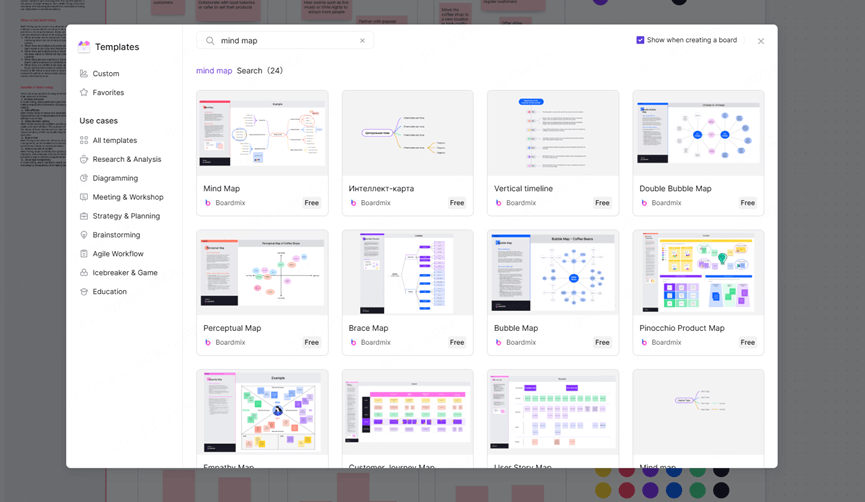
🚩Idea generation can stall in virtual environments without structure, so Boardmix AI's fifth trick provides AI-assisted mind mapping. Start with a central topic, and the AI auto-suggests branches, connections, and even related images or notes based on inputs, enabling groups to build expansive maps collaboratively in real-time.
This ignites creative bursts and organizes chaotic thoughts, ideal for project planning or creative writing sessions, where student additions multiply ideas exponentially. Picture a science brainstorming where AI populates sub-branches with facts—participants drag, connect, and vote on nodes, fostering ownership.
As a versatile free online whiteboard for teaching, this trick elevates online teaching engagement by visualizing complexity, encouraging quieter students to contribute, and transforming ideas into actionable plans. Teachers can export maps as PDFs for assignments, extending utility.
In a creative writing class, AI suggestions spark plot twists, collaborative editing refines narratives. The free online whiteboard for teaching supports multimedia embeds, enriching maps with videos or links. This feature promotes divergent thinking, crucial for innovation, while AI ensures logical flow. By making brainstorming inclusive, it boosts group cohesion and idea quality.
Best Practices for Implementing Boardmix AI's 5 Tricks
🔶To fully harness these Boardmix AI tricks and 10x your online teaching engagement, consider these best practices:
✅Start small: Test one trick per session to build familiarity before combining them.
✅Promote inclusivity: Use avatars and real-time tracking to ensure all students participate.
✅Review AI insights: Regularly check auto-generated suggestions for personalized tweaks.
✅Encourage mobile access: Leverage hybrid compatibility for on-the-go contributions.
✅Iterate based on feedback: Use polls and maps to refine future lessons dynamically.
Following these will help you create more engaging, efficient online classrooms. Additionally, integrate with calendars for scheduling, and train students briefly to maximize adoption. As a free online whiteboard for teaching, Boardmix AI adapts to various subjects, from STEM to humanities.
Conclusion
🚩Boardmix AI's 5 transformative tricks—from 3-second AI images and SWOT battles to Six Thinking Hats, instant polls, and mind mapping—offer a free online whiteboard for teaching solution that redefines online teaching engagement. By addressing low interaction pain points and amplifying participation by 10x, these features empower educators to deliver vibrant, student-centered sessions that inspire learning from anywhere.
Integrate these into your routine to cut prep time, spark creativity, and build stronger connections. Ready to revolutionize your classroom? Sign up for a free trial of Boardmix AI today with one-click registration at https://boardmix.com/ and experience the difference in student enthusiasm and outcomes.





