A C4 system context diagram answers a simple question: what is this software system, who uses it, and which other systems does it depend on? It should help someone understand the boundary before they need to understand the implementation.
For a team drawing in a shared architecture-diagram workspace, that boundary is the first decision to make. This example models a booking platform used by customers and service coordinators. It deliberately leaves screens, databases, and deployment infrastructure out of the picture.
State what the booking platform is responsible for
The C4 model's system context guidance centers one software system and the people and external software systems directly connected to it. This is the broad view: users and responsibilities matter more than protocols or internal components.
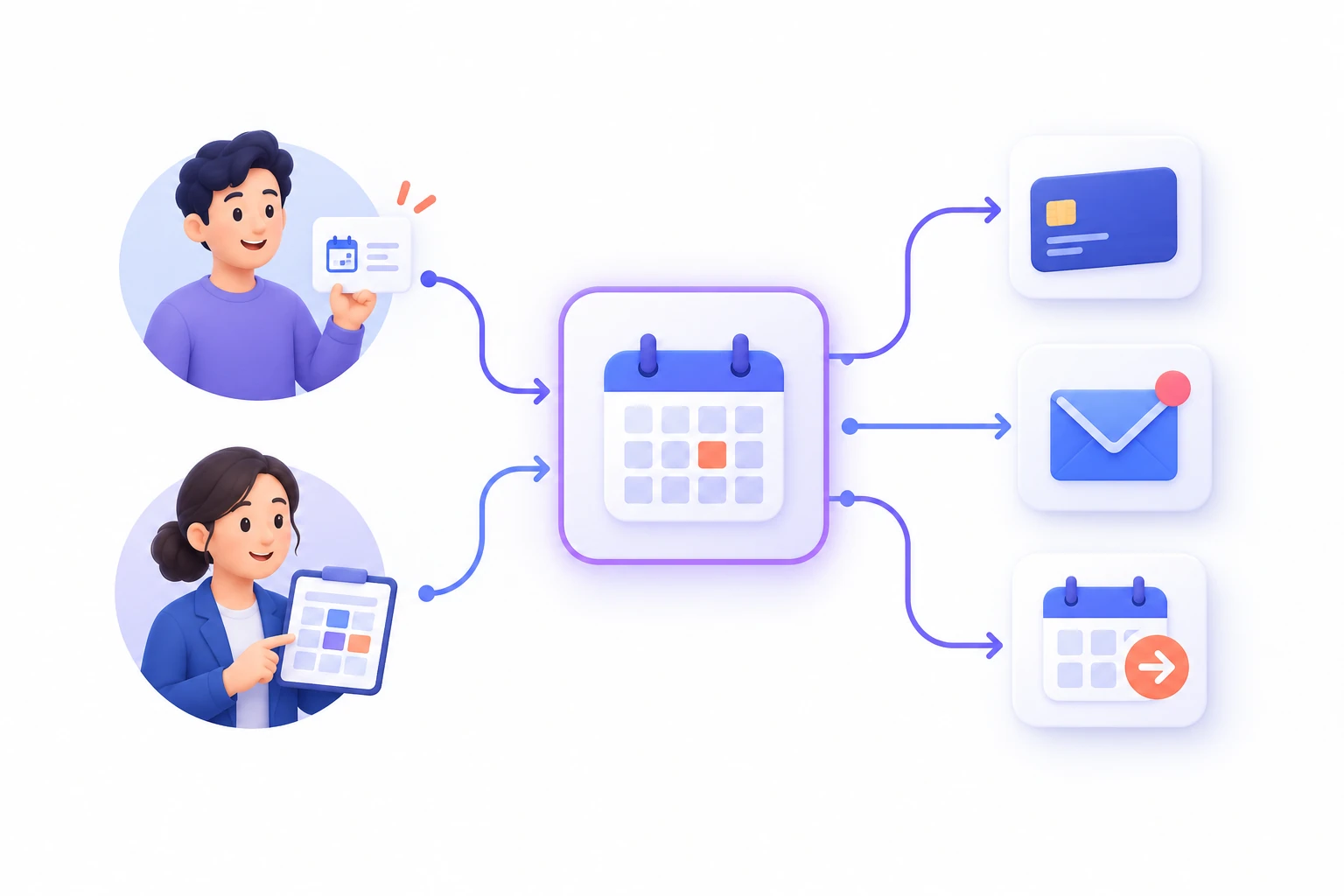
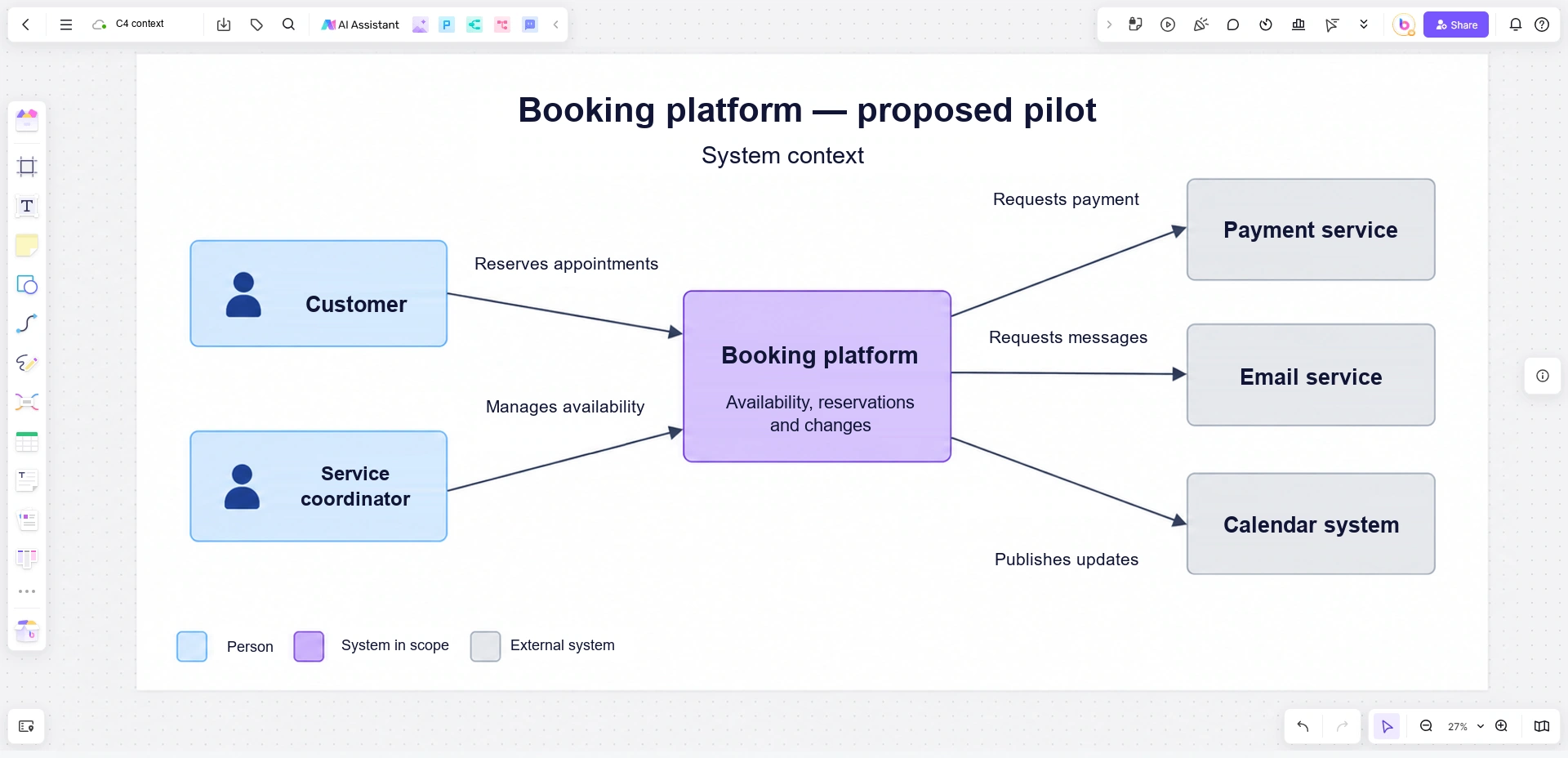
Consider a booking platform that lets customers reserve service appointments and lets coordinators manage availability. It also requests payments from an external payment service, sends message requests to an email service, and publishes booking updates to an external calendar system.
Write a one-sentence description inside the central box: Booking platform — manages availability, reservations, and booking changes. This is more useful than a box labeled “Backend,” which names a technical position without explaining the system's purpose.
The boundary includes the platform's customer-facing and coordinator-facing applications as parts of the same system. It does not include the independently operated payment, email, or calendar services. Someone may own the integration code without owning the service on the other end; show those as different responsibilities.
Build the relationship inventory before arranging boxes
Start with a short inventory. It prevents a tidy layout from becoming the reason an important actor or dependency disappears. Only add an element when you can describe how it relates to the system in scope.
| Element | Role in this example | Relationship label |
|---|---|---|
| Customer | Person who makes and changes a booking | Reserves and changes appointments |
| Service coordinator | Person who manages the service schedule | Manages availability and bookings |
| Payment service | External system that processes payment requests | Requests payment processing |
| Email service | External system used to deliver booking messages | Requests delivery of booking messages |
| Calendar system | External system receiving the platform's booking updates | Publishes booking updates |
The first two relationships run from the person to the booking platform. The last three run from the platform to the external system. The labels explain the interaction in that direction; they are not an attempt to show every request and response.
For instance, “Requests payment processing” can represent the platform's use of the payment service without adding a second line for every response. If a separate asynchronous payment notification is important to the architectural discussion, show and label that relationship explicitly. Do not use a double-headed arrow labeled “data” to avoid deciding what the connection means.
Decide what does not belong in this view
Now test the elements that people are tempted to add. A database is important to the application, but it is not automatically another external system. In this example, the booking database is an internal part of the booking platform, so it belongs in a more detailed view.
| Proposed addition | Decision for this context diagram | Where the detail belongs |
|---|---|---|
| Booking database | Leave it inside the central system's abstraction. | A container diagram showing the platform's applications and data stores |
| Customer login screen | Do not draw a screen as a separate software system. | A user flow or screen-level design |
| Load balancer and replicas | Leave out deployment topology. | A deployment view for the relevant environment |
| Customer-support employee | Add only if this role directly uses or interacts with the booking platform in the modeled scope. | The context diagram if the direct relationship exists |
| Accounting platform that receives only a manual staff report | Do not invent a direct system integration. | A separately described operational handoff, if relevant |
The accounting example matters because an arrow can imply a connection that nobody has built. If a coordinator exports information and manually enters it elsewhere, that is not the same relationship as the booking platform transmitting it. Describe the current situation accurately, and distinguish a planned integration from an existing one.
A future-state diagram is legitimate, but its title must say so. Do not quietly mix a live payment connection and a proposed calendar connection into one unexplained picture.
Use labels that survive the meeting
C4's notation guidance emphasizes understandable element descriptions, relationship labels, and a diagram key. You can choose a visual style, but readers should not have to guess whether a gray box is external, optional, or simply unselected.
Give this diagram a specific title: “Booking platform — system context — proposed pilot.” Add a small key distinguishing people, the system in scope, and external systems. Use the same terms as the surrounding documentation. If the product team says “service coordinator,” changing the actor to “administrator” can introduce a different set of responsibilities.
Keep descriptions short enough to read without opening another document. “Email service — delivers booking confirmations and change notices” carries more meaning than a vendor logo alone. A logo may identify the current provider, but it does not explain why the dependency exists.
Avoid treating every line as a chronological step. A system context diagram shows relationships, not the exact order of a booking transaction. Questions such as “does payment happen before confirmation?” need a behavior-oriented view, not a longer caption on this diagram.
Draw the booking context in Boardmix
Place the booking platform at the center of a Boardmix canvas. Put the two people on one side and the three external systems on the other, leaving enough room for relationship labels. Use simple shapes and connectors; the meaning comes from the names, descriptions, and boundary, not from a special-looking server icon.
Add the five inventory relationships one at a time. Read each aloud from its source to its destination: “Customer reserves and changes appointments in Booking platform.” If the sentence is unclear, fix the label before adding another arrow.
Beside the diagram, keep a small “scope questions” area for unresolved decisions. For example: “Does the coordinator manage calendar updates directly, or does the platform publish them?” Do not resolve that uncertainty by drawing both routes as though both were confirmed.
Open a Boardmix board to map your own system's context. Bring the people who understand both user work and system dependencies: they often notice different omissions in the same drawing.
Zoom in without changing what the first diagram means
Once the context is agreed, a C4 container diagram can show the applications and data stores inside the booking platform. “Container” here is a C4 abstraction, not a requirement to use Docker or another container runtime.
In the next view, the single platform box might expand into a customer application, a coordinator application, an application service, and a booking data store. Keep the same names for the external payment, email, and calendar systems. The second diagram adds detail to the first; it should not unexpectedly introduce a different product boundary.
If the team cannot agree whether the calendar belongs inside the platform or outside it, stop at that question. A more detailed drawing will not settle an unresolved responsibility. Clarify the boundary, then choose the view that explains the next question.