Crazy 8s is a sketching exercise in which each person explores eight ideas in eight minutes. Give everyone the same problem, divide their working area into eight panels, and ask for a different possible response in each panel. The point is to discover alternatives—not to produce eight polished screens or choose a winner before anyone has explained their thinking.
For a remote group, a shared brainstorming board keeps the prompt, sketches and discussion together. Each person still needs their own eight-panel area. A single grid filled by the whole group changes the exercise: people spend their time negotiating ideas instead of exploring them independently.
What you should have at the end
The immediate result is a set of rough alternatives that other people can understand. A sketch can be a few boxes, arrows and words. Drawing skill matters less than showing what a person would see, do or learn.
Miro's Crazy Eights method guide describes the eight-ideas, eight-minute format. Keep that sketch round separate from the time needed to explain the problem, share work and discuss what to develop. An eight-minute exercise is not an entire eight-minute workshop.
Use it when the group understands a problem but is settling too quickly on one solution. If people disagree about whose problem they are solving, clarify that first. If you already have a detailed design and need to evaluate its usability, a sketching exercise will not answer that question.
Prepare one prompt and eight panels per person
Start with a problem that is specific enough to draw but does not prescribe the answer. In our coffee-shop example, customers can place a mobile order but are unsure where to wait and when to collect it.
Prompt: “How could a customer know where and when to collect their mobile coffee order?”
“Design a better notification” is too narrow: it has already selected a notification as the solution. “Improve the coffee-shop experience” is too broad: one person may sketch payment while another redesigns the seating.
Set out eight equally sized panels. Leave room above them for the prompt and below them for notes after sharing. Number the panels so people can refer to an idea without moving it. On Boardmix, arrange simple rectangles on a canvas and leave a separate area for each participant. Paper is also fine: someone who finds drawing with a mouse difficult can sketch on paper and add a clear photograph afterward.
Before starting, tell the group what rough work looks like. A rectangle labeled “Ready” and an arrow to a pickup shelf is sufficient. Nobody needs a finished interface, brand colors or realistic illustrations.
Run the sketch round without reviewing each idea
- Read the problem together. Answer questions about the situation, such as whether customers are already in the shop. Do not demonstrate your preferred solution.
- Start the eight-minute round. Ask people to explore one idea per panel. They can move on early; spending the whole round polishing panel one defeats the purpose.
- Keep conversation paused. A running commentary about one person's ideas can pull everyone toward the same direction.
- Give simple time reminders. A visible or spoken countdown is enough. Use whatever timer the group can access; the method does not depend on a particular whiteboard feature.
- Stop drawing before sharing. Let people briefly label any sketch whose meaning would otherwise be unclear.
If someone runs out of ideas, suggest changing the point of intervention: before arrival, at the entrance, while waiting or at collection. Another useful question is “What could work without a phone?” These prompts change the approach without handing over a specific design.
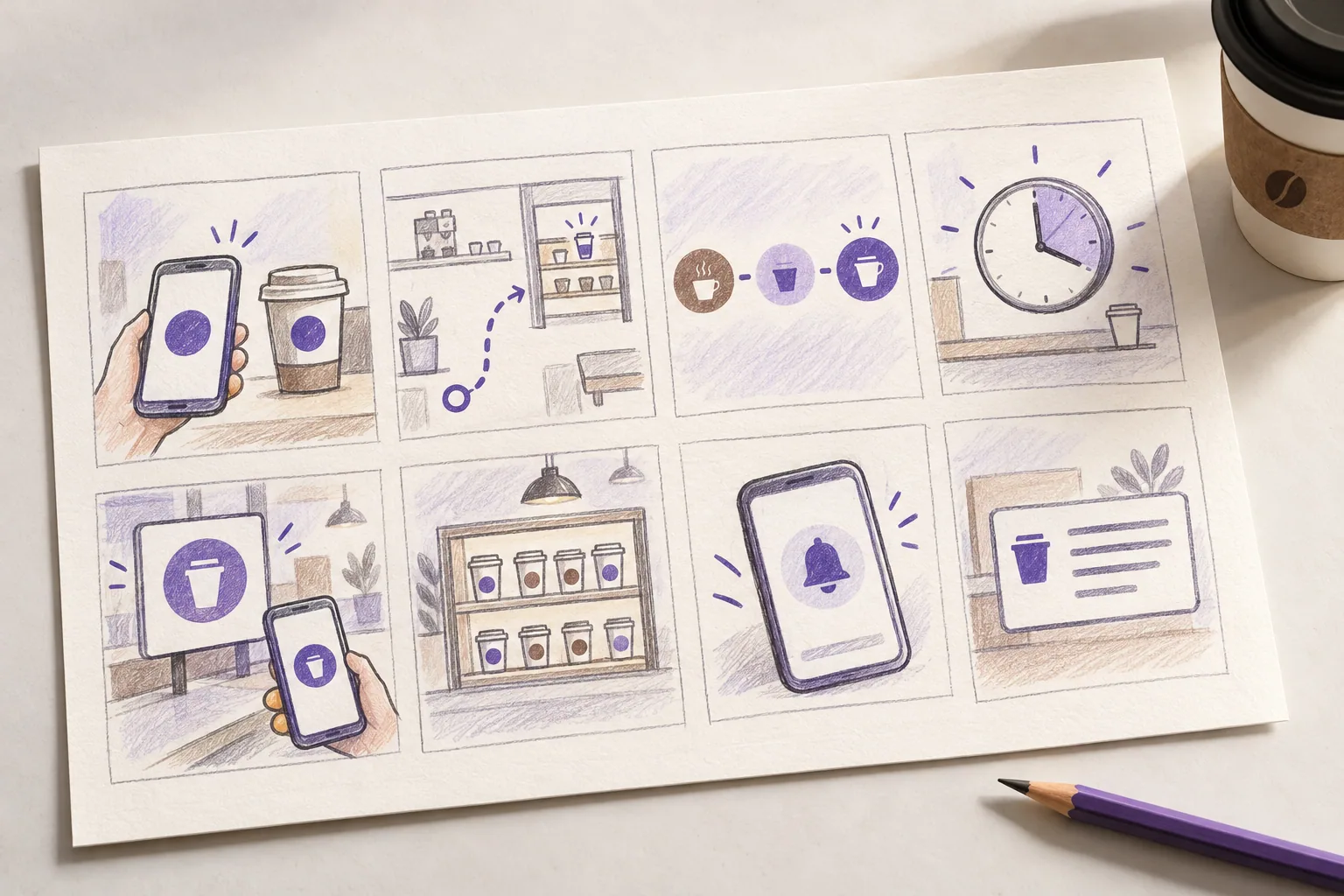
Eight sketch examples for the same pickup problem
Imagine a participant produces the eight options below. They are deliberately different: some change the mobile experience, some change the shop, and some change the interaction between the two.

| Panel | What to sketch | What the idea helps the customer understand |
|---|---|---|
| 1. Collection code | A short order code on the phone, repeated on the cup label. | “Is this drink mine?” The matching code connects the digital order with a physical item. |
| 2. Shelf map | A small shop plan with an arrow from the entrance to the pickup shelf. | “Where should I go?” It makes the location visible before the customer joins the wrong queue. |
| 3. Preparation stages | Three states: received, preparing and ready, with the current state emphasized. | “Has anything happened to my order?” It shows progress without inventing a precise completion time. |
| 4. Pickup estimate | An expected collection window beside the order, with a changed estimate clearly marked. | “When should I arrive?” Its usefulness depends on having a reliable way to estimate preparation. |
| 5. Named pickup zone | A zone name on the order and the same name on a physical sign. | “Which collection area is right?” Use words or symbols as well as color so color is not the only cue. |
| 6. Ready-order display | A display near the counter listing order codes that are ready. | “Can I collect it now?” People can check without repeatedly opening their phone. |
| 7. Readiness alert | A short phone message that says the order is ready and names the collection point. | “When do I need to act?” The message brings the update to someone waiting elsewhere. |
| 8. Plain-text collection instructions | A compact instruction: collection point, order code and what to do if the order is missing. | “What exactly should I do?” It offers a clear route without relying on a map, animation or color. |
These are possibilities, not tested solutions. For example, an attractive countdown does not establish that the café can predict preparation accurately. A screen showing order progress also needs a source for those states. Put that question beside the sketch instead of quietly assuming the capability exists.
Share the ideas, then choose what to develop
Ask each person to explain what the customer does in a sketch and which uncertainty it addresses. Keep explanations brief enough that everyone can contribute. Questions such as “What changes for the customer here?” are more useful than “Which one looks best?”
In the example, the group might combine panel 1's matching code with panel 5's named pickup zone. Those ideas address identification and location. Panel 7 could be explored separately because it depends on a reliable readiness event. Combining all eight into one design would add complexity before anyone has learned which problem matters most.
Place a short note beside each idea selected for further work: the part worth developing, the main question and what the team would need to explore next. “Make a simple prototype showing the code and pickup zone” is a concrete next step. “Customers will love this” is not a result of the exercise.
Keep the sketches useful after the session
On the Boardmix canvas, keep each original grid together and create a separate area for the ideas being developed. Refer to panel numbers when adding comments or questions. This preserves the difference between what a participant proposed and what the group later combined.
For an online session, make sure the prompt is readable at the working zoom level and explain where each person should draw before the timer begins. If people need longer to use assistive technology or an unfamiliar input device, adjust the time or offer paper participation. The purpose is to explore alternatives, not to measure drawing speed.
Open a Boardmix board, lay out the eight panels, and try the coffee-pickup prompt before using a problem from your own project. You will have something concrete to discuss: eight possible approaches, rather than eight people repeating the first idea.