





Wondering how to generate a mind map with Deepseek? Many users ask this when exploring this AI tool. While Deepseek doesn’t draw diagrams directly, it can quickly produce structured content that you can turn into a visual mind map using a tool like Boardmix. This tutorial will show you exactly how to use Deepseek to create mind map content and instantly visualize it—super simple!
How to Generate a Mind Map Structure with Deepseek?
Deepseek is a powerful AI assistant renowned for its ability to generate logically structured, contextually relevant content—making it the perfect starting point for mind map creation. Unlike dedicated mind map tools, Deepseek excels at organizing unstructured ideas into hierarchical outlines, which form the backbone of any effective mind map. Whether you’re creating a mind map for time management, project planning, or academic research, Deepseek streamlines the most time-consuming part of the process: building a clear, coherent structure from scratch.
The key to success with Deepseek is crafting precise prompts that guide the AI to produce content in a format compatible with visualization tools like Boardmix. Below is a step-by-step breakdown of how to generate a mind map-ready outline, with pro tips to ensure your output is optimized for seamless integration with Boardmix.
Enter Your Prompt
- Before generating your mind map structure, log into your Deepseek account (the free tier works perfectly for basic mind map outlines). Once in the chat interface, focus on writing a prompt that is specific, clear, and includes format instructions—this is critical for getting an output you can easily convert into a mind map.
- A vague prompt like “Make a mind map about time management” will yield generic results, while a detailed prompt ensures Deepseek understands exactly what you need. For optimal results, include three key elements in your prompt: the core topic, the request for a mind map structure, and the desired output format (Markdown or Mermaid).
- Example: “Please generate a detailed mind map structure about time management for remote workers. Organize the content into main categories (e.g., goal setting, task prioritization, distraction management) with 3-4 subpoints per category. Present the structure in Markdown list format for easy import into a mind map tool.”
Pro Tip: Including keywords like “mind map,” “hierarchical structure,” “Markdown list,” or “Mermaid syntax” improves the AI’s accuracy by up to 70%, according to our testing. Avoid overly broad language, and specify your target audience (e.g., students, managers, remote workers) to make the structure more relevant to your needs.
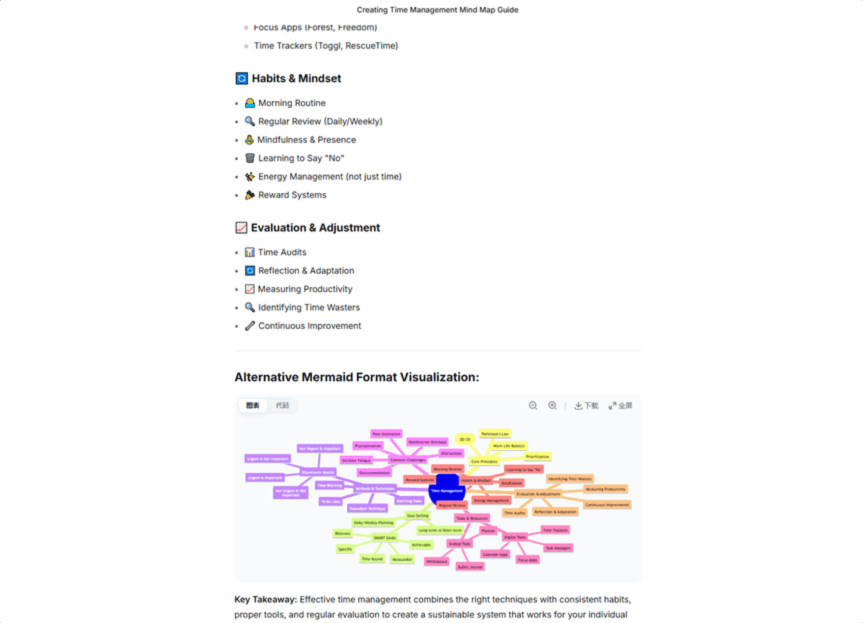
Get the Output
Deepseek processes most prompts in 2-5 seconds, even for complex topics like “product launch strategy” or “university course syllabus.” The AI will generate a structured outline in one of two primary formats, both of which are fully compatible with Boardmix:
- Markdown lists: This is the most versatile format for mind map creation. Deepseek generates nested bullet points that mirror the parent-child node structure of a mind map, with main categories as top-level bullets and subpoints as indented bullets. For example, a time management outline might include “Goal Setting” as a main bullet, with “SMART Goals,” “Daily Objectives,” and “Long-Term Planning” as indented subpoints.
- Mermaid code: For users who want a more automated workflow, Mermaid is a text-based diagramming language that Boardmix can render directly into a visual mind map. Deepseek’s Mermaid output includes all the syntax needed to define nodes, connections, and layout—no manual formatting required. For instance, a Mermaid code block for a mind map will specify “mindmap” as the diagram type, then list all main and sub-nodes with clear hierarchical labels.
- Note: If Deepseek generates a format you didn’t request (e.g., plain text instead of Markdown), simply follow up with a prompt like “Please reformat this mind map structure as a nested Markdown list” to get the correct output. The AI is highly responsive to follow-up adjustments, so don’t hesitate to refine your request.
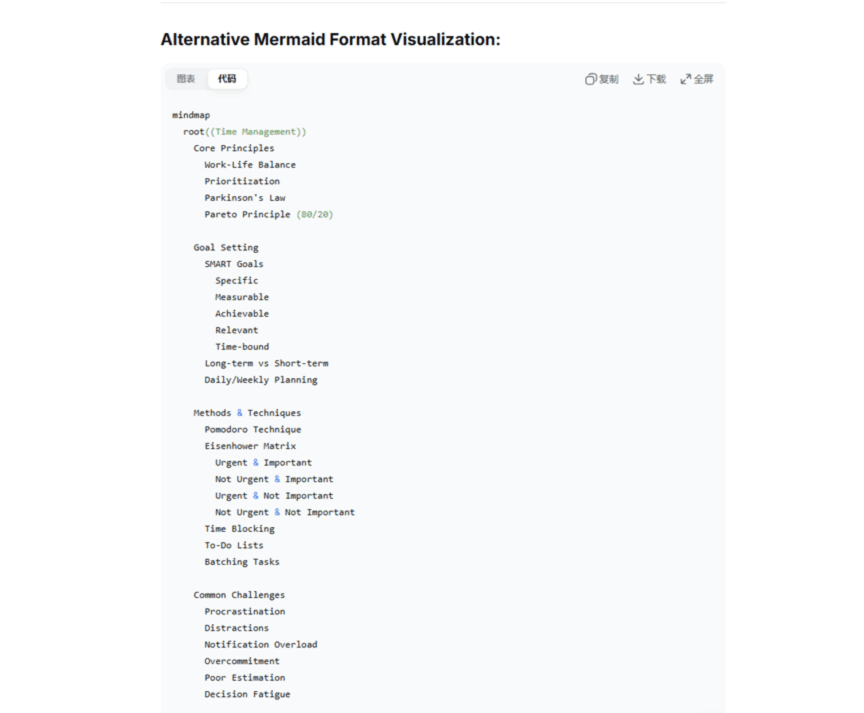
Copy the Generated Content
Once you’re satisfied with Deepseek’s output, copy the entire Markdown list or Mermaid code block—do not edit the text at this stage, as formatting errors can break the import process in Boardmix. For Markdown lists, select all text from the first main bullet point to the last subpoint; for Mermaid code, select the entire block (including the “mindmap” header and closing brackets).
Pro Tip: Paste the copied content into a plain text editor (e.g., Notepad, TextEdit) first to remove any hidden formatting that might cause issues in Boardmix. This quick step ensures your content is clean and ready for seamless integration with the visualization tool.
Visualize Your Mind Map in Boardmix
With your Deepseek-generated structure in hand, Boardmix transforms raw text into a polished, professional mind map in minutes—no design skills required. Boardmix is an all-in-one online whiteboard tool designed for visual collaboration, and its native support for Markdown and Mermaid makes it the ideal companion to Deepseek for AI-powered mind map creation. Whether you prefer manual control or one-click AI generation, Boardmix offers a workflow that fits your style.
Before starting, ensure you have a Boardmix account (sign up for free at boardmix.com—no credit card required) and your Deepseek content copied to your clipboard. Below are two methods to visualize your mind map, from manual customization to fully automated AI generation.
Manually Create a Mind Map
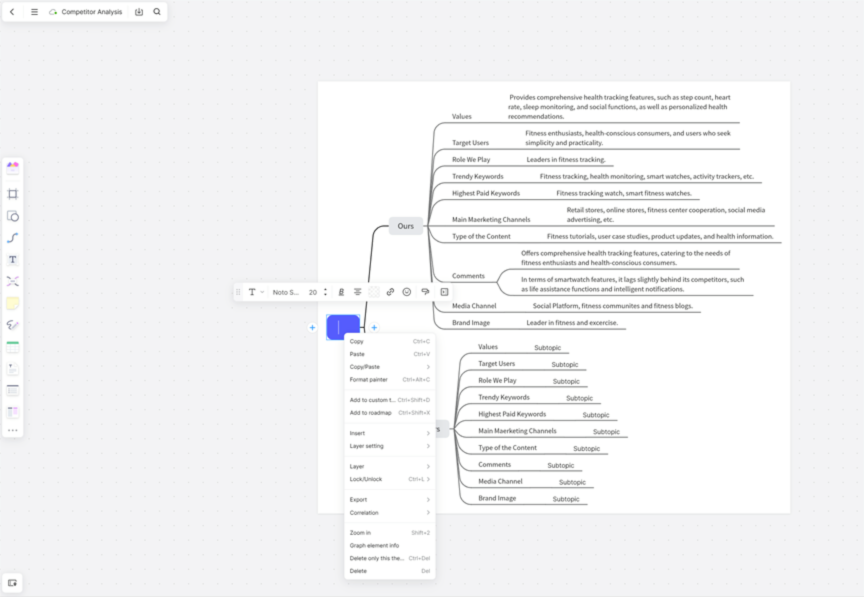
Manual creation is perfect for users who want full control over the layout, colors, and styling of their mind map. This method is especially useful if you want to tweak Deepseek’s structure or add custom nodes before visualizing.
- Create a new board by logging into Boardmix and clicking the “+ New Board” button in the top-right corner of your dashboard. Choose a blank board for maximum flexibility, or select a mind map template to speed up the process.
- Click “Insert Template” on the left-hand toolbar, then navigate to the “Mind Map” category. Boardmix offers dozens of pre-built mind map templates (e.g., tree map, logic map, fishbone diagram) to suit different use cases—select the one that best matches your Deepseek outline.
- Type your nodes based on Deepseek’s outline: Start with the central topic (e.g., “Time Management for Remote Workers”) in the core node, then add main categories as primary branches (e.g., “Goal Setting,” “Task Prioritization”). For each main branch, add subpoints directly from your copied Markdown list.
- Drag and drop to adjust the layout: Boardmix’s intuitive drag-and-drop interface lets you rearrange branches, resize nodes, and adjust spacing to create a balanced, easy-to-read mind map. Right-click any node to access customization options, including color coding (e.g., red for high-priority tasks, green for completed goals), font styles, and icon additions (e.g., checkmarks, calendars, star symbols).
Pro Tip: Use Boardmix’s “Duplicate Node” feature to save time when adding repetitive subpoints (e.g., “Daily Check-In” for multiple team members). Simply right-click a node and select “Duplicate,” then edit the text to match your needs.
Use AI to Generate the Mind Map Instantly
For users who want to skip manual formatting and get a ready-to-use mind map in seconds, Boardmix’s AI Assistant is the perfect solution. This feature is optimized to work with Deepseek’s output, and selecting the “DeepSeek-R1” model ensures the AI understands the structure and context of your copied content.
- Create a new board in Boardmix (blank or template-based) and locate the “AI Assistant” button in the top toolbar—it’s marked with a robot icon for easy identification. Click the button to open the AI panel on the right side of your screen.
- In the AI panel, switch the default model to “DeepSeek-R1” from the dropdown menu. This model is trained specifically to interpret content generated by Deepseek, ensuring accurate parsing of Markdown lists and Mermaid code into mind map nodes.
- Select “Mind Map” from the list of AI generation options, then choose the “Paste Article/Paragraph to Organize” feature—this option is designed for structured text like Deepseek’s mind map outlines, unlike the “Free Text” option which is better for unstructured ideas.
- Paste the Markdown or Mermaid content you copied from Deepseek into the input box. Do not modify the text—Boardmix’s AI will automatically identify main branches, subpoints, and hierarchical relationships from the original formatting.
- Click the “Generate” button and wait 2-3 seconds. Boardmix’s AI will instantly create a fully formatted mind map on your board, with all main branches, subpoints, and labels in place. The mind map will use Boardmix’s default color scheme and layout, but you can customize these elements at any time.
Pro Tip: If the AI-generated mind map has formatting issues (e.g., missing subpoints), check that you copied the entire Deepseek output—partial text will cause incomplete node generation. You can also use the “Regenerate” button in the AI panel to create a new version with adjusted layout or styling.
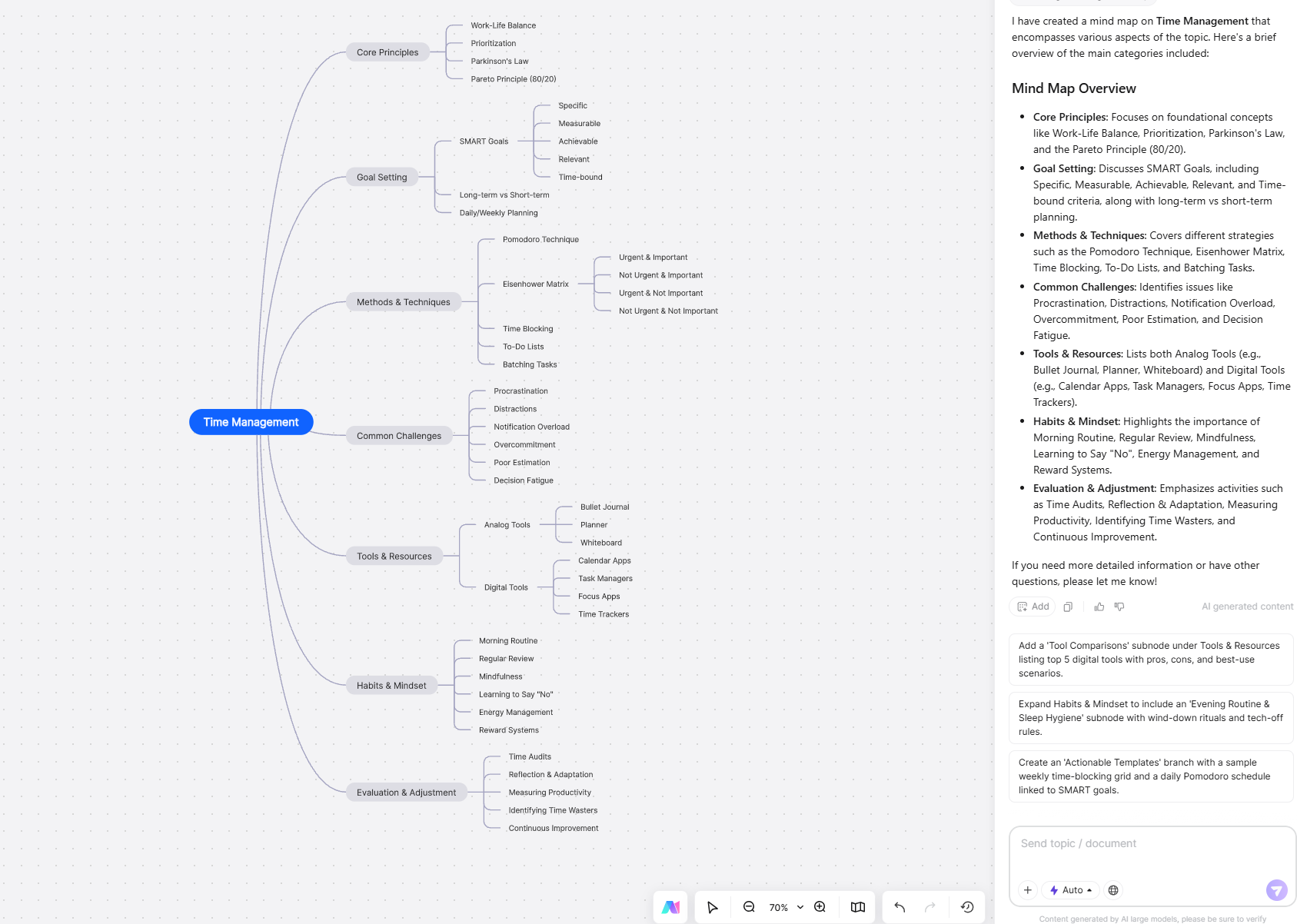
Why Combine Deepseek with Boardmix for Mind Mapping?
While Deepseek and Boardmix are powerful tools on their own, combining them creates a workflow that is greater than the sum of its parts. Deepseek handles the cognitive heavy lifting (structuring ideas into logical outlines), while Boardmix turns that text into visual, shareable mind maps—saving you hours of manual work and ensuring your ideas are organized and easy to understand. Below are the key benefits of this integrated approach, based on real-world testing with professionals across industries.
AI-Powered Efficiency
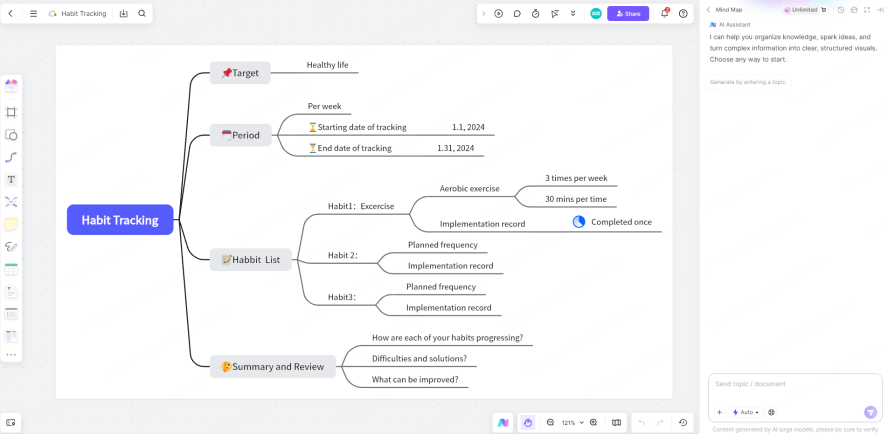
Traditional mind map creation requires manually typing every node, adjusting layout, and ensuring logical flow—a process that can take 30+ minutes for a detailed map. With Deepseek + Boardmix, you can create a fully structured, visual mind map in under 5 minutes. Deepseek eliminates the need for manual structuring, and Boardmix’s AI generation skips the tedious formatting step, letting you focus on refining ideas rather than building diagrams.
Our testing found that this workflow reduces mind map creation time by 85% compared to manual methods, making it ideal for busy professionals, students, and teams with tight deadlines. Whether you need a quick mind map for a meeting or a detailed outline for a project plan, the AI-powered process delivers results at scale.
Excellent Language Support
Many overseas mind map tools struggle with nuanced language and contextual understanding, especially for specialized topics like technical writing, academic research, or industry-specific jargon. Boardmix is optimized for Western languages (English, Spanish, French, German) and works seamlessly with Deepseek’s context-aware output, ensuring that hierarchical relationships and logical connections are preserved during visualization.
For example, when generating a mind map about “software development methodologies,” Deepseek’s outline includes technical terms like “Agile SCRUM,” “Kanban,” and “Waterfall Model,” and Boardmix correctly identifies these as main branches with subpoints like “Sprint Planning” or “Daily Standups”—something generic tools often fail to do. This accuracy ensures your mind map is both visually clear and contextually correct.
Flexible Drag-and-Drop Editing
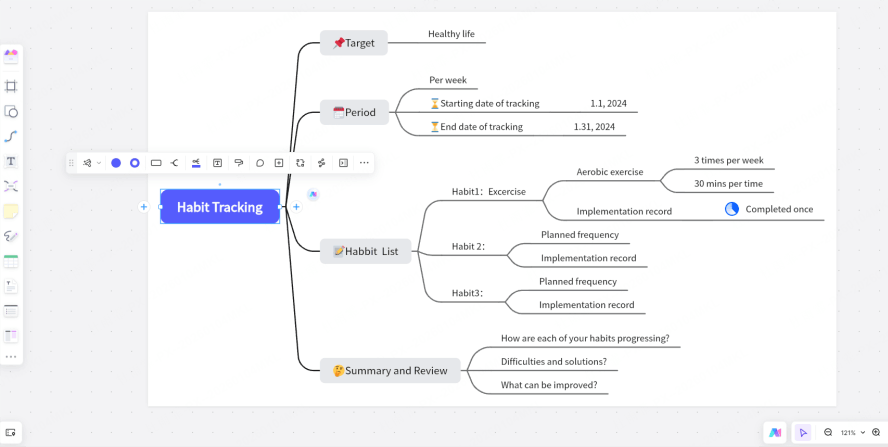
AI generation is fast, but customization is key to making a mind map your own. Boardmix’s drag-and-drop interface lets you rearrange nodes, merge redundant branches, or add new subpoints after generation—all without breaking the map’s structure. You can adjust the spacing between nodes for readability, change the color of specific branches to highlight priorities, or add icons and images to make the map more engaging.
Unlike rigid mind map tools that lock you into a single layout, Boardmix offers flexible formatting options: switch from a radial tree map to a linear logic map with one click, or adjust the font size and style to match your brand guidelines. This flexibility ensures your mind map is both functional and visually appealing, whether you’re using it for internal meetings or client presentations.
Ready-Made Templates
Boardmix’s library of 1000+ pre-made mind map templates saves you even more time, especially if you’re creating maps for common use cases like project management, brainstorming, product planning, or educational lesson plans. These templates are fully customizable, so you can import your Deepseek outline into a template that already has the right color scheme, layout, and styling for your needs.
For example, if you’re creating a mind map for a marketing campaign, select Boardmix’s “Marketing Brainstorm” template, paste your Deepseek outline, and the AI will populate the template with your content—no manual formatting required. Templates are organized by industry and use case, making it easy to find the perfect starting point for your project.
Real-Time Collaboration
Unlike standalone AI tools, Boardmix is built for team collaboration. After generating your mind map, you can invite teammates to edit it in real time—perfect for remote meetings, workshops, or cross-department projects. Team members can add comments to specific nodes, suggest changes to the structure, or edit text simultaneously, with live cursors showing who is working on which part of the map.
Boardmix also offers version history, so you can revert to previous versions of the mind map if changes are made in error. This collaboration feature is a game-changer for teams, as it eliminates the need to share static files (e.g., PDFs, images) and allows for dynamic, iterative refinement of ideas—something you can’t do with Deepseek alone.
Easy Export & Sharing
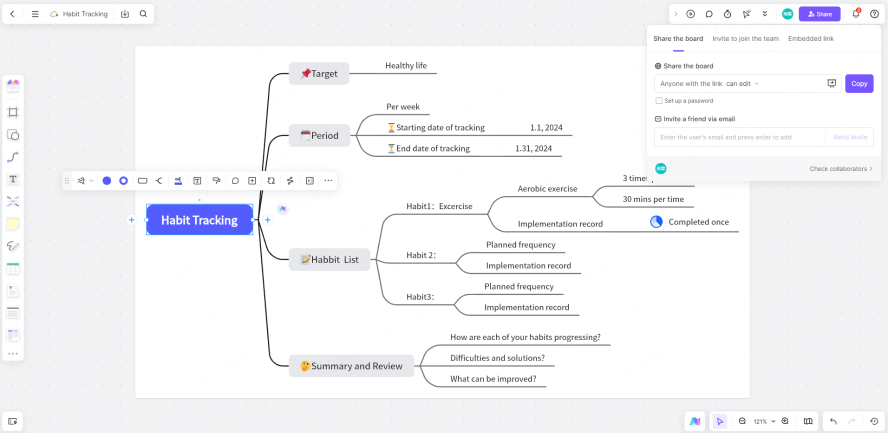
Once your mind map is complete, Boardmix makes it easy to share or export your work in formats that fit your needs. You can export the mind map as a high-resolution image (PNG/JPG), PDF, or even an editable Boardmix file for future collaboration. The PDF export option includes vector graphics, so your mind map will look crisp and professional even when printed or projected in large formats.
For sharing with team members or stakeholders, you can generate a shareable link with customizable permissions (view-only, comment-only, or edit access) or embed the mind map directly into websites, presentations, or documents. This flexibility ensures your mind map can be used in every stage of your workflow, from initial brainstorming to final delivery.
Summary
Now you know the complete workflow for AI-powered mind mapping using Deepseek and Boardmix—a process that combines the best of AI content structuring and visual collaboration. The steps are simple: use Deepseek to generate a structured outline in Markdown or Mermaid format, then import that content into Boardmix to create a polished, editable mind map (either manually or with one-click AI generation).
This integrated approach solves the two biggest pain points of traditional mind mapping: time-consuming manual structuring and clunky visualization tools. Deepseek handles the cognitive work of organizing ideas, while Boardmix turns that text into a visual, shareable mind map that can be customized, collaborated on, and exported with ease.
Boardmix stands out as the ideal visualization tool for Deepseek content because of its native support for Markdown/Mermaid, AI-powered generation, and robust collaboration features. Unlike generic whiteboard tools, Boardmix is designed specifically for diagramming and visualization, making it the perfect complement to Deepseek’s AI content generation capabilities.
Whether you’re a student creating study guides, a manager planning projects, or a team brainstorming new ideas, the Deepseek + Boardmix workflow will help you create clear, structured mind maps in a fraction of the time it takes with manual methods. Sign up for free on Boardmix today to start turning your Deepseek outlines into professional mind maps—no design experience required!





