





As digital education advances, the traditional classroom faces mounting challenges. Today's educators must not only impart knowledge but also ignite proactive learning and critical thinking. However, constrained by time and physical space, many curriculums lack sufficient interaction, leaving students passive. The pivotal question for instructional design is: how can we truly bring the classroom to life?
Boardmix, as a visual teaching whiteboard, offers an innovative solution. It empowers educators to present lesson structures with clarity while enabling students to participate in real-time and collaborate on inquiries. This effectively fosters interactive, inquiry-based learning, paving the way for more dynamic and efficient classroom experiences.
What is Curriculum Design?
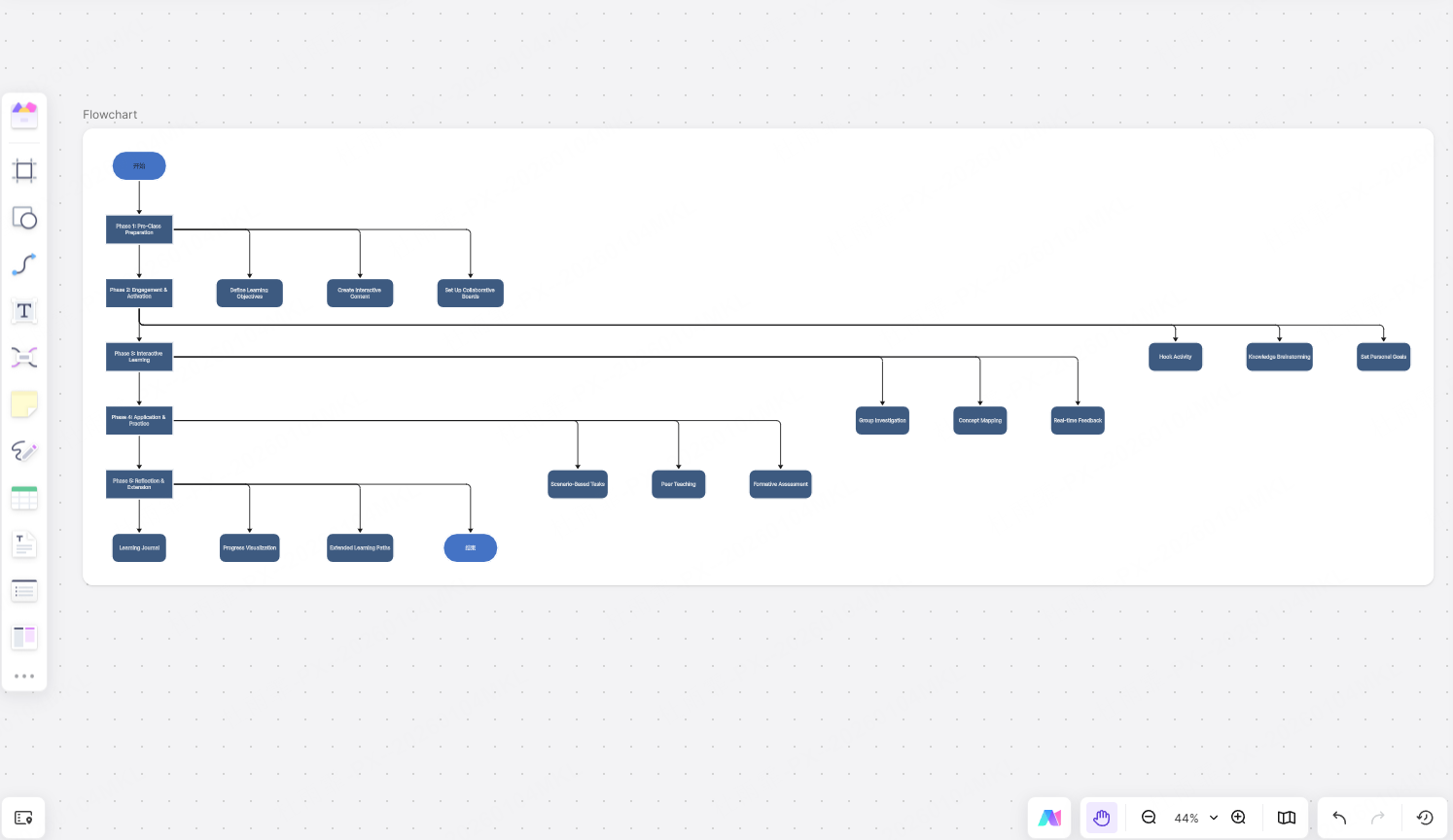
Curriculum design is the systematic planning and scientific organization of core teaching elements—such as learning objectives, content, methods, media, and assessment—during the course preparation and implementation process. It goes far beyond surface-level “how to teach” arrangements, representing a learner-centered, systematic approach that guides teachers to deeply consider fundamental questions: "What to teach? How to teach? How do students learn? How is learning effectiveness evaluated?" The goal is to construct a clear, goal-oriented, and effective teaching plan.
A complete curriculum design typically includes the following key components:
Defining Clear Learning Objectives
Set precise goals for knowledge transmission and skill development based on curriculum standards, teaching requirements, and students' cognitive levels, ensuring targeted educational activities.
Analyzing Learner Characteristics
Gain a deep understanding of students' prior knowledge, interests, cognitive styles, and learning habits. This provides a basis for differentiated instruction and personalized guidance, enhancing the relevance and effectiveness of teaching.
Designing Learning Activities
Centered around the learning objectives, flexibly employ various teaching methods such as lectures, discussions, case studies, project-based learning, and inquiry-based experiments. Use visual and contextualized designs to increase student engagement and deepen cognitive processing.
Selecting Appropriate Instructional Media
Effectively integrate different media—including traditional blackboards, PPTs, audiovisual resources, and digital tools (like the online collaboration platform Boardmix)—based on content and activity needs. Leverage the strengths of each medium in information presentation, interaction support, and knowledge construction.
Designing Learning Assessment Methods
Establish a diversified, dynamic evaluation system that focuses not only on students' mastery of knowledge but also on the development of comprehensive competencies such as performance during the learning process, collaboration skills, and critical thinking. This achieves "assessment for learning" and "assessment for teaching."
Curriculum design serves as a crucial bridge connecting teaching intent with actual learning outcomes. It shifts teaching from experience-driven practices to scientifically planned processes, and from one-way knowledge transmission to interactive co-construction.
Utilizing online teaching whiteboard software like Boardmix, teachers can visually map course logic, dynamically present teaching flows, collect real-time student feedback, and flexibly adjust strategies mid-lesson. This enables the visualization, collaboration, and iterative optimization of curriculum design, significantly enhancing the effectiveness of interactive teaching.
How Boardmix Empowers Instructional Design?
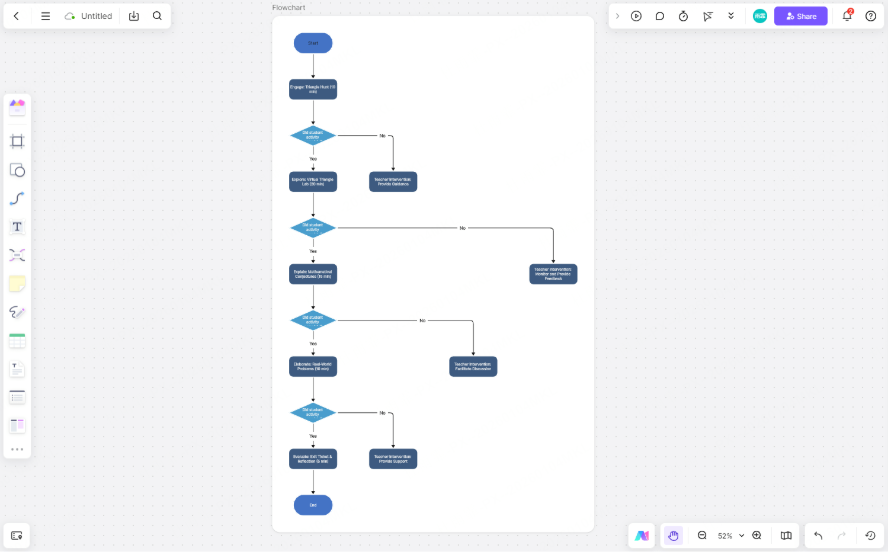
As a powerful online visual collaboration whiteboard, Boardmix is breathing new life into modern curriculum design. It is more than just a digital canvas; it's a comprehensive teaching support platform integrating course planning, resource consolidation, interactive activity design, and learning feedback. With its flexible, open interface and rich collaborative features, Boardmix helps teachers transcend the limitations of traditional methods, enabling more systematic, interactive, and innovative instructional design.
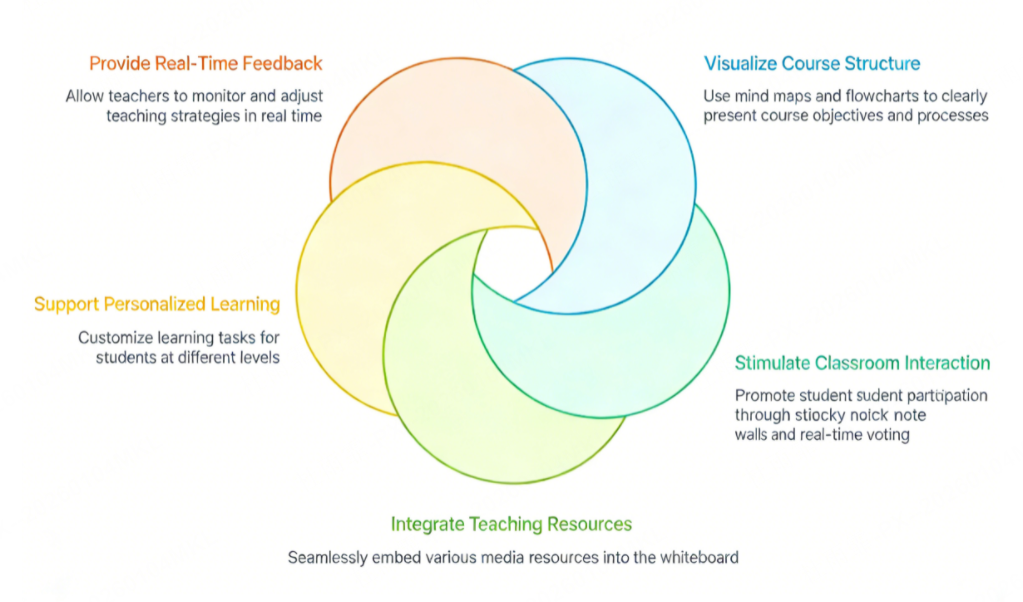
The 5 Core Empowering Values of Boardmix in Instructional Design:
Visual Construction of Course Structure
Instructors can leverage Boardmix's visual tools—such as mind maps, flowcharts, and timelines—to clearly map out abstract learning objectives, knowledge frameworks, and activity flows. This structured visual representation helps students quickly grasp the course logic, establish connections between concepts, and enhances overall comprehension and learning efficiency.
Facilitating Diverse Classroom Interactions
Boardmix features built-in tools like sticky note walls, live polls, timers, and group discussion areas, providing rich options for interactive teaching. Instructors can design activities for group collaboration, idea gathering, brainstorming, and instant feedback. This enables every student to contribute in an equitable, open environment, shifting the dynamic from passive listening to active participation.
Efficient Integration & Dynamic Presentation of Resources
Boardmix supports embedding and freely arranging diverse media—PPT, PDFs, audio/video, web links, images—onto a shared whiteboard. This allows instructors to cohesively integrate fragmented resources, creating immersive, multimodal learning scenarios that make knowledge presentation more intuitive and engaging, thereby boosting student interest and depth of understanding.
Supporting Personalized & Differentiated Curriculum
By creating separate whiteboards or partitioned workspaces, instructors can tailor specific tasks and inquiry paths for individual students or groups with varying proficiency levels. This is ideal for research projects, collaborative assignments, or tiered practice, addressing personalized learning needs while enabling precise instructor guidance and progress tracking.
Enabling Real-Time Feedback & Dynamic Instructional Adjustment
During class, instructors can observe student actions on the whiteboard, view submitted notes, or monitor group outputs in real time, gaining instant insight into learning progress and thought processes. Based on this visual feedback, they can flexibly adjust pacing and teaching strategies, implementing a responsive, student-centered approach that enhances classroom effectiveness.
What Are Practical Application Scenarios of Boardmix in the Classroom?
The true value of Boardmix lies not only in its robust features but also in its flexible integration into diverse teaching contexts, seamlessly bridging theory and practice. Whether in physical classrooms, online sessions, or hybrid environments, Boardmix serves as a core collaboration platform, empowering educators to deliver creative and engaging interactive lessons. Below are several typical use cases:
Brainstorming & Creative Ideation Sessions
In subjects that emphasize creative thinking—like literature, art, design, or innovation—Boardmix provides a digital canvas for free expression. Instructors can set up themed zones where students jot down ideas on sticky notes, then use color coding, drag-and-drop grouping, and live voting to converge and refine thoughts. The instant visualization of ideas boosts engagement and helps instructors identify and highlight key insights for guided discussion.
Group Projects & Collaborative Learning
For cross-disciplinary projects or research-based tasks, Boardmix acts as a "virtual collaboration hub." Team members can work simultaneously on a shared whiteboard—collecting and uploading resources, drawing flowcharts or timelines, drafting reports—enabling real-time co-editing and interaction. This breaks down time and space barriers, supporting seamless hybrid collaboration and embodying the "co-construction of knowledge."
Case Analysis & Inquiry-Based Discussions
In case-study-heavy fields like law, business, medicine, or sociology, instructors can embed real-world cases into Boardmix. Students can then analyze them in stages, using annotations, comments, connector arrows, and charts to highlight key points, identify causes, and propose solutions. This visual, structured approach strengthens logical reasoning, critical thinking, and teamwork.
Course Review & Knowledge System Building
At the end of a unit or course, instructors can guide students in collectively building a "course knowledge map" on Boardmix. Through keyword extraction, concept linking, and hierarchical categorization, scattered ideas are synthesized into a clear knowledge network. This process not only reviews content systematically but also fosters structured thinking, aiding long-term retention and knowledge transfer.
Supporting Remote & Hybrid Learning
In fully online or blended settings, Boardmix becomes the "digital classroom" connecting instructors and learners. Regardless of location, students can participate in discussions, submit work, and follow demonstrations in real time. Instructors can pre-load activity templates, manage permissions, and use zoom/focus tools to direct attention, maintaining class rhythm and engagement to ensure continuity and immersion.
What Are Application Examples Across Different Subject Areas
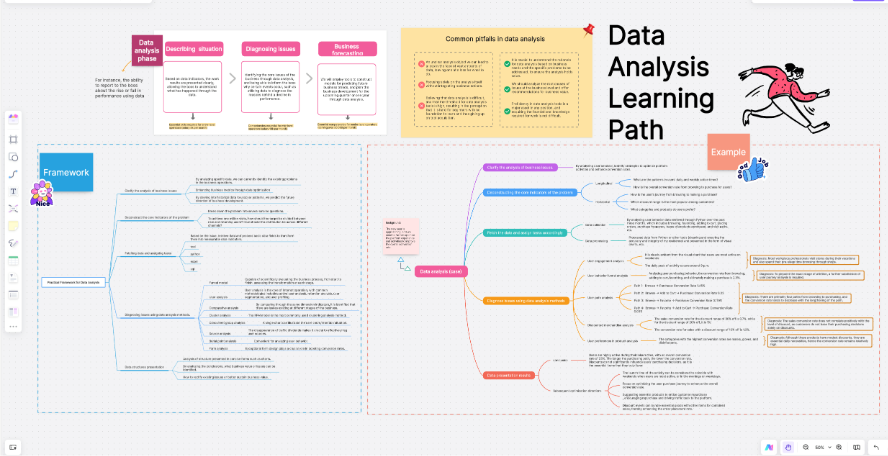
The open, visual nature of Boardmix allows it to adapt flexibly to the teaching needs of various disciplines. It helps instructors design more targeted, interactive, and cognitively engaging classroom activities tailored to subject-specific characteristics.
Here are typical application scenarios of Boardmix across different subjects, showcasing its potential to empower teaching across diverse disciplines:
Language / Literature Courses: Building a Mind Map for Textual Comprehension
In reading curriculum, teachers can use Boardmix to create multi-layered mind maps that guide students in analyzing plot structures, character relationship webs, and thematic meanings in novels or literary works.
Students can use color-coded sticky notes to submit personal interpretations, key quote excerpts, or emotional reflections, forming a visual "collaborative reading log."
Teachers can then synthesize these ideas in real-time, organizing small group discussions or whole-class dialogues to encourage diverse perspectives and deep critical thinking. This elevates text analysis from individual reflection to collective knowledge construction.
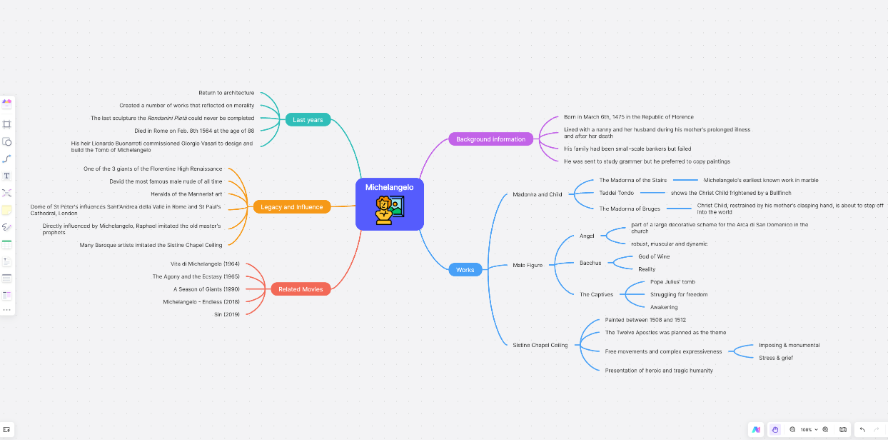
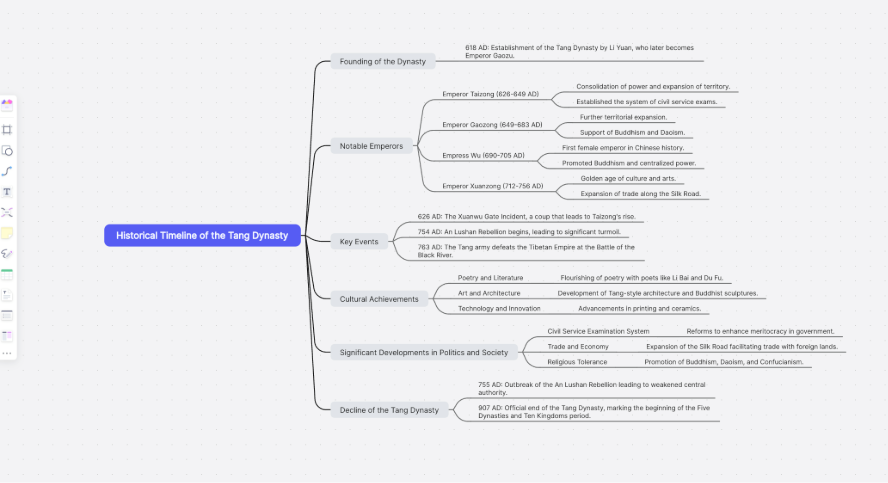
History Courses: Reconstructing Dynamic Historical Processes
When dealing with complex historical events and long-term developments, Boardmix’s timeline feature provides a clear cognitive framework for students.
Teachers can guide students in co-creating a "Historical Events Timeline," marking key moments, causal chains, and social contexts. By embedding images, document excerpts, or short video clips, they can achieve multimodal content presentation.
Through activities such as drag-and-drop sequencing and group-based cause-and-effect analysis, students not only grasp the sequence of historical facts but also deeply understand the underlying logic and interconnections of historical development.
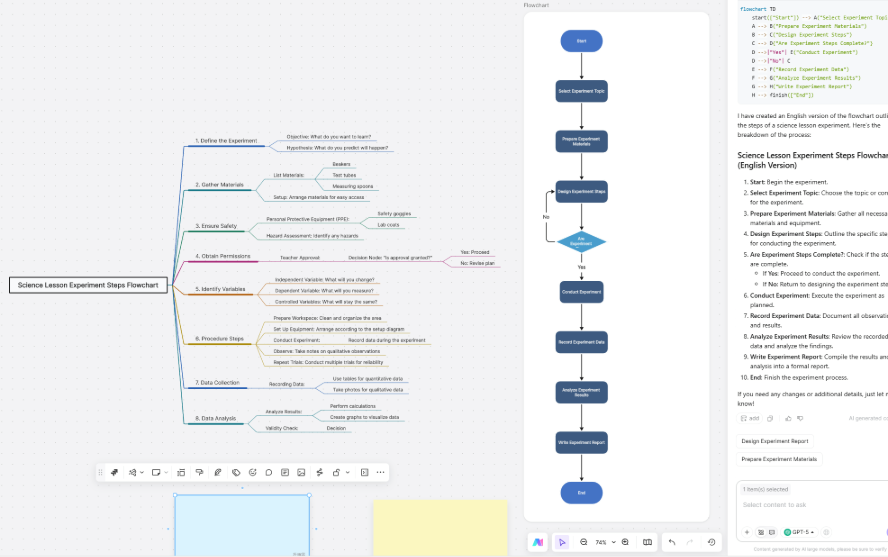
STEM Courses (Mathematics / Physics / Chemistry): Visualizing Abstract Thinking Processes
In science and math education, complex formula derivations, problem-solving logic, or experimental designs can often be challenging for students to follow. Boardmix can serve as a "thinking scaffold," helping teachers break down and visually illustrate abstract processes step by step.
For example, teachers can use flowcharts to present solution pathways, utilize step-by-step boards to document experimental designs and hypothesis testing, or employ dynamic annotations to highlight key variables and formula transformations.
Students can participate synchronously in derivations, mark points of confusion, propose alternative solutions, and thereby transition from merely "understanding" to actively "thinking through" concepts.
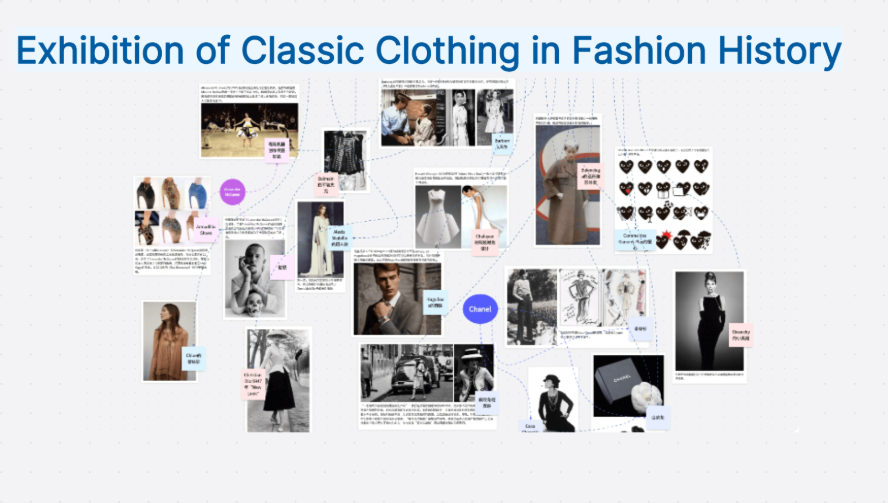
Art and Design Courses: Creating a Space for Creative Sharing and Feedback
Boardmix naturally serves as a digital canvas and collaborative platform for artistic creation. Students can upload hand-drawn sketches, design prototypes, or photography projects. Teachers can then organize a "gallery walk" style critique for the whole class, inviting feedback via sticky notes, using polls to vote for the best ideas, or creating inspiration mood boards to spark cross-disciplinary associations.
This open and equitable interactive mechanism not only boosts students’ confidence in self-expression but also nurtures aesthetic judgment and the ability to give and receive constructive feedback.
Interdisciplinary Project-Based Learning (PBL): Supporting End-to-End Collaborative Management
In Project-Based Learning, Boardmix can function as the project’s "central command console," supporting student teams through the entire workflow—from topic selection and project initiation, through research and task delegation, to final presentation.
Each group can create its own project board within a dedicated workspace, setting up to-do lists, defining milestones, uploading research data, and maintaining ongoing communication via comment sections.
Teachers can monitor each group’s progress at any time, provide ongoing guidance, and ensure the project advances in an organized manner. This truly embodies the deep integration of "learning by doing, learning by collaborating, and learning by reflecting."
How Teachers Can Use Boardmix Effectively?
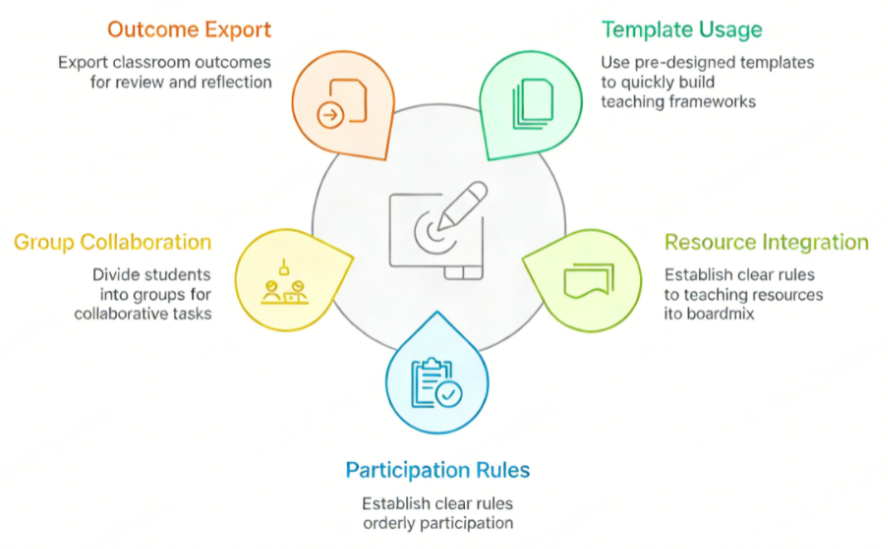
While Boardmix is feature-rich and highly adaptable, truly transforming it into a powerful teaching aid requires more than just operational familiarity. Teachers must master strategic methodologies for its use. Deep integration of the tool with instructional design is essential to maximize its classroom value. Here are key strategies to help educators leverage Boardmix efficiently:
Leverage Templates to Rapidly Build Instructional Frameworks
Boardmix offers a wide array of templates specifically designed for educational contexts, such as lesson plan tables, mind maps, KWL charts (Know-Want to Know-Learned), project boards, and discussion matrices. Instead of starting from scratch, teachers can select a suitable template based on their learning objectives, make minor personalized adjustments, and quickly establish a clear, logically structured lesson flow. This significantly reduces lesson preparation time and enhances design efficiency.
Pre-Integrate Teaching Resources for Seamless Transitions
To avoid frequent platform switching during class, which can disrupt the teaching rhythm, it is recommended that teachers pre-embed all relevant resources—including PPT slides, PDF documents, images, video links, and reading materials—into designated areas on the Boardmix whiteboard before the lesson. Through thoughtful layout and visual annotations, achieving "integration on a single board" allows for smooth content presentation, strengthening classroom coherence and student immersion.
Establish Clear Rules to Guide Efficient and Orderly Participation
To ensure students can use Boardmix effectively for interaction, teachers should clearly explain operational guidelines before activities begin. Examples include: assigning specific sticky note colors to represent different types of viewpoints, limiting submissions to three ideas per person, using the polling function for priority ranking, and setting explicit time limits. By establishing clear participation rules, teachers can stimulate student expression while preventing discussions from becoming scattered, thereby ensuring the efficiency and quality of classroom interaction.
Flexibly Utilize Group Collaboration to Foster Deep Engagement
Boardmix supports multi-area collaboration and permission management. Teachers can divide students into several groups based on instructional needs, assigning them independent whiteboard areas or sub-panels to complete specific tasks such as case studies, project planning, or knowledge organization. Groups can collaborate synchronously without interference. Upon completion, switching to a "whole-class view" allows for showcasing results and collective evaluation. This approach not only guarantees participation opportunities for every student but also cultivates teamwork and a sense of responsibility.
Conduct Real-Time Synthesis and Export Outcomes to Reinforce the Learning Cycle
At the end of a class session, teachers should guide students in systematically organizing and summarizing the discussion outcomes on the Boardmix whiteboard. Using methods like connecting lines, categorization, and highlighting helps distill core ideas, completing the transition from "information generation" to "knowledge construction." Subsequently, the entire whiteboard content can be exported as a PDF, image, or shareable link and shared with students as a learning portfolio. This facilitates post-class review, reflection, and continuous improvement, truly achieving the integration of "teaching, learning, and assessment."
Summary of Boardmix’s Advantages in Interactive Classrooms
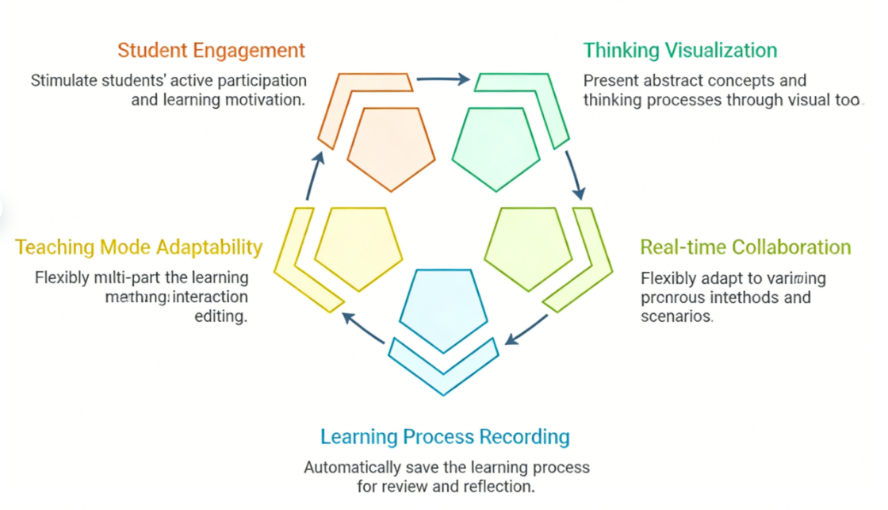
Boardmix has gained increasing recognition from both teachers and students in the educational field, not only due to its robust functional support but also because it profoundly addresses the pressing demands of modern teaching for interactivity, collaboration, and visualization of thought processes. Compared to traditional teaching tools, Boardmix demonstrates irreplaceable and unique advantages in enhancing classroom quality and learning experiences:
Visualizing Thinking Processes
Knowledge construction often begins with understanding and organizing abstract concepts. Boardmix utilizes diverse visual tools such as mind maps, flowcharts, concept diagrams, and sticky note walls to intuitively present fragmented information, complex logical relationships, and dynamic thinking processes. This "visible thinking" not only helps students grasp knowledge structures more quickly but also enables teachers to gain insights into students' learning paths, allowing for timely guidance and corrective support.
Enabling Real-Time Multi-Party Co-Creation
Boardmix breaks down the barriers of time and space, allowing multiple teachers and students to edit, comment, drag, and annotate simultaneously on the same whiteboard. Whether facilitating group collaboration in a physical classroom or enabling cross-regional interaction in remote teaching, all participants can instantly view each other’s actions and feedback. This creates a truly "co-present, co-thinking, and co-creating" collaborative learning experience, significantly enhancing the depth and breadth of classroom interaction.
Comprehensive Documentation of Learning Processes for Traceability
Unlike the "fleeting" discussions of traditional classrooms, Boardmix automatically saves every edit, sticky note, and interaction trace. This transforms the entire learning process into a dynamic "growth portfolio." Teachers can review the trajectory of students’ thinking development for reflective teaching and personalized guidance, while students can revisit the content repeatedly after class to reinforce understanding. This shifts learning from a transient activity to an ongoing process of sustained construction.
High Flexibility for Diverse Teaching Models
From lecture-based instruction to inquiry-based learning, from group discussions to project-based practice, and from pre-class preparation to post-class review, Boardmix—with its open-canvas structure and rich plugin ecosystem—can flexibly adapt to various teaching scenarios and pedagogical approaches. Whether designing an introductory lesson to inspire thinking or organizing an in-depth case analysis discussion, Boardmix provides the necessary tool support, truly serving as a "digital teaching foundation" that spans the entire teaching process.
Fostering Student Engagement and Intrinsic Learning Motivation
In Boardmix’s interactive environment, students are no longer passive information receivers but active knowledge constructors and collaborative participants. Through hands-on operations, expressing ideas, participating in polls, and engaging in co-editing, students gain immediate feedback and a sense of achievement by "thinking with their hands and minds." This highly participatory learning experience effectively enhances students’ interest in learning and sense of responsibility, motivating them to shift from being "required to learn" to actively "wanting to learn."
Conclusion
Teaching has long transcended the boundaries of chalkboards and PowerPoint, moving toward more open, interactive, and innovative forms. How to build a modern classroom that fosters efficient collaboration, deep engagement, and creativity has become a core challenge that every educator actively explores. Boardmix, as a visual collaboration platform born in response to this trend, not only expands the possibilities of curriculum design but also redefines the potential for teacher-student interaction.
If you wish to break the silence in the classroom and ignite students' enthusiasm for participation, why not start with Boardmix?





