





Kickstart your software design with our collection of high-definition, editable system architecture diagram templates. This guide shares ready-to-use templates for common systems Each template clearly visualizes component relationships and workflows. Simply pick a template, customize the text, and collaborate with your team in real-time—streamlining your design process in three easy steps!
What is a System Architecture Diagram?
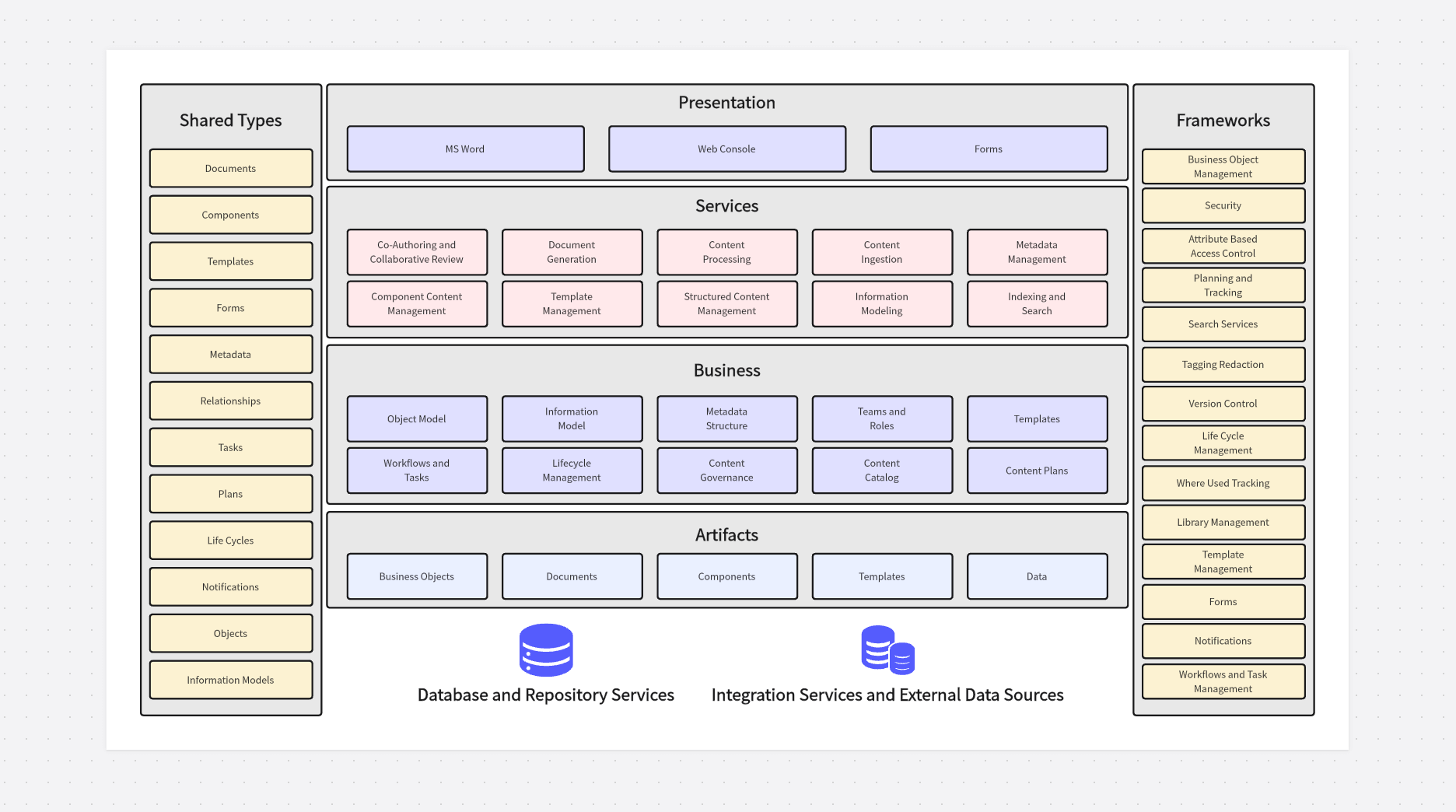
Definition
A system architecture diagram acts like a blueprint for software. It's a visual representation that shows how a system's components are organized and how they interact. For example, it can clearly illustrate the functional modules behind a mobile app—such as user authentication, data storage, and third-party API integration—and how these modules communicate with one another to deliver a seamless user experience. Unlike technical documentation that relies on text to describe system logic, architecture diagrams translate complex technical concepts into intuitive visuals, making it easier for both technical and non-technical stakeholders to understand the system’s structure, dependencies, and key workflows.
System architecture diagrams are not one-size-fits-all: they can range from high-level conceptual diagrams (showing the overall system ecosystem) to detailed component diagrams (breaking down individual modules into sub-components like databases, servers, and front-end interfaces).
Regardless of the level of detail, the core purpose remains the same: to provide a shared visual language that aligns developers, product managers, designers, and executives on how the system is built and how it will operate.
Why Use a Template?
Creating diagrams from scratch often leads to confusing logic, collaboration hurdles, and maintenance headaches. Without a standardized structure, different team members may use inconsistent notation, label components differently, or overlook critical relationships—resulting in diagrams that are hard to interpret and update. Using professionally designed system architecture diagram templates lets you leverage industry best practices instantly, ensuring your diagrams follow universal standards (such as UML or AWS architecture notation) and include all essential elements for clear communication.
This approach boosts technical communication efficiency across teams: new team members can quickly understand the system design without spending hours deciphering custom diagrams, and external stakeholders like clients or auditors can review the architecture without needing deep technical expertise. Additionally, pre-built templates reduce the learning curve for your entire team—instead of spending time designing the layout or choosing notation, your team can focus on customizing the template to reflect the unique needs of your project, accelerating the design process by up to 50% compared to building diagrams from scratch.
Popular System Architecture Diagram Templates
System architecture diagram templates offer immense value for modern software development workflows, as they eliminate redundant work and ensure consistency across projects. On the online whiteboard platform Boardmix, we provide a curated library of fully editable templates tailored to different industry scenarios and system types. Each template is built with real-world use cases in mind, incorporating feedback from senior architects and developers to cover the most common system design needs. Here’s a detailed breakdown of the most popular templates to help you choose the right one for your project:
Human Resources Management Architecture Template
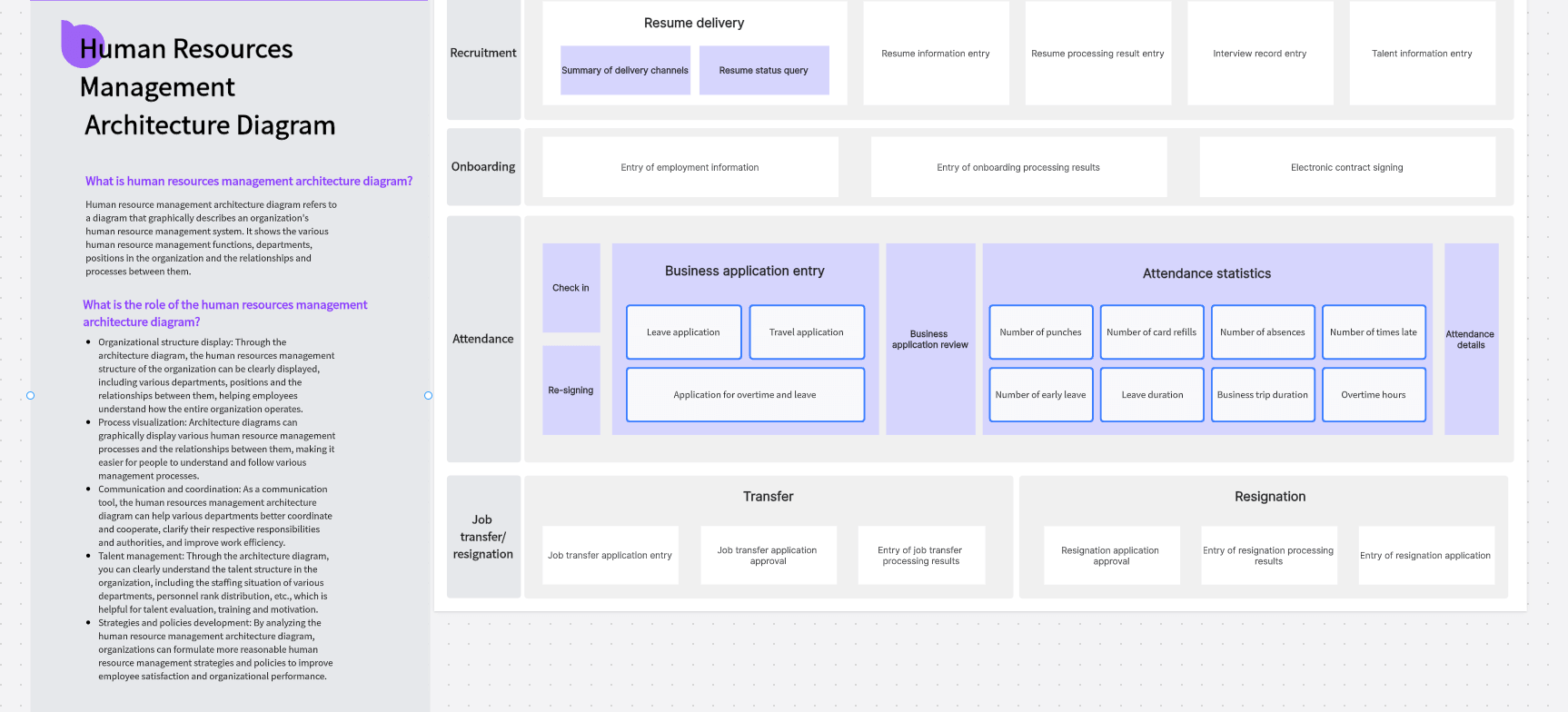
Designed for HR technology teams and enterprise architects, this template shows how different systems, data sources, business processes, and user roles interact to support the entire employee lifecycle—from recruitment and onboarding to performance management, payroll, and offboarding. Think of it as the technical and functional "floor plan" for HR operations, mapping out every touchpoint between employees, HR teams, and the underlying technology stack.
The primary goal of this template is to provide a clear, high-level view of how HR systems are structured, how they integrate with one another (e.g., linking a recruitment ATS to a payroll system), and how data flows between modules like employee records, benefits administration, and training management. This level of visibility aids in strategic HR technology planning, ensures system coherence across departments, supports compliance with labor regulations (such as data privacy laws for employee records), and guides informed technology investment decisions—helping organizations avoid redundant systems or integration gaps that can lead to inefficiencies.
Internet Product Architecture Template
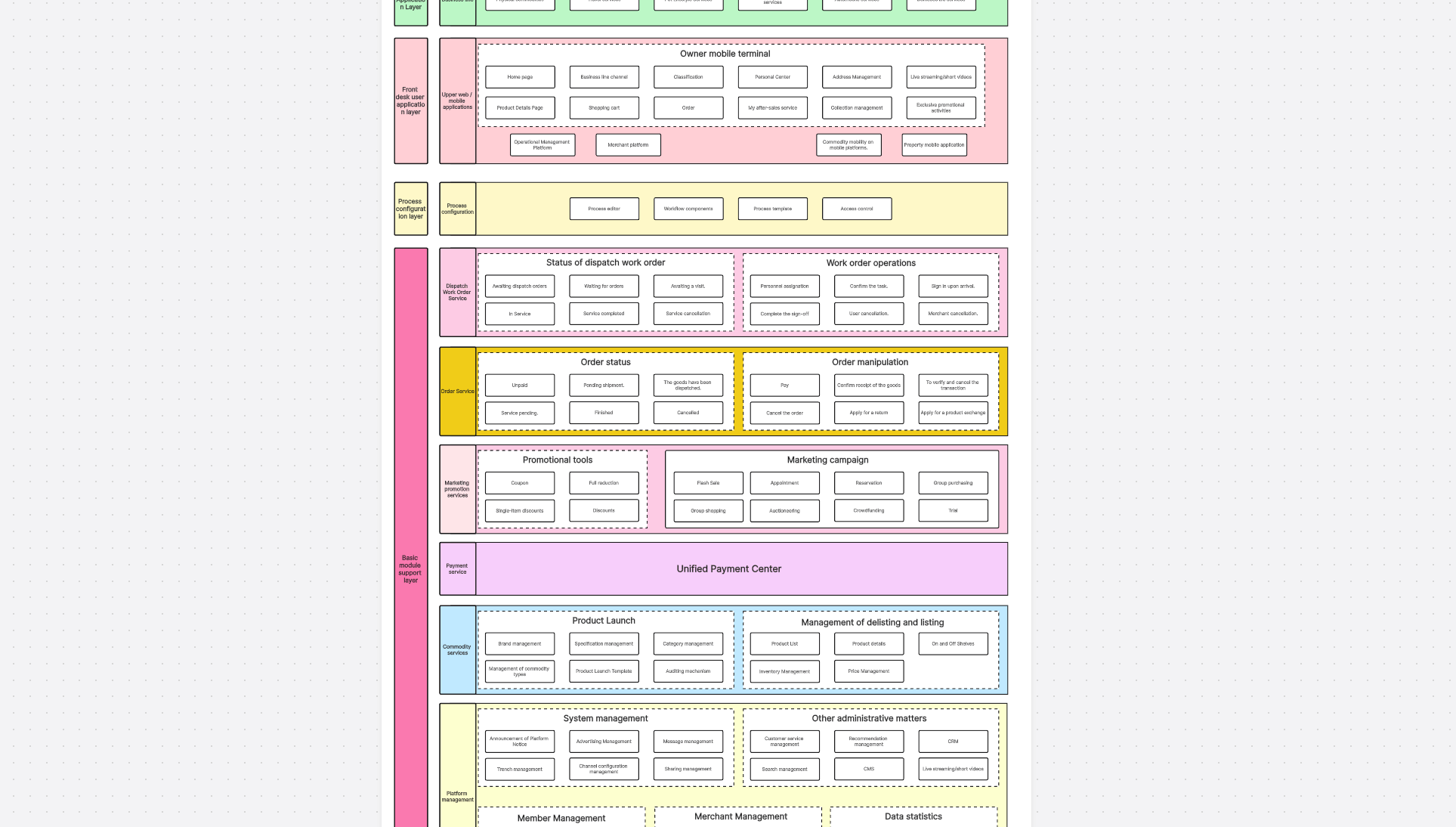
Perfect for product and engineering teams building local service platforms (e.g., food delivery apps, home services marketplaces, or on-demand repair applications), this template divides the system into four interconnected key sections that cover the full user journey:
- Business Layer: Defines all core service types offered by the platform (e.g., meal delivery, house cleaning, appliance repair) and maps them to user segments (consumers, service providers, administrators).
- Operation Layer: Handles the end-to-end order lifecycle, including user order placement, vendor acceptance, dispatching, and status tracking—ensuring visibility into every step of the service delivery process.
- Process Layer: Allows custom configuration of service workflows to adapt to different business rules (e.g., rush delivery processing, refund workflows, or service cancellation policies), making the template flexible for diverse local service models.
- Core Layer: Integrates critical backend modules like order management, payment processing, marketing automation (e.g., promo codes, loyalty programs), and user profile management—serving as the backbone of the entire platform.
This system architecture diagram template visually explains "how users place orders, how orders are processed through the platform, and how payments and marketing features function within the broader system." It’s highly practical for both defining project requirements (aligning product and engineering teams on scope) and explaining complex system design to non-technical stakeholders like investors or business leaders, who need to understand the platform’s technical foundation without diving into code.
QMS Architecture Template
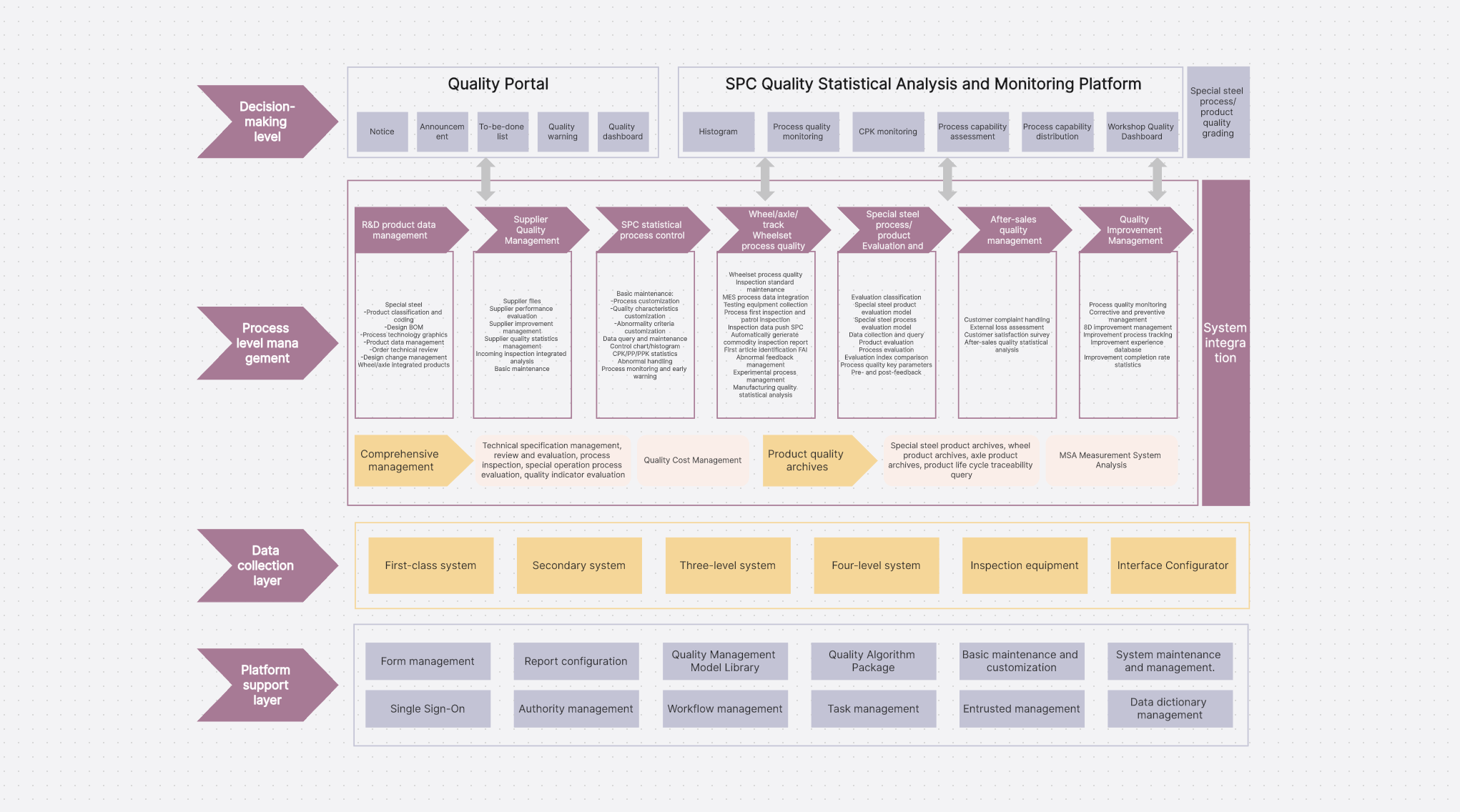
An architecture diagram for a Quality Management System (QMS) is a visual representation that shows how all the components, modules, and integrations of the QMS fit together to support quality assurance and control processes in an organization—whether it’s a manufacturing plant, healthcare provider, or software company. It illustrates the system's hierarchical structure, data flow between quality processes, and relationships between different functional parts, ensuring that quality standards are embedded into every stage of operations.
The template includes pre-built sections for all core QMS modules, each mapped to key business processes:
- Document Control: Manages standard operating procedures (SOPs), quality policies, and training manuals—ensuring all team members access the latest approved documents.
- Training Management: Tracks employee qualifications, mandatory training records, and skill assessments to ensure staff are competent to perform quality-critical tasks.
- CAPA (Corrective & Preventive Action): Visualizes issue resolution workflows, from identifying quality non-conformities to implementing corrective actions and verifying their effectiveness.
- Audit Management: Maps out internal and external audit scheduling, findings documentation, and corrective action tracking—supporting compliance with industry standards like ISO 9001.
- Non-Conformance Management: Details the process for handling deviations from quality standards, including root cause analysis and escalation paths for high-risk issues.
- Risk Management: Outlines risk assessment frameworks, mitigation strategies, and ongoing risk monitoring to proactively address quality risks before they impact operations.
- Change Control: Defines approval workflows for process or system changes to ensure modifications do not compromise quality standards.
- Supplier Quality Management: Tracks vendor qualification, incoming material inspections, and supplier performance metrics to maintain quality in the supply chain.
- Complaint Handling: Maps customer feedback collection, complaint resolution workflows, and trend analysis to identify recurring quality issues.
SaaS System Architecture Template
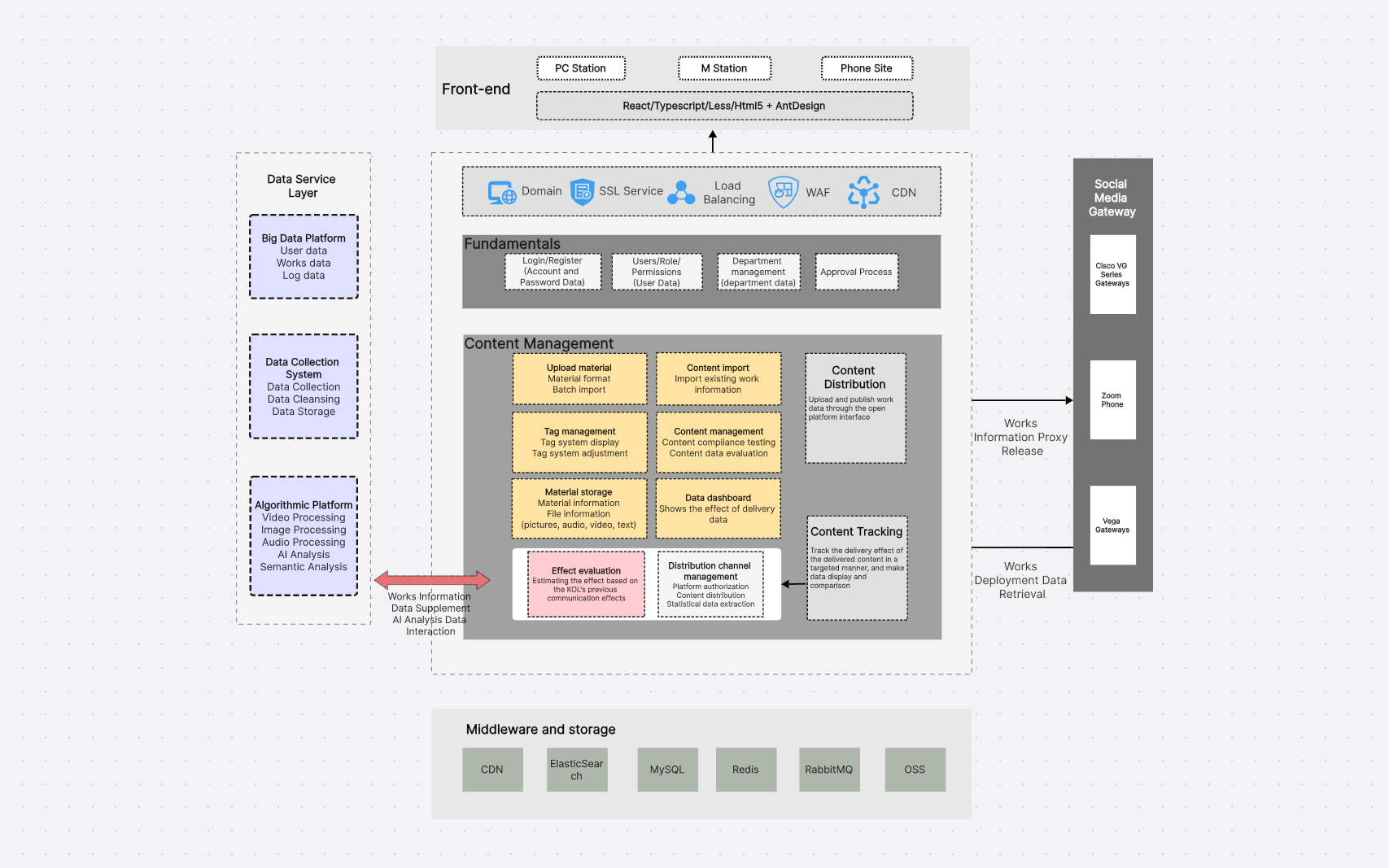
Building a creator platform, content distribution product, or digital publishing tool? This CMS (Content Management System) technical architecture template is tailored to the unique needs of SaaS-based content platforms, with a scalable five-layer structure that aligns with modern cloud-native design principles:
- Front-end Layer: Includes user-facing interfaces for content creators (dashboard, content editor, analytics) and end-users (content consumption, comments, sharing features)—optimized for web and mobile access.
- Network Layer: Covers API gateways, load balancers, and security protocols (e.g., HTTPS, OAuth) to manage traffic, ensure scalability, and protect user data.
- Core Content Management Layer: Handles content creation, moderation, tagging, and personalization— the heart of the platform’s content operations.
- Data Services Layer: Integrates AI-powered analytics (e.g., content performance tracking, user behavior analysis), recommendation engines, and third-party data integrations (e.g., social media APIs).
- Data Storage Layer: Includes databases for user data, content metadata, media files, and analytics—with options for relational (SQL) and non-relational (NoSQL) storage to suit different content types.
This template helps you map out critical workflows like "how users upload and format content, how content is reviewed and approved by moderators, how it’s distributed to different channels, where all content and user data is stored, and how to integrate with external platforms like social media or email marketing tools." It addresses the core needs of content platform teams, from ensuring scalability for high-volume content uploads to maintaining data security for creator and user information.
Software Testing Architecture Template
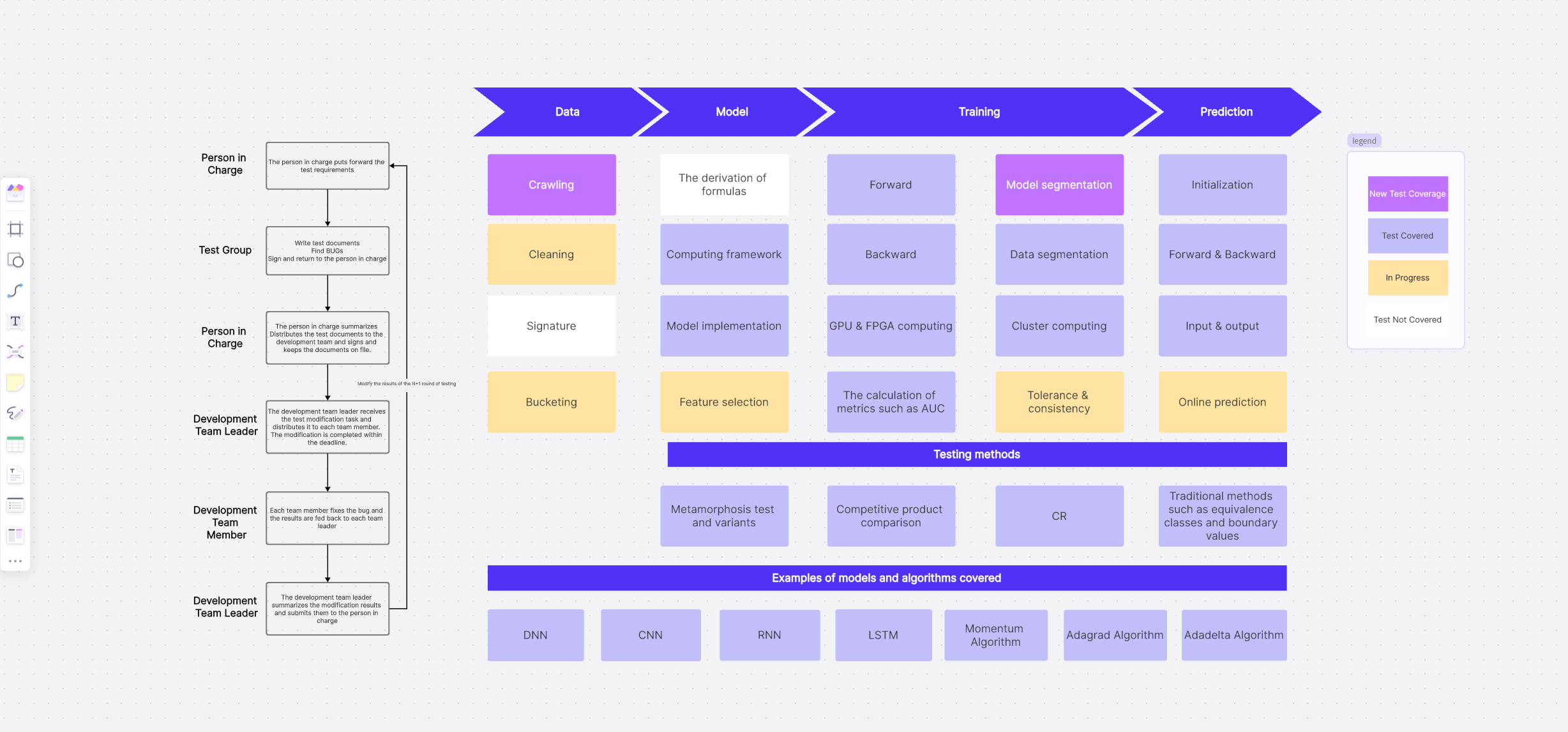
Designed for QA (Quality Assurance) teams and test engineers, this template visualizes all the components, tools, data flow, and environments involved in the software testing process—from unit testing to end-to-end (E2E) testing. It shows how different testing elements (e.g., test automation frameworks, bug tracking tools, test data generators) interact with one another and with the development pipeline to ensure software quality before release.
The template clearly outlines the purpose of a comprehensive testing architecture diagram, which includes:
- Visualizing the test automation framework structure (e.g., modular vs. linear frameworks) to ensure reusability and maintainability of test scripts.
- Showing seamless integration between testing tools (e.g., Selenium, JUnit, Postman) and core systems (e.g., CI/CD pipelines, bug tracking software like Jira).
- Illustrating test data flow—how test data is generated, stored, and reused across different testing environments (development, staging, production).
- Documenting the testing environment setup, including separate environments for different test types to avoid interference with live data.
- Facilitating clear communication among QA engineers, developers, and product managers about testing scope, priorities, and resource allocation.
Date Monitoring Architecture Template
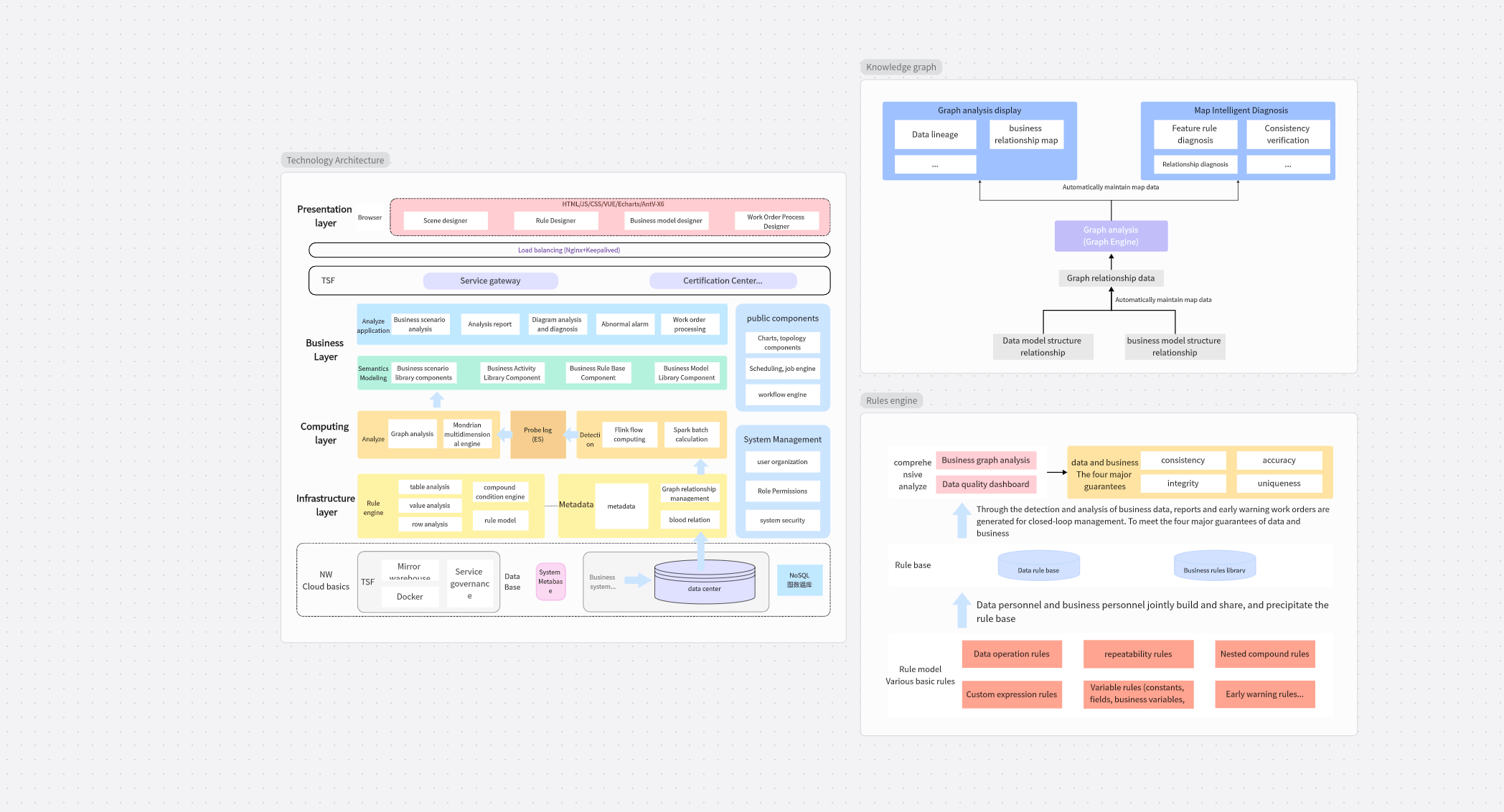
A Date Monitoring Architecture Diagram is a specialized visual representation of the system design used to track, validate, process, and alert on date and time-related data within an application or data pipeline. Unlike general system architecture diagrams, this template focuses exclusively on time-sensitive data handling, ensuring date/time values are accurate, consistent, and properly synchronized across different systems, regions, and time zones.
This is critical for applications where time accuracy directly impacts functionality, compliance, or user experience—such as financial transactions, scheduling tools, or global e-commerce platforms. The template also outlines key use cases for date monitoring architecture across industries:
- Financial systems: Ensuring transaction dates and timestamps are accurate for regulatory reporting (e.g., tax filings, audit trails) and compliance with financial regulations like GDPR or SOX.
- E-commerce platforms: Monitoring order placement dates, delivery deadlines, and promotion periods to prevent errors like expired discount codes or missed delivery windows.
- IoT/sensor networks: Detecting time-skew between devices or missing data batches (caused by network delays) to maintain data integrity for real-time monitoring systems.
- Log analysis tools: Ensuring log timestamps are sequential and accurate for forensic analysis, troubleshooting, and security incident investigations.
- Distributed systems: Synchronizing events and data across servers in different time zones to avoid conflicts (e.g., duplicate transactions, incorrect user activity logs).
How to Use System Architecture Diagram Templates Effectively?
Having access to high-quality templates is only half the battle—using them effectively requires aligning the template with your project’s unique needs and leveraging collaboration features to ensure the diagram serves as a living document for your team. Below is a step-by-step guide to maximizing the value of Boardmix’s system architecture diagram templates:
Choosing the Right Template
The key to effective template use is matching the template to your specific project needs and industry context. For example, if you’re building a mobile mini-program for a retail brand, the "Application Architecture" template (optimized for lightweight, front-end focused systems) is a better fit than a complex SaaS architecture template. For an e-commerce platform focused on payment processing, the "Payment System Architecture" template (included in Boardmix’s library) is more suitable, as it pre-maps payment gateways, fraud detection modules, and reconciliation workflows.
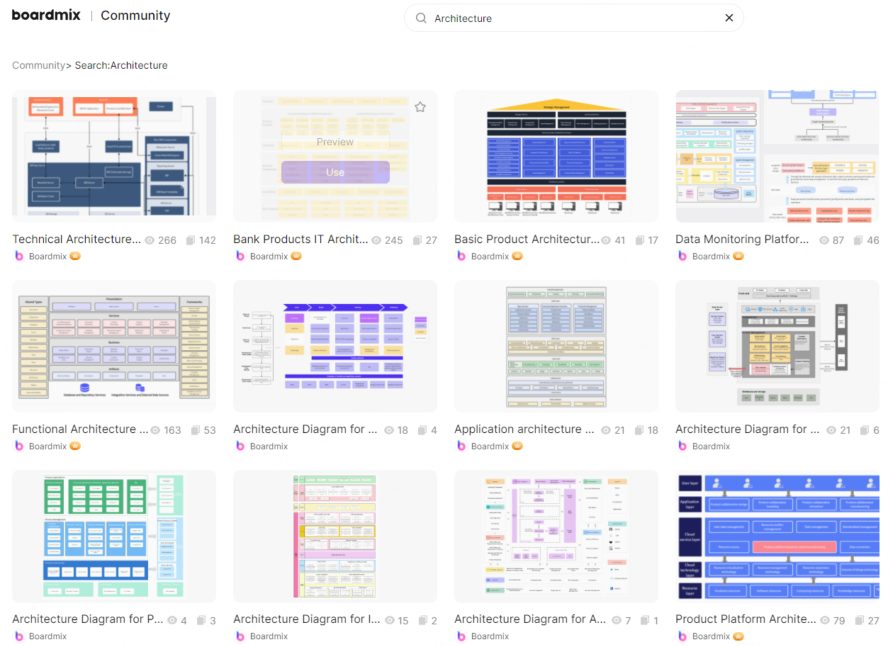
Boardmix offers a rich, categorized library of system architecture diagram templates to cover diverse needs—from small-scale startup projects to enterprise-grade systems. Each template is tagged by industry (e.g., fintech, healthcare, e-commerce), system type (e.g., microservices, monolithic), and complexity level (beginner to advanced), making it easy to filter and find the right fit in seconds. Explore templates now to browse the full collection and find the perfect starting point for your project.
Customizing a Template
Modifying a template in the Boardmix online whiteboard is intuitive and requires no advanced design skills—even team members with no prior architecture diagram experience can make meaningful customizations in minutes. Follow these simple steps to adapt a template to your project:
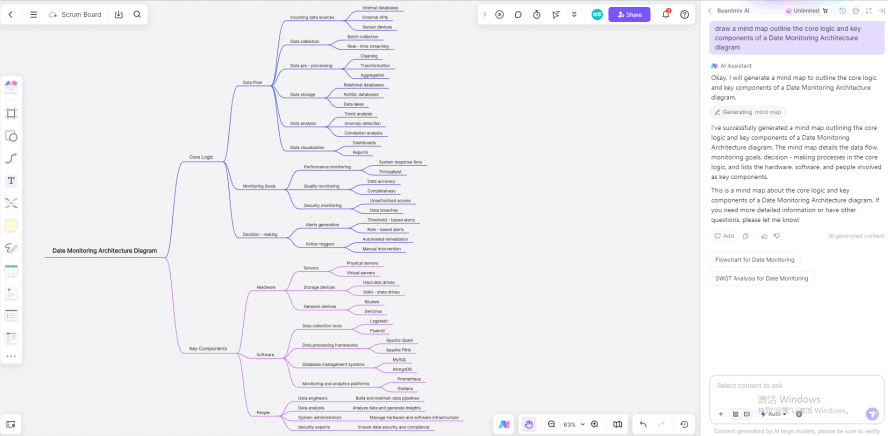
Step1:
Use a mind map or text boxes within Boardmix to outline your system’s core logic and key components before editing the template—this ensures you have a clear roadmap and avoid making ad-hoc changes that disrupt the template’s structure.
Step2:
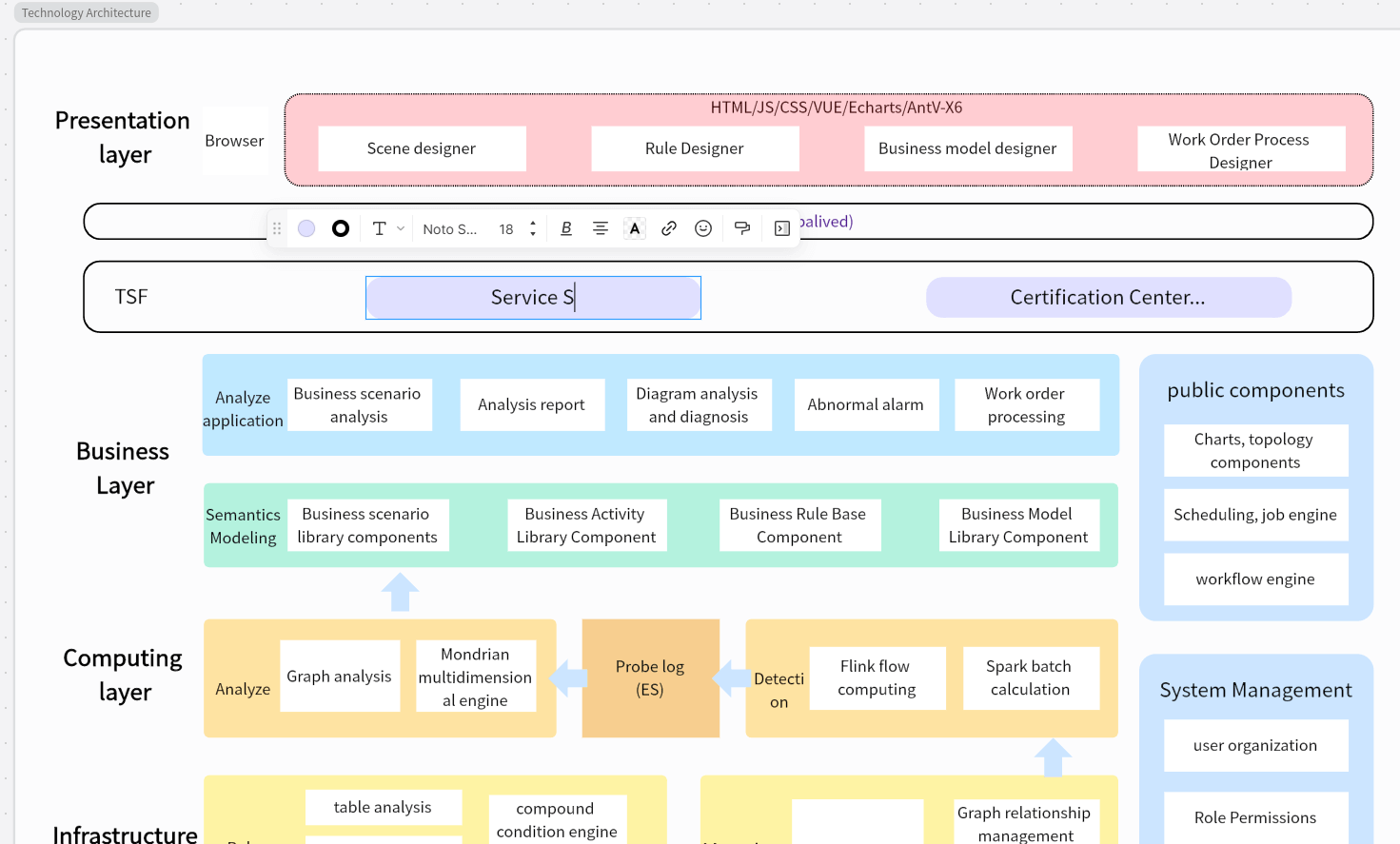
Select and replace the placeholder text in the template with your project’s specific details (e.g., renaming "Payment Module" to "Stripe Integration Module," or updating "User Segment A" to "Premium Subscribers"). You can also add, remove, or adjust visual elements like boxes, arrows, or color codes to reflect your system’s unique relationships—Boardmix’s drag-and-drop interface makes this process fast and error-free.
Step3:
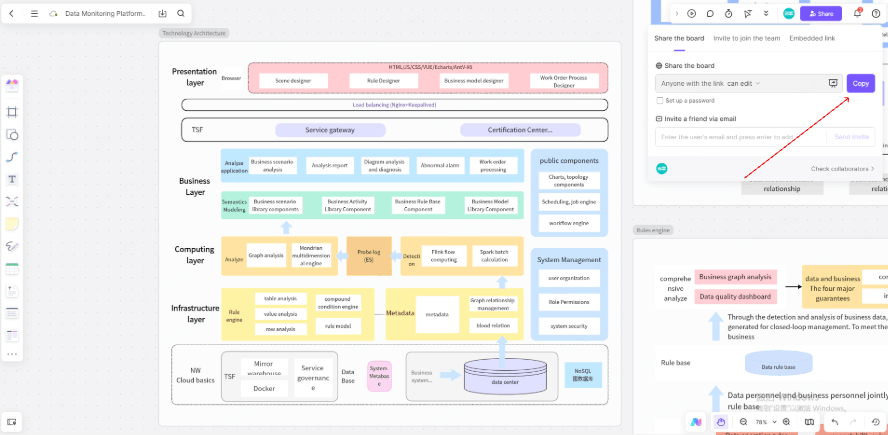
Share the template file link with team members to invite real-time collaboration. All edits are visible instantly to every collaborator, and you can use @mentions to tag specific team members to discuss details (e.g., "@John review the data flow in the Core Layer")—this eliminates the need for back-and-forth emails or version control issues, significantly boosting your team's diagramming efficiency and alignment.
Exporting Diagrams for Presentations
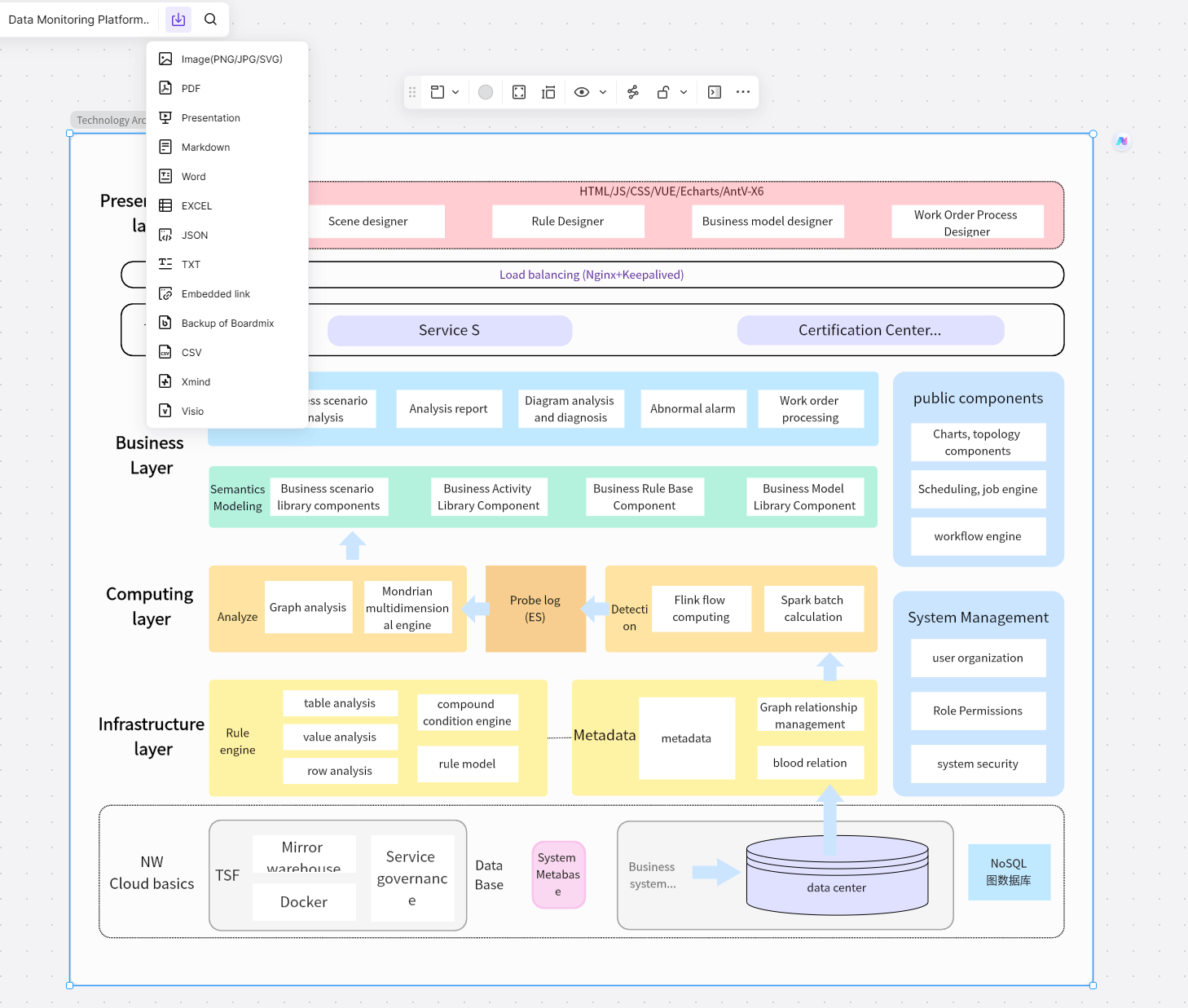
Once your system architecture diagram is finalized and approved by the team, Boardmix makes it easy to export it in formats optimized for presentations, reports, or documentation. Simply click the "Export" button in the top menu to save the diagram as a high-resolution PNG/JPG image (ideal for slideshows) or a PDF file (perfect for printing or offline reports)—all exports preserve the template’s clarity and formatting, even when scaled to large sizes.
Conclusion
Need to create a presentation deck or formal document to accompany the diagram? Boardmix is a powerful ally: its built-in AI tools can help generate explanatory documents, PPT slides, or supplementary charts based on your diagram, saving you hours of manual work. Additionally, Boardmix supports live collaboration for hundreds of users at once, so you can walk stakeholders through the diagram in real time (even remotely) and make on-the-fly edits based on feedback—ensuring your system architecture diagrams are presented clearly, professionally, and aligned with your audience’s needs.
Need to finalize your system design quickly and accurately? System architecture diagram templates help you structure complex logic in a visual, easy-to-understand way, while high-quality template images accelerate team collaboration and reduce design delays. Boardmix is your efficient design partner, offering a wealth of such resources for numerous industry scenarios and system types—all designed to streamline your workflow and improve technical communication.
With Boardmix, you benefit from: a vast library of pre-built system architecture diagram templates and images that save time with one-click reuse; support for real-time multi-user collaboration that makes team communication smoother and more efficient; and high-resolution export in multiple formats that ensures your diagrams deliver clear, professional presentations to any audience.
Try Boardmix Free Today & Access All Templates! Whether you’re a solo developer, a small startup team, or an enterprise architect, Boardmix’s editable templates and collaborative features will transform how you design, document, and communicate system architecture—helping you build better software faster.





