A weekly project status board gives a team one place to answer four questions: what moved, what is at risk, which decisions changed the plan, and what happens next. Unlike a long status report, a visual board makes the relationships between work, owners and risks easy to discuss in a short review.
Start with the project status report guide for the information a status update should contain, then turn that information into a compact shared canvas. The board is a review artifact, not a promise that every project can be measured by the same traffic-light labels.
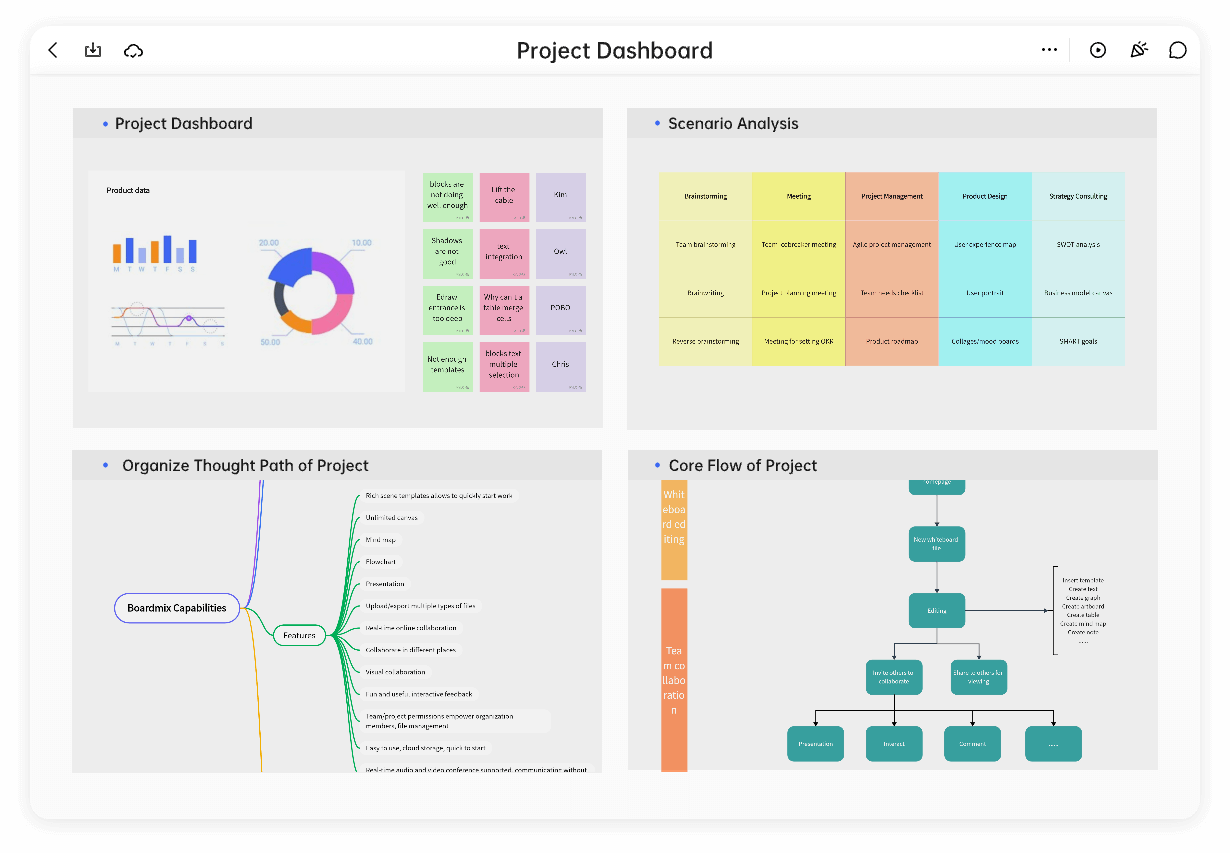
Choose the question the weekly review must answer
Write the review question at the top: “Can we keep the target date with the current risks?” or “Which dependency needs a decision this week?” A question gives the board a purpose. Without it, teams often fill a canvas with activity that does not help anyone choose a next action.
Keep the reporting period visible and define the status vocabulary in one sentence. For example, “At risk means a known issue can change the next milestone unless a response is chosen.” This prevents a red label from becoming a vague expression of concern.
Build four review zones
Use four clearly labelled areas: progress, risks and dependencies, decisions, and next actions. Keep each zone short enough to scan. The same work item may appear in progress and risks when the risk changes its path; link the cards or repeat only the context needed for the review.
| Zone | Useful entry | Avoid |
|---|---|---|
| Progress | Released onboarding copy for review | A long list of every completed task |
| Risks | API decision may move the integration slice | “Everything is blocked” without a cause |
| Decisions | Choose one export format for the pilot | A decision recorded without an owner |
| Next actions | Product and engineering confirm the API path | Actions with no due context or handoff |
Write progress as change, not busyness
Describe what became true since the previous review. “Prototype reviewed with three internal partners” is more useful than “design work ongoing” because it names the change and the evidence. If a result is illustrative or internal, say so; do not present a team’s weekly board as a customer outcome.
Use a small “since last review” note and a “still open” note. This makes a quiet week legible without inventing progress. If an item did not move because another decision is pending, place that relationship in the risk zone.
Make risks actionable
For each risk, record the cause, the possible effect and the next response. Separate a dependency (“waiting for a security review”) from an assumption (“we expect the current API limit to be sufficient”). Both can change a plan, but they need different conversations.
Use connectors for a direct dependency and comments for questions that do not belong in the headline. When a risk is accepted, record the reason and review point. When it is reduced, update the card rather than leaving an old warning beside a new one.
Capture decisions and next actions together
A decision is useful only when the affected work can find it. Put the decision next to the related risk or milestone and note who will communicate it. Then add the smallest next action that will change the board at the next review.
Do not use a color alone to communicate meaning. Pair a color or shape with a short label, and keep the legend visible for new participants. The shared canvas can hold the labels, cards and comments; the project team remains responsible for confirming the source of each statement.
Run a short weekly review
- Read the review question and reporting period.
- Scan progress for changes that affect the target.
- Discuss risks only where a response or decision is needed.
- Confirm decisions and connect them to affected work.
- Read the next actions back with the context each owner needs.
- Archive or move stale notes after the review, preserving the reason for major changes.
Invite contributors to comment on the relevant card before the meeting when possible. During the review, edit the shared board in place so remote participants see the same state. Boardmix’s canvas tools—text, notes, shapes, connectors, sharing and comments—support this structure without requiring a claim about automatic status calculation.
When the zones fit your workflow, open a Boardmix board and adapt the labels to your project. Keep the board concise, evidence-based and easy to revisit next week.