





Online whiteboard integration has become a critical focus for technical teams and product managers. Whether building an internal collaboration platform or a customer-facing interactive system, integrating whiteboard functionality is a powerful way to boost real-time collaboration efficiency and gain a competitive edge.
This guide breaks down the three most common paths for whiteboard integration: using a dedicated Whiteboard SDK, customizing an open-source solution, or building a privately deployed collaboration system. We'll help you choose the best fit for your business needs.
Why Businesses Are Prioritizing Whiteboard Integration?
For B2B enterprises, an online whiteboard is more than a drawing tool—it's a productivity platform that combines visual collaboration, real-time communication, and multi-user synchronous editing. Integrating this capability into existing products or systems reduces learning curves and significantly streamlines workflows.
Common integration scenarios include embedding a whiteboard into OA or IM systems (like Microsoft Teams or Slack) for meeting notes and visual presentations.
Other scenarios include adding a whiteboard to project management platforms for mind mapping, flowcharting, and visual modeling.
Additionally, integrating whiteboard tools into educational systems for interactive teaching and live annotation is a key use case.
Businesses increasingly treat whiteboard capabilities as foundational collaboration infrastructure rather than a standalone tool.
Whiteboard SDK Integration: Rapid, Custom Collaboration
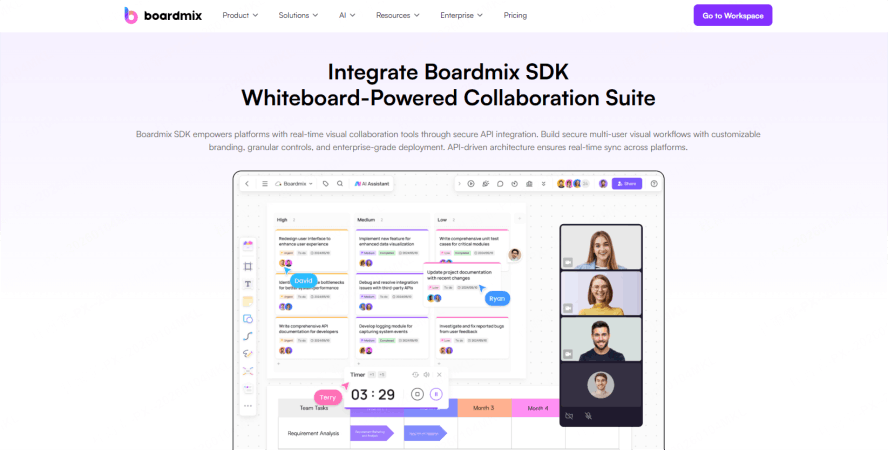
Integrating a Whiteboard SDK is the most mainstream and flexible approach. An embedded SDK lets you seamlessly add powerful whiteboard features into your existing system, with full control over the UI, interaction design, and data handling.
A high-quality Whiteboard SDK should offer:
- Rich drawing components: Sticky notes, flowcharts, mind maps, icons, and shapes.
- Real-time collaboration: Multi-user editing, operation synchronization, and version history.
- Controllable data interfaces: Import/export, custom storage, and event listeners are essential for a robust SDK.
- Granular permission controls: Access management, content locking, and workspace isolation are also key requirements.
For example, the Boardmix Whiteboard SDK provides core graphics capabilities (shapes, pens, containers, mind maps, text), file uploads (images, SVG, PDF), version history, access to templates and stickers, and OpenAPI interfaces for file management.
Open-Source Whiteboard Solutions: Flexible but Technically Demanding
Another path is custom development based on an open-source project. This approach offers maximum freedom and is attractive to startups or teams with strong dev resources. Popular projects include Excalidraw and OpenBoard.
While open-source offers flexibility and no licensing fees, there are several challenges to consider. You are responsible for maintenance, updates, and security patches for the open-source codebase.
You must also build the real-time collaboration and data sync mechanisms from scratch, which requires significant engineering effort.
Cross-platform compatibility and performance optimization for different devices and networks also require substantial time and resources.
For a rapid and reliable rollout, we recommend using open-source for prototyping, not as your final production solution.
Private (On-Premise) Deployment: Secure, Controllable, and Custom
For businesses with strict requirements on data security, internal network compliance, or advanced permission controls, whiteboard integration with private deployment is the ideal choice.
Benefits of an on-premise whiteboard include data localization, which meets compliance standards for government, finance, and healthcare industries.
High system availability is another key benefit, as it integrates with existing IT infrastructure and cluster operation ensures stability even during high usage.
Deep custom integration allows connection with enterprise IM, document systems, and business platforms to create a unified workflow.
Full development control means autonomous management of code, versions, and permissions to align with internal policies and processes.
The Boardmix Enterprise Whiteboard solution offers a complete Whiteboard SDK plus private deployment capabilities, providing end-to-end service for embedding whiteboard components or building a dedicated collaboration platform.
How to Choose the Right Whiteboard Integration Path?
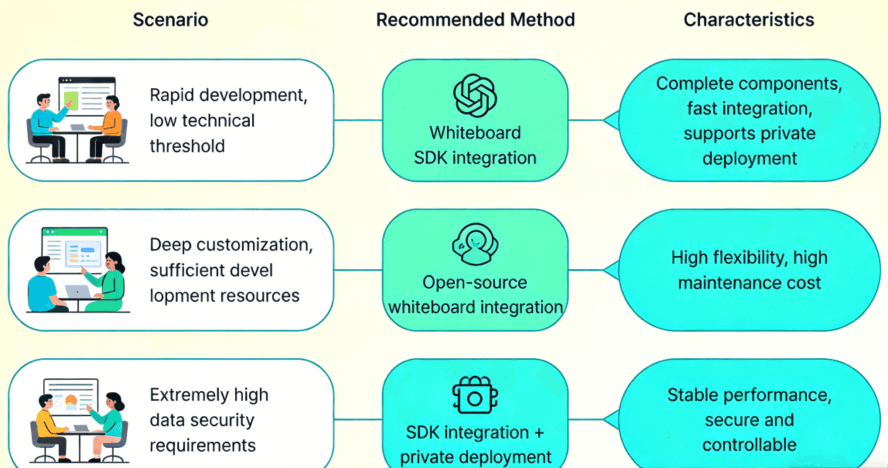
Evaluating whiteboard functionality? Start with a Whiteboard SDK for a pilot project. Quickly embed it to test the fit with your workflows, then scale up to a full private collaboration system if needed.
Whiteboards are evolving from "visual aids" into the operating system for enterprise collaboration. Through SDK integration, open-source customization, or private deployment, businesses can embed collaborative power directly into their processes—achieving efficiency, security, and flexibility.
Ready to Build Your Smart Collaboration Space? Boardmix Enterprise Whiteboard supports the entire journey from SDK embedding to on-premise deployment, helping you quickly build your own intelligent collaboration hub.





