An async design review needs a specific version to inspect, a small set of questions, a clear response deadline, and someone responsible for deciding what the feedback changes. Share those together. Ask reviewers to refer to a labeled part of the design and explain the user problem they see, then publish the decisions when the review closes.
That is more useful than posting a design link with “Any thoughts?” A shared whiteboard for visual collaboration can put the review brief, flow, questions, and comments in one place, so people can contribute at different times without reconstructing the context from a chat thread.

Use async review for a question people can answer independently
Async review is a good fit when the material can stand on its own and reviewers have time to examine it before responding. It can be especially useful for finding missing states in a flow, checking wording against a user task, or identifying dependencies that a design team has overlooked.
Use a short live conversation when participants cannot agree on what the problem is, the decision is urgent, or a written exchange keeps producing new misunderstandings. The goal is a useful review, not eliminating every meeting.
Be clear about whether you are gathering critique or seeking formal approval. A collection of comments is not approval, and silence is not a sign-off. Name the decision-maker and any required reviewers before the review begins. For the broader practice of giving feedback, see the design critique guide.
Write the brief before sending the link
Consider an illustrative team reviewing a subscription-cancellation flow. The designer wants to know whether a person can understand what happens next and recover if the cancellation request fails. The review is about interaction and wording; it does not establish the company's cancellation policy.
| Field | Example |
|---|---|
| Version | Cancellation flow, review version R2. Screens C1–C4. |
| User task | Cancel a subscription and understand whether the request succeeded. |
| Question 1 | At C3, can the user distinguish a submitted request from a completed cancellation? |
| Question 2 | If submission fails at C2, is there a clear route to retry without losing the user's intent? |
| Scope | Flow states and interface wording. Brand styling and commercial policy are not being decided here. |
| Reviewers | Design, engineering, support, and the person responsible for confirming approved policy wording. |
| Response window | Close at an explicit date, time, and time zone agreed with the reviewers. Include who to contact if they cannot review in that window. |
| Decision owner | The product lead consolidates feedback with the designer; unresolved policy wording goes to the authorized policy owner. |
These fields prevent different reviewers from evaluating different problems. Engineering can inspect failure states, support can flag recurring misunderstandings, and the policy owner can confirm whether proposed wording matches the approved rules.
Erin Casali's first-hand account of asynchronous design critique emphasizes precise questions and explicit discussion checkpoints. The brief above applies those ideas to one bounded review, rather than asking for reactions to an entire evolving product.
Keep the reviewed version stable
If the designer changes the flow while comments are arriving, a reviewer may identify a problem on a screen that no longer exists. Another reviewer may respond to the replacement. The thread then appears to contain a disagreement that is really a version mismatch.
Label the material R2 and leave it intact during the agreed window. This can be a set of exported screens or a clearly identified copy of the relevant design material. Keep the source design link nearby, but specify which version receives comments. Creating a separate copy is an editorial choice by the team; the label does not enforce a software lock.
If a necessary correction cannot wait, mark what changed and tell reviewers whether their feedback is still needed. Do not quietly replace the material and assume every comment now refers to the new version. After the review, label the revised proposal R3 and describe the changes.
Ask for observations that lead to a decision
A useful comment names the location, the concern, and the reason it matters. A suggested solution is welcome, but it should be distinguishable from the problem it tries to solve.
Location: C3, confirmation heading.
Observation: The heading says the subscription is canceled, while the message below says the request is still processing.
User consequence: A person may leave believing that the change is complete.
Suggestion: Use a pending-state heading until the system can confirm completion.
This comment is more actionable than “The confirmation page feels wrong.” It identifies inconsistent states. The team still needs engineering to confirm what the system knows at that point and the authorized owner to confirm the wording.
Ask reviewers to separate an observed contradiction from an assumption or personal preference. “I prefer the shorter heading” can be discussed, but it should not carry the same weight as an error state that the design omits. Team feedback can identify something to test; it is not a substitute for evidence from the people who use the product.
Resolve conflicting comments against the same question
Do not count comments as votes. Two reviewers may recommend opposite changes because they are solving different problems. Restate the shared question before deciding what to do.
| Feedback | Underlying concern | Disposition |
|---|---|---|
| “Make C3 shorter; the current message is too long.” | People may miss the main status in a dense paragraph. | Revise the hierarchy so the status is prominent, then assess which supporting detail is necessary. |
| “Add more explanation to C3.” | People may not know what happens while the request is pending. | Keep the essential next-step information below the status. Brevity and a clear explanation can coexist. |
| “Change the policy so cancellation is immediate.” | The reviewer wants a different service rule. | Route the policy proposal separately. Do not rewrite the interface to promise a rule that has not been approved or implemented. |
| “The retry at C2 might create a duplicate request.” | The design may hide a technical failure mode. | Ask engineering to confirm the behavior. Keep the affected flow decision open until the answer is known. |
The first two comments do not require choosing a winner. The third is outside this review's authority. The fourth may block the proposed interaction. Treating them all as requests to edit a screen would lose those distinctions.
Build the review workspace in Boardmix
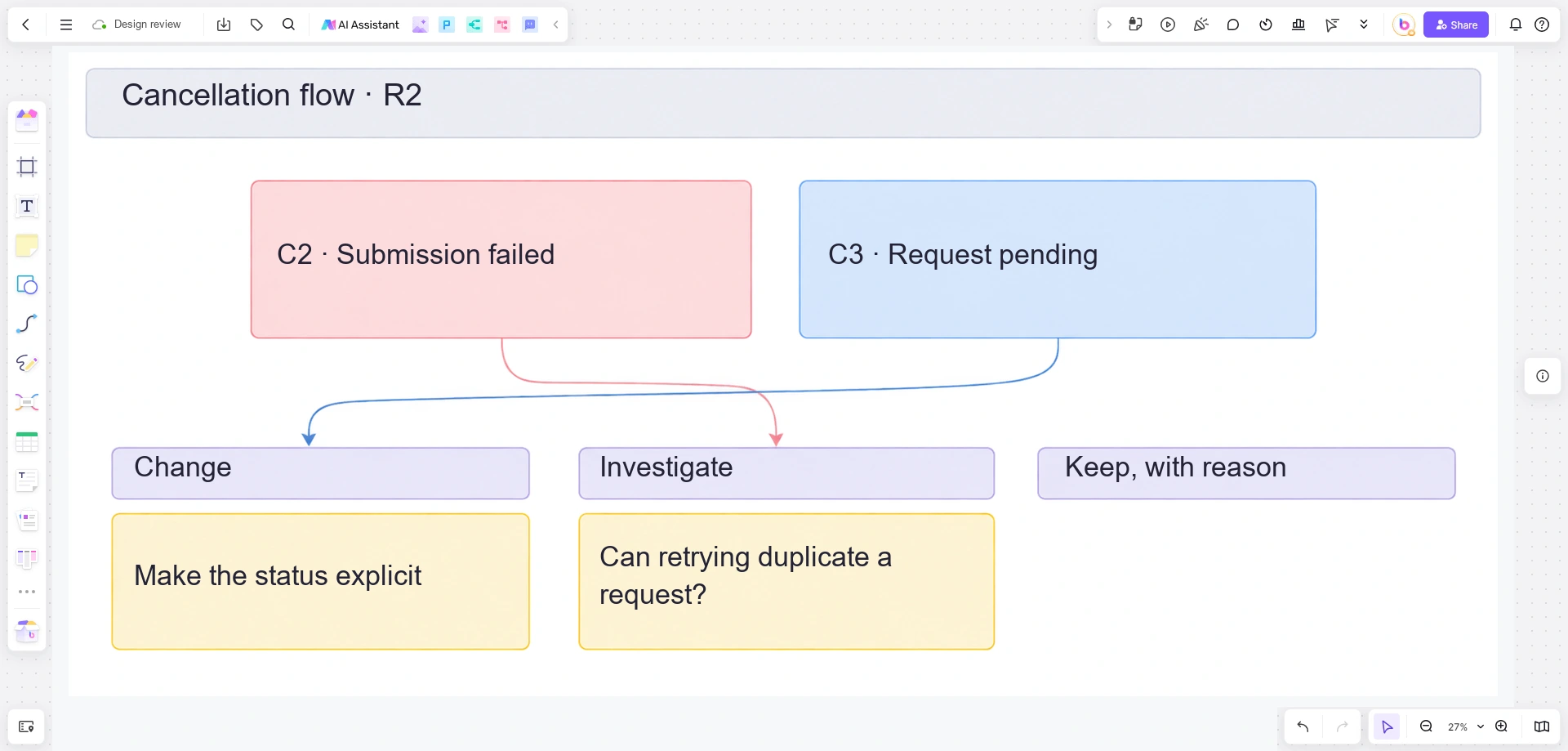
Put the review brief at the board's starting point. Arrange the flow beneath it using your existing design material or a simple sequence of shapes and connectors. Give every state a visible label, such as C1 or C2, so reviewers can refer to it precisely.
Add the two review questions next to the relevant part of the flow. Leave a feedback area beside each question, and use comments for clarifications attached to the work. A note can carry a reference such as “C3 · pending status” even when the discussion takes place elsewhere.
Keep a separate decision area with the headings “Change,” “Investigate,” and “Keep, with reason.” The review owner moves or summarizes feedback there after reading it. Boardmix provides the shared canvas and comments; your team sets the review window, communicates reminders, and makes the decisions.
Before sending the invitation, have one reviewer confirm that they can access the board, read the brief, and add feedback in the intended way. Put the exact closing time in the invitation as well as on the board. If a required reviewer cannot participate, agree on a new arrangement rather than interpreting the absence as approval.
Publish the outcome with the next version
When the window closes, summarize the changes and unresolved questions. For the example, the outcome might be:
- C3 will distinguish a pending request from a completed cancellation.
- The next-step explanation will remain below the main status.
- C2's retry behavior is awaiting an engineering answer.
- The proposal to change the commercial policy has been routed to its owner and is not part of the current design approval.
Show the revised material as R3 and connect each meaningful change to the question it addresses. Invite another review only where a new answer is needed; do not make everyone reread unchanged screens. A late comment that reveals a serious error still deserves attention, while a new preference can wait for the next appropriate review.
To start, open Boardmix and prepare one review question around a clearly labeled piece of work. Give reviewers enough context to answer it without you in the room.