





Image Source: boardmix.com
Most teams work online now, therefore, simple and dependable digital whiteboards are in high demand. A lot of people want tools that let them write down ideas, plan projects, and work together without having to pay a lot in fees for subscriptions.
Miro is a very popular option, but its free version has several limits. You only get a few boards that you can edit. Large files cannot be uploaded. Some templates are locked, and a lot of useful features require an upgrade. Because of these restrictions, a lot of people keep asking: Is there a free alternative to Miro?
The short answer is yes. There is a strong free Miro alternative that gives you strong features without making you pay. This article will tell you what people are looking for, what a good free online Miro alternative should have, and the best option available in 2026.
Why People Look for a Free Miro Alternative?
Many people like Miro, but they soon discover that the free plan isn't enough for their daily work. Many boards, files, templates, and tools for working together in real time are often needed by remote teams.
These tools aren't available in the free version of Miro, which is unfortunate. It's hard for remote teams, students, and small teams to handle multiple jobs at once or when they need to upload larger files.
The free version of Miro has restrictions, such as:
- Only 3 editable boards are allowed
- Limited storage for uploads
- Fewer templates
- Missing advanced tools
- Restrictions on team collaboration features
These limitations make it hard for many people to use Miro freely and easily. This is why many people are starting to search for a free Miro alternative. They want a free online Miro alternative that lets them do more, has more boards, and has more features without asking them for upgrade.
What Makes a Good Free Online Miro Alternative?
People looking for a free online Miro alternative want something that is easy to use, powerful, and smooth. A good choice should give users enough space and tools to get work done without frustration. Users should be able to learn it fast and easily.
Here are the most important features a free alternative should offer:
- Unlimited canvas so your ideas never run out of space
- Real-time online collaboration with team members
- Multi-format import and export for images, PDFs, and documents
- Template library that supports quick project setup
- Commenting and annotation tools for teamwork
- Fast loading speed and simple interface so work feels easy
These features make a free alternative strong and useful for both professional teams and casual users.
Introducing Boardmix — The Best Free Miro Alternative
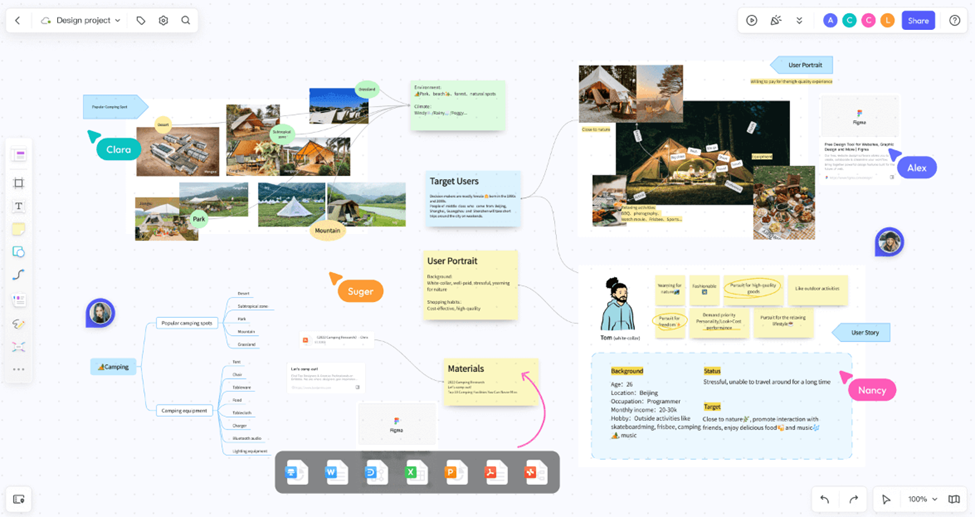
Image Source: boardmix.com
Boardmix is one of the best and most complete tools out there right now, and it works great as a free Miro alternative. It has many useful features that are free, so teams can work together without any limitations. You can work together in real time, import files in a variety of formats, and even use AI Smart Tools to help you summarise information or come up with new ideas.
Boardmix is also lighter, quicker, and easier to use than a lot of other platforms. It loads quickly on computers and phones, and even when there are a lot of elements on the canvas, the interface stays clear. Boardmix also has plenty of templates that can be used to make it easy to start a new project.
Boardmix vs Miro: Quick Comparison
| Feature | Miro (Free Plan) | Boardmix (Free Plan) |
| Editable Boards | 3 only | Unlimited |
| Team size | Limited | Unlimited |
| AI Tools | Mosty paid | Full access |
| File Import | Limited | Multi-format |
| Real-Time Collaboration | Yes | Yes |
| Templates | Many locked | Large free library |
| Performance | Heavy | Fast and lightweight |
That's why Boardmix is one of the best and most flexible free online Miro alternative right now, in 2026. People can create as many boards as they want, and teams can stay organised without paying for upgrades. For long-term use, many users also like the simple layout, fast loading times, and easy-to-use tools for working together.
What Can You Do with Boardmix for Free?
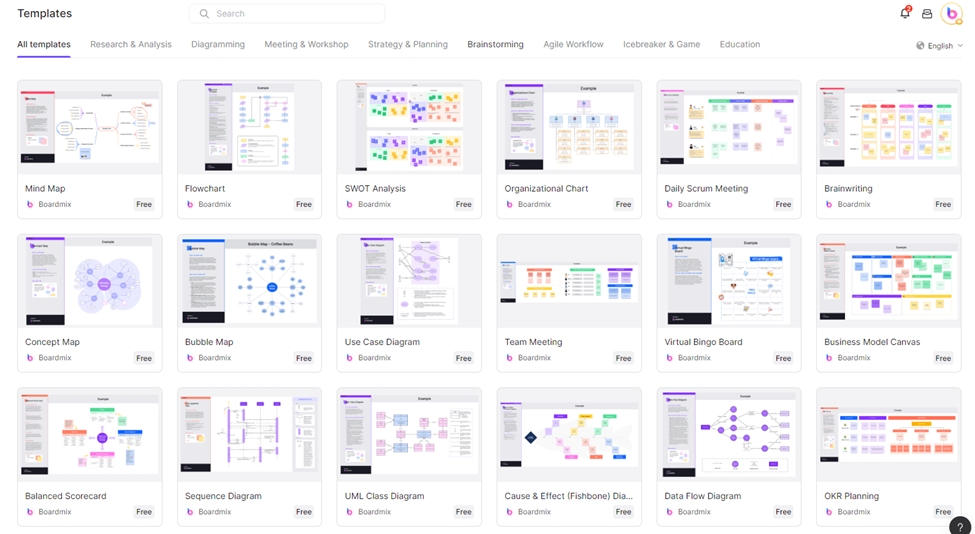
Image Source: boardmix.com
People can use powerful tools on Boardmix without having to pay anything. A lot of people choose it because it doesn't have limitations that other platforms do. You and your team can quickly share boards, hold remote meetings, and come up with new ideas. These features work great for teams that are spread out and need to work together reliably in real time.
Boardmix's free version also lets you plan projects, map out user journeys, and make flowcharts and other diagrams. It can be used for group projects by students. Teachers can plan tasks for the school. Product plans, strategies, and visual documents can be made by small teams.
Since there is no limit on the number of people on a team, anyone can join and work together. For anyone looking for a free Miro alternative, this makes Boardmix one of the best options available.
How to Switch from Miro to Boardmix (Step-by-Step)
Switching from Miro to Boardmix is very simple, and most people can complete it in a few minutes. You can move your work and invite your team without any complicated steps. This makes it comfortable for people who want a free online Miro alternative but worry about migration.
Here is a clear step-by-step guide:
Step 1: Import Your Files
Open Boardmix, click “Import,” and upload your Miro content. Boardmix supports many file formats, including images and PDFs, which makes the process smooth.
Step 2: Create A New Whiteboard
Click “New Board,” and choose from the empty canvas or a template. The board opens instantly with a clean layout.
Step 3: Invite Your Team Members
Click the “Share” button and add emails or send the invite link. There is no limit on team member count.
Step 4: Explore The Template Library
Open the template section and choose templates for mind maps, flowcharts, retrospectives, or planning sessions. You can start creating immediately.
These steps make the switch easy and comfortable for anyone coming from Miro.
FAQ — Answering "Is There" Is there a free alternative to Miro?
Is there a free alternative to Miro?
Yes. Boardmix is a great completely free app that you can use alternatively to Miro. It has a lot of tools that Miro only lets paid users have.
Is Boardmix really free?
Yes, the free version of Boardmix comes with as many boards, users, templates, and AI tools as you want. You do not have to pay to make as many projects as you want.
Does Boardmix support real-time collaboration?
Yes, Boardmix lets multiple users work at the same time on the same board. Everyone can type, draw, comment, and edit things at the same time.
Can I import Miro files into Boardmix?
Yes, Boardmix supports a number of different file types. It's easy to share files from Miro or download your content and then bring it into Boardmix.
Why should I switch to Boardmix?
Boardmix is a great choice if you want more freedom, faster speed, and unlimited boards for free.





