




An exclusive gateway chooses one route. A parallel gateway starts every outgoing route. The distinction becomes especially important where those routes meet again: an exclusive merge does not wait for concurrent work, while a parallel join does.
When you sketch a process in a shared flowchart workspace, label the business rule before choosing the diamond. This order-check example shows why “pickup or delivery” and “check payment and stock” need different behavior, even though both create two visible branches.
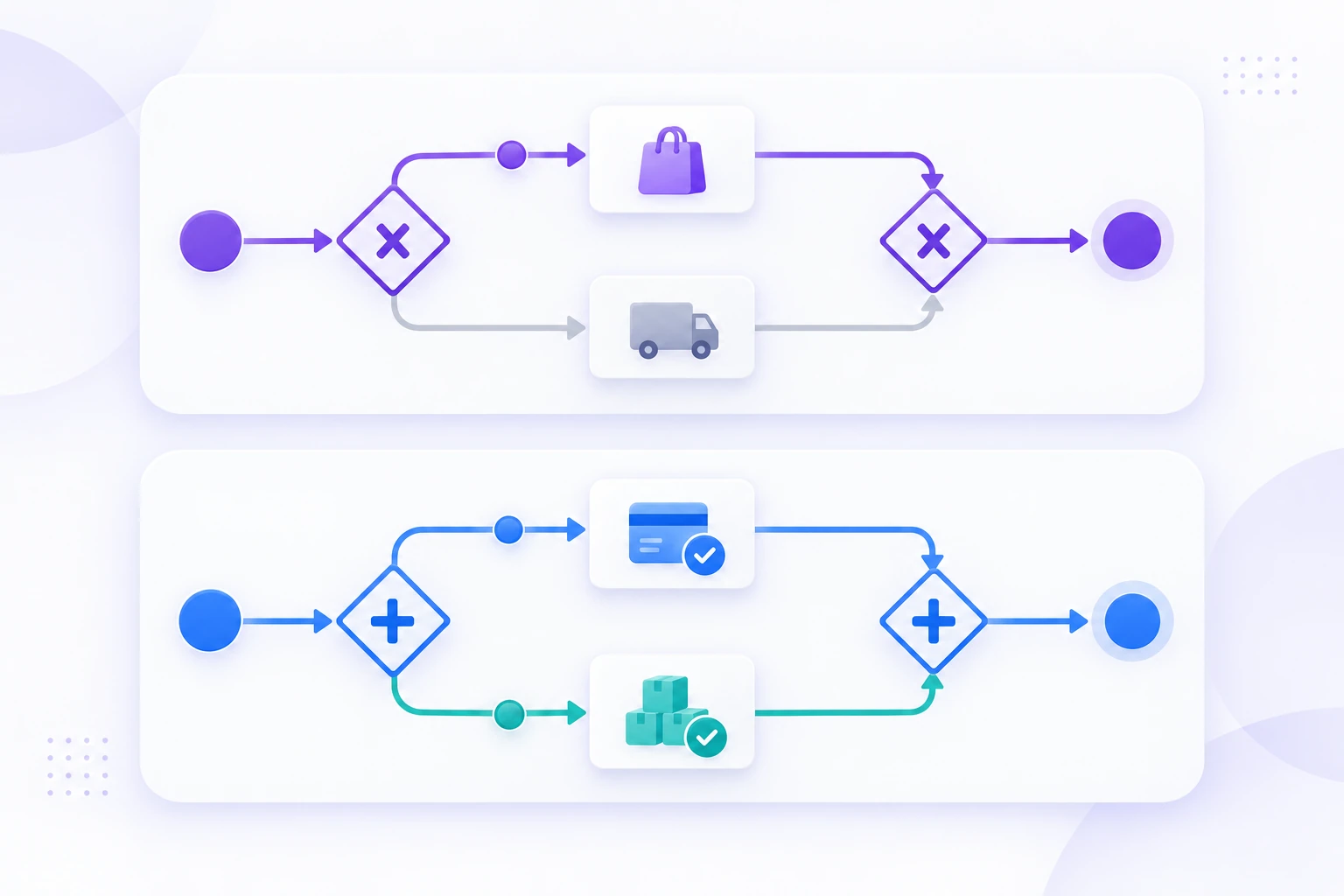
Compare what the gateways do
BPMN stands for Business Process Model and Notation. Its gateway symbols describe process behavior, not merely the shape of the drawing. The OMG BPMN specification defines the relevant branching and merging semantics.
| Question | Exclusive gateway | Parallel gateway |
|---|---|---|
| What does a split do? | Selects one outgoing route according to the modeled conditions. | Activates every outgoing route. |
| What does a join do? | Passes an arriving token onward; it does not synchronize concurrent arrivals. | Waits for a token on each incoming route before continuing. |
| Typical question | Which one applies? | Which tasks must all complete? |
| Common marker | X inside a diamond; an exclusive gateway can also be shown without the X marker. | + inside a diamond. |
A token is a way to reason about an instance's progress through a process. For the examples below, imagine moving a marker along each active route. It is not a customer record or an item of inventory.
Camunda's exclusive-gateway documentation explains the selected-route behavior and the pass-through merge. Its parallel-gateway documentation describes starting all outgoing routes and waiting for the incoming routes at a join. Logical concurrency does not promise that two staff members or machines will perform the tasks at exactly the same moment.
Use an exclusive gateway for pickup or delivery
Consider an order whose fulfillment method is already recorded as either pickup or delivery. After receiving the order, the process asks “Fulfillment method?” One branch prepares pickup instructions; the other prepares delivery details.
Only one of those branches should run for this order. Mark the routes “Pickup” and “Delivery,” and use an exclusive gateway. The paths can meet at an exclusive merge before the process moves to the next stage.
Walk a pickup order through the diagram. One marker goes down the pickup path, reaches the merge, and continues. Nothing is expected from the delivery path, because it was never selected.
Also decide how missing or unexpected data is handled. If the method has not been chosen, “delivery” should not become the accidental answer. Add an explicit clarification route or establish a valid precondition before this decision. In an executable model, configure the conditions and any default flow deliberately; a label alone is not an executable rule.
Use a parallel gateway for payment and stock checks
Now suppose the process must check both payment status and stock availability before preparing the order. Neither check supplies an input needed to start the other in this example. A parallel split activates both paths: “Check payment” and “Check stock.”
At the parallel join, the order waits until both checks have completed. If payment finishes first, its marker waits at the join. When stock finishes, the join can consume the two arrivals and let one marker continue.
Completion is not the same as approval. A completed stock check can report “unavailable,” and a completed payment check can report “not confirmed.” After the join, use a separate decision to examine the recorded results. The join itself only coordinates completion; it does not decide that the order is ready.
A compact sequence for this stage is: start both checks → wait for both results → decide whether the order can proceed. If both results are acceptable, prepare the order. Otherwise, route it to the relevant resolution work.
Spot the two wrong-join patterns
The most misleading diagrams often have the right activities and the wrong merge. Trace one order instead of judging the picture by its symmetry.
| Incorrect pattern | What the trace shows | Correction for this example |
|---|---|---|
| Exclusive pickup/delivery split followed by a parallel join | The pickup marker arrives, but the join also waits for the unselected delivery route. That second marker will not arrive. | Use a non-synchronizing merge for these mutually exclusive alternatives. |
| Parallel payment/stock split followed by an exclusive merge | The first check can continue without waiting. The second arrival can continue later as well, potentially starting downstream work twice. | Synchronize the two required checks with a parallel join before examining their results. |
These are behavior problems, not cosmetic mistakes. Changing a diamond's marker can change whether a process waits forever, continues early, or starts work more than once.
Do not reduce the lesson to “always pair identical gateways.” Real processes may contain nested decisions, loops, or branches that end separately. Choose a join based on which arrivals can actually reach it and what must happen before continuation. Matching symbols are not a substitute for that reasoning.
Account for a check that cannot finish normally
What if the stock service is unavailable? A model that simply removes that path from the drawing leaves the payment marker waiting at the join. Decide what “check completed” means when a result cannot be obtained.
For a high-level business sketch, the stock task can finish with an explicit “unknown — requires review” outcome. The post-join decision then routes the order to resolution rather than treating unknown as available. An executable BPMN model needs the appropriate error, timeout, cancellation, and retry handling for its engine and business requirements.
The business question comes first: should the whole order wait, move to manual review, or stop? Do not route a failed check around the join straight into “Prepare order” unless that is genuinely the authorized process. Bypassing synchronization can undermine the reason for having two checks.
Trace the process together in Boardmix
Build two clearly separated sections on a Boardmix canvas. The first contains the exclusive pickup/delivery choice and merge. The second contains the parallel payment/stock checks and join, followed by the decision on their results.
Use short verb-led task names, visible gateway markers, and labels beside the alternative paths. Leave room below the diagrams for a manual trace. Move a small shape along a pickup route, then use two shapes for the parallel checks. Use the board to discuss the logic; run an executable process in a BPMN engine.
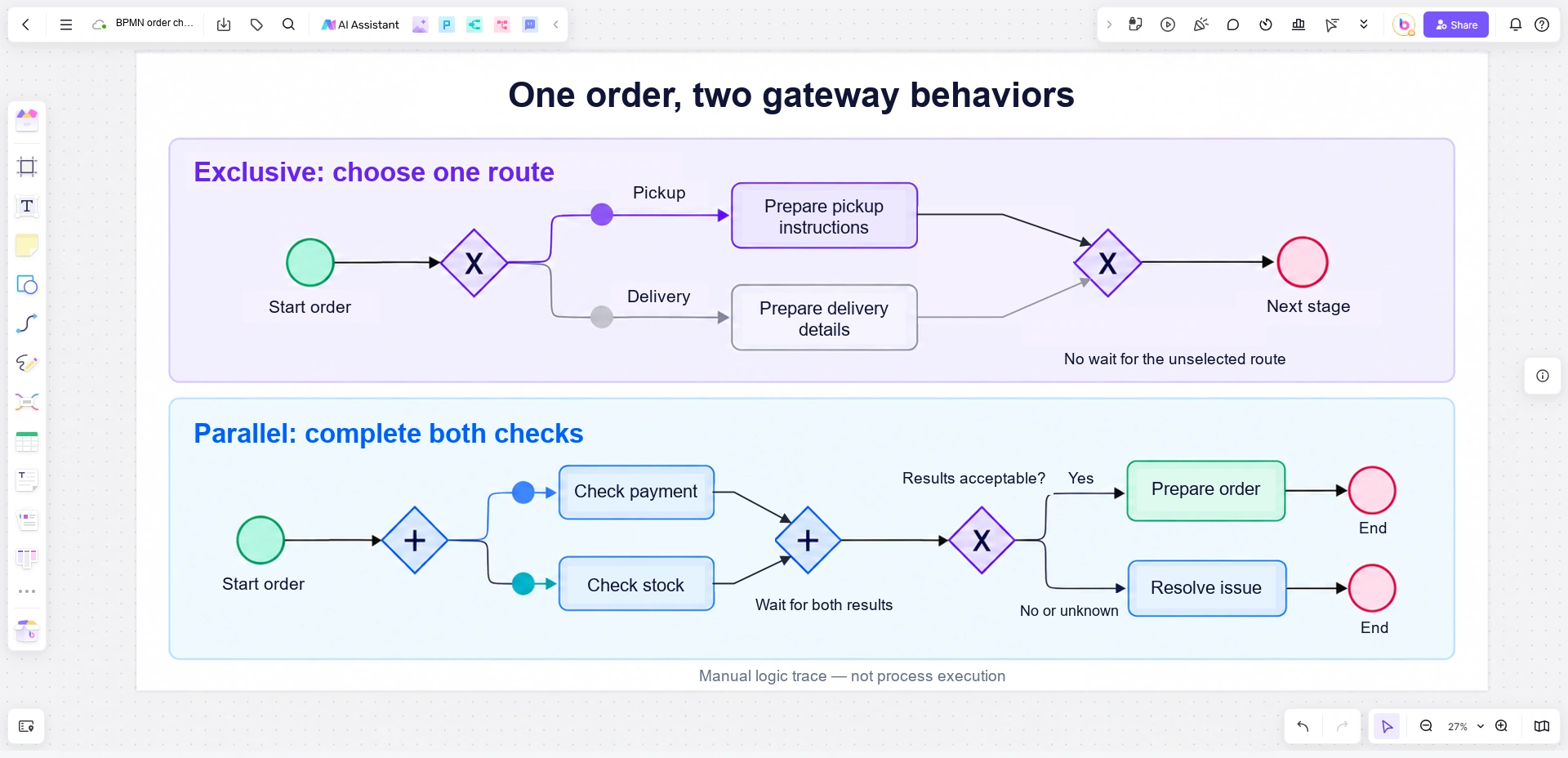
Open a Boardmix board and invite the people who perform the checks to walk through the example with you. Ask where a result can be missing, which work can start independently, and what must be known before the next task begins.
If the business rule is “run one or more applicable checks,” neither a simple exclusive choice nor an unconditional parallel split fully expresses it. Keep that rule visible and examine the appropriate conditional branching model. Drawing two arrows does not settle whether one, both, or a changing subset should run.


