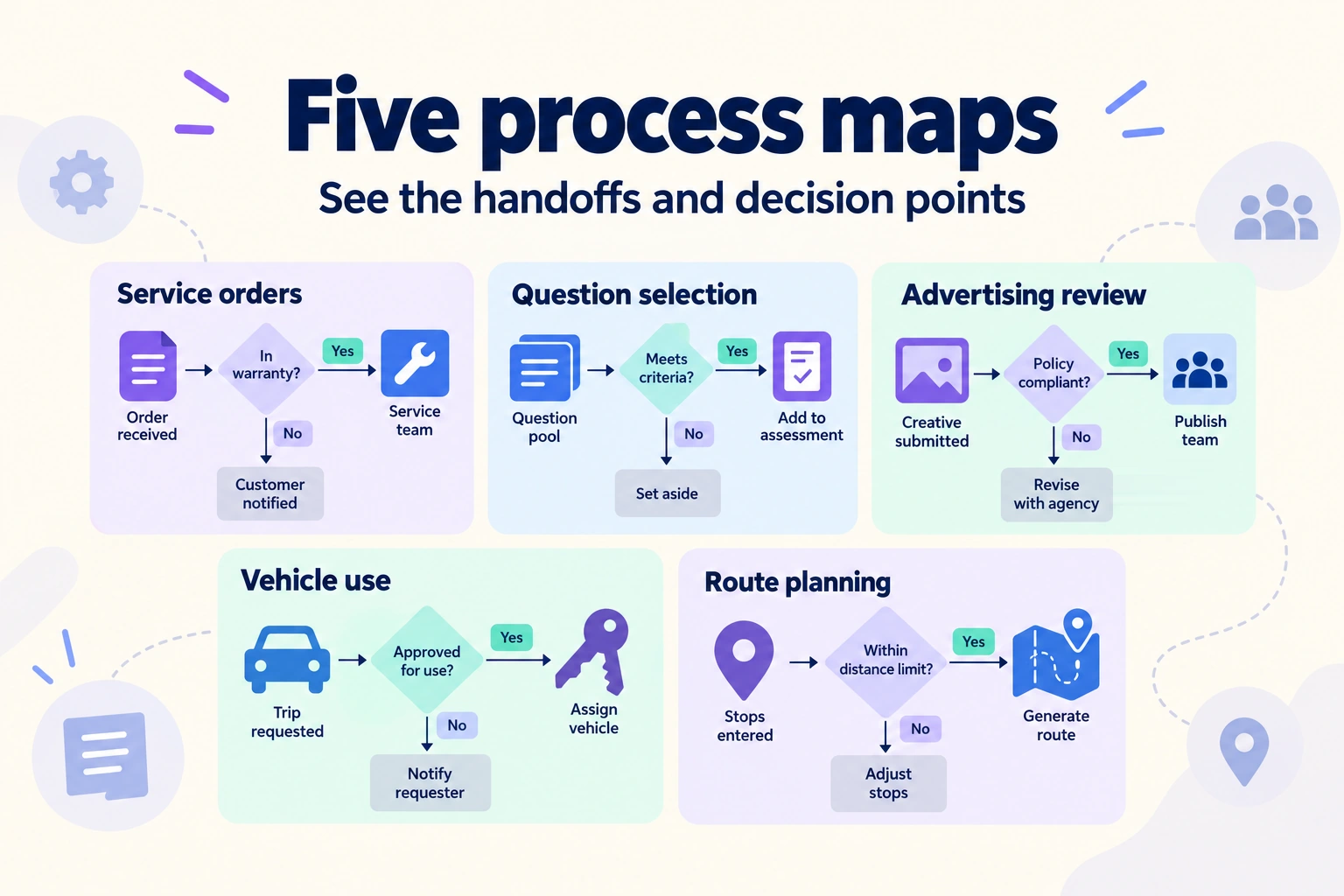
Business process mapping shows the steps, decisions, and responsibilities in a workflow. It helps people discuss how work moves between roles, where it waits, and what must happen before the process can finish.
The five examples below cover a service-order flowchart, a program flow, advertising-supervision handoffs, vehicle use, and product navigation. Each illustrates a different mapping problem you can explore with flowcharts and other diagrams on a Boardmix canvas.
What is business process mapping?
Business process mapping is a visual way to describe and examine how work happens. A process map can show tasks, roles, decision points, inputs, outputs, and the relationships between them. A flowchart emphasizes sequence and decisions; a swimlane diagram also makes responsibility visible.
ASQ's flowchart guidance describes flowcharts as a way to represent a process in sequence and identify opportunities to improve it. Mapping is one activity within the broader discipline of business process management, often abbreviated BPM. A map does not itself enforce a procedure or prove compliance.
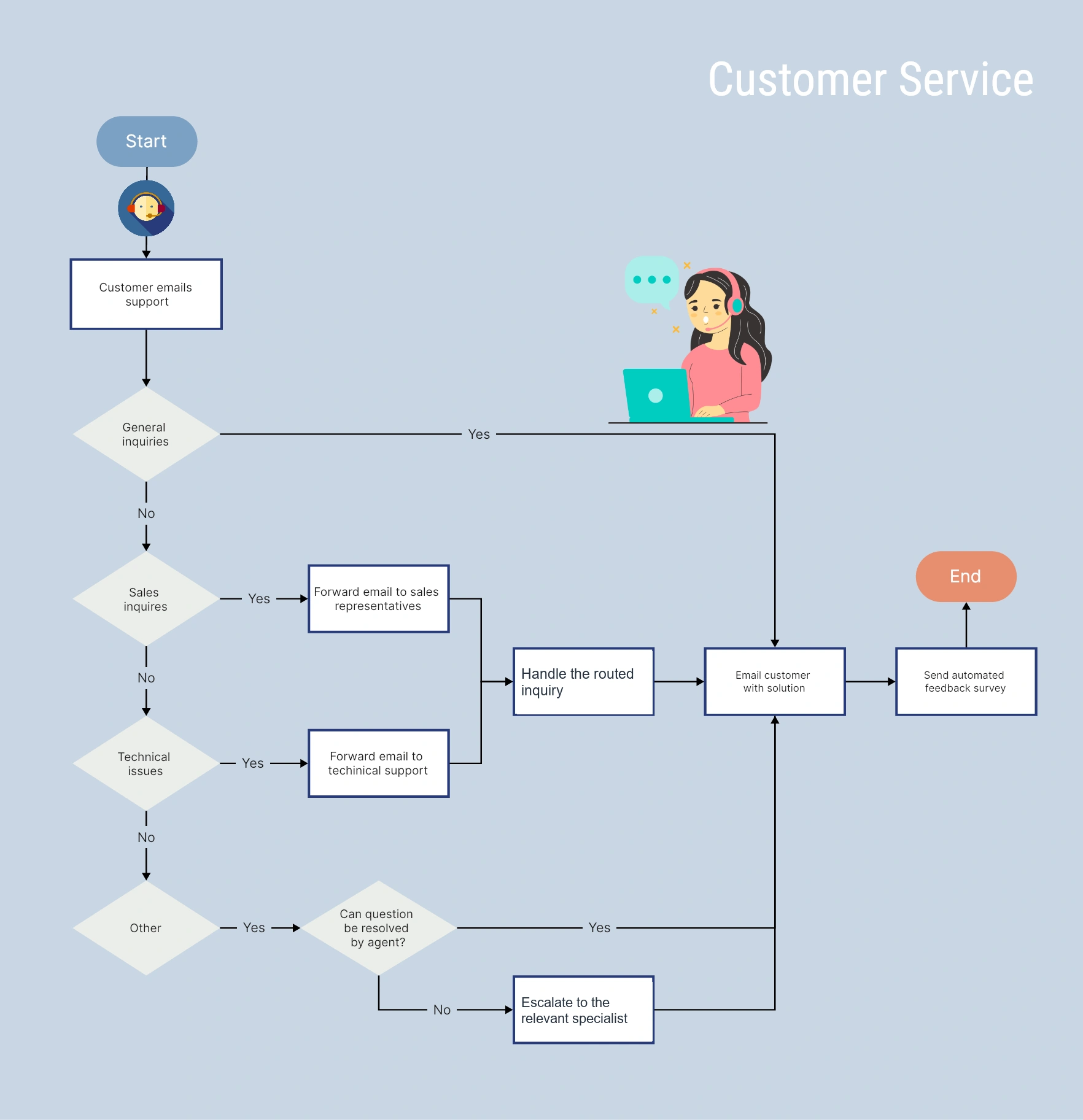
What should a business process map include?
- Process goals and boundaries: Name the trigger, the intended result, and where the map starts and ends. “From a service order to payment” is a clearer boundary than “Operations.”
- Key steps: Describe activities with short verb phrases. Keep the level of detail consistent so one box does not hide an entire department's work while another describes a single click.
- Decision points: Show questions that change the route, such as whether a request is complete or an approval has been granted. Label the branches.
- Participants and roles: Name who performs each step. Use lanes when handoffs are central to the problem.
- Inputs and outputs: Show what the process needs to begin and what it produces. At a handoff, identify what the next person must receive.
- Tools and resources: Add the relevant system, document, or equipment when it helps explain the work.
- Sequence and timing: Connect the steps in order and mark waits when they matter. Include measured time only when you have a reliable source.
- Exceptions and bottlenecks: Show how missing information, rejected requests, or failed checks are handled. The normal path alone can hide the main problem.
Use the same shape for the same kind of step throughout the diagram. The flowchart symbols guide explains common conventions.
When should you use business process mapping?
Process improvement: Make repeated work visible before deciding what to change. Ask the people doing it to walk through a recent case, including any workaround that the official procedure leaves out.
Training and standardization: Use a map as a shared reference for responsibilities and handoffs. Confirm that it matches the procedure people are expected to follow, and name an owner for keeping it current.
Problem diagnosis: Follow a delayed or incomplete case through the map. Mark where it waited, what information was missing, and which decision had no clear owner.
Project planning: Map the work needed to deliver an outcome and identify dependencies between roles. A process map clarifies the sequence; a schedule can separately describe dates and commitments.
Audits and procedural review: Use the diagram to locate decisions, records, and responsibilities that need review. The responsible specialists must still evaluate the applicable requirements.
Keep the current-state map separate from a proposed future version. Otherwise, a desirable new step can quietly become a claim about what people already do.
Five business process mapping examples
1. Business process flowchart: handle a service order
A business process flowchart is useful for explaining a recurring service from the initial request through completion and payment. It gives a new colleague a broad view before they learn the detail of each stage.
If one stage makes the overview difficult to follow, simplify a complex flowchart without losing its detail by separating the parent flow from a named subprocess. The expense-request example keeps the entry, return, waiting and withdrawal paths explicit instead of hiding them behind a shorter label.
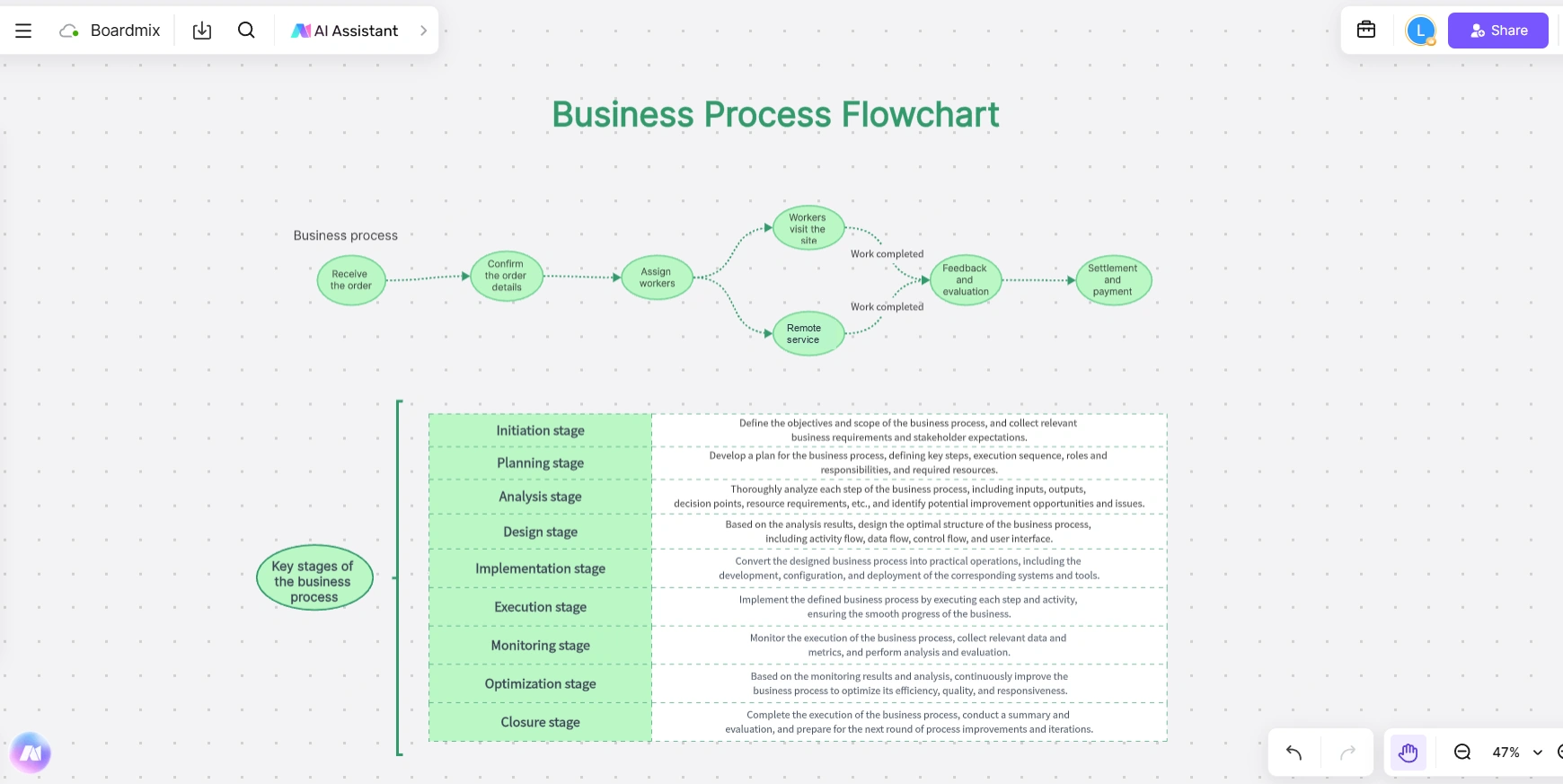
The main flow includes receiving an order, confirming details, assigning workers, completing the service, collecting feedback, and settling payment. The table below it describes stages used to manage a process, from initiation to closure; those stages are not extra steps in every customer's order.
Before adapting this map, clarify who confirms the order and what information the worker receives. Add the path for an incomplete request or an unavailable worker. That makes a useful training reference more precise without changing its basic purpose.
2. Modular process flowchart: select a participant and a question
A program flowchart can reveal the order of operations and the conditions that repeat a sequence. The example below follows initialization, personnel selection, question extraction, and answer display.
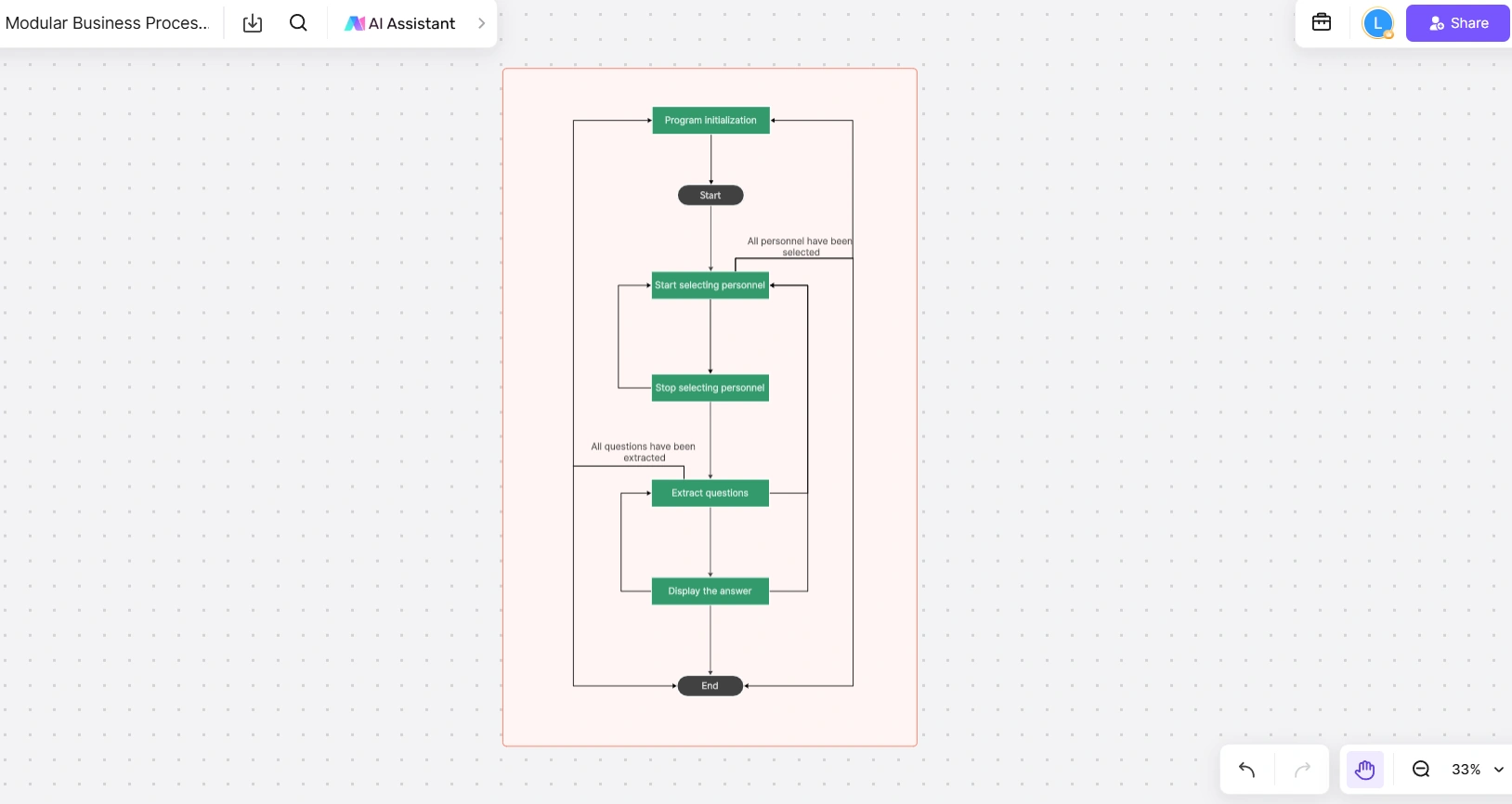
Use this kind of map when reviewing an interaction or a small program's logic. Trace one pass through the flow, then ask what should happen when everyone has been selected or no questions remain. Label those conditions clearly.
The flow shows program behavior, rather than the architecture of separate software modules. If the question is how systems exchange data, draw those systems and data handoffs in a separate diagram.
3. Advertising supervision: show administrative handoffs
A swimlane map is useful when a request moves between several administrative roles. This advertising-supervision example includes a monitoring agency and different levels of supervision, with assignment, acceptance, dispatch, approval, and case-closure steps.
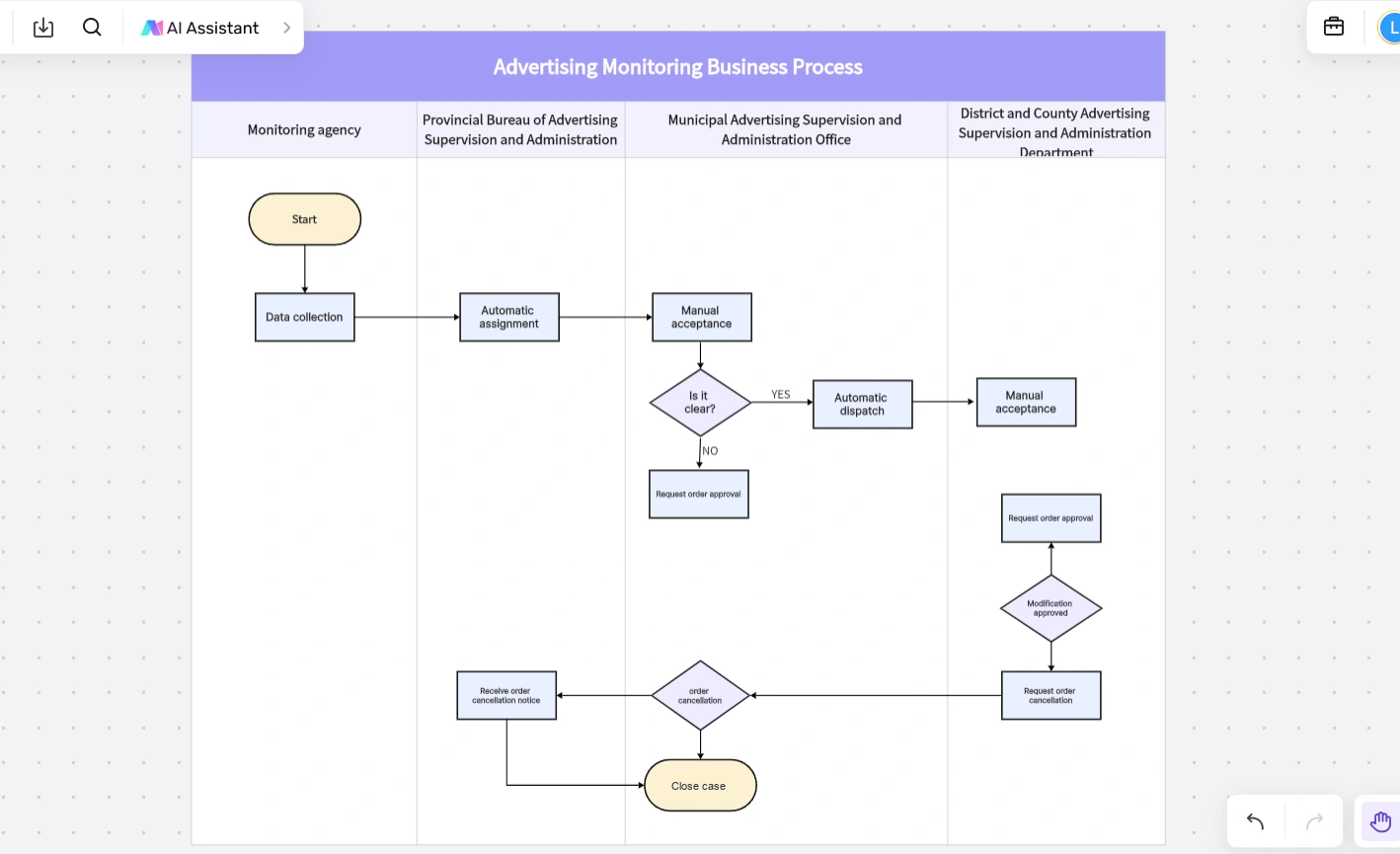
Follow one request across the lanes and ask what each unit must receive before it can act. The clarification decision and closure step need agreed meanings. When adapting the diagram, replace the administrative labels with the actual roles and define how a case is closed.
This is a handoff map, not a campaign-performance dashboard. Impressions, clicks, conversions, and return on advertising spend would require a different analysis and its own data.
4. Vehicle management: request, use, and return a vehicle
A vehicle-use process crosses the person requesting a vehicle, the coordinator, and the approval role. A swimlane diagram makes those responsibilities easier to see than a single line of unlabeled activities.
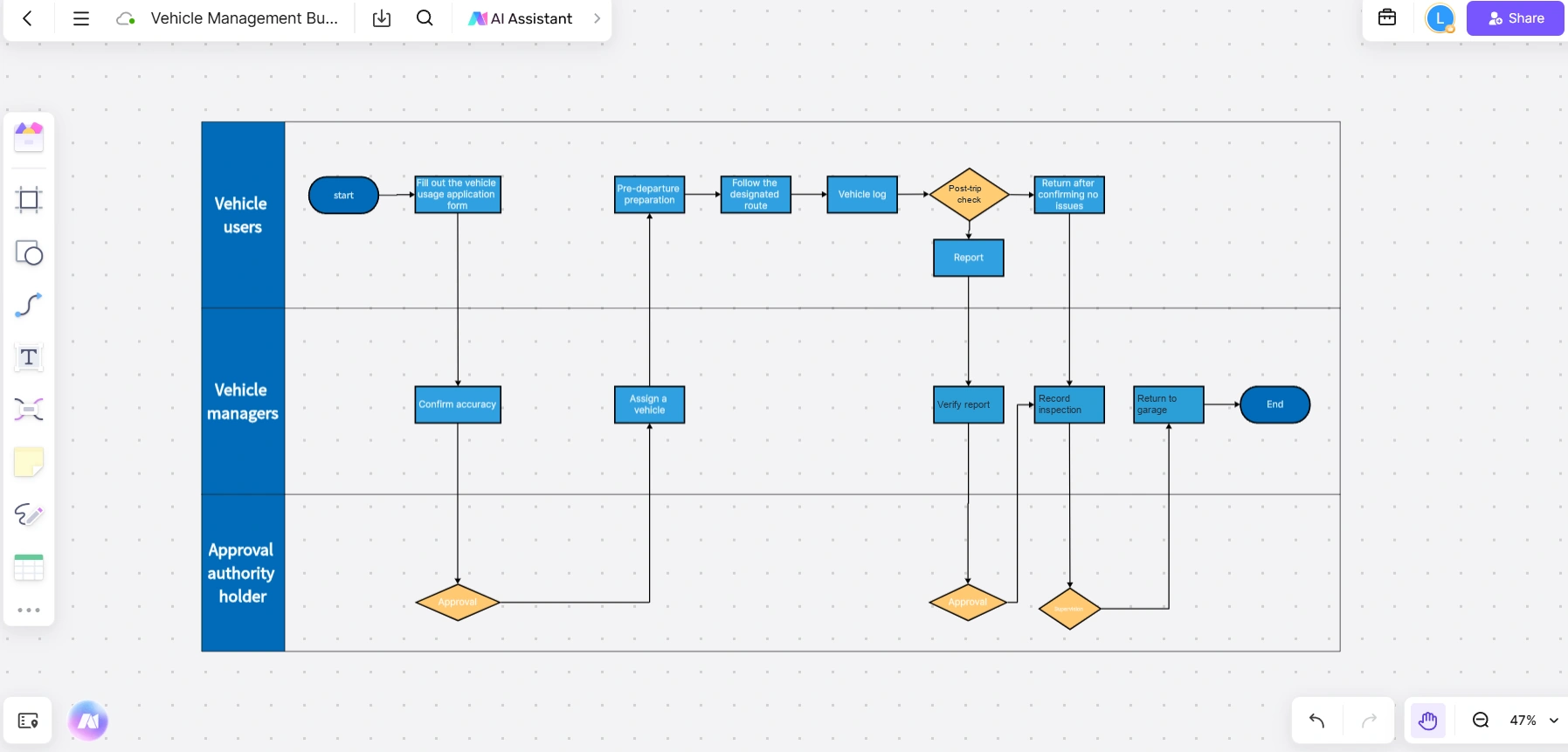
The normal route begins with a usage application, confirmation of its details, approval, and vehicle assignment. It then follows preparation, the designated route, a vehicle log, inspection, and the return record.
When improving the map, make the exception paths explicit: what happens if the application is incomplete, approval is refused, or inspection finds an issue? Vehicle maintenance and the decision that a vehicle is safe to use require their own qualified procedures. Do not treat this usage map as a full maintenance lifecycle.
5. Product process flowchart: show navigation after login
A product flowchart can show which paths a user can take through an application. The example below starts at login and branches into a home page, map, route planning, and query analysis.
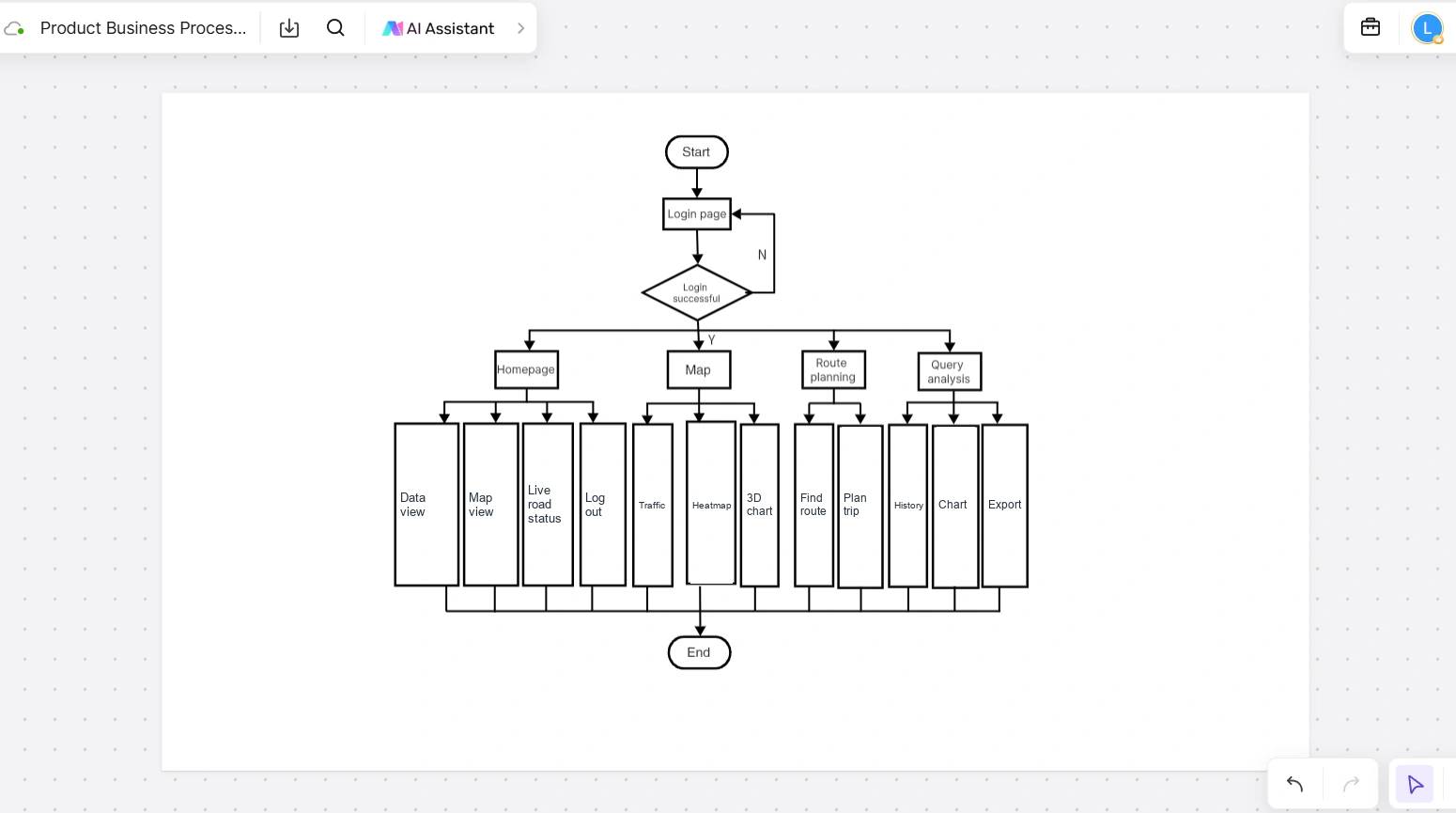
Use the map to examine whether a user can reach the function needed for a task. Follow the unsuccessful-login branch as well as the successful one. For each feature path, ask what information the user needs and what happens if a query has no useful result.
This diagram covers application navigation. Product planning, development, release, and maintenance are separate workflows; combining them here would obscure the user's path.
Create and refine the map in Boardmix
In Boardmix, place the start and end points first, add the main activities, and connect them in order. Use lanes when the example depends on responsibility, then add decisions and exception paths. Put longer explanations beside the diagram rather than inside every box.
Review the map with the people who do the work. Walk through an ordinary case and one that went wrong, checking what passes across each arrow and who receives it. If you propose a change, place it in a separate area labeled as the proposed process so the current workflow remains clear.
Open Boardmix to create a process map and adapt the example closest to your team's question.