





Requirements analysis is a critical determinant of project success. It directly impacts whether product features meet user needs and influences team collaboration efficiency and development velocity. Traditional methods relying on Excel sheets, email threads, or in-person meetings often lead to fragmented information, version chaos, high communication overhead, misunderstandings, and even project misalignment. The consequences of poor requirements analysis extend beyond missed deadlines—they can lead to wasted resources, reduced team morale, and ultimately, lost market opportunities for businesses.
Boardmix, as an online visual collaboration whiteboard, provides an ideal and efficient solution for product managers facing these pain points. It helps PMs visualize complex requirements while enabling cross-functional team members to collaborate in real-time on a shared canvas, synchronize feedback, and make the analysis process clearer, more efficient, and engaging. This level of transparency is crucial in eliminating the guesswork and misinterpretations that often plague traditional requirements analysis workflows.
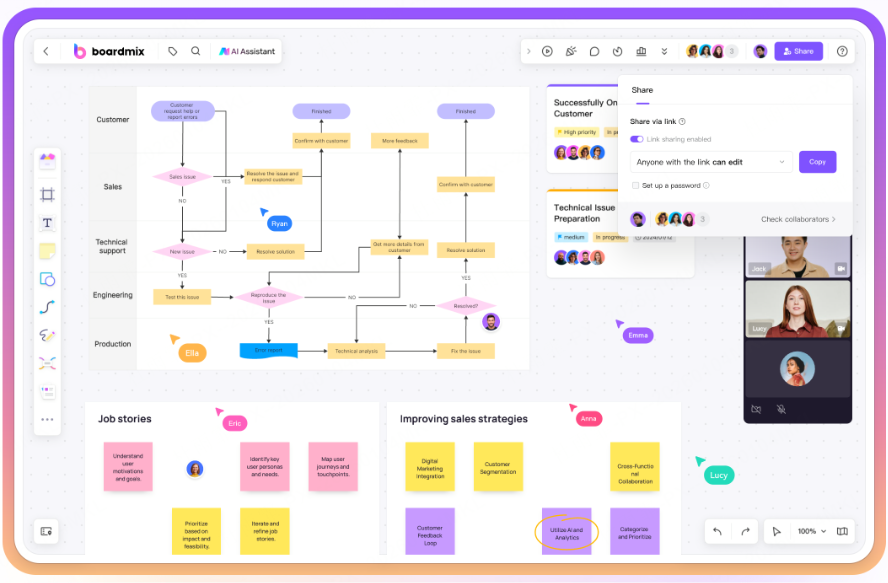
What is Requirements Analysis?
Requirements analysis is the crucial starting point in the product development lifecycle. Its core objective is to identify, organize, and clarify the actual needs and expectations of users, business stakeholders, and the technical team. This process transforms vague initial ideas into concrete, actionable functional definitions and design foundations for subsequent stages. Without a thorough requirements analysis, product teams risk building features that do not address real user pain points or align with business objectives, leading to costly rework and missed market opportunities. At its core, requirements analysis is about bridging the gap between what stakeholders want and what the development team can deliver, ensuring that every feature built has a clear purpose and value proposition.
A complete requirements analysis typically includes these key steps:
Requirements Gathering: Collect raw input from users, the market, and business units through user interviews, surveys, behavioral data analysis, and competitive research. This step is about casting a wide net to capture all potential needs—both explicit and implicit. For example, user interviews might reveal unspoken frustrations with existing products, while competitive research can highlight gaps in the market that the new product can fill. The goal here is to gather as much qualitative and quantitative data as possible to inform the next stages of the process.
Requirements Organization & Categorization: Deduplicate, synthesize, and structure the gathered information. Categorize it by feature module, priority, or business goal to form a clear requirements backlog. This step turns unstructured data into organized insights. For instance, feedback about a mobile app’s checkout process might be grouped under the "Payment Module" category, while requests for new notification features could be prioritized as "High" if they address a critical user pain point. Effective organization ensures that the team can easily prioritize work and avoid being overwhelmed by unstructured information.
Requirements Validation: Align with stakeholders from product, design, development, and business to assess the rationale, technical feasibility, and business value of requirements, preventing rework later. This is a critical checkpoint where the team validates whether a requirement is worth building. A requirement might be technically feasible but lack business value, or it might align with user needs but be too complex to develop within the project timeline. Validation ensures that only the most valuable and feasible requirements move forward.
Requirements Documentation: Output confirmed requirements as structured documents, flowcharts, wireframes, or user stories. This serves as a single source of truth for the team, ensuring accurate information transfer. Documentation is not just about writing down requirements—it’s about making them accessible and understandable to everyone involved. A well-documented requirement includes clear acceptance criteria, user personas, and use cases, which guide the development team and reduce the risk of misinterpretation.
High-quality requirements analysis significantly reduces communication costs and rework risks during development while increasing the product's fit for real user needs. Using visual collaboration tools like Boardmix, teams can organize information more intuitively and discuss in real-time, making the process more efficient and transparent. Visualization is particularly powerful because it allows teams to see the big picture and the details simultaneously—something that is difficult to achieve with text-heavy documents like Excel or Word.
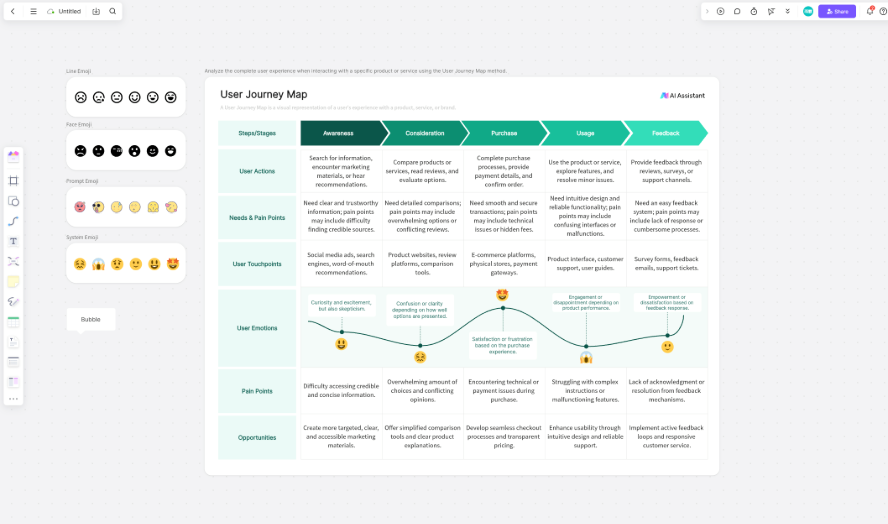
Why Boardmix is the Perfect Tool for Requirements Analysis?
During requirements analysis, product managers must synthesize information from users, business, and technology, then communicate it to the team clearly and visually. This demands a tool with three core capabilities: visual expression, efficient collaboration, and flexible scalability. Boardmix excels in all three dimensions, making it a standout choice for modern product teams.
Infinite Canvas for a Holistic View
Boardmix's infinite canvas breaks the spatial limits of traditional documents. User personas, journey maps, and priority matrices can all be freely arranged and connected on one canvas, balancing overall logic with detailed presentation to build systemic understanding. Unlike a static Word document or a limited Excel spreadsheet, the infinite canvas grows with the project—product managers can add new sections, link related requirements, and expand on ideas without being constrained by page limits or cell boundaries. This flexibility allows teams to maintain a holistic view of the project, even as requirements evolve and expand.
Real-Time Collaboration to Accelerate Decisions
Supporting simultaneous multi-user editing, commenting, and annotation, Boardmix gets cross-functional teams actively involved in requirements discussions. Built-in voting features help teams quickly reach consensus on priorities, significantly reducing time spent on back-and-forth communication. In a distributed team environment, real-time collaboration is game-changing—team members in different time zones can contribute to the requirements analysis process without waiting for email responses or scheduling lengthy meetings. The ability to comment directly on sticky notes or diagrams eliminates the need for separate email threads, keeping all feedback in context and easy to reference.
Rich Templates, Ready to Use
Boardmix offers a vast library of pre-built templates like mind maps, user story maps, and business process flowcharts. Product managers can skip building frameworks from scratch, adapt templates to their project, and drastically cut prep time. Templates are a huge time-saver for product managers, who often have to balance multiple projects and tight deadlines. Instead of spending hours creating a user story map from scratch, a PM can select a pre-built template in Boardmix, customize it to their project’s needs, and start gathering feedback within minutes. This not only speeds up the initial setup but also ensures that the requirements analysis process follows industry best practices.
Compared to traditional tools like Word, Excel, or standalone diagramming software, Boardmix offers superior advantages in information visualization, team synergy, and process flexibility. This is why it's becoming the core collaboration platform for requirements analysis in more and more product teams. While traditional tools have their place, they are not designed for the dynamic, collaborative nature of modern requirements analysis—Boardmix fills this gap by combining the best of visualization, collaboration, and flexibility in one platform.
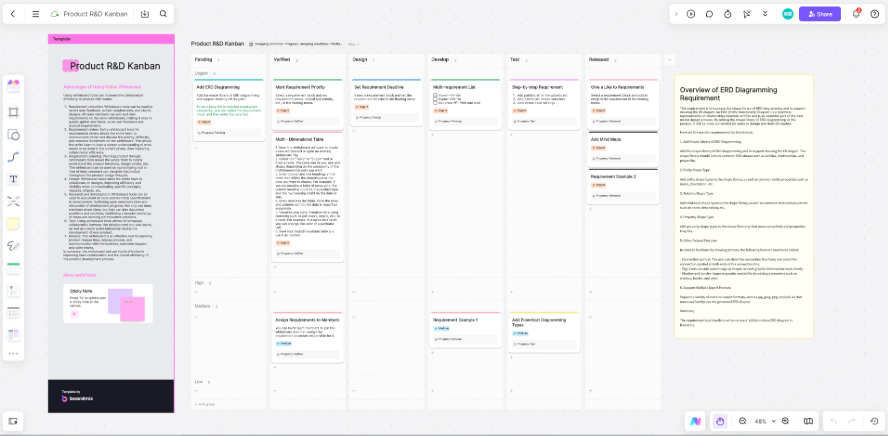
How Product Managers Can Conduct Requirements Analysis in Boardmix?
To ensure an efficient and structured process, follow these steps in Boardmix:
Step 1: Preparation
Define your analysis goal (e.g., new feature definition, user pain point sorting, iteration planning) and identify participants (PMs, designers, developers, etc.). In Boardmix, select a suitable template from the library like a User Story Map or Mind Map to set the stage. Preparation is key to a smooth requirements analysis process—clear goals ensure that the team stays focused, while identifying the right participants ensures that all relevant perspectives are included. Selecting a template in Boardmix at this stage provides a structured starting point, so the team doesn’t have to start from a blank canvas.
Step 2: Information Collection & Organization
Post research findings like user feedback, business goals, market data as digital sticky notes on the board. Group them by theme (e.g., User Needs, Business Requirements, Technical Constraints). This visual clustering helps the team quickly grasp the big picture. Digital sticky notes are far more flexible than physical ones—they can be color-coded, moved around, and duplicated with a click, making it easy to organize and reorganize information as the analysis progresses. Grouping by theme also helps identify patterns and connections between different pieces of feedback that might not be obvious in a list format.
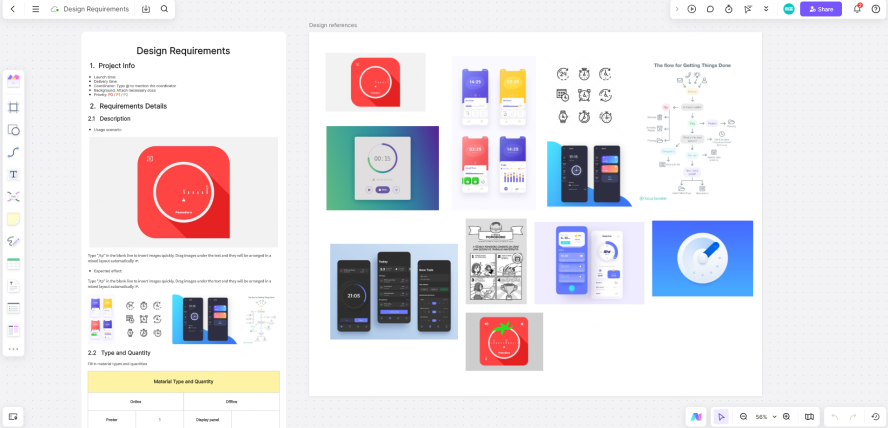
Step 3: Visualize the Requirements
Use containers to bundle related content into modules for easy toggling between global and detailed views. Draw logical relationships with arrows and connection lines to create requirement flowcharts or diagrams. Use color coding to differentiate priority levels or requirement sources, helping the team spot key items. Visualization is where Boardmix truly shines—turning text-heavy requirements into diagrams, flowcharts, and maps makes it easier for the team to understand how different requirements relate to each other. Color coding, in particular, is a simple but effective way to highlight high-priority requirements or distinguish between user needs and business requirements at a glance.
Step 4: Collaborate & Discuss
Use real-time comments to flag detailed questions and use @mentions for directed feedback. Employ the voting feature during priority discussions to reach consensus quickly and avoid unproductive debates. Collaboration is not just about sharing information—it’s about engaging the team in meaningful discussion. @mentions ensure that the right team members are notified of comments or questions, while the voting feature takes the subjectivity out of priority setting, ensuring that decisions are based on team consensus rather than individual opinions.
Step 5: Output & Sync Results
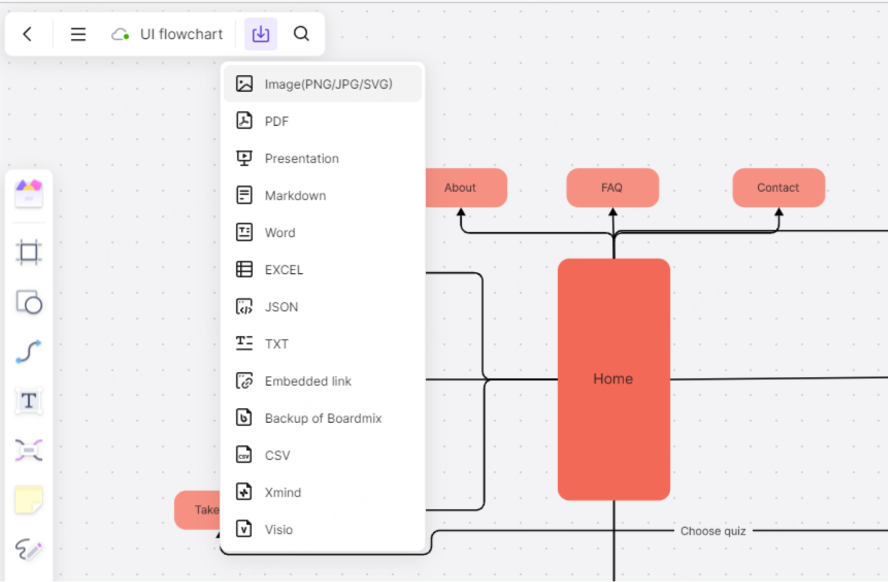
Export the finalized board as a PDF or image for archiving and sharing. Leverage Boardmix's native integrations. Sync requirements directly to task management systems like Jira, link to Figma design files, or embed prototypes to bridge the gap between analysis, design, and development. This end-to-end integration minimizes information loss and allows the team to track requirement progress on a unified platform, ensuring efficient project advancement. The ability to sync directly with other tools eliminates the need for manual data entry, reducing the risk of errors and ensuring that the development team has access to the latest requirements in their preferred workflow tool.
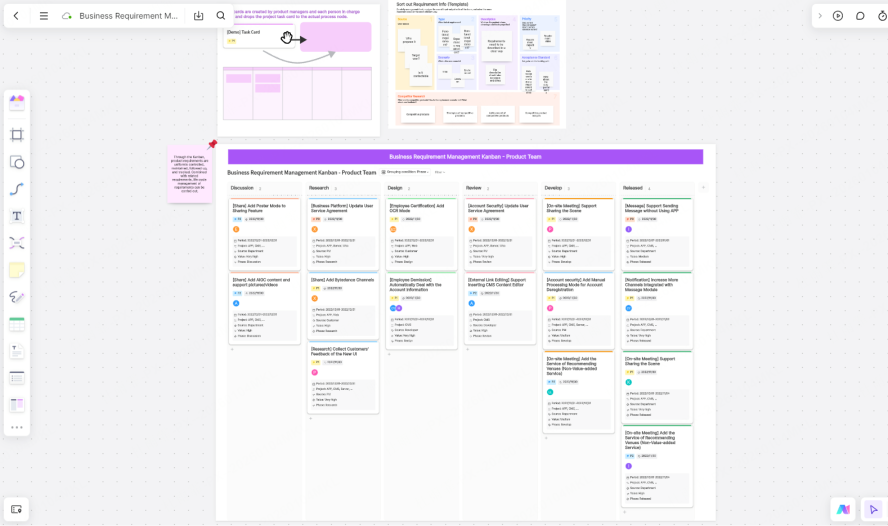
Recommended Templates & A Real-World Case Study
In Boardmix, templates are your efficiency "power-ups." They provide a structured starting point so you can focus on core thinking rather than building frameworks from scratch. The right template can transform a disorganized brainstorming session into a focused, productive analysis process, saving hours of work and ensuring consistency across projects.
Top Templates for Requirements Analysis
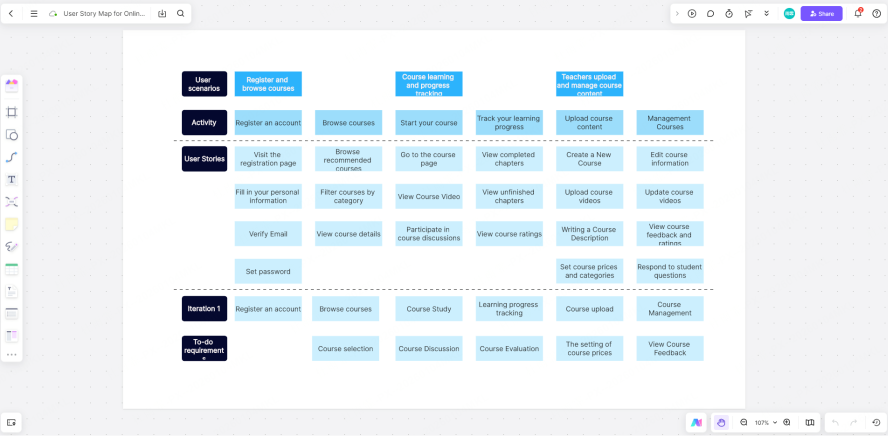
User Story Map: Best for breaking down product features, mapping user behavior paths. Core Value: Structures features along the user journey, aiding iteration planning. A User Story Map template helps teams focus on the user experience, ensuring that every feature built aligns with how users actually interact with the product. It organizes requirements into user activities and tasks, making it easy to see which features are critical to the core user journey and which are nice-to-haves.
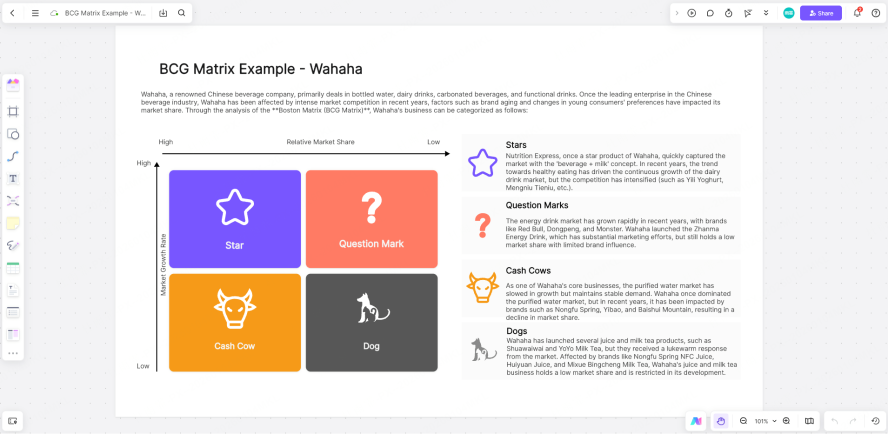
Priority Matrix: Best for filtering critical demands when resources are limited. Core Value: Enables scientific prioritization using "Importance vs. Urgency" axes. When resources are tight, it’s essential to focus on the requirements that deliver the most value. A Priority Matrix template in Boardmix allows teams to plot requirements on a grid, making it easy to identify which ones are urgent and important, and which can be deferred to later iterations.
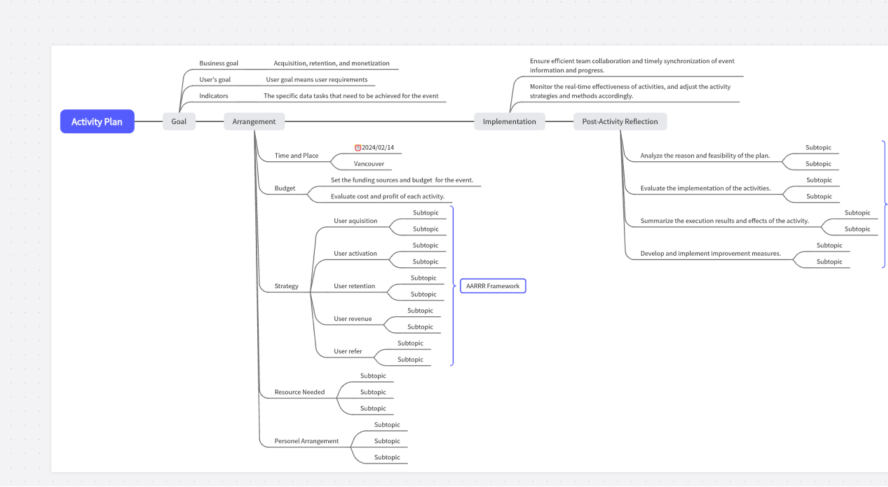
Mind Map: Best for brainstorming, categorizing requirements, expanding ideas. Core Value: Offers clear structure and hierarchy to systemize scattered thoughts. Brainstorming sessions often generate a lot of unstructured ideas— a Mind Map template helps organize these ideas into a logical hierarchy, making it easy to see how different requirements relate to each other and to the overall project goals.
Business Flowchart: Best for analyzing current processes, identifying bottlenecks. Core Value: Visualizes entire workflows, aligning cross-departmental understanding. For projects that involve optimizing existing business processes, a Business Flowchart template makes it easy to map out current workflows, identify bottlenecks, and design improved processes that address pain points.
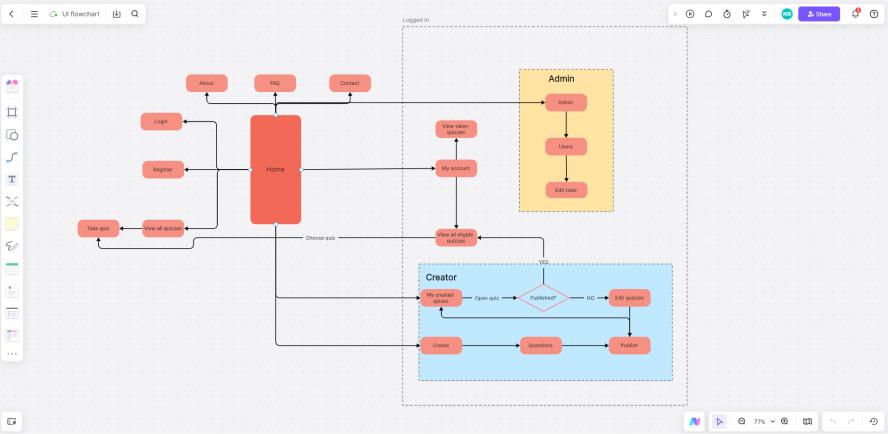
Case Study: Aligning Distributed Teams in 3 Days
A SaaS company with teams in New York, London, and Berlin struggled with inefficient communication during a product iteration. Previously relying on email and Excel led to missed information, taking an average of two weeks for analysis. Team members often worked from outdated Excel sheets, and email threads became so long that important feedback was buried or overlooked. The distributed nature of the team made in-person meetings difficult, and time zone differences meant that decisions took days to finalize.
After adopting Boardmix, the product manager used a User Story Map template. The team collaboratively mapped the user journey online, collecting feedback via sticky notes. They then used the voting feature to rapidly agree on priorities. The entire requirements sorting was completed in just 3 days. The structured output was seamlessly synced to Jira, moving directly into development. The infinite canvas allowed the team to see the entire user journey in one place, and real-time comments meant that team members in different time zones could contribute asynchronously without missing out on discussions.
Result: Requirements analysis efficiency improved nearly 4x, team transparency increased significantly, and the project timeline was substantially shortened. The company reported a 30% reduction in rework during the development phase, as the requirements were clear and aligned with all stakeholders’ expectations.
6 Pro Tips to Boost Your Efficiency in Boardmix
Master these tips to significantly enhance collaboration and output quality, making your requirements analysis process even more efficient and effective.
Use Color Coding for Quick Identification: Assign different colored sticky notes to requirement types (e.g., user feedback, business need) or priorities (High/Medium/Low) for visual layering and quick focus. Color coding is a simple but powerful way to make the board scannable—team members can instantly identify high-priority requirements or distinguish between different types of feedback without reading every note.
Lock Core Elements to Prevent Accidents: Use the "Lock" function on confirmed frameworks, flowcharts, or key modules to prevent accidental moves or deletes during multi-user sessions. In a busy collaborative environment, it’s easy for a team member to accidentally move a critical diagram or delete a key sticky note. Locking core elements ensures that the foundational structure of the board remains intact, even as the team adds new information.
Leverage Keyboard Shortcuts for Fluidity: Master key shortcuts to speed up work: N for creating a sticky note, T for adding text, L for drawing a connection line, and Space + Drag for panning quickly across the canvas. Keyboard shortcuts reduce the need to switch between the mouse and the keyboard, making the workflow smoother and faster. Even small time savings add up—using shortcuts can cut the time spent on basic tasks by up to 50%.
Use Tags & Search for Information Management: Add tags to sticky notes for easy filtering by topic later. Use the search function in large boards to locate specific content instantly. As the board grows, finding specific information can become time-consuming. Tags allow teams to filter notes by topic (e.g., "Checkout Process" or "Mobile App"), while the search function lets users find exact keywords or phrases in seconds.
Enable the Timer to Control Discussion Pace: During brainstorming or review meetings, use Boardmix's built-in Timer to set limits for each agenda item, preventing scope creep and boosting meeting efficiency. Meetings often run over time when discussions veer off-topic— the Timer feature keeps the team focused on the task at hand, ensuring that each part of the requirements analysis process stays on schedule.
Export & Sync Regularly to Connect Workflows: Periodically export board content as PDFs for archiving. Use integrations to sync requirements to tools like Jira or Slack, creating seamless handoffs from "Analysis → Tasks → Development" and eliminating redundant re-creation. Regular exports ensure that there is a record of the requirements at each stage of the process, while integrations with other tools keep the workflow seamless—no more copying and pasting requirements from Boardmix to Jira or retyping feedback into Slack.
Conclusion
In the product lifecycle, requirements analysis is not just the starting point for feature definition—it's the key to efficient execution and successful delivery. Traditional methods often cause information silos and communication delays, leading to distorted requirements or repeated rework. These inefficiencies can have a cascading effect on the entire project, from missed deadlines to products that fail to meet user needs.
Boardmix, as a powerful online visual collaboration whiteboard, provides an effective solution. It enables product managers, designers, developers, and stakeholders to gather, structure, prioritize, and validate requirements together on a shared digital canvas. This fosters information transparency, highly efficient collaboration, and a traceable process. Unlike traditional tools that isolate teams and information, Boardmix brings everyone to the same table—even if they’re working from different parts of the world—ensuring that everyone is aligned on the same goals and requirements.
Ready to transform your requirements analysis? Try Boardmix today and experience seamless, visual collaboration with your team. Whether you’re working with a small in-house team or a large distributed team, Boardmix has the tools and features to make your requirements analysis process more efficient, transparent, and effective—ultimately leading to better products and more successful projects.





