




A many-to-many relationship becomes easier to model when you give the relationship its own record. A student can take several courses, and a course can have several students. An enrollment table records each individual connection instead of trying to store a list of course IDs in the student row.
Use an ER diagram workspace to work through that relationship before deciding on the database implementation. This example starts with students and courses, adds a junction table, and then fixes a detail that often gets missed: the same course can run more than once.

Identify what one enrollment row means
Suppose a training provider offers Data Basics and Visual Planning. Student S01 attends both courses; student S02 attends Data Basics. The conceptual relationship is many-to-many: a student can connect to several courses, and each course can connect to several students.
In a relational design, a junction table represents those individual associations. Microsoft's many-to-many relationship documentation explains the same pattern: each join-table row carries foreign keys pointing to the records on the two sides. The resulting table links are one-to-many even though the underlying business association is many-to-many.
| student_id | course_id | Meaning |
|---|---|---|
| S01 | C10 | Student S01 is enrolled in Data Basics. |
| S01 | C20 | The same student is also enrolled in Visual Planning. |
| S02 | C10 | A different student is enrolled in Data Basics. |
These three rows are not duplicate student records. The student details stay in Student, the course details stay in Course, and Enrollment records the association. A spelling correction to a student's name should not require editing every enrollment.
Draw the two one-to-many links
Place Enrollment between Student and Course. For this first, simplified model, label the links as follows:
- One Student can have zero or many Enrollment rows.
- Each Enrollment refers to exactly one Student.
- One Course can have zero or many Enrollment rows.
- Each Enrollment refers to exactly one Course.
The zero matters. A new student may exist before enrolling, and a newly created course may have no students yet. The enrollment itself cannot exist meaningfully without both ends, so its two foreign-key fields are required in this model.
Do not leave a second direct Student-to-Course connector in a physical table diagram unless its meaning is clearly different. Otherwise the drawing can appear to specify both the junction-table relationship and an additional direct implementation. A conceptual overview may show the many-to-many association; the table-level view explains how it is represented.
Put association-specific fields in Enrollment
Ask whether a value describes the student, the course, or this student's participation in this course. That question tells you where many fields belong.
| Field | Belongs in | Reason |
|---|---|---|
| student_name | Student | The name is not different for every enrollment. |
| course_title | Course | The title describes the course, not one attendee. |
| enrolled_at | Enrollment | It records when this association began. |
| enrollment_status | Enrollment | One student can withdraw from one course while remaining active in another. |
| completion_result | Enrollment | The result belongs to this student's participation, not every student taking the course. |
A junction table can be more than two IDs. In this case, Enrollment is a useful business name because the association has a status and a history. Calling it StudentCourse is also possible, but the name should not hide what the record represents.
Keep the lifecycle explicit. If an enrollment is withdrawn, decide whether to update its status or record separate events. Deleting the row would remove the association's history. The appropriate retention policy depends on the application; the diagram should show the agreed model rather than silently assuming that every withdrawal means deletion.
Choose the key and the uniqueness rule separately
For a model allowing one enrollment per student–course pair, the pair (student_id, course_id) can serve as a composite primary key. That means the combination identifies a row; neither column must be unique on its own.
An alternative is a separate enrollment_id primary key, with a uniqueness constraint on the student–course pair. The extra ID does not, by itself, prevent S01 from being inserted twice for C10. If duplicate associations are invalid, record that rule explicitly.
PostgreSQL's constraint documentation distinguishes primary keys, unique constraints, and foreign keys. Applied to this example, the foreign keys require referenced students and courses to exist; the uniqueness rule prevents a repeated association. A primary key identifies a row. These are related responsibilities, not interchangeable labels.
The diagram documents those rules; the database must enforce them. A line marked “1” or a note saying “unique” does not prevent an application from writing invalid data unless the implementation carries the rule through.
Handle the same course running again
The simple pair becomes restrictive when Data Basics runs in both spring and autumn. If S01 can take it again, (student_id, course_id) no longer describes the intended uniqueness rule. Removing uniqueness entirely would also allow accidental duplicate registrations for the same run.
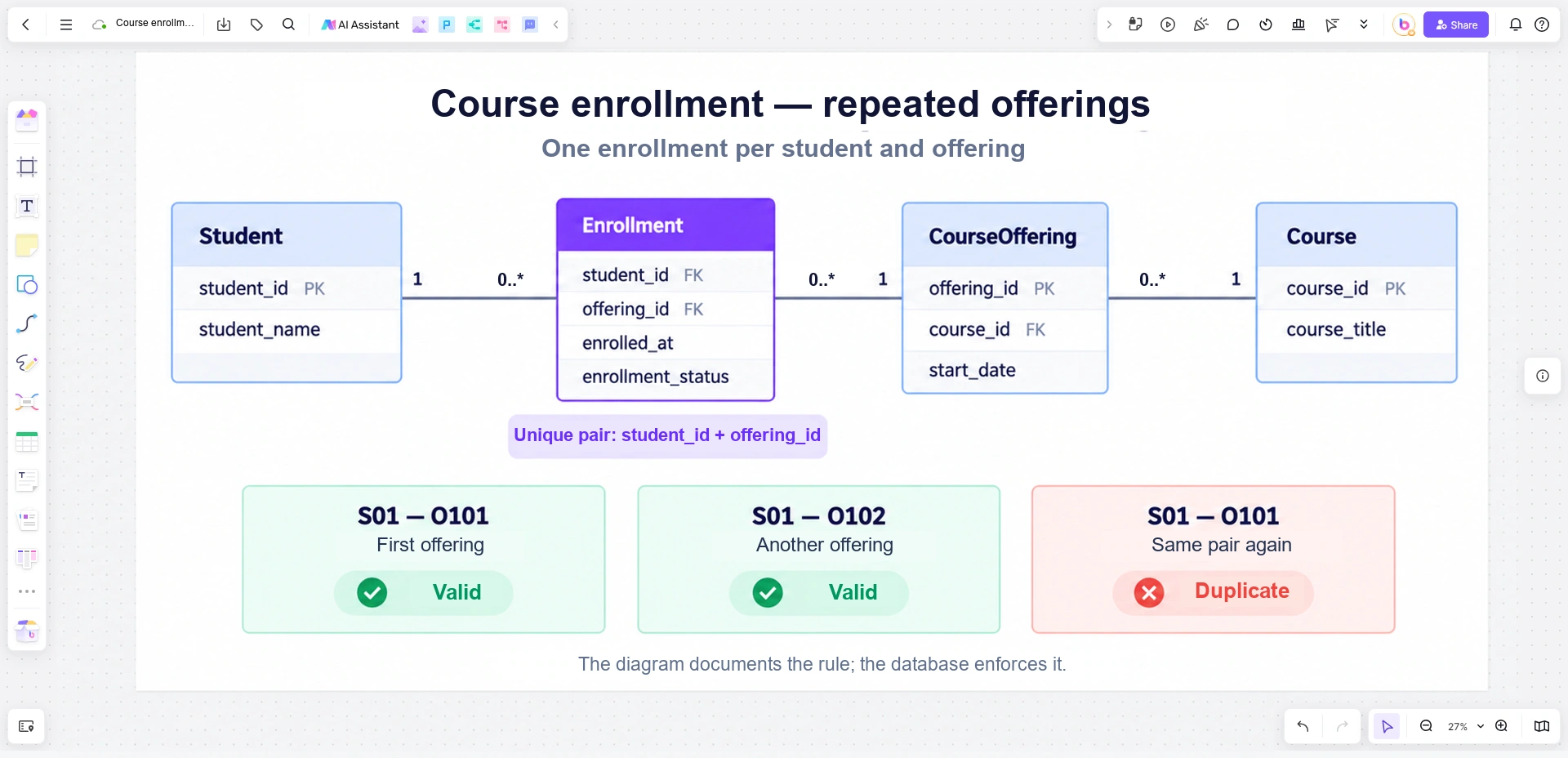
Introduce CourseOffering: one scheduled run of a course. Course C10 might have offering O101 in spring and O102 in autumn. Each offering refers to one Course; a Course can have several offerings. Enrollment now connects Student to CourseOffering.
The enrollment pair becomes (student_id, offering_id). S01–O101 and S01–O102 are different registrations and can both be valid. A second S01–O101 remains a duplicate if the rule permits only one enrollment per student per offering.
Put run-specific details, such as the start date, in CourseOffering rather than Course. The course title describes the reusable course; the offering describes when it runs. If the service permits multiple attempts within one offering, model that additional concept explicitly rather than continually weakening the enrollment key.
Review the model with concrete records in Boardmix
On a Boardmix canvas, draw Student, Enrollment, CourseOffering, and Course as four entity boxes. Put Enrollment between Student and CourseOffering, and connect CourseOffering back to Course. Mark the primary and foreign keys next to the field names, and add a separate note for the unique student–offering pair.
Below the diagram, place three example registration cards: S01–O101, S01–O102, and a repeated S01–O101. Mark the first two as distinct associations and the repeated pair as a duplicate under the chosen rule. This makes the model's behavior easier to discuss than a list of field names alone.
Open a Boardmix board and test the relationship with a few records from your own domain. Ask whether a new parent record may have no associations, whether the same pair may occur again, and where association-specific values belong.
Those answers can change the diagram. For this training provider, the important discovery is not that a third table is needed. It is that an enrollment joins a student to a particular course offering, not to an abstract course forever.
![[Must Know] All About Organizational Chart Online](https://cms.boardmix.com/images/image/article-images/all-you-need-to-know-about-organizational-chart.png)


