Sales work needs a repeatable way to move from an initial inquiry to a decision and follow-up. A flowchart makes those stages, decisions and handoffs visible to the team.
Without a shared process, team members may handle the same inquiry differently or miss a handoff. A sales process flowchart helps the team review where that happens and decide what to change.
This blog will tell you all the things you should know about sales process flowcharts and how to create templates for free using a whiteboard tool. Let’s dive straight in.
Part 1. All You Need to Know About Sales Process Flowchart
1.1 What is a sales process flowchart?
Essentially, a sales process flowchart is a diagram that illustrates the sales breakdown and depicts an overview for the sales team to look back on and commit to an efficient system. A typical sales process flowchart begins from the first contact with a potential customer, all the way to post-purchase and customer support.
When it comes to creating a good sales process flowchart, it is all about including relevant and important details that tailor to your specific industry and the products and services you provide.
1.2 Why is a sales process flowchart important?
Indeed, why do organizations need a sales process flowchart where they can use other diagramming methods?
First and foremost, sales process flowcharts help in breaking down the sales process into digestible chunks of information that can be easily comprehended by anyone.
And second, it helps to guide sales professionals through the customer journey or as some say, a sales funnel, for a long period of time and ensures they move on in the right direction to close the deal and deliver customer satisfaction.
Part 2. How to Create a Sales Process Flowchart
2.1 What are the 5 stages of the sales process?
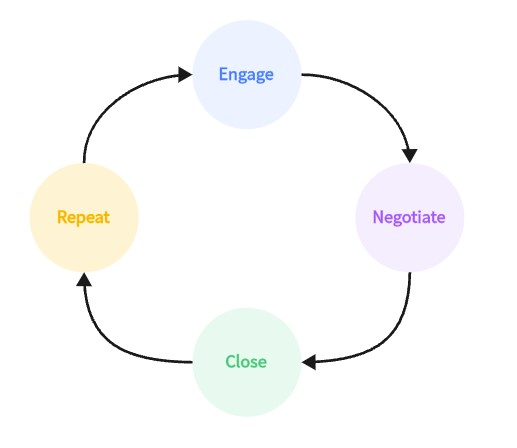
Before we learn to create a sales process flowchart, let us first understand what are the basic steps involved in a typical sales process. Here are the 5 stages of a sales process:
1. Prospect clients
The first step involves the first contact with the client by approaching them through cold calls, cold emails, direct meetings, or utilizing inbound leads. It is essential to build a good first impression and make the introductory message clear to the client on why you are reaching out to them and initiating a good healthy conversation.
2. Discover their needs
Your next step is all about going deep and discovering their pain points—what is keeping them up at night. This is where building empathy is crucial as listening to their requirements. The best mindset you can think of would be don’t think of yourself as if you are there to sell something, think of yourself as someone who is there to find and solve a problem.
3. Provide your offer
After understanding all the client’s requirements carefully, the next step is to introduce your solution. Ensure the solution is tailored to fix their specific pain points. Your offer should be simple and clear so that the client knows that this is the right solution for them. Moreover, you can demonstrate the product or service process so that the client will be even more convinced by your offer.
4. Close the deal
The fourth stage is all about going for it and closing the sale. Ensure you deal with any other objections and make them fully commit to your solution. If everything goes well, you have successfully completed a deal and delivered the ultimate solution.
5. Follow up and support
But your journey doesn’t end there in a sales process. There is one more and it happens after the client makes the purchase. This final stage covers delivery, follow-up and support after purchase. If an issue needs to move between teams, a customer-support escalation flowchart can show who takes over, what information travels with the request and when it returns to the customer.

2.2 How can I create a sales process flowchart with ease?
You can create a sales process flowchart easily in Boardmix. Here is how you can do it:
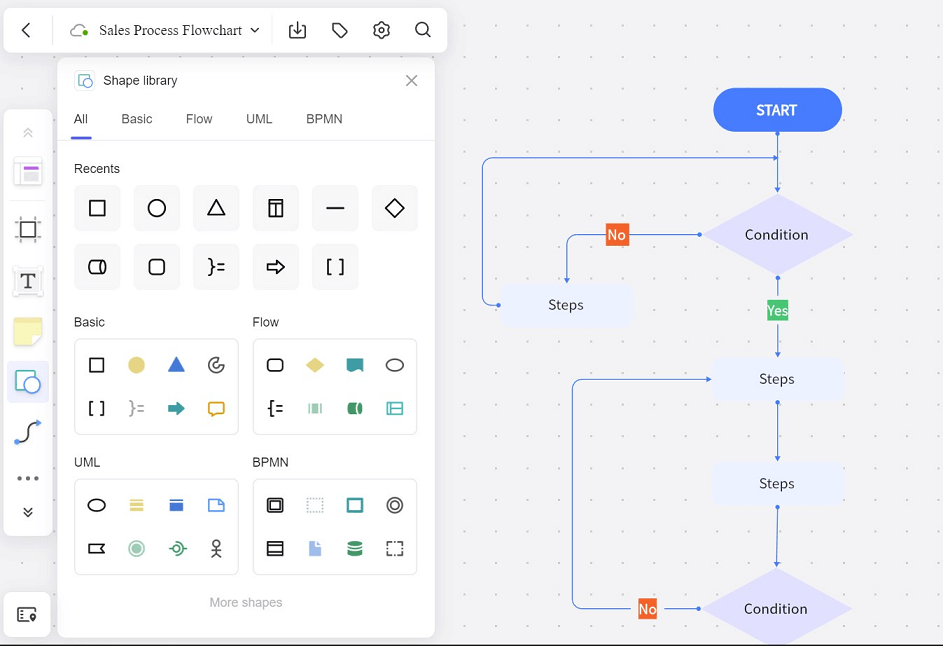
Step 1. Open a new file in Boardmix. Insert a frame by clicking on the frame icon on the left-hand side panel or pressing the F key. This is optional if you want the flowchart to contrast well with the background.
Step 2. From the left-hand side panel, select various shapes such as ovals, circles, rectangles, etc., by clicking on the shape icon or pressing the S key. After adding shapes, you can drag each corner of the shape and adjust the dimensions.
Step 3. Add text to each shape by clicking on the text icon or by pressing the T key to label all your flowchart elements. Moreover, you can add color to each shape by clicking on each shape once and going to color fill.
Step 4. Finally, you can connect your flowchart by choosing the connection line tool from the left-hand side panel or simply pressing the L key. You can press Ctrl + C to copy and Ctrl + V to paste copies of flowchart components to make your workflow smoother.
2.3 Why use Boardmix to create flowcharts?
Boardmix makes it much easier to create all kinds of flowcharts, including sales process flowcharts. Besides, Boardmix offers:
- Options to create more than a single flowchart.
- The simple-to-use interface allows users to freely add, remove, and drag elements in a flowchart with ease.
- Various templates that meet your flowchart and also other business needs.
- A safe online drawing platform where changes are saved automatically and users won’t need to worry about lost progress.
- The capability to export your sales process flowchart as .png, .jpg, .pdf, .svg, and .bdx (Boardmix format) files.
Part 3. Free Examples of Sales Process Flowcharts
Example 1
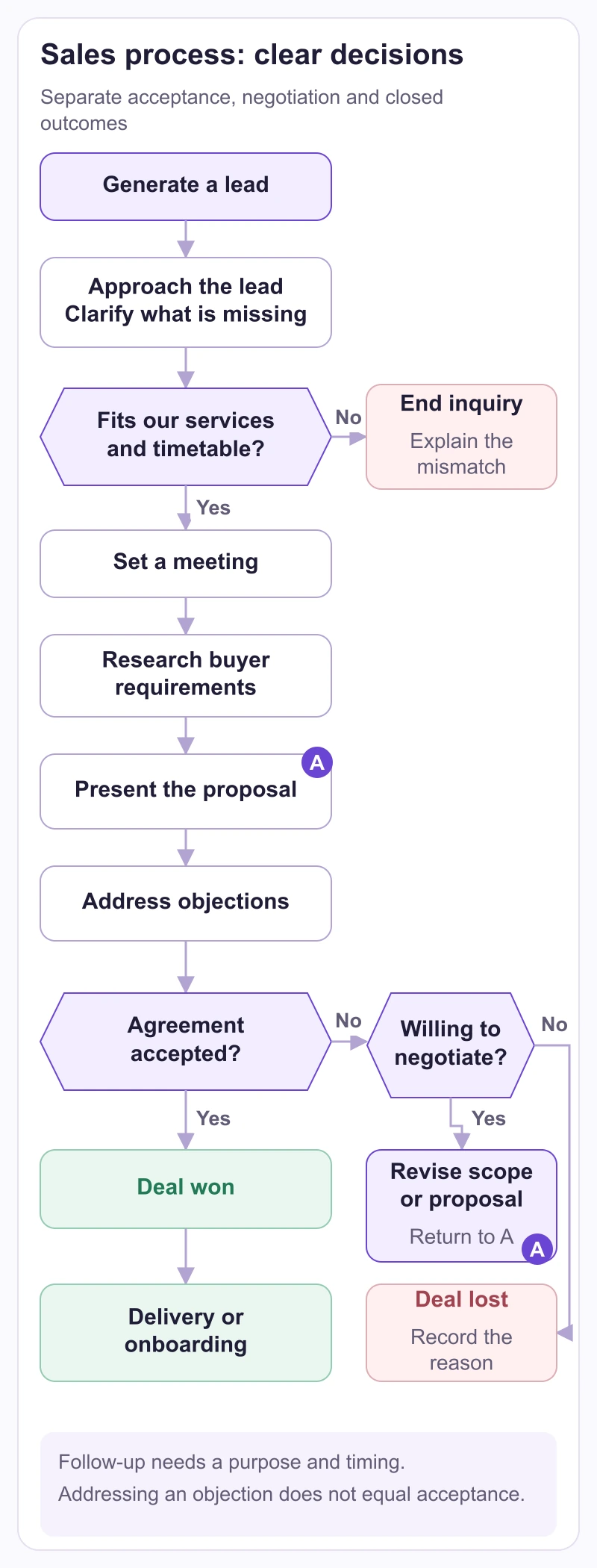
The first chart separates qualified and unqualified leads, then follows a possible sale through a meeting, requirements and a presentation. Read it as a starting structure, not a rule that every conversation must end in a sale. Before adopting it, define each decision question and what information allows the salesperson to answer.
For example, a small design agency could qualify an inquiry by checking whether the requested work is within its services and whether the customer has a realistic decision timetable. A request outside its services ends the sales process with a clear response. An otherwise suitable inquiry with missing information goes to a clarification step; it should not silently be counted as either qualified or lost.
The “Willing to Negotiate?” branch needs particular care. A Yes should lead to a specific next action, such as clarifying scope and preparing a revised proposal. It should not mean repeatedly approaching the person with the same offer. A No can end the opportunity with a recorded reason. If follow-up is appropriate, agree on its purpose and timing rather than drawing an endless loop.
Finally, make “Deal Won” mean something observable, such as an accepted agreement under the team’s own rules. Addressing an objection is not the same as receiving acceptance. If questions remain, route the opportunity back to the unresolved requirement instead of advancing it automatically.
Example 2
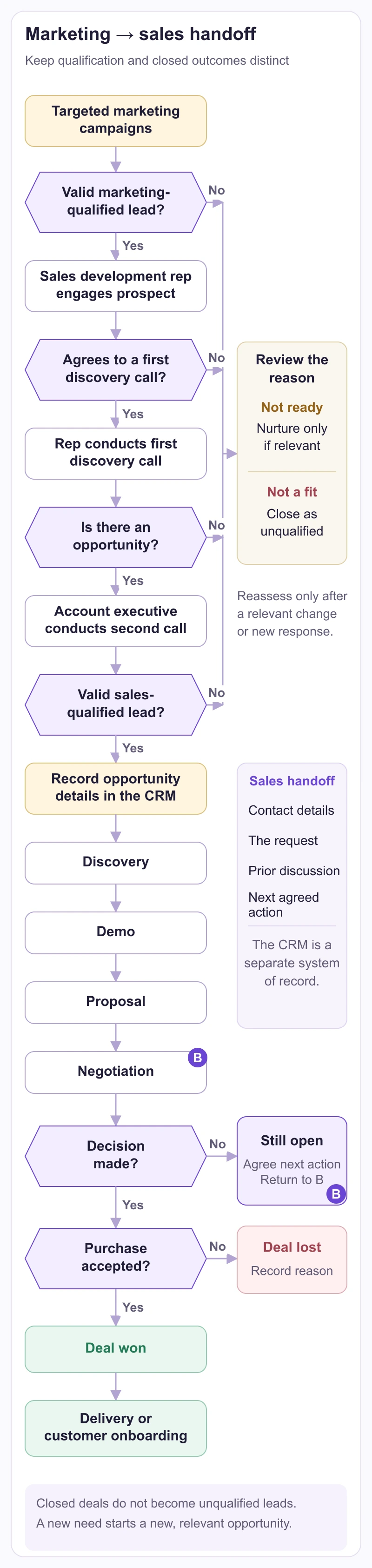
The second chart adds the handoff from marketing to sales. MQL means marketing-qualified lead; SQL means sales-qualified lead. These labels need agreed criteria, not just a change of color. For a sample agency workflow, marketing might pass on a contact who requested a relevant consultation, while sales confirms the problem, decision participants and next conversation before accepting the opportunity.
Write the handoff information beside the connector: contact details, the request, what has already been discussed and the next agreed action. The receiving salesperson should be able to continue without asking the customer to repeat everything. The CRM step in this example describes the team’s separate system of record; drawing it in Boardmix does not automatically create or update a CRM record.
Keep a completed sale distinct from an unqualified lead, as the separate outcomes in the chart show. A won deal normally needs delivery or onboarding; a lost opportunity needs a recorded outcome. Add a new sales opportunity only when there is a new, relevant need. This keeps the map from turning every closed deal into the same prospecting loop.
Sales Process Flowcharts Make Life Easier for the Sales Team…
As you have learned, a sales process flowchart is important and organizations should not find it difficult to draw one and share it with their sales team.
Use Boardmix today and feel free to create sales process flowcharts within the plan limits that meet your business goals and ensure your sales team is always on top to close deals and support clients constantly.