A launch discussion can stall even when everyone understands the options. Product wants to release, support wants more preparation, and engineering wants a smaller rollout. If nobody knows who can make the final choice, another meeting may produce the same disagreement.
DACI gives that decision a clear set of roles. On a shared product-planning board, put the decision question, the people involved, and the evidence beside the alternatives. The point is not to make everyone agree. It is to ensure that the appropriate person makes an informed choice and that affected teams know what it means.

What each DACI role does
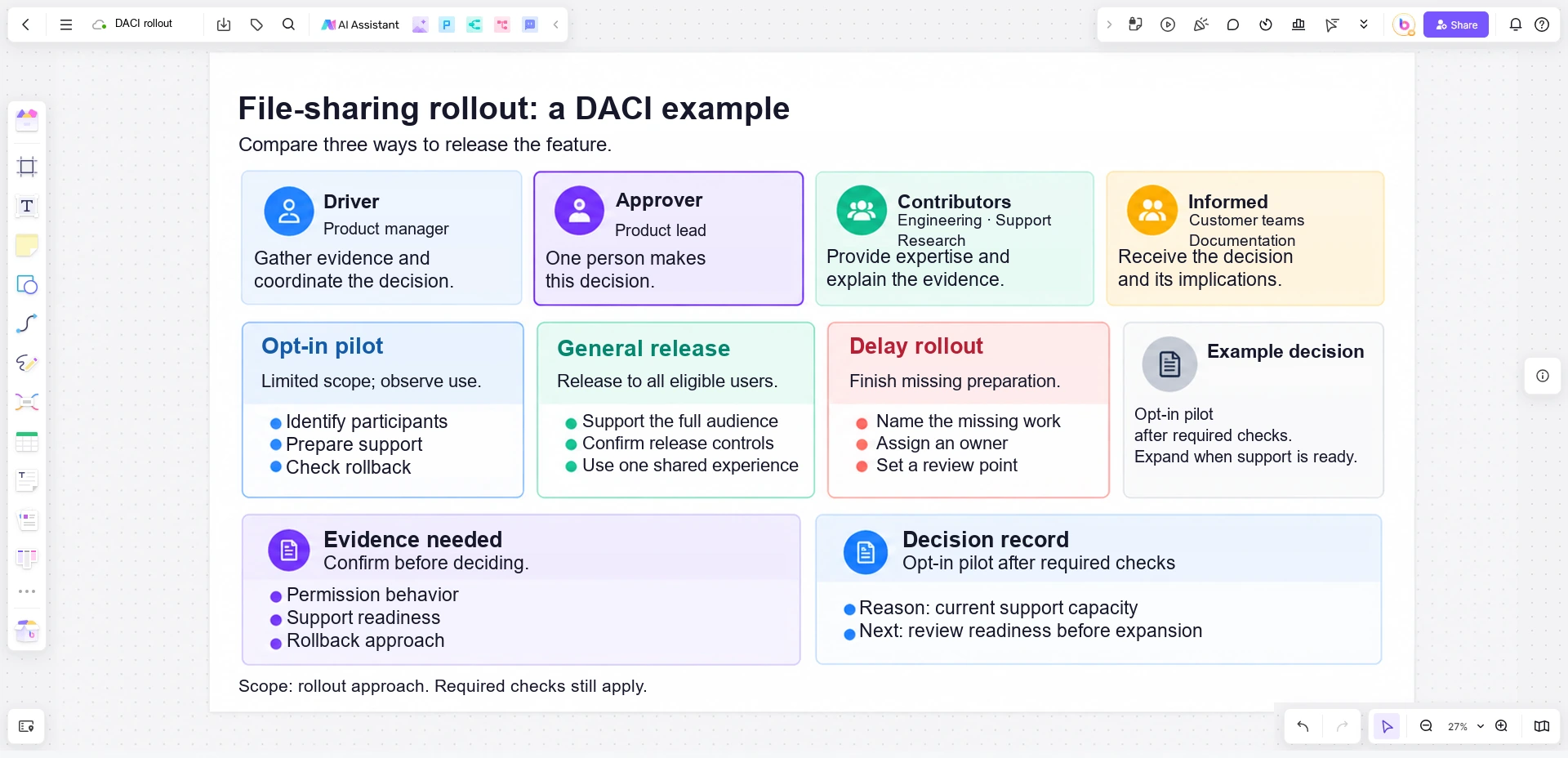
The Atlassian Team Playbook's DACI guidance distinguishes four roles:
- Driver: moves the decision forward, gathers relevant information, coordinates input, and keeps the agreed decision date visible.
- Approver: the one person who makes this decision. “Approver” is not merely a person who stamps an outcome already decided elsewhere.
- Contributors: people whose knowledge helps evaluate the options. Their input informs the choice; the framework does not give each Contributor a separate vote.
- Informed: people who need to know the outcome because it affects their work, without participating in this particular decision.
Assign names, not a row containing every department. “Product and engineering” does not identify an Approver. Nor does the framework create authority that someone does not actually have. Confirm who can decide the question within your organization's existing responsibilities.
Frame one rollout question
Consider a hypothetical team developing a new file-sharing experience. The feature is ready for a controlled release, but the team has not agreed on its rollout. The question is: “Should we offer the new sharing experience to an opt-in pilot group, make it generally available, or delay access until support preparation is complete?”
The decision covers rollout scope, not whether required security checks can be skipped or whether the product should change its access policy. Those constraints remain outside the Approver's discretion unless that person already has the relevant authority. State the boundaries before discussing the options.
The team needs an answer before scheduling customer communications. Put that real dependency beside the decision date. An arbitrary deadline can force a premature choice; a date linked to actual work explains what is waiting.
Assign the roles in the example
| Role | Example assignment | Contribution to this decision |
|---|---|---|
| Driver | Product manager | Collects the option descriptions, asks for missing evidence, and prepares the decision discussion. |
| Approver | Product lead with rollout authority | Chooses the rollout scope within the agreed release constraints. |
| Contributors | Engineering lead, support lead, and researcher | Explain release controls, support readiness, and what the team has observed about use. |
| Informed | Customer-facing teams and the documentation owner | Receive the chosen scope, timing, and changes needed in their work. |
A person can contribute to one decision and only need an update about another. The documentation owner may become a Contributor if the rollout depends on explaining a confusing permission change. Do not assign roles permanently according to job title; assign them according to the question.
Compare options using the same questions
Ask what each option makes possible, what it risks, and what must be true before it can proceed. Keep a proposed benefit separate from evidence that it will occur.
| Option | Reason to consider it | Unresolved condition |
|---|---|---|
| Opt-in pilot | Lets the team observe the new experience with a clearly bounded audience. | Can the team identify participants, support them, and return them to the prior experience if necessary? |
| General release | Avoids maintaining different experiences for different groups. | Are support materials and release controls ready for the full affected audience? |
| Delay access | Provides time to complete the missing preparation. | Which specific tasks would resolve the concern, and who owns them? |
“Engineering prefers a pilot” is an opinion. “The release can be limited to identified accounts, but the support team has not reviewed the new error messages” is information the Approver can use. Ask the Contributor closest to the claim to explain its basis and limits.
If the team does not know whether it can reverse a pilot safely, mark that as a question with an owner. Do not quietly convert “we probably can” into a verified condition. The Driver's next action may be to obtain that answer rather than schedule another broad discussion.
Make a decision without hiding disagreement
Suppose the missing checks confirm that a limited pilot is feasible and that support can handle the selected audience. The Approver chooses an opt-in pilot, while declining general availability until the support material is complete. Record the choice in a sentence:
“Proceed with the bounded opt-in pilot after the named release checks are complete; do not expand access until support readiness has been reviewed.”
The reason is equally important: the pilot permits observation while matching the team's current ability to support users. Record the concern from the support lead, the evidence considered, and the condition for expansion. A decision can be clear without claiming every uncertainty has disappeared.
If a required check fails, the decision is not permission to proceed anyway. Record whether the pilot is paused, the option is changed, or a different authority must decide. Avoid using “the Approver said yes” as a substitute for the constraints recorded at the start.
Keep the decision readable in Boardmix
In Boardmix, put the question and scope at the top of the canvas. Make a compact DACI panel beside it. Below, arrange the three option cards with the same fields: reason, concern, evidence, and unresolved question. Leave a separate space for the final decision so readers do not confuse an option with the chosen plan.
During the discussion, add factual answers next to the question they resolve. Keep unverified statements marked as open. Once the Approver decides, record the decision, rationale, owner of the next action, and who needs the update. This is a visual working record; it does not automate approval or grant product-release permissions.
A decision log can preserve the outcome after the discussion. Link to the relevant working board instead of duplicating every comment. The Informed group should receive the choice, what changes for them, and where to find the reasoning—not an unexplained screenshot of the meeting.
Open a Boardmix board for the next decision that keeps returning. Start by writing the question and naming the Approver. If the team cannot agree on either, resolve that before comparing another set of options.