A Kanban board with fifteen cards in progress and almost nothing finished is not short of activity. It is short of decisions about what to stop starting. Work-in-progress limits make that decision explicit: when the agreed capacity is occupied, the team looks for a way to finish or unblock existing work before pulling in more.
Choosing the number is only part of the job. You also need to decide what counts toward the limit, what people should do when it is reached, and which observations justify changing it.
What a WIP limit means
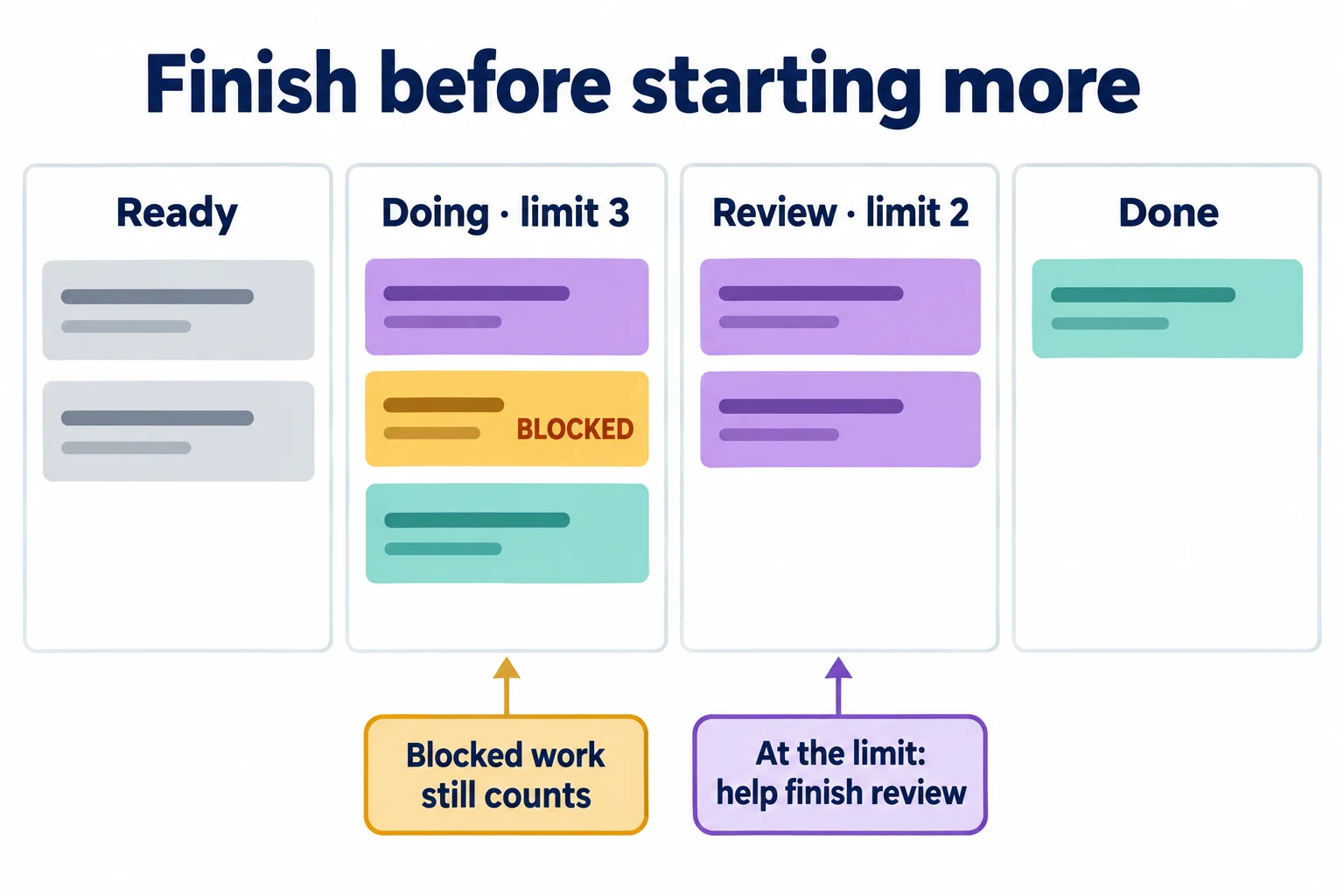
A work-in-progress limit is an agreed constraint on how many work items can be started but unfinished within a defined workflow or part of it. The Kanban Guide requires teams to define how they control WIP and make exceptions explicit. A numerical cap is a common implementation, not a universal number prescribed by the guide.
A limit of three in “Review” means the column can contain three items under the team's counting policy. It does not mean each reviewer gets three items. Nor does it mean those three items are equally difficult. If your board is still being designed, first establish the workflow using the online Kanban board guide.
Define start and finish boundaries before counting. For an editorial team, “requested” might remain outside WIP, while “drafting” through “approved for publication” counts. For a service team, work might start when a request is accepted rather than when someone first touches it.
Choose an initial limit from how work actually moves
Do not copy another team's limits or multiply headcount by an arbitrary formula. Begin with the current board: how many items are active, where do they wait, who can move them forward, and which work can be shared? A specialist who reviews only one afternoon each week creates a different constraint from a full-time review team.
Atlassian's WIP guidance treats limits as something teams establish and adjust while learning about their workflow. Use an initial limit as a working agreement to test, not a target people must keep filled.
If a team already has more active items than it can handle, set a temporary “no new starts” policy while finishing the excess. Moving unfinished cards back to the backlog solely to make the count look acceptable loses information. If work is genuinely canceled or decommitted, record that decision clearly.
Worked example: a content production team
Consider a hypothetical team with writers, a designer, and a reviewer who also has other responsibilities. Its cards are individual publishable articles, not every task inside an article. The team selects these starting policies after looking at its current workload; the figures are an example, not recommended defaults.
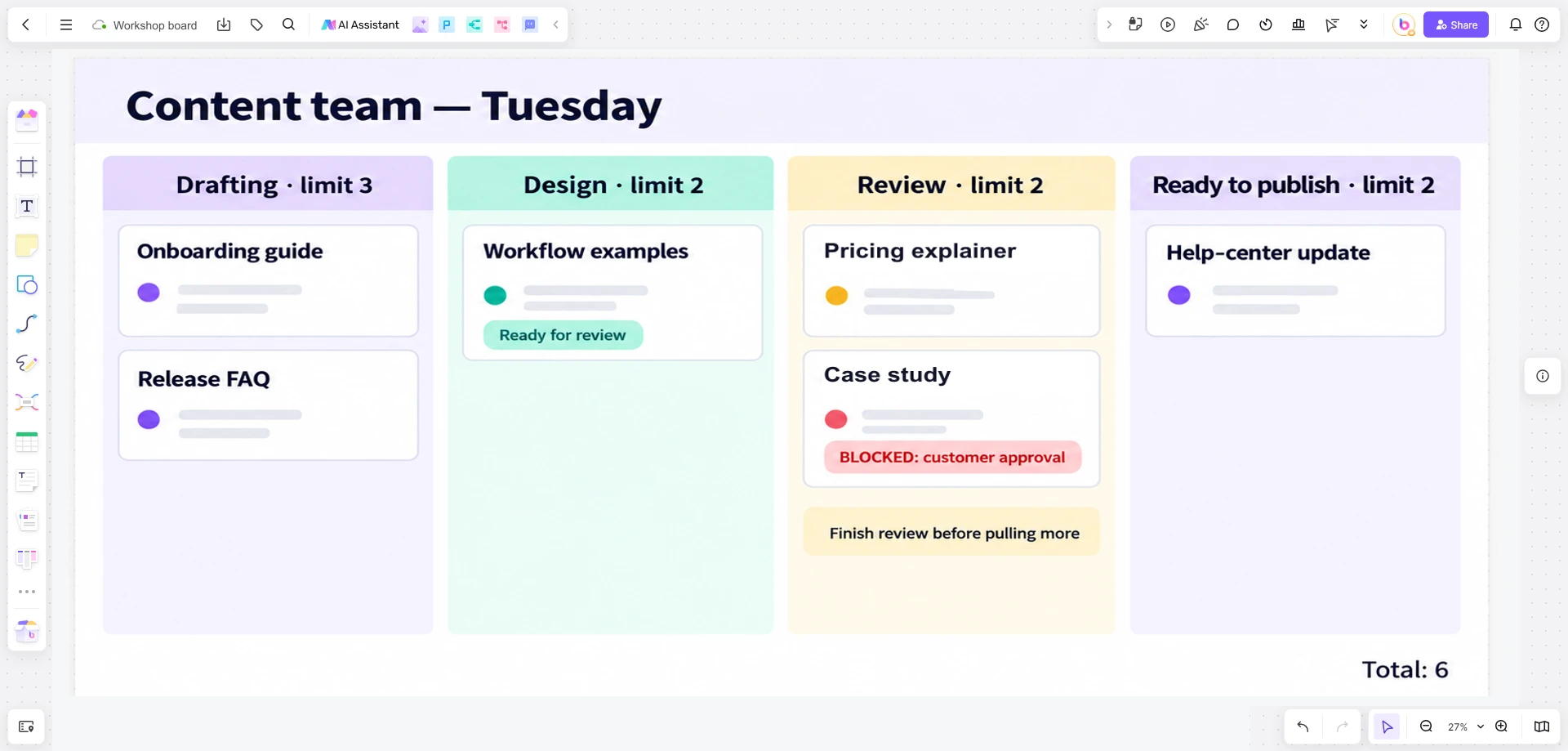
| Stage | Initial cap | What counts | When full |
|---|---|---|---|
| Drafting | 3 articles | All accepted articles whose drafts are unfinished | Help research or edit an active article; do not begin another |
| Design | 2 articles | Articles waiting for or receiving required visuals | Clarify briefs or reuse approved assets where appropriate |
| Review | 2 articles | Articles waiting for feedback or undergoing revisions | Resolve review questions before moving more work in |
| Ready to publish | 2 articles | Approved articles not yet published | Check the publishing constraint rather than stockpiling |
On Tuesday, Review contains two articles and Design has another ready. The designer should not silently move that article into a new “Review waiting” column outside the cap. The team can help finish revisions, arrange a review session, or reconsider whether the item is genuinely ready. The waiting time remains visible.
Stage caps do not by themselves explain the total workload. This team also counts all articles between acceptance and publication so it can see accumulation across the whole system.
Count blocked work honestly
A blocked item that has started and has not finished remains work in progress. If an article needs approval from a customer, keep it in its current stage with a clear blocked marker and the next action. Otherwise a separate parking area can conceal an expanding queue while every active column appears healthy.
For this example, blocked articles count against both their stage cap and the total active count. Every blocked card records what is missing, who can obtain it, and when the team will follow up. A team can agree on an exception to a stage cap, but the item still belongs in total WIP until it finishes or is explicitly canceled.
Sometimes the responsible person cannot help the bottleneck directly. They can prepare missing information, clarify acceptance criteria, pair with someone learning the work, or address a recurring source of delays. A WIP limit is not an instruction to perform work you are unqualified to do.
Make urgent work an explicit exception
Urgent work does not create extra capacity. If a correction must go live immediately, say which ongoing work will wait and who authorized the exception. Keep the urgent item visible in the workload count even if it has a separate lane.
A useful exception policy specifies who can declare urgency, which situations qualify, and how many expedited items can exist at once. “An important stakeholder asked” is too vague. For the content team, a materially incorrect published statement may qualify; a preference for publishing a new article earlier may not.
Review frequent exceptions as a pattern. If nearly everything bypasses the cap, either the entry policy is wrong, the team is accepting incompatible commitments, or “urgent” has stopped conveying useful information.
Review limits with flow data, not busyness
The Kanban Guide distinguishes WIP, throughput, work-item age, and cycle time. In plain terms: how much has started, how much finishes in a period, how long unfinished items have been open, and how long completed items took. Keep start and finish definitions consistent when comparing observations.
Suppose the example team's lower Review cap reveals that authors wait several days for one recurring approval. Raising the cap would allow a larger queue, not supply approval sooner. The more promising change may be an earlier review of sensitive claims or a backup approver.
Compare similar work over a meaningful period and note changes in staffing or item size. One quiet week cannot establish the best limit. Change one policy at a time when practical, record why, and watch whether older items clear without quality problems. A falling active count is not success if it merely reflects fewer incoming requests.
Make the policy visible on your board
Open Boardmix and arrange the content team's board into Drafting, Design, Review, and Ready to publish. Write the agreed caps—3, 2, 2, and 2—inside the column headings. Use one card per article, and leave blocked work in the stage where it is waiting. For Tuesday's review, keep the third article in Design until one of the two Review cards moves forward. Add a note naming the reviewer and the next action. Update the written counts together when cards move; these labels record the team's policy.
If the workflow itself is a poor fit, compare alternative arrangements in the Kanban board examples. Keep the limit conversation focused on one practical question: which unfinished item could move closer to done before we start another?