A good product design handoff lets developers understand the decision, the intended behaviour and the boundaries of the work without guessing. Start with a checklist that connects each requirement to a testable result and a named owner. The checkout example below shows what to write, including the states that a polished screenshot cannot explain.

Record the decision context
Name the user problem, chosen direction, alternatives considered and the evidence behind the decision. In a shared product-planning workspace, keep that context beside the specification, so design, engineering and QA can discuss the same version.
For this example, the task is to place one order from the checkout page. The design covers the final review, submission and confirmation; changing the shopping cart is outside this handoff. The central risk is uncertainty: after a slow response, a customer might submit again without knowing whether the first order succeeded. The specification must distinguish a rejected order from an order whose result is still unknown.
| Check | Include in the handoff | Ready when |
|---|---|---|
| Scope and decision | User task, included screens, exclusions and reason for the chosen flow. | The team can explain what this change does and does not deliver. |
| States and transitions | Default, validation error, submitting, unknown result, rejection and success. | Every state has a trigger, message and next action. |
| Components and content | Component reference, approved labels, error copy, assets and their versions. | No placeholder copy or ambiguous source file remains. |
| Responsive behaviour | Reading order, wrapping rules and examples at supported widths. | Long labels and errors do not hide the action or order total. |
| Accessibility | Keyboard order, visible focus, accessible names and status announcements. | The flow is usable without a mouse and status is not conveyed by colour alone. |
| Acceptance evidence | Starting condition, user action and observable result for each test. | QA can reproduce the scenario without asking what “works correctly” means. |
| Ownership | Responsible person, unresolved questions, reviewer and review date. | Each blocker has a decision owner; approved exceptions are recorded. |
Specify states, assets and content
List the relevant states rather than attaching only the ideal screen. For each component, link the source of truth for tokens, assets and copy. If an empty or permission state is not relevant to this flow, record that decision instead of inventing extra screens.
| State and trigger | Visible behaviour | Next action and acceptance observation |
|---|---|---|
| Ready: required information is present | Show the order total and a “Place order” button. | Keyboard focus reaches the button after the review fields; activation starts one submission. |
| Invalid: submission reveals a missing field | Show a specific inline error and an error summary. | Focus moves to the summary, which links to the invalid field. No order request is sent. |
| Submitting: the request is in progress | Change the label to “Placing order…” and prevent repeat activation. | Keep focus on the control and announce the status. Repeated clicks or key presses do not create extra orders. |
| Unknown: the response is interrupted | Show “We’re checking your order” rather than claiming the order failed. | Check the existing order attempt before offering another submission; preserve the entered information. |
| Rejected: the service confirms no order was created | Explain the recoverable problem and show “Try again” when retry is available. | Announce the error, retain valid input and allow a new attempt after correction. |
| Success: an order identifier is confirmed | Open the confirmation view with the order identifier and summary. | Move focus to the confirmation heading. Refreshing the confirmation view does not resubmit the order. |
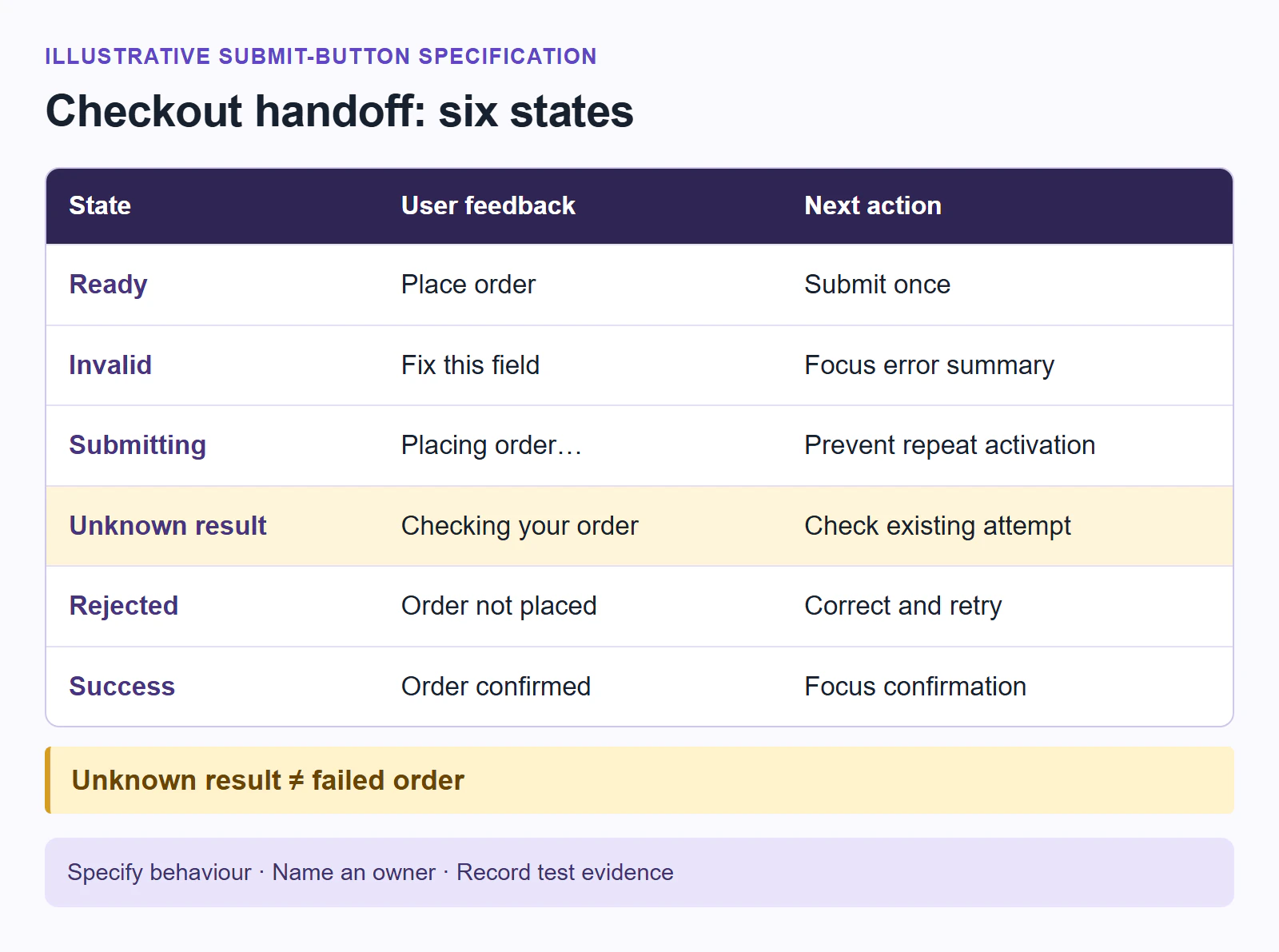
These are the example’s intended behaviours. Engineering must define the request and order-status contract, including how repeated requests are recognised. A disabled-looking button alone is not a duplicate-order safeguard.
Describe responsive and edge cases
Show how the design changes across supported widths and call out long labels, localization, keyboard focus, reduced motion and interrupted network states. In this checkout, the total must stay associated with the submit action. At narrow widths, stack the summary and action in reading order; let translated labels wrap without overlapping the price.
Include a long product name, an inline error spanning several lines and a zoomed view in the review. If a sticky action is used, specify how it avoids covering the focused field or error message. A loading animation may help sighted users, but the text status must still explain what is happening when motion is reduced.
Make behaviour and accessibility testable
Write interaction rules as observable behaviour: what happens on click, submit, retry and back. Include focus order, contrast expectations and the accessible name for controls. Replace “handle errors gracefully” with scenarios such as these:
- Invalid submission: given a missing required address field, when the customer activates “Place order”, no order request is sent; the error summary receives focus and leads to the field needing correction.
- Slow response: given a valid checkout, when submission starts and the customer activates the button again, only one order attempt is processed. The loading status remains understandable with a keyboard and screen reader.
- Lost response: given a request whose outcome is unknown, when connectivity returns, the application checks that attempt. It shows the existing confirmation if the order succeeded; it does not silently place another order.
- Confirmed rejection: given a response confirming that no order was created, the customer can correct the problem and retry without re-entering valid information.
- Success: given a confirmed order, the customer can read the identifier, reach the next action by keyboard and refresh the confirmation without a new submission.
Assign acceptance and ownership
Give each item an owner, acceptance criterion and review date. The designer owns the state layouts, wording and focus specification; frontend engineering owns rendering and interaction; backend engineering owns order identity and duplicate-request handling; QA records results against the agreed scenarios. Replace role labels with named people in the working document.
In Boardmix, arrange the decision, checklist and state matrix on one board. Place comments beside the relevant state, record unresolved questions and link the current specification and test results. For example, a question beside “Unknown” can ask the backend owner which response confirms the existing order. The board keeps the discussion in context; the application tests still verify the implementation.
A handoff is ready when the developer and designer agree how to verify it, not when every pixel is described. If the order-status contract is unresolved, leave that item visibly blocked with its owner and next decision; do not mark the whole flow ready merely because the screens are finished.