A skills matrix puts people in rows and specific skills in columns so a team can see where it has reliable coverage and where it needs practice or backup. Start with the work your team actually needs to do, define what each rating means, and fill the cells from recent examples—not from job titles alone.
A shared team-planning whiteboard is useful when people need to discuss those judgments together. The matrix is the starting point; its value comes from noticing a gap and agreeing on a practical way to close it.
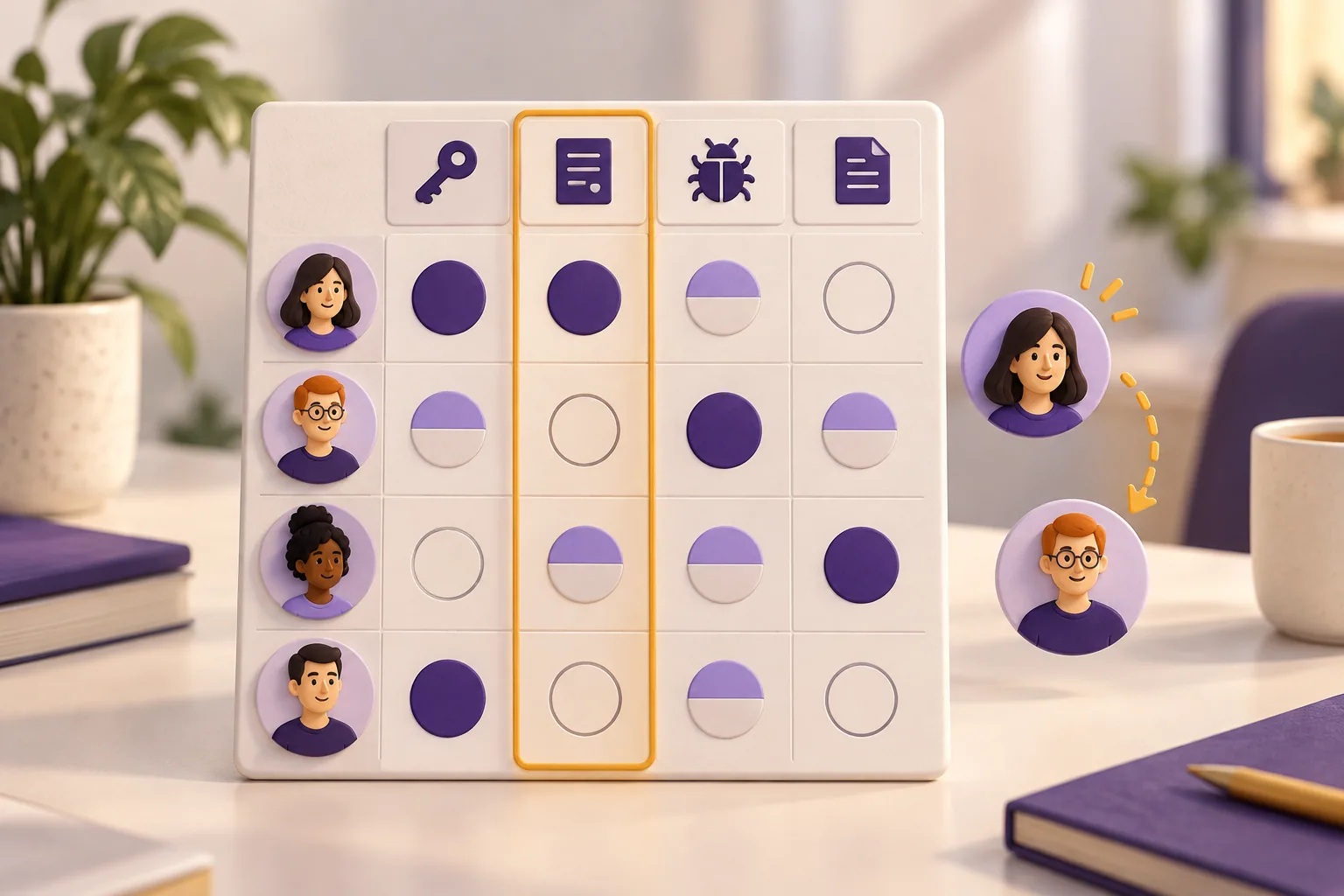
A filled skills matrix example
Imagine a four-person customer-support team preparing for a period of leave. They want to know which tasks have a backup and where someone would still need help. Their matrix covers four everyday skills, rather than broad labels such as “communication” or “technical ability.”
| Team member | Resolve account access | Investigate billing discrepancies | Reproduce product bugs | Publish help articles |
|---|---|---|---|---|
| Maya | 3 | 2 | 1 | 2 |
| Leo | 2 | 1 | 3 | 1 |
| Priya | 1 | 0 | 2 | 3 |
| Jon | 2 | — | 1 | 1 |
| People working independently: 2 or 3 | 3 | 1 | 2 | 2 |
The team uses these working definitions:
- — Not assessed: there is not enough information to assign a level.
- 0 — Not yet practiced: the person has not performed the task.
- 1 — With guidance: the person can do parts of the task but needs help to complete it reliably.
- 2 — Independently: the person can complete the agreed task and recognize when to escalate.
- 3 — Can coach: the person can work independently and help someone else learn the task.
These labels are a simple scale for this team. “Not assessed” is different from “not yet practiced”: Jon's billing cell is an unanswered question, not evidence that he cannot do the work.

Choose skills that describe observable work
A useful column describes something you could observe someone doing. Replace “good with customers” with a task such as “explain an account-access recovery path.” Replace “knows the product” with “reproduce a reported bug and describe the steps.”
Choose skills that matter to the next period of work. A support team preparing for leave needs service coverage. A project team preparing for a new kind of delivery may need to map unfamiliar techniques. Mixing every possible future skill into the same matrix makes immediate gaps harder to see.
Write a short definition for each column. For “investigate billing discrepancies,” this team means locating the relevant account and billing records, explaining the difference and knowing when specialist approval is needed. It does not mean that every independent practitioner can approve a refund or change a commercial policy.
Keep skills separate from availability and authority. A person may be able to do the work but be on leave. Someone may understand a process without having permission to authorize its final step. Add those constraints beside the matrix rather than changing the skill rating to compensate.
Copy this blank skills matrix template
Use the table below as a starting structure. Replace the four skill headings with tasks relevant to your team, add or remove people, and keep the rating definitions visible nearby.
| Team member | Skill or task 1 | Skill or task 2 | Skill or task 3 | Skill or task 4 |
|---|---|---|---|---|
| Person A | — | — | — | — |
| Person B | — | — | — | — |
| Person C | — | — | — | — |
| Person D | — | — | — | — |
| Independent coverage | Count people at level 2 or 3 | Count people at level 2 or 3 | Count people at level 2 or 3 | Count people at level 2 or 3 |
Alongside it, record the scope, the date discussed and the evidence used. A compact note might read: “Account access, standard recovery cases; observed during paired support work.” You do not need to paste private customer records into a widely shared board.
Fill the ratings with the team
Ask each person to suggest a level and give a recent example. Discuss the example against the same task definition. “I completed the training” and “I handled a case independently” are different kinds of evidence.
If the person and reviewer disagree, find the specific uncertainty. Perhaps one is rating routine cases and the other is thinking about unusual exceptions. Narrow the definition or record that the level needs another observation. Averaging two opinions into a number hides the disagreement without resolving it.
Use a label as well as color. A green cell alone may not explain whether someone works independently or coaches others, and color can be difficult to distinguish. In a small matrix, the number and a nearby legend are usually enough.
If your organization already has an approved competency framework, use its definitions. For example, SFIA describes professional skills alongside levels of responsibility. Its levels are not interchangeable with the simple practice scale in this example.
Read team coverage, not a ranking of people
Read down each skill column first. In the filled example, account-access work has three independent practitioners; bug reproduction and help-article publishing each have two. Billing investigation depends on Maya alone.
That makes billing a sensible discussion point before Maya's leave. It does not automatically make billing the most important training topic in every team. Consider how often the task occurs, what happens if nobody is available and whether another team already provides backup.
Do not total the row numbers to produce a league table. The skills may differ in complexity, relevance and opportunity to practice. A person doing specialized work can have a lower row total and still provide capability the team cannot replace.
A high rating is also not a capacity commitment. Before assigning coaching, ask whether the experienced person has time. Otherwise, the matrix can increase the workload of the one person it was meant to support.
Turn one gap into a practical training plan
For the support team, Leo is already working on billing cases with guidance. Rather than enroll everyone in a broad course, the team chooses a focused pairing task.
| Field | Worked example |
|---|---|
| Capability needed | A second person can investigate routine billing discrepancies independently. |
| Practice | Leo works through representative cases with Maya, explains the records used and identifies when specialist approval is required. |
| Evidence of progress | Leo handles an agreed routine case without step-by-step prompting and explains when he would escalate. |
| Support needed | Maya has protected pairing time; appropriate example records are available. |
| Next review | After the paired practice, before relying on Leo as the leave-period backup. |
The rating changes when there is relevant evidence, not simply when the scheduled date arrives. If Leo still needs help with one kind of case, record that boundary and plan another practice opportunity.
Build and maintain the matrix in Boardmix
Arrange the people-by-skill table in the center of a Boardmix board. Keep the task definitions and rating legend beside it, with a smaller area for the selected learning activities. Boardmix's guide to tables on a whiteboard shows the basic table layout and formatting approach.
Use the board for the discussion and the agreed planning view. Restrict sensitive individual feedback to the appropriate audience, and keep private evidence in its proper location. Revisit the matrix after relevant practice, a change in responsibilities or a new delivery need—not just to refresh a date.
Open a Boardmix board and start with one team and its most important recurring tasks. The first useful outcome is not a completely green grid. It is a clearer answer to “Where do we need a backup, and what will help someone become ready?”