A support team can resolve more tickets this week and still finish with a larger queue. Throughput describes how much work leaves the queue over time; backlog describes how much remains at a particular moment. Comparing the two without accounting for incoming work can make the team's performance look contradictory.
A stock and flow diagram makes that accounting visible. On an online whiteboard for the team, draw the queue as a stock and the movements into and out of it as flows. Then place a small worked calculation beside the picture so that everyone can see why the queue changes.
Separate the stock from the flow
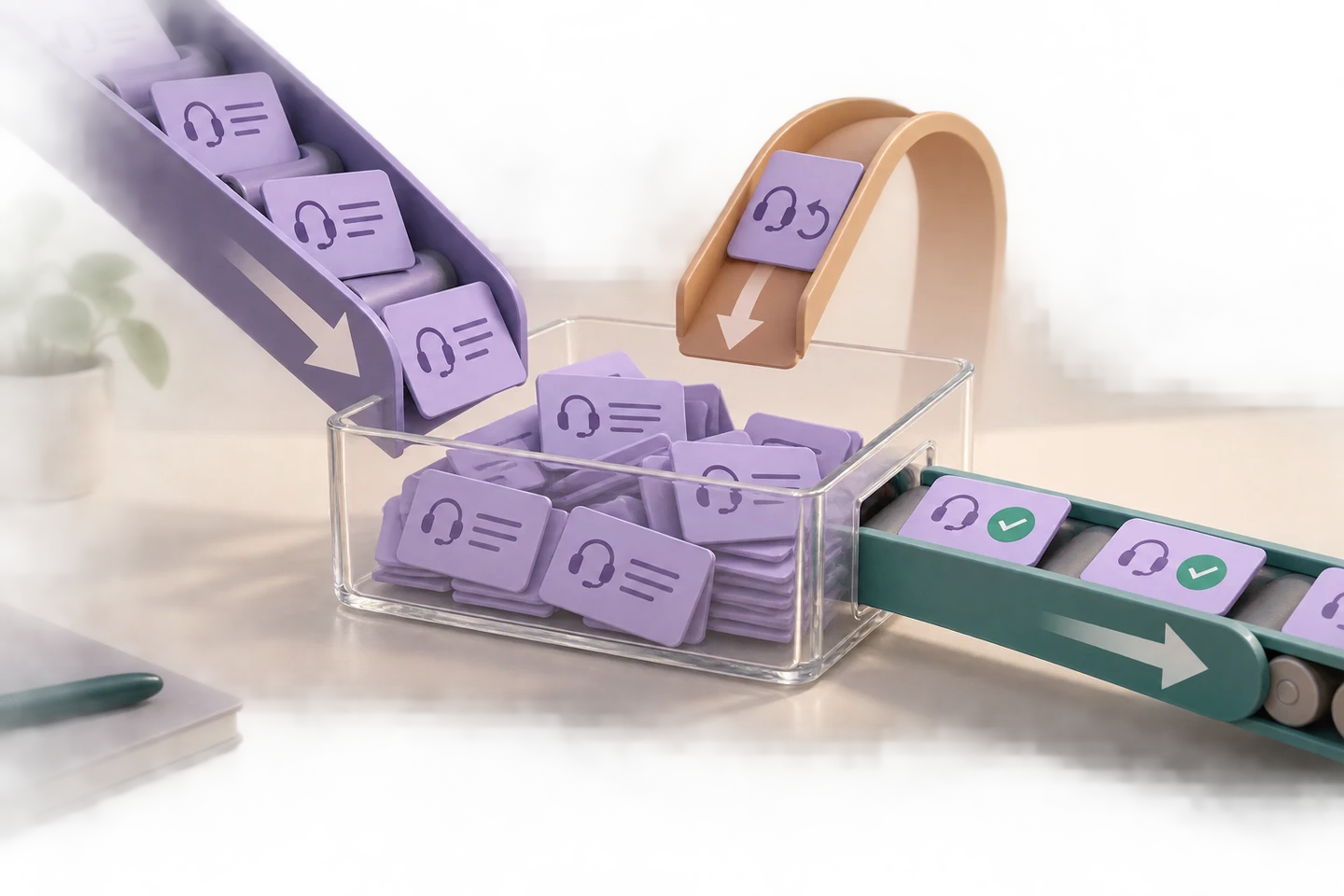
A stock is an accumulated quantity at a point in time. A flow changes that quantity over time. In this example, unresolved tickets are the stock; new-ticket arrivals, reopened tickets, and resolutions are flows.
MIT researchers Linda Booth Sweeney and John Sterman use the bathtub relationship to explain accumulation in their work on stock and flow reasoning. Water in a tub changes with the water entering and leaving it. A work queue follows the same accounting principle, though the behavior driving its arrivals and departures can be more complicated.
Keep the units visible. The backlog might contain 12 tickets at the start of a day. An arrival rate might be 20 tickets per day. “12 tickets” and “20 tickets per day” describe different things; they cannot be compared as though both were queue sizes.
Define what belongs in this support queue
For the worked example, the stock contains every unresolved ticket handled by one support team, including tickets waiting for a customer response. A ticket enters when it is newly received or when a previously resolved ticket is reopened. It leaves when it is resolved.
Reassigning a ticket between agents does not remove it from this team's backlog. Nor does moving it from “in progress” to “waiting for customer,” because both states remain inside the chosen boundary. If you want to study only active work, define a different stock and explicitly show transfers to and from waiting.
Use the same boundary in the report and the diagram. Otherwise one person may count all unresolved tickets while another counts only assigned tickets, and both can produce correct numbers for different questions.
Draw the queue and its movements
Place a rectangle labeled Unresolved tickets in the center. Draw two incoming flow arrows, New tickets and Reopened tickets, and an outgoing arrow labeled Resolved tickets. Keep the two inflows separate so reopening is not hidden inside new demand.
In conventional stock and flow notation, a flow is commonly shown as a pipe with a valve, while a cloud represents a source or destination outside the model's boundary. A simpler labeled arrow is adequate for this team's first conversation if the labels make the meaning clear. Do not use the same unlabeled line for both ticket movement and a possible influence such as staffing.
This diagram answers how the quantity changes. It does not show which agent should receive an urgent case. That is a separate process question, better handled by an escalation workflow. A causal-loop diagram asks another question again: how variables may influence one another through feedback.
Work through three days of tickets
The following numbers are an illustrative calculation, not a customer benchmark. Each row covers one complete day. Arrivals, reopenings, and resolutions are the numbers of transitions during that day, not instantaneous rates.
End backlog = start backlog + new tickets + reopened tickets − resolved tickets.
| Day | Start backlog | New | Reopened | Resolved | End backlog |
|---|---|---|---|---|---|
| 1 | 12 | 20 | 2 | 18 | 16 |
| 2 | 16 | 17 | 1 | 21 | 13 |
| 3 | 13 | 19 | 2 | 18 | 16 |
On day 1, the calculation is 12 + 20 + 2 − 18 = 16. Day 2 starts from that 16, not from the original 12. It ends at 13 because departures exceed the combined inflows. Day 3 adds more than it removes, bringing the queue back to 16.
Across all three days, the team resolves 57 tickets and receives 56 new ones. Looking only at those totals might suggest that the queue should shrink. But five reopening transitions also enter the stock: 12 + 56 + 5 − 57 = 16. The backlog grows by four.
A reopened ticket is not a newly created ticket, but it is a new entry into this unresolved stock. Count its state transition in the appropriate inflow rather than counting it in both “new” and “reopened.” If the same ticket is resolved and reopened within a day, both transitions affect the accounting.
Use the diagram to ask a better operational question
The arithmetic explains the change; it does not explain why the flows have those values. Investigate that separately. A rise in reopenings could reflect incomplete answers, a different ticket-closure policy, or customers returning with additional information. The number alone cannot identify the cause.
Likewise, matching average arrivals with average resolutions prevents long-run growth only within the assumptions of that comparison; it does not eliminate an existing backlog. To reduce an accumulated queue, departures must exceed all inflows over the relevant period. Daily variation, ticket complexity, and service priorities affect how that can happen.
Do not infer that every agent should simply close more tickets. Premature closure can increase the reopening flow, while an apparent improvement in throughput leaves the underlying work unresolved. The diagram makes that possibility visible without pretending to measure it.
Build the stock and flow example in Boardmix
Create the central queue rectangle and the three labeled flow connections on a Boardmix canvas. Place “tickets” next to the stock and the time unit next to any rates you show. Put the three-day table beside the diagram, with the end value of each row visibly feeding the start of the next.
Add a note describing the boundary: “All unresolved tickets for this team, including waiting for customer.” Keep assumptions beside the calculation. Our example assumes no deletions, duplicate merges, or transfers to another team. If those happen in your data, add the relevant inflow or outflow rather than forcing the numbers to balance by changing the opening backlog.
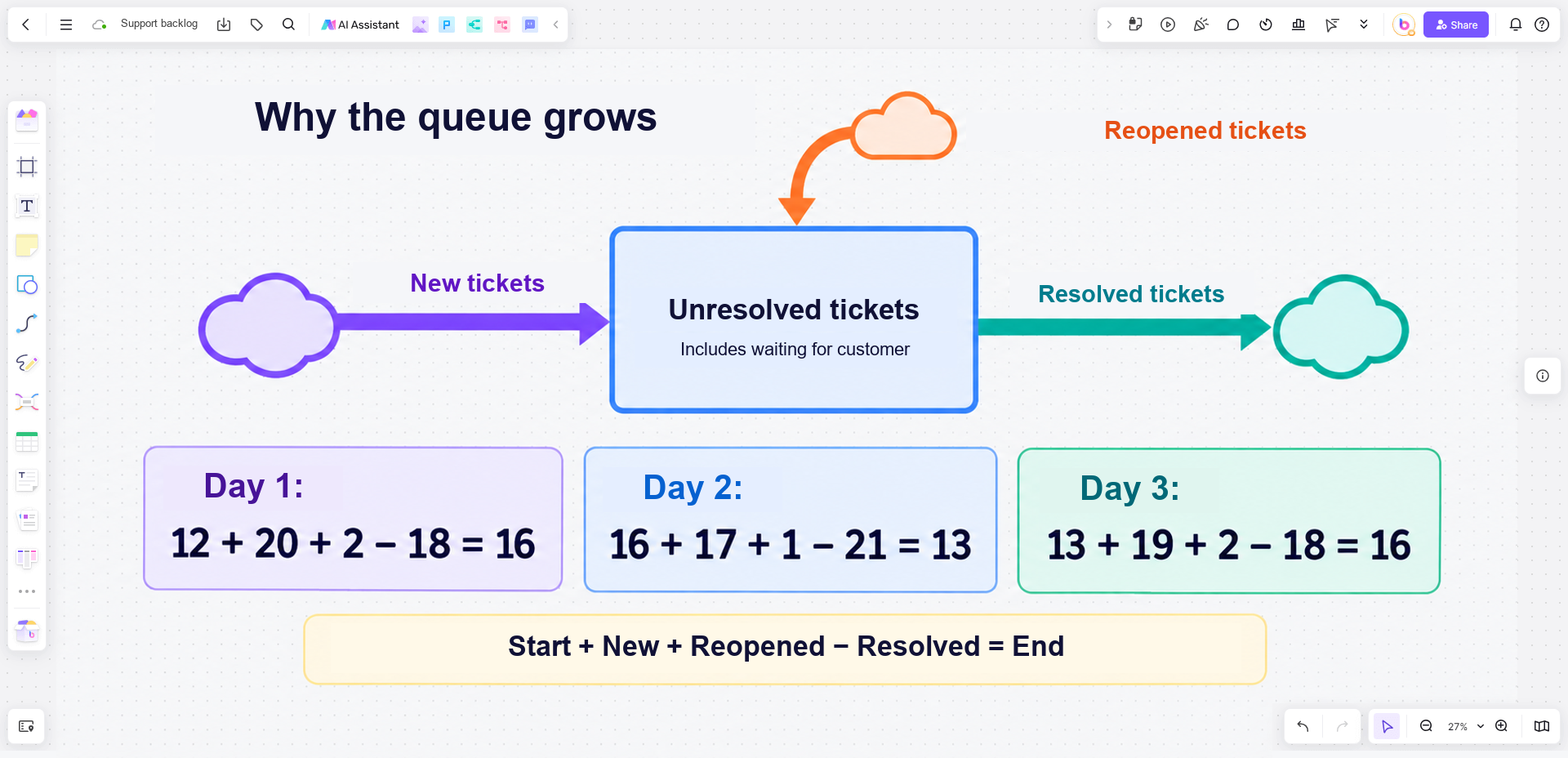
Boardmix provides a space to draw and discuss this model; the calculation shown here is manual, not an automatic simulation. For a quantitative model with changing rates, delays, or feedback, you will also need appropriate data and a calculation or simulation method.
Open a Boardmix board and sketch your team's queue with the people who maintain its reports. Start by agreeing on which status changes cross the boundary. That definition determines which numbers belong in the equation.