A support escalation flowchart should answer more than “send the ticket to a manager.” It needs to show the trigger, the receiving role, the information that moves with the case, and who updates the customer while ownership changes. Without those details, a neatly drawn arrow can still produce a lost ticket.
Define the trigger and the handoff record. A useful escalation path states when to involve another team, which facts can be shared, who owns the next update and how the customer will be informed. Keep credentials, payment details and other sensitive content out of a shared diagram; link to the approved system instead. Mark an exception path when the normal owner is unavailable.
Use a shared online whiteboard to agree on the flow before configuring it in your support system. Zendesk's ticket-escalation guide describes different support tiers and notes that the structure depends on the organization. The example here is a design exercise, not a claim that Boardmix routes tickets.
Choose one ticket type and its boundaries
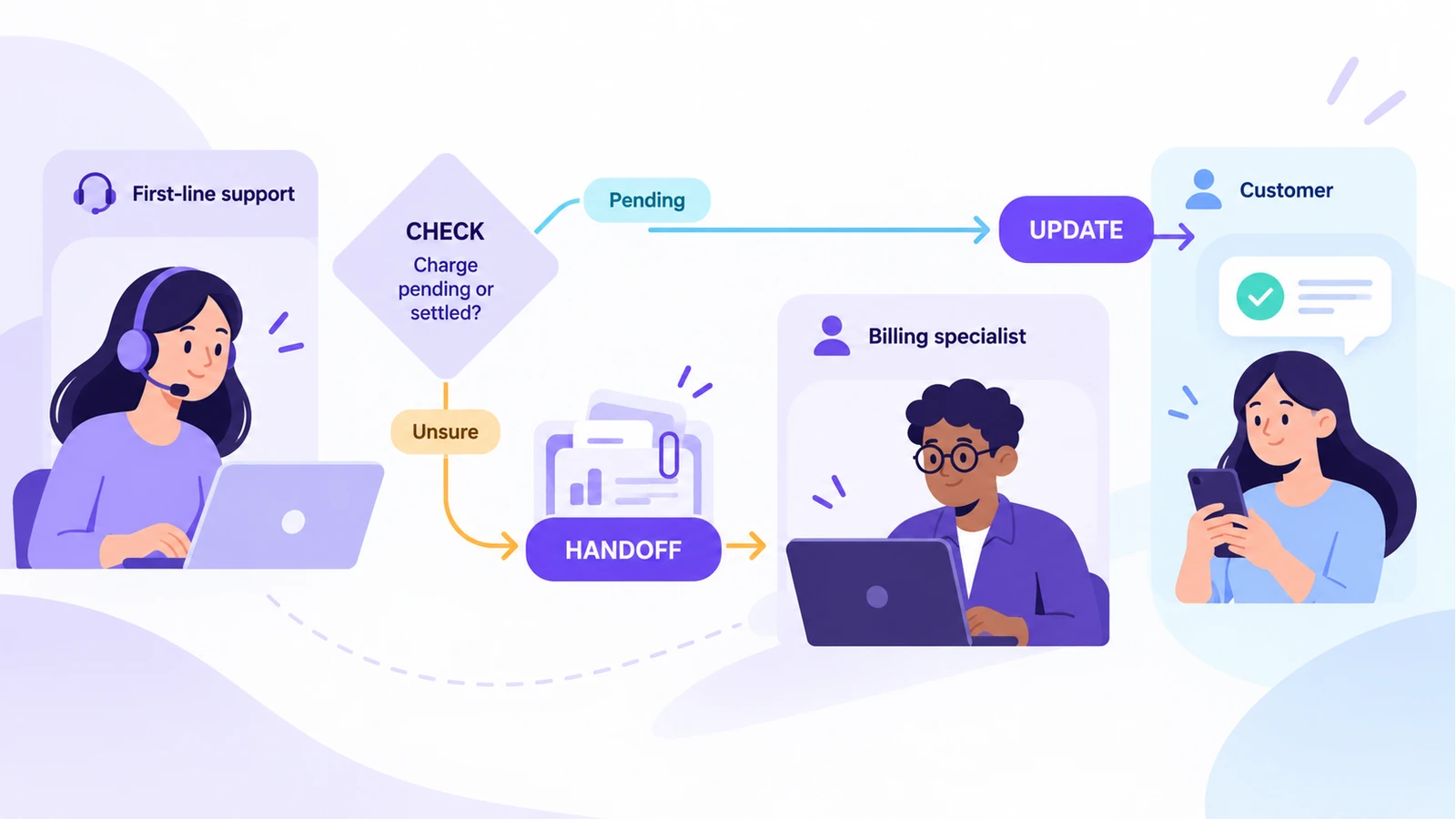
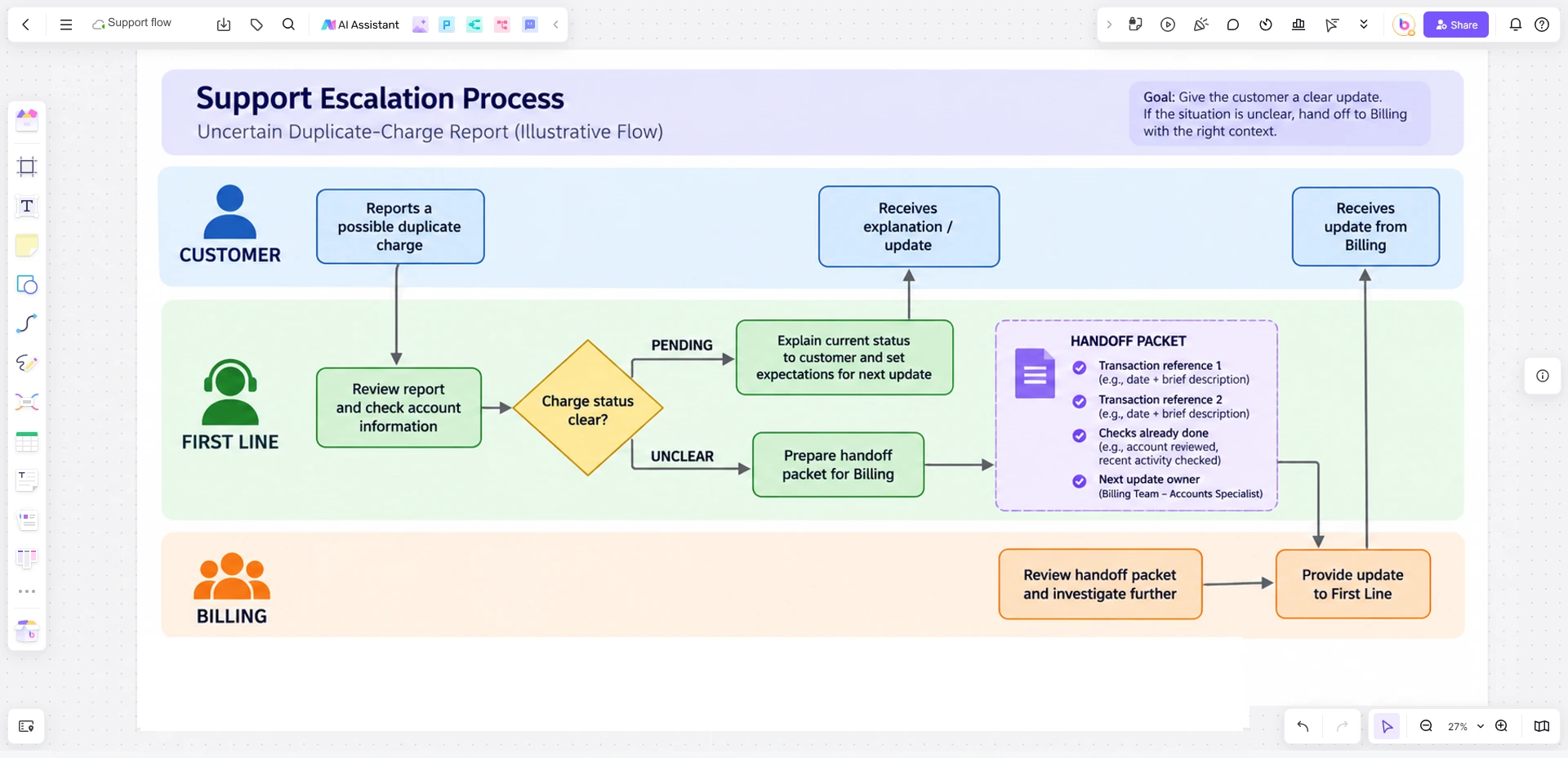
Suppose a customer reports two charges for one subscription renewal. The first-line agent can check the account, invoice references, and payment status. The agent cannot decide whether a pending authorization is a settled second charge without help from a billing specialist. That uncertainty is the flowchart's starting point.
Define the start as “duplicate-charge report received” and the end as either “explained and closed” or “billing owner takes the unresolved case.” Do not draw a generic path for every support issue at once; different issues have different evidence and authority.
Draw decisions, not vague tiers
- Capture the case. Record the customer's report, account reference, transaction identifiers, and the time of the charge. Exclude unnecessary card or personal data from a planning board.
- Check what is known. Is the second item a pending authorization, a settled charge, or not yet identifiable? Label each branch with a condition the agent can actually observe.
- Resolve within authority. If the record clearly explains the pending item and the approved support response covers it, the agent can explain and document the answer.
- Escalate the uncertain case. Assign it to a billing specialist with the checks already performed, customer impact, and the next promised update time. A transfer without this packet makes the customer repeat the story.
- Close the loop. The receiving owner confirms the finding, communicates through the approved channel, and records whether the original flow needs correction.
Do not encode a made-up refund threshold or guaranteed resolution time. Use the business's actual policy and service commitments. Zendesk also recommends aligning escalation with documented triage and service-level arrangements in its escalation guidance.
Make the handoff packet visible
Beside the transfer arrow, add a small checklist of case facts: issue summary, verified transactions, steps already tried, impact or urgency, current owner, new owner, and customer update due. This is not an editorial checklist for the reader; it is the information the next agent needs in the workflow. If a field has no reliable source, mark it unknown rather than guessing.
The flowchart should also show a path back when the specialist discovers that the initial classification was wrong. A one-way ladder of tiers hides reassignment and can leave the customer without an owner.
To track how the total unresolved workload changes, use a stock and flow example of a support backlog that separates new and reopened tickets from resolved work.
Map the flow in Boardmix
Open a Boardmix board and place the customer, first-line support, and billing specialist in separate lanes. Add rectangles for work, diamonds for decisions, and labeled arrows for the conditions. Put the handoff packet next to the transfer and the customer update next to the owner change. The board helps the team examine the process; implement routing rules in the actual support platform after policy owners approve them.
For another type of issue, reuse the method rather than the same diagram. Confirm its trigger, authority, evidence, and communication route with the people who handle those cases. A flowchart template can provide shapes, but the service policy determines the path.