A weighted decision matrix helps a team compare a short list of options without pretending that one number can make the decision for them. Define the decision, agree on criteria, assign weights, rate each option against evidence, and inspect how the result changes when an important assumption changes.
After defining the method, you can review free project-management software options for the trial and keep the scoring rules visible beside the candidates. The matrix still needs evidence from your own team; a software list is not a substitute for checking fit.

What a decision matrix does
A decision matrix evaluates several options against the same criteria. A weighted version gives more influence to criteria that matter more for this decision. The American Society for Quality describes the method as establishing weighted criteria, evaluating each option, multiplying the rating by the weight, and adding the resulting points.
The matrix is a structured conversation, not an automatic verdict. It exposes assumptions, makes disagreements specific, and leaves a record of why a team preferred one option at that moment. A high total can still be rejected when an option fails a non-negotiable requirement, carries an unacceptable risk, or depends on evidence the team has not verified.
1. Define the decision before scoring
Write one sentence that names the choice and the boundary. For example: Which of three collaboration tools should our remote product team trial for a six-week planning cycle? The time box matters: a tool that is easy to try this month may not be the right long-term system.
List the alternatives that are genuinely available. Do not add every product anyone has heard of. A short list of three to five options is easier to investigate and compare. If an option fails a mandatory requirement—such as a required security review or a supported export format—record it as a gate rather than hiding the failure inside a low score.
2. Choose criteria that describe the outcome
Start with what the team needs to achieve, not with the features of a preferred product. Useful criteria for a collaboration-tool decision might include:
- Decision fit: how well the option supports the team's planning and review work.
- Implementation effort: how easy it is to start the defined trial with the available people and time.
- Cost predictability: how clearly the expected cost can be estimated for the chosen scope.
- Collaboration and access: how well the option supports the participants and access conditions that the team has verified.
Keep each criterion distinct. “Easy to use,” “quick to learn,” and “low training effort” may describe the same thing and accidentally give it three votes. Give each criterion a description of what a high rating means. For example, write “low implementation effort” rather than “implementation effort,” so a 5 always points in the desirable direction.
3. Assign weights that add up
Agree on relative importance before discussing which option should win. You can distribute 100 percentage points, or use another scale and normalize it. The important part is that the weights have a documented meaning and add up to the same total.
Here is one illustrative set of weights for the collaboration-tool decision:
| Criterion | Weight | A high rating means |
|---|---|---|
| Decision fit | 35% | The tool supports the agreed planning and review task. |
| Implementation effort | 25% | The team can begin the defined trial with little avoidable setup. |
| Cost predictability | 20% | The expected cost for this scope is clear enough to plan. |
| Collaboration and access | 20% | The verified participants can work together under the required access conditions. |
Ask what would change if the project goal changed. A launch-critical decision may weight implementation more heavily; a regulated project may need a mandatory security gate instead of treating security as one compensating score. The Project Management Institute's discussion of decision methods also cautions that the quality of the result depends on the assumptions and judgments behind the inputs.
4. Set one rating scale
Use a small, consistent scale such as 1 to 5:
- 1: the option barely meets the criterion or evidence is weak.
- 3: it meets the criterion adequately for this decision.
- 5: it meets the criterion especially well with strong, relevant evidence.
Define what the endpoints mean for each criterion. A 5 for implementation effort should mean low effort, while a 5 for decision fit should mean strong fit. The scale must not reverse direction from one column to the next. If two people assign different ratings, compare the evidence and the definition of the scale; do not simply average the disagreement to make it disappear.
5. Worked example: compare three collaboration tools
The following example is illustrative. “Option A,” “Option B,” and “Option C” are placeholders, not product reviews. Replace them with tools your team has actually checked, and keep the evidence beside each rating.
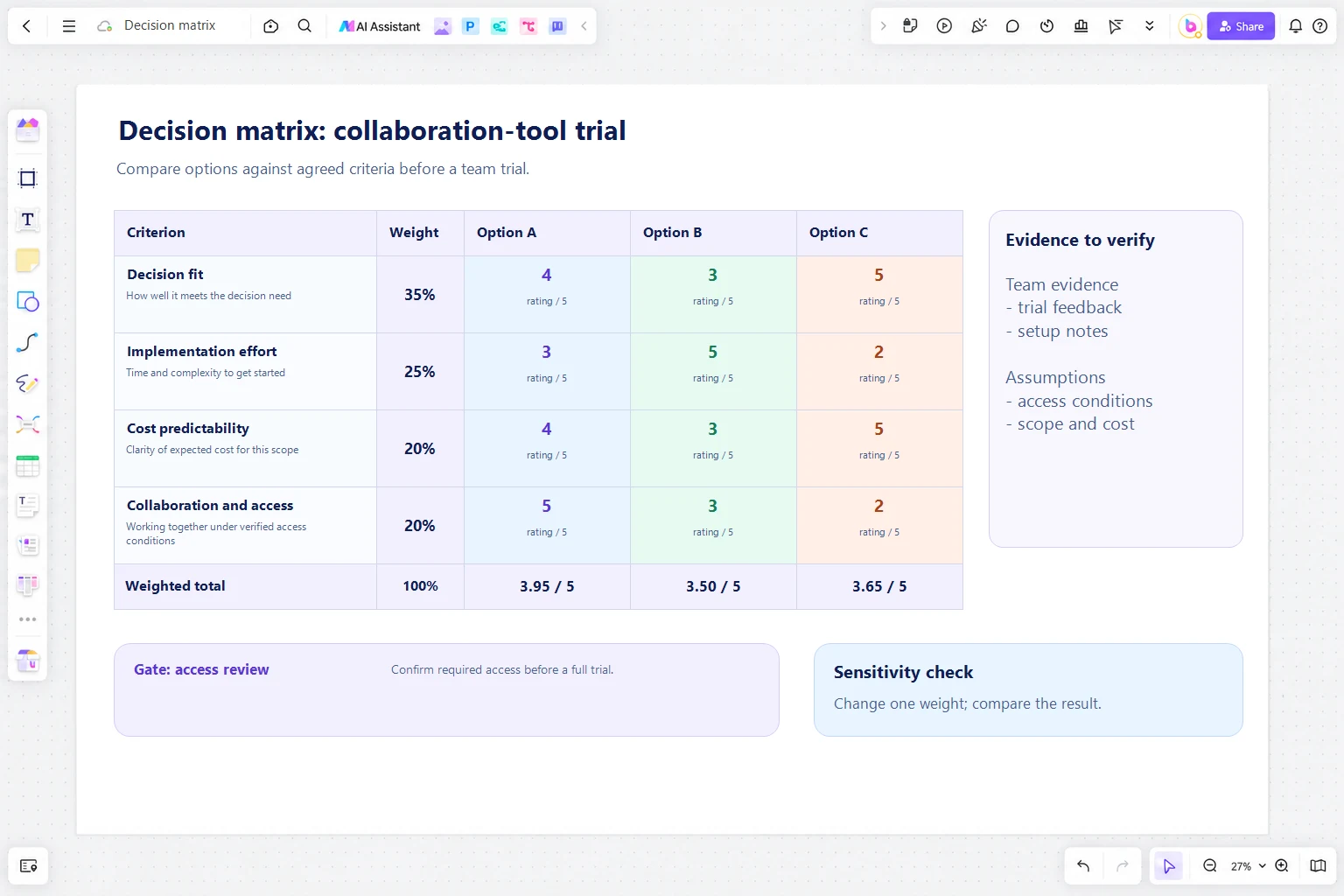
| Criterion | Weight | Option A | Option B | Option C |
|---|---|---|---|---|
| Decision fit | 35% | 4 (1.40) | 3 (1.05) | 5 (1.75) |
| Implementation effort | 25% | 3 (0.75) | 5 (1.25) | 2 (0.50) |
| Cost predictability | 20% | 4 (0.80) | 3 (0.60) | 5 (1.00) |
| Collaboration and access | 20% | 5 (1.00) | 3 (0.60) | 2 (0.40) |
| Weighted total | 100% | 3.95 / 5 | 3.50 / 5 | 3.65 / 5 |
Each contribution is the rating multiplied by the weight as a decimal. For Option A, the calculation is (4 × 0.35) + (3 × 0.25) + (4 × 0.20) + (5 × 0.20) = 3.95. The totals provide a consistent comparison, but they do not prove that Option A is the correct choice. The team should ask why Option A is lower on implementation effort, whether its access rating was verified with the actual participants, and whether any non-negotiable requirement was omitted.
6. Record evidence, not just scores
Add a short evidence note for every rating. A note might say “tested with the pilot group,” “confirmed in the current plan,” or “needs a security review.” Keep a separate column for unknowns so an uncertain 3 is not mistaken for a measured 3.
Separate facts from preferences. “The export format is supported in the current documentation” is evidence. “The interface feels cleaner” is a preference that can still matter, but the team should label it as such and agree on how it will be judged. The University of South Carolina's facilitation guide recommends using a defined scale, evaluating each option against each criterion, and reviewing strengths and weaknesses rather than treating the total as the whole discussion.
7. Check sensitivity and decision gates
Recalculate the matrix after changing one important assumption within a plausible range. Try a different weight distribution, a new piece of evidence, or the removal of a criterion that was double-counting another. If a small change flips the leader, report the decision as sensitive and identify what information would reduce the uncertainty.
Use gates for requirements that cannot be traded away. For example, an option may be removed if it fails the team's required access review, even if it scores well on cost. This keeps a strong score from compensating for a disqualifying condition.
When the totals are close, treat that as a reason to investigate—not as proof that the options are identical. A short trial, reference check, or focused technical review may be more useful than adding more subjective criteria.
8. Make the decision auditable
Save the decision question, date, participants, criteria definitions, weights, ratings, evidence, gates, and final rationale together. Record what would trigger a review. This lets a later team understand the decision without reconstructing it from scattered messages.
Do not back-fill the matrix after the choice simply to make the preferred option look inevitable. If the team overrides the highest score, write down the reason—for example, a mandatory requirement, a risk that the scale did not represent, or new evidence received after scoring.
Build the matrix in Boardmix
On a Boardmix board, place the decision question and gates at the top, criteria and weights in one table, and the candidate options in adjacent columns. Keep evidence notes next to the ratings they support. A separate area can hold open questions, owners, and the date for a sensitivity check. The board is a shared workspace for organizing the discussion; it does not automatically score options or verify product claims.
Open a Boardmix board to lay out the matrix with the people who will use the decision. Bring the verified evidence into the board, keep unknowns visible, and agree on the next review rather than presenting the score as an automatic recommendation.