A meeting parking lot is a visible place to capture questions and ideas that matter but do not belong in the current discussion. To use one, write down the issue, check whether it affects today's decision, and agree when and by whom it will be considered. Before the meeting ends, give every parked item a destination.
The useful part is the agreement to return to an issue. A box full of abandoned sticky notes only tells people that speaking up has little effect. On a shared online whiteboard, keep the parking lot beside the agenda so participants can see both the current task and what has been deferred.

What belongs in the parking lot?
Park a topic when it deserves attention, the current group cannot usefully resolve it now, and it is not a prerequisite for the meeting's outcome. For example, a team choosing the first release of a help center may need to record a good idea for a later video tutorial. It can decide the first release without designing that tutorial.
Do not park an issue just because it is uncomfortable. A missing accessibility requirement, an unresolved safety concern, or a dependency that makes the proposed decision unworkable may need attention now. The facilitator should ask, “Can we make today's decision responsibly without resolving this?” If the answer is no, change the agenda or defer the decision.
| Situation | Response | Reason |
|---|---|---|
| The answer determines whether the current proposal can work. | Discuss it now, or stop the decision until it is answered. | It is a dependency, even if it was absent from the agenda. |
| The idea is useful for a later phase. | Park it with a destination and a review date. | The group can proceed without losing the idea. |
| The issue needs someone who is not present. | Record a specific question and ask a present participant to arrange the follow-up. | Repeating guesses will not supply the missing expertise. |
| The topic is outside this team's remit. | Identify a suitable route, or explicitly decline it with a reason. | “Parked” should not imply a commitment the team cannot make. |
Capture a question someone can pick up later
Write enough context for an absent colleague to understand the issue. “Analytics” is too vague. “Which events will tell us whether customers can find a help article?” preserves the actual question.
A useful note contains the question or proposal, why it matters, who will arrange the next step, and when the team will hear back. Add the proposed destination if you already know it: the next planning meeting, a specialist review, or a backlog discussion. A name is a proposed responsibility until that person agrees to it.
For a live meeting, a short note is enough:
Question: Which search events do we need for the new help center?
Why: We need to distinguish unsuccessful searches from abandoned visits.
Next step: Priya will ask the analytics owner to review the event list.
Return: Report back in Thursday's release-planning meeting.
You do not need a complex tracking system inside the meeting. If follow-up belongs in your team's task tool, move the agreed action there and add its reference to the note.
Example: keep a help-center planning meeting on track
Imagine a support team meeting to choose the help articles needed for a small product release. The intended output is an agreed article list and an owner for each article. Four additional topics arise.
| Topic raised | Facilitator's check | Disposition |
|---|---|---|
| Some customers cannot complete a required setup step using a keyboard. | Does this undermine the instructions we are about to approve? | Keep it in the discussion. The team cannot treat documentation as a fix for an inaccessible product step; the release owner must address the dependency. |
| Make a short tutorial video for every article. | Do we need videos to choose this release's article list? | Park it for the next content-planning review. The content lead will bring one proposed pilot, not a commitment to produce every video. |
| Track searches that return no useful results. | Can the article list be chosen before the event specification is complete? | Park the instrumentation question. Priya will arrange an analytics review before the team agrees the release measurement plan. |
| Change the support team's weekend coverage. | Can this meeting's participants make that staffing decision? | Route it to the support manager. Record who will raise it, without assigning absent colleagues new work. |
The accessibility issue never enters the parking lot. The other topics receive different outcomes because they are different kinds of work. This distinction matters more than making every card look the same.
How to park a topic without dismissing the person
Briefly restate the issue before asking to defer it: “You are concerned that we will not know whether the help articles work. Is that right?” Then connect the proposed deferral to the meeting's task: “We can choose the article list now, but we need an analytics review before agreeing the measurement plan.”
Ask whether the speaker sees a dependency you have missed. If they do, hear it. If they agree to defer, show the captured note and name the point when you will return to it. This makes the intervention understandable without opening a second full discussion.
If several participants raise the same parked question, revisit whether the agenda is wrong. Repetition may reveal a shared concern that belongs in the main conversation. For broader decisions about session roles and timing, use the meeting facilitation guide.
Set up the parking lot in Boardmix
- Write the meeting outcome at the top of the board. In this example: “Choose the first-release help articles and their owners.” Put the agenda directly below it.
- Add a labeled parking area nearby. Use a shape with a heading and put one issue on each note. Keep the current discussion visually separate.
- Give each note a short label. For example, P1 for tutorial videos and P2 for search measurement. Participants can refer to the label when adding a clarifying comment.
- Review the notes together before closing. Edit each note to include its agreed destination, a person responsible for arranging the next step, and a return point.
- Update the outcome after follow-up. Record the decision or add a reference to the task where the work continues. Keep unresolved items visibly separate from closed ones.
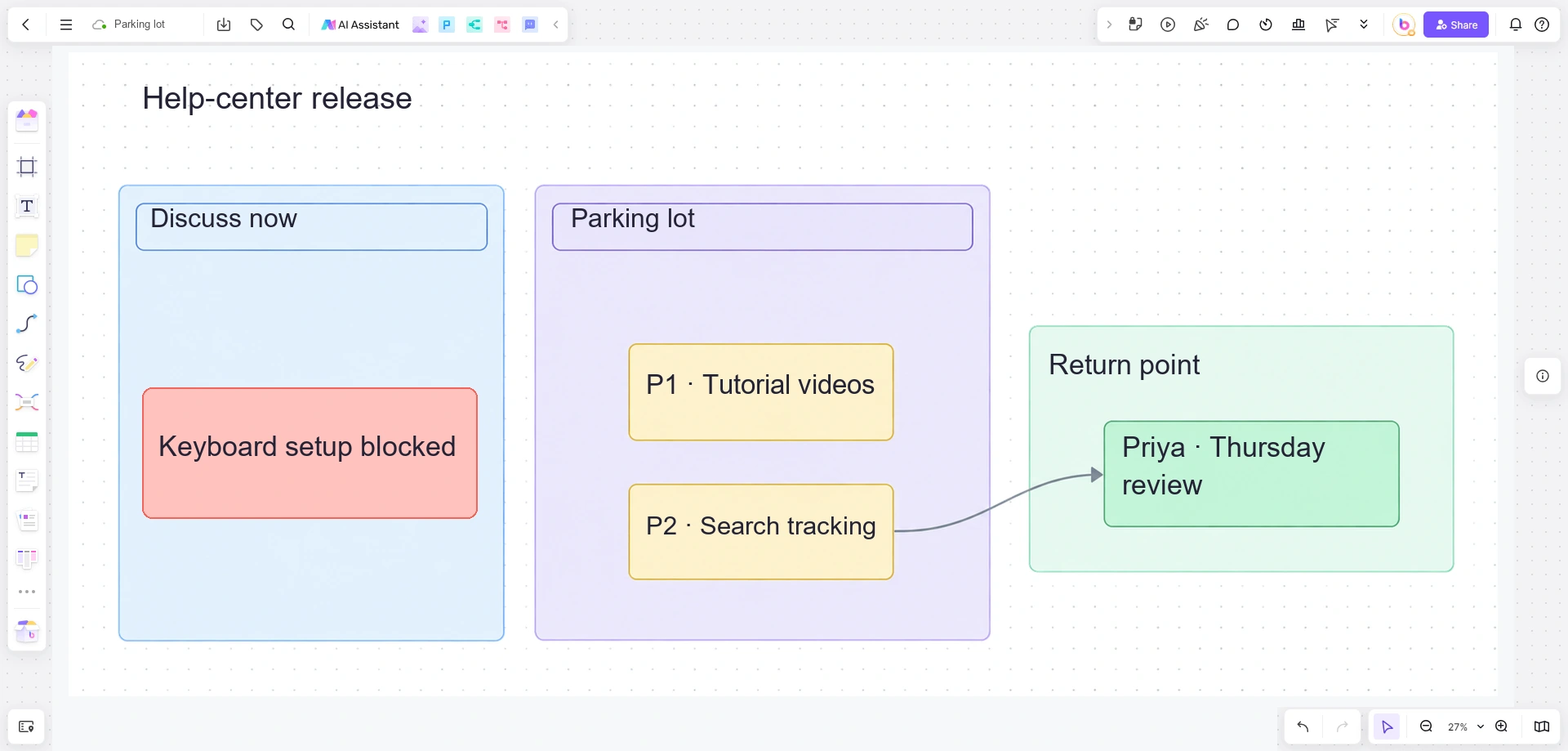
These are areas and notes you arrange on the board. The facilitator still routes the work and checks the follow-up. Boardmix's shared editing and comments let participants clarify a note; they do not replace an agreement about responsibility.
What to do at the end of the meeting
Reserve a brief final review for the parking lot. Read each question, confirm its destination, and correct any misunderstanding. An item can return to the agenda, become a separate discussion, move into the team's backlog, or be declined with a stated reason. It does not have to become a task.
If no one can agree on a next step, label the item unresolved and name the person who will obtain a decision. Avoid “we will revisit this” without saying where or when. At the next relevant meeting, start by reporting what happened to the items carried forward.
For your next session, open Boardmix, write the decision the group needs to make, and add a small parking area beside it. Start with the first real interruption; capture the question clearly and agree on its return point.