The cost of switching online whiteboards is more than the new subscription. It combines one-time migration effort, recurring destination cost, contract overlap, training, board rebuilding, integrations, support, and the productivity work the new platform may save. This TCO worksheet helps teams compare those inputs before a renewal, pilot, or migration decision.
The Cost of Switching Online Whiteboards: TCO Model
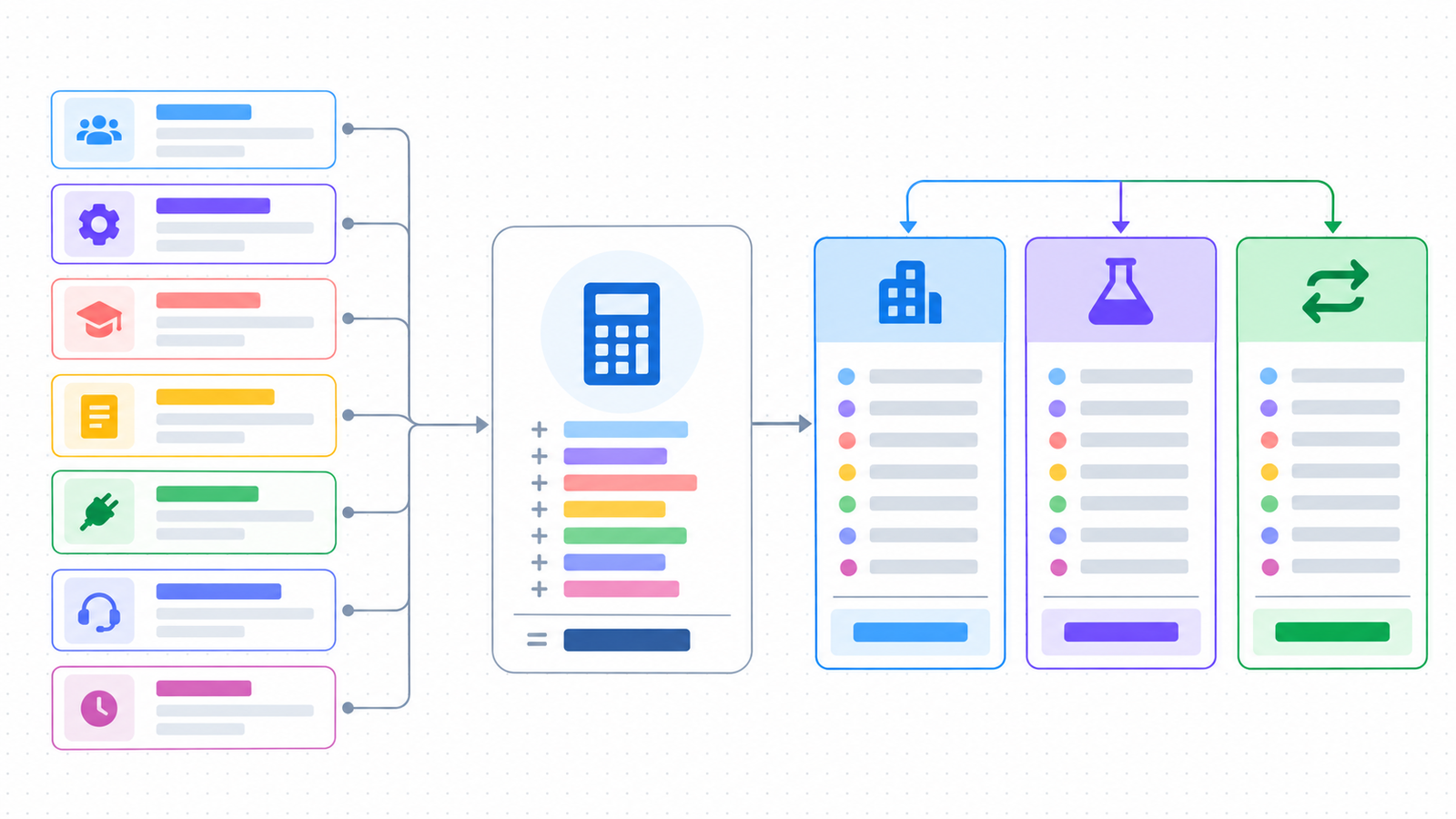
Start with a baseline: calculate what the team will spend if it stays, including the current subscription, administration, support, and known renewal changes. Then compare the same horizon for a pilot or switch.
Year-one Switch TCO versus Stay = one-time transition costs + contract overlap or exit costs + first-year destination operating cost − avoidable current-state cost.
Three-year Switch TCO versus Stay = one-time transition costs + contract overlap or exit costs + three years of destination operating cost − three years of avoidable current-state cost.
Payback period = one-time transition costs ÷ monthly net savings, when monthly net savings is positive. Keep destination TCO, migration cost, and the Stay baseline as separate outputs so a lower subscription price cannot hide a high transition burden.
Use the same input definitions for Stay, Pilot, and Switch. Normalize annual and monthly billing, role types, minimum seats, guest rules, limits, support, and add-ons before comparing vendors.
| Bucket | Examples | When it matters |
|---|---|---|
| Subscription | Paid members, guests, storage, AI, support, enterprise options | Every scenario |
| Administration | Inventory, access reviews, workspace rules, reporting | Large or regulated teams |
| Migration | Exports, imports, repair, rebuild, link updates | Existing board library |
| Training | Orientation, role training, documentation, support hours | New interface or workflow |
| Integrations | API changes, embeds, webhooks, replacement connectors | Connected workflows |
| Downtime and opportunity cost | Paused work, duplicate entry, delayed projects | Active projects and deadlines |
Normalize Prices Before You Compare Plans
A headline seat price is not a comparable cost until the billing unit and plan rules are clear. Record the following inputs for every candidate and use the same team shape in each scenario.
| Input | What to record | Why it changes the decision |
|---|---|---|
| Roles and seats | Members, editors, viewers, guests, external collaborators | A viewer or guest may be free in one plan and billable in another |
| Billing period | Monthly or annual price, renewal date, currency, taxes | A monthly headline price can be higher than an annual commitment |
| Plan limits | Editable boards, storage, AI, exports, history, file size | A low tier may force an upgrade or manual workaround |
| Security and administration | SSO, domain controls, audit, retention, support tier | Governance requirements can move the team to a higher plan |
| Existing suite value | Figma, Microsoft 365, Atlassian, or other bundled access | An included whiteboard changes the Stay baseline |
| Integrations and services | Connectors, API usage, implementation, vendor migration help | Replacement work can exceed the subscription difference |
Use the current Boardmix pricing page and each competitor's official pricing page as the source of record. Store the URL and checked date beside the input because prices, plan names, limits, and minimum seats change.
Separate One-Time and Recurring Costs
One-time costs happen because the team is changing platforms. Recurring costs continue after the switch.
| One-time | Recurring |
|---|---|
| Board inventory and exports | Members, guests, and plan allowances |
| Object repair and template rebuilding | Administration and access reviews |
| Integration replacement | Support, storage, AI, and service tiers |
| Training and change communication | Annual renewal, price changes, and growth |
| Parallel running and cutover | Ongoing productivity or time savings |
This split prevents a common error: treating a migration as free because the new subscription is cheaper. A platform can have a lower annual fee and a higher first-year TCO if the content and integrations require extensive rebuilding.
Build the Input Sheet
Assign an owner and a confidence level to every input. Use actual invoices, administrator time logs, board counts, and project estimates where possible. Mark uncertain values as ranges rather than hiding them inside a single precise number.
| Input | Formula or question | Owner | Actual value |
|---|---|---|---|
| Paid members | Required seats × annual price | Finance / admin | Enter |
| Guest and visitor use | Expected usage × plan rule | Workspace owner | Enter |
| Board inventory | Active + archive + templates | Migration lead | Enter |
| Rebuild hours | Boards needing repair × average hours | Project owner | Enter |
| Training hours | Participants × hours × loaded hourly cost | People lead | Enter |
| Integration work | Connections to replace × estimate | IT / platform owner | Enter |
| Downtime cost | Interrupted hours × people affected × loaded hourly cost | Finance / PMO | Enter |
| Savings | Avoided subscription, support, or manual work | Finance / sponsor | Enter |
Make the Worksheet Reusable
A worksheet is decision-ready when another person can reproduce the number. Add evidence and uncertainty fields instead of hiding assumptions in a single precise value.
| Input | Formula | Owner | Evidence or source | Low / base / high | Confidence |
|---|---|---|---|---|---|
| Seat cost | Seats x normalized annual cost | Finance / admin | Invoice or official plan URL | Enter range | High / medium / low |
| Board rebuild | Boards in scope x repair rate x hours | Migration lead | Representative-board test | Enter range | High / medium / low |
| Training | Participants x hours x loaded rate | People lead | Training plan and time log | Enter range | High / medium / low |
| Integration work | Connections x replacement estimate | IT owner | Dependency register or vendor answer | Enter range | High / medium / low |
| Downtime | Interrupted hours x people x loaded rate | PMO / finance | Cutover plan and project schedule | Enter range | High / medium / low |
| Avoidable Stay cost | Subscription or work removed by the switch | Sponsor | Renewal quote and current admin time | Enter range | High / medium / low |
Mark an input as unknown until it has an owner and a validation step. Unknown values should trigger a pilot or vendor question rather than being treated as zero.
Estimate Migration and Rebuild Effort
Use a sample of boards to estimate the library instead of assuming every board takes the same time. Classify each board as direct transfer, light repair, substantial rebuild, visual archive, or retirement candidate.
For example, an illustrative team might estimate 40 administrator hours at $75 per hour ($3,000), 120 rebuild hours at $60 ($7,200), 80 training hours at $50 ($4,000), and eight hours of downtime affecting eight people at $60 ($3,840). The one-time estimate would be $18,040. These values are examples for the worksheet, not a Boardmix or Miro price claim.
Record the assumptions beside the number. The estimate becomes decision-ready when another person can reproduce it from the board inventory and rate assumptions.
Include Hidden Transition Costs
Migration cost is not limited to exporting and importing boards. Add the work that appears around the cutover and retirement of the old platform.
| Cost area | Examples | How to validate |
|---|---|---|
| Contract and overlap | Remaining term, renewal notice, dual-running months, cancellation fees | Review the contract and renewal calendar |
| Decommissioning | Read-only retention, exports, deletion requests, legal hold | Ask legal, security, and the current vendor |
| Content repair | Objects, connectors, templates, comments, links, history | Test a simple, dense, and integration-heavy board |
| Change management | Training, office hours, documentation, support tickets | Assign role-based training hours and an owner |
| Governance | SSO, permissions, audit, data residency, backup, review | Map every requirement to evidence |
| Cutover risk | Paused work, duplicate updates, broken embeds, missed handoffs | Define a parallel period and rollback rule |
Some vendors offer paid migration services while a manual path may require administrators and end users to move content and reconfigure settings. Treat vendor assistance, internal labor, and the time to validate the result as separate inputs.
Compare Stay, Pilot, and Switch
| Scenario | Include | Decision question |
|---|---|---|
| Stay | Renewal, current administration, current support, known limitations | Is the cost of remaining lower than the risk and effort of change? |
| Pilot | Pilot plan, parallel work, training, test imports, evaluation time | Can evidence reduce uncertainty before a full commitment? |
| Switch | One-time migration, destination subscription, rebuilds, support, cutover | Does the long-term benefit justify the transition cost? |
A pilot is often the cheapest way to improve the estimate. It can reveal whether the largest cost is board rebuilding, user training, permissions, an integration, or a contract constraint. Do not label a pilot a success only because participants like the interface.
Build a Three-Year Scenario
The following examples are illustrative calculations, not Boardmix or competitor price claims. Replace every input with a dated invoice, official plan page, or measured pilot result.
| Team shape | Illustrative inputs | Year-one incremental TCO vs Stay | Three-year incremental TCO vs Stay | Payback signal |
|---|---|---|---|---|
| 10-seat team | $120/month Stay; $80/month destination; $2,000 transition | $1,520 | $560 | 50 months; no three-year payback |
| 25-seat team | $300/month Stay; $200/month destination; $8,000 transition | $6,800 | $4,400 | 80 months; validate before switching |
| 50-seat team | $900/month Stay; $500/month destination; $10,000 transition | $5,200 | -$4,400 | 25 months; positive after payback |
These scenarios show why “cheaper per seat” is not enough. A team should switch only when the evidence supports the assumed repair rate, the destination meets governance requirements, and the payback period fits the business horizon.
When Switching Is Not Worth It
A responsible TCO worksheet should be able to recommend staying or running a limited pilot. Consider staying when the current platform already supports the required workflow, the contract cost is lower than the transition burden, or a mandatory integration or governance control has no validated replacement.
| Path | Use it when | Evidence required |
|---|---|---|
| Stay | The current workflow is adequate and switching has no credible payback | Stay baseline, renewal terms, and known limitations |
| Pilot | The decision depends on unknown repair, adoption, or governance inputs | Representative board, task script, and acceptance criteria |
| Split | Only certain teams or board types benefit from a new platform | Board classification and separate ownership rules |
| Switch | The destination passes mandatory tests and long-term value exceeds transition cost | Validated migration, TCO, payback, and cutover plan |
Link this decision to the Miro stay-or-switch framework and the 30-day alternative pilot guide so the financial model and operational test use the same decision criteria.
Run Sensitivity Checks
Change one assumption at a time and observe the decision. The most useful checks usually include:
- Seat growth over the next renewal cycle.
- The percentage of boards that need manual repair.
- Average rebuild hours for dense or integration-heavy boards.
- Training time for occasional contributors and external guests.
- Integration replacement cost and support ownership.
- Downtime during the cutover window.
- Price or plan changes at renewal.
If a small change in one assumption flips the decision, the decision is sensitive. Carry that uncertainty into the pilot plan and assign someone to validate it.
Validate the Numbers with a Representative Board
Use a real but controlled board sample to replace estimates with evidence. Record the object mix, export format, transfer path, elapsed time, repair minutes, permission work, comments, links, and integration changes. Keep the source board unchanged and retain the validation log.
The Miro migration checklist provides the inventory, backup, permissions, template, integration, pilot, and rollback checkpoints. The Miro-to-Boardmix import guide explains the editable import path and the visual-reference fallback. Use both to replace generic migration assumptions with board-level observations.
Record migration evidence, not only an estimate
For each representative board, label the result as transfers as editable, transfers with visual changes, preserves a visual reference only, or requires rebuilding. Record object counts, repair minutes, permissions, comments, links, history, and integrations. A single success percentage hides where the work is concentrated.
| Measure | Record | Decision use |
|---|---|---|
| Board inventory | Active, archive, template, and retirement candidates | Sets the migration scope |
| Object fidelity | Objects present, editable, visual-only, or missing | Sets repair and rebuild effort |
| Context retention | Comments, links, history, decisions, and attachments | Sets retention and acceptance rules |
| Access and integrations | Members, guests, embeds, APIs, and connectors | Sets governance and replacement work |
| Elapsed effort | Import, repair, review, training, and cutover hours | Replaces assumptions in the TCO model |
Keep the source board unchanged and retain the validation log. The online whiteboard exit-readiness checklist is useful for documenting export, history, permissions, integrations, and contract questions.
Use TCO with a Product Comparison
A comparison page helps identify which workflows and plan features need testing. It should not be the worksheet itself. The Boardmix vs Miro comparison and Boardmix, Miro, and Mural comparison cover product fit and pricing context; this worksheet adds the people, content, integration, and opportunity costs around the subscription.
Also test whether an existing Figma, Microsoft 365, or Atlassian subscription already covers part of the required whiteboard workflow. Suite consolidation can change the Stay baseline, while a standalone tool can add integration and security maintenance even when its seat price looks lower.
When you compare a destination, keep the same board sample and task script for every vendor. A lower price is meaningful only when the team can complete the same work and meet the same governance requirements.
Where Boardmix Fits in the Worksheet
Boardmix can be evaluated as the destination for a bounded test: import a representative board, run one complete workflow, validate access and export, and record the repair effort. Use the current Boardmix pricing page for the subscription input and keep plan limits date-stamped in your worksheet.
TCO Worksheet FAQs
What is the biggest hidden cost when switching whiteboards?
It depends on the workspace, but board rebuilding, integration changes, administration, and duplicate work during parallel running are common sources of unplanned effort.
Should subscription price be included in migration cost?
Keep it separate. Subscription is usually a recurring destination cost; migration labor, training, rebuilding, and downtime are one-time or transition costs. Combining the categories can hide the timing of the cash and effort.
How accurate does a TCO worksheet need to be?
It should be reproducible and honest about uncertainty. Use ranges when the board inventory or rebuild effort is not known, then use a pilot to narrow the range.
Can a free plan make switching cost-free?
No. A free plan may reduce subscription cost, but it does not remove administrator time, training, rebuild work, integration work, or opportunity cost.
What should a three-year TCO include?
Include the one-time transition, contract overlap or exit, destination operating cost, avoidable Stay cost, ongoing administration, support, and measurable productivity savings across the same 36-month horizon.
What is the difference between migration cost and TCO?
Migration cost is the incremental burden of changing systems. TCO adds that burden to the destination's operating cost and compares it with the Stay baseline over a defined period.