Affordable AI-Powered Collaboration Starts Here! Go Pro for Less🎉
Lifetime plans start at just $99/seat, upgrade today and save big for your team.
Shop Now
activity banner
logo logo
Product
Solutions
Bring teams together

Run workshops, plan projects, and work with colleagues on a shared whiteboard.

Explore collaborative work

Boardmix for Education

An online whiteboard for education

Teach a concept, develop an argument, or plan a group project on a shared canvas. Give learners a place to connect ideas and show their thinking.

Free tool access for education

Illustration of learners connecting ideas around a shared visual workspace

Free tools, activated by email

Tell our team about your educational use and the account you want to activate. You can explore Boardmix with a regular free account first.

Standard free AI credits

Education access includes the basic AI credits of a regular free account. No additional AI credit package is included.

Learning takes more than a blank page

Explain, discuss, and build together

Use text, sticky notes, diagrams, images, and comments to make the reasoning behind an answer visible. A board can hold individual notes and the work a group develops from them.

Connect ideas

Build a study map

Start with a question or a concept. In a mind map, separate definitions, examples, evidence, and questions into branches. Add source links where they support an idea.

For a reading seminar

Put the author’s central claim in the middle. Use branches for supporting passages, counterarguments, and points to discuss.

Compare perspectives

Run a visual discussion

Ask learners to add their responses before discussing them together. Group related notes, compare different explanations, and record the question the group still needs to answer.

For a research class

Create areas for observations, interpretations, and missing evidence. Keep a conclusion beside the material that supports it.

Work as a group

Develop a shared assignment

Keep the project question, research, draft structure, and feedback on one board. Assign sections in the plan and leave comments beside the work that needs attention.

For a team presentation

Give each part a named owner, add sources beneath it, and use a separate area for the presentation order.

A learning activity you can adapt

From a story map to a writing workshop

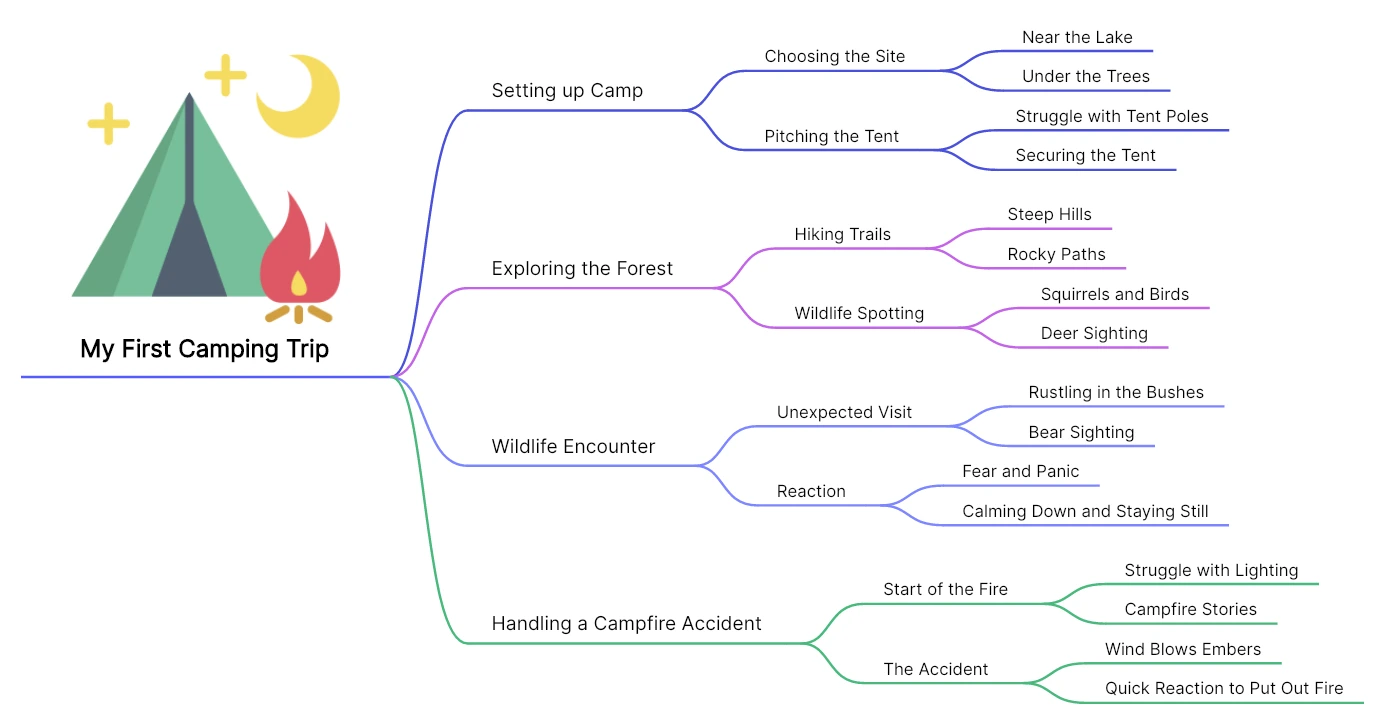
The map below organizes “My First Camping Trip” into events and details. Use this structure for a writing exercise: the result is an outline students can turn into a draft and revise with a partner.

A camping story mind map with branches for setting up camp, exploring the forest, a wildlife encounter, and a campfire accident
A Boardmix mind-map example: events branch into details that can become scenes in a story.
  1. Set the writing task

    Place the story title in the center. Add a brief instruction beside the map: tell the events in order and show how the narrator reacts.

  2. Develop the scenes

    Use branches for setting up camp, exploring the forest, the wildlife encounter, and the campfire accident. Add a location, an action, and a sensory detail beneath each.

  3. Invite specific feedback

    Ask a partner to comment on one missing detail and one unclear transition. Keep those comments beside the relevant branch instead of collecting them in a separate document.

  4. Turn the map into a draft

    Arrange the scenes in sequence, write the opening, and use the branches to develop paragraphs. Return to the board when revising the order or adding detail.

What learners leave with

A connected story outline, feedback tied to particular scenes, and a plan for the next draft. The same approach works for explaining a scientific process or structuring an argument.

For a different activity, browse education templates and adapt the structure to your learning goal.

Use AI to start a draft, then teach through the revision

Boardmix AI can help draft an outline or generate ideas for a topic. Give it the subject and the purpose, then have learners question, correct, and develop the result. The useful learning task is explaining what they kept and what they changed. The education program uses the standard free-account AI allowance.

Getting access

Send one request with the account details

A short introduction helps our team understand your educational work and identify the right account. The request button opens an email draft; you can also write directly to us.

support@boardmix.com

Include in your email

  • Boardmix account email
  • School or educational institution
  • Your role
  • Planned learning activity
  • Class or team setup, if relevant
  1. Identify your account

    Sign in or create a Boardmix account. Use its email address in your request so our team can find it.

  2. Describe your educational use

    Include your school or institution, your role, and the activity you want to support. Mention whether you are arranging access for yourself, a class, or a teaching team.

  3. Arrange activation

    Send the message to support@boardmix.com and follow our team’s setup guidance. You can continue exploring the regular free workspace while your request is discussed.

Questions about education access

Is Boardmix free for education?

Yes. Boardmix offers free tool access for educational use. Contact our team by email to request activation and describe how you plan to use it.

Who can use the education workspace?

Educators and learners can use Boardmix for teaching, study, and group work. Boardmix is intended for people aged 16 and over. See the privacy policy for the existing age requirements.

Does the program include extra AI credits?

No. It includes the basic AI credits provided to a regular free account, with no additional AI credit package.

Can learners contribute outside a live class?

A shared board can hold notes, diagrams, resources, and comments for the group to return to. Set the board’s sharing permissions for the people who need access.

Do I have to prepare a whole lesson before applying?

No. Describe the educational use you have in mind and include your account email. You can start with a regular free account and develop the activity as you explore the workspace.


Give your next lesson a shared workspace

Tell us how you teach or learn. We’ll help you arrange education access.

Request education access