Affordable AI-Powered Collaboration Starts Here! Go Pro for Less🎉
Lifetime plans start at just $99/seat, upgrade today and save big for your team.
Shop Now
activity banner
logo logo
Product
Solutions
Bring teams together

Run workshops, plan projects, and work with colleagues on a shared whiteboard.

Explore collaborative work

Boardmix for Nonprofits

A shared whiteboard for your nonprofit’s work

Bring staff, volunteers, and collaborators into the same plan. Map activities, work through decisions, and keep responsibilities visible as your project develops.

Free tool access for nonprofits

Illustration of a nonprofit team planning community activities on a shared visual workspace

Free tools for your organization

Email our team about your nonprofit and the account you want to activate. You can explore the workspace with a regular free account first.

A straightforward AI allowance

Nonprofit access includes the basic AI credits of a regular free account. No additional AI credit package is included.

The work behind your mission

Plan the activity. Explain the process. Involve the team.

A visual board gives people a common reference when they bring different roles and perspectives to a project. Combine notes, diagrams, images, links, and comments in the same workspace.

Community activities

Prepare an event together

Map the purpose, audience, activities, resources, and key dates. Put owners beside the work so staff and volunteers can see what they are taking on.

For a volunteer open day

Separate outreach, venue preparation, introductions, and follow-up. Add open questions beside the task they affect.

Service delivery

Make a process easier to explain

Use a flowchart to show how a request moves through your organization. Mark the decisions and handoffs that a new team member needs to understand.

For a support request

Map receipt, initial assessment, assignment, and follow-up. Include a path for a request your team needs to refer elsewhere.

Team decisions

Develop a project from shared ideas

Collect suggestions on a brainstorming board, group related proposals, and compare what each one needs. Record the choice and its practical implications.

For a new outreach activity

Place community needs, proposed activities, available resources, and open questions in separate areas before agreeing on a plan.

A plan your team can work from

Build a volunteer open-day board

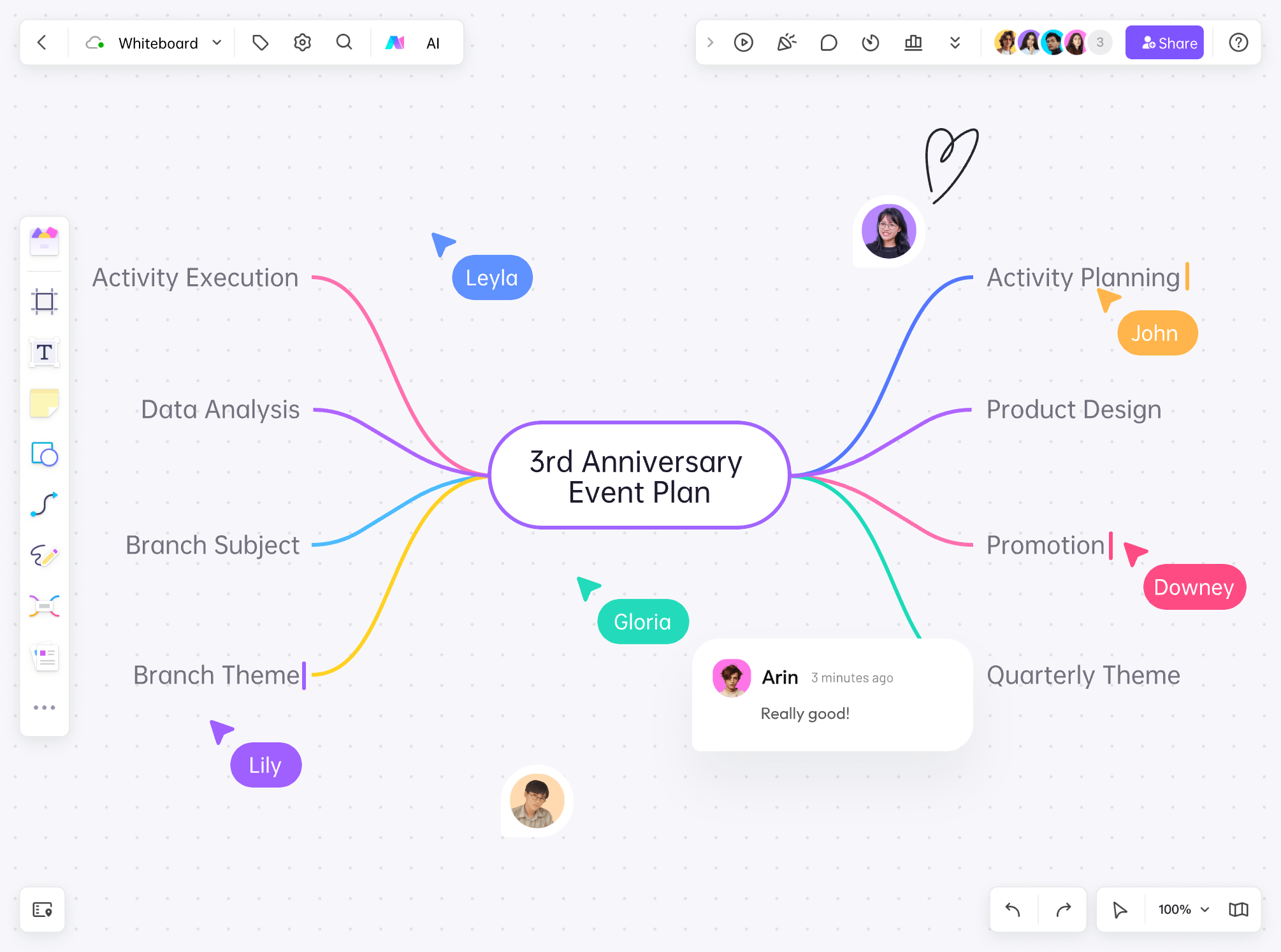
Use this example to prepare an event where potential volunteers meet your team and explore ways to help. The board brings the event’s purpose, preparations, responsibilities, and follow-up into one discussion.

A Boardmix event-planning mind map with named collaborators and comments beside the work
Product example: people edit and comment on an event-planning map. Adapt the branches to your organization’s own activity.
  1. Define the event

    Write the purpose at the top: help prospective volunteers understand the work and choose a suitable way to get involved. Note the audience, format, location, and event date.

  2. Lay out the preparations

    Create areas for invitations, venue and access, welcome activities, volunteer roles, and follow-up. Add a named owner and a due date to each preparation note.

  3. Work through a dependency

    If a proposed activity needs a trained facilitator, connect that requirement to the staffing plan. Decide whether to recruit a facilitator, adjust the activity, or use a different format.

  4. Prepare the handover

    Before the event, review the board with the people running it. Afterward, record unanswered questions and follow-up actions with owners so the next conversation starts from the actual plan.

What the team leaves with

An event outline, a preparation plan with owners, a visible decision about staffing, and a follow-up area. Everyone can point to the same plan when a date or responsibility changes.

Keep the planning board focused on activities and responsibilities. Use your organization’s appropriate systems for sensitive participant or beneficiary records.

Use AI for the first outline, and people for the decisions

Use Boardmix AI to draft an activity outline or suggest ideas for a planning discussion. Add the audience, purpose, and practical constraints to your prompt. Your team can then adapt the draft to its resources and knowledge of the community. The nonprofit program uses the standard free-account AI allowance.

Getting access

Introduce your nonprofit by email

Tell us what your organization does and which Boardmix account you want to use. The request button opens an email draft with the useful details already listed.

support@boardmix.com

Include in your email

  • Boardmix account email
  • Organization name
  • Website, if available
  • Your role
  • Planned use and team setup
  1. Identify your account

    Sign in or create a Boardmix account. Include the account email you want associated with nonprofit access.

  2. Describe your organization and use

    Share your organization’s name, your role, and the activity you want to organize. Add a website if available, and explain how your team plans to work together.

  3. Arrange activation

    Send your request to support@boardmix.com. Our team will respond about setting up access; follow that guidance for your account and team.

Questions about nonprofit access

Is Boardmix free for nonprofits?

Yes. Boardmix offers free tool access for nonprofits. Email our team to introduce your organization and request activation.

Does nonprofit access include additional AI credits?

No. You receive the basic AI credits available to a regular free account. The program does not include an additional AI credit package.

Can staff and volunteers use a board together?

Boardmix supports shared editing and comments. Set the board’s sharing permissions for the people involved, and mention your team setup when requesting access.

What should our organization use it for?

Use a board to plan an activity, explain a service process, discuss proposals, or organize project work. Keep notes, diagrams, resources, and decisions beside the work they relate to.

Can we try Boardmix before access is activated?

Yes. Explore the workspace with a regular free account. Use the same account email when you contact our team about nonprofit access.


Make room for the people behind your mission

Introduce your organization and tell us what you want to plan together.

Request nonprofit access