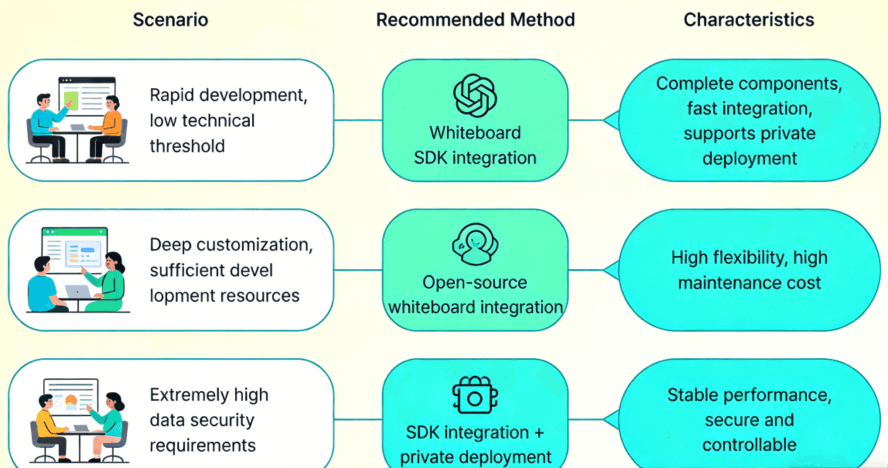
Whiteboard integration usually follows one of three paths: embed a commercial SDK, build on an open-source canvas, or deploy a privately hosted system. An SDK can reduce the amount of canvas and collaboration infrastructure a team must build; open source gives engineers direct control of the code but also transfers maintenance responsibility to them; private deployment is designed for organizations that need tighter control over where the service and its data operate. The right path depends on product scope, engineering capacity, data boundaries, and long-term ownership - not on a single feature list.
This guide explains what each path includes, where its hidden work appears, and how to choose with a practical architecture and pilot checklist.
What Does Whiteboard Integration Mean?
Whiteboard integration is the process of adding a shared visual canvas to another product or internal system so that users can create, edit, organize, and exchange visual information without leaving their primary workflow. The surrounding application may supply identity, navigation, project context, and permissions, while the whiteboard layer handles canvas interactions and visual objects.
Working definition: A whiteboard is integrated when its identity, data, permissions, and user journey operate as part of the host system rather than as an unrelated link to a separate tool.
Typical host environments include project portals, learning platforms, meeting tools, customer workspaces, and internal knowledge systems. The technical design should begin with the user journey: who opens the canvas, what context is passed in, who can edit it, where the content is stored, and what happens when access changes.
The Three Whiteboard Integration Paths at a Glance
| Path | Best fit | Your team owns | Primary decision risk |
|---|---|---|---|
| Commercial SDK | Products that need an embedded canvas and a defined integration surface | Host experience, identity mapping, business rules, and integration code | Vendor fit, extension limits, and lifecycle compatibility |
| Open-source foundation | Teams that require code-level control and can operate the complete system | Canvas changes, collaboration services, testing, security fixes, and upgrades | Underestimating ongoing engineering and operational work |
| Private deployment | Organizations with explicit infrastructure, network, or data-location requirements | Environment readiness, operational governance, and internal integration | Unclear responsibility across the vendor, platform team, security, and IT |
The paths are not always mutually exclusive. A privately deployed product may still expose an SDK, and an SDK pilot may precede a larger private deployment. Treat the table as a way to identify ownership, not as a promise that every vendor packages the options in the same way.
Path 1: Embed a Whiteboard SDK
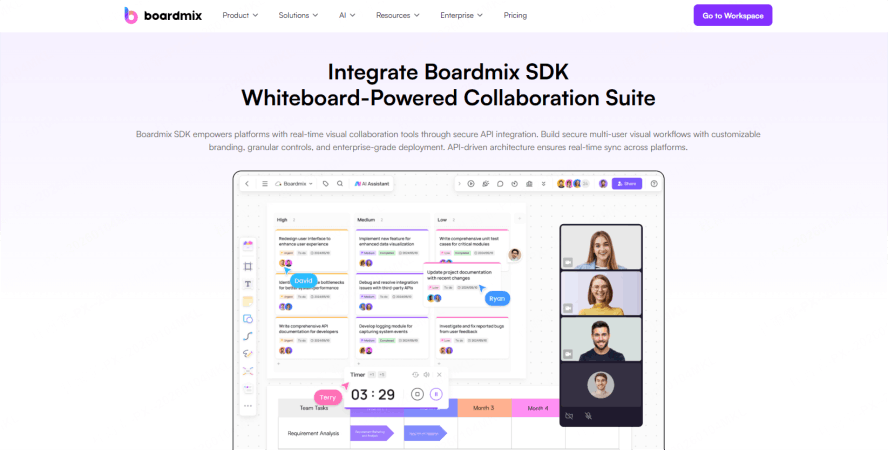
An SDK is appropriate when the host product needs a whiteboard experience but the team does not want to create every canvas interaction and collaboration service from the ground up. The host application still needs to decide how users enter the canvas, how a board maps to a project or record, and how permissions are enforced.
What to inspect before selecting an SDK
- Embedding model: Determine how the canvas is initialized, configured, resized, and destroyed inside the host interface.
- Identity and authorization: Document how host users, roles, guests, and revoked accounts map to board access.
- Data interfaces: Identify the events, import/export operations, object access, and file workflows the product actually needs.
- Extension points: List required tools, menus, branding controls, shortcuts, and host-to-canvas actions.
- Lifecycle support: Ask how versions, breaking changes, defect handling, and upgrade testing are managed.
Do not approve an SDK from a polished demo alone. Build a thin vertical slice that covers sign-in, board creation, one real collaboration flow, data persistence, access revocation, and error recovery. Teams evaluating a commercial option can review the published Boardmix SDK integration scope, while a broader comparison of whiteboard SDKs can help organize an initial shortlist.
Path 2: Build on an Open-Source Canvas
An open-source starting point can be a strong fit when code ownership is a firm requirement or when the experience must depart substantially from standard whiteboard behavior. Access to source code, however, does not automatically provide a production collaboration platform.
Separate the visible canvas from the system behind it
The canvas is only one layer. A production design may also need presence, concurrent-operation handling, storage, file processing, search, authorization, audit history, recovery, monitoring, and cross-browser testing. The team must decide which of these services already exist in the host platform and which must be designed specifically for the whiteboard.
Estimate ownership after launch
Include dependency updates, security review, regression testing, browser changes, performance investigation, accessibility work, and migration of stored board data. Licensing terms and notices also require review by the appropriate legal owner. Open source may remove a software license fee, but it does not remove implementation or maintenance cost.
A useful prototype should answer two questions separately: can the team create the desired interaction, and can the organization operate it safely over time? Passing the first test does not establish the second.
Path 3: Use Private Deployment
Private deployment moves the discussion from an embedded feature to an operated system. It is relevant when an organization has explicit requirements concerning network boundaries, environment control, data location, system integration, or administrative governance. Those requirements should be written before a vendor or architecture is selected.
A private environment still needs named owners for identity integration, secrets, certificates, backups, monitoring, incident response, upgrades, capacity review, and user support. Avoid treating "private" as proof of security or compliance by itself. Security depends on the implemented controls, operating procedures, and evidence that apply to the actual environment.
Organizations evaluating this route can review the available Boardmix private deployment options and compare the published scope with their own infrastructure and governance requirements.
Architecture Questions to Answer Before Development
1. User and tenant context
Define the identifier for a user, organization, workspace, project, and board. Decide which system is authoritative for each identifier and how account suspension or tenant separation is reflected in the canvas.
2. Permission boundaries
List actions such as view, edit, comment, share, export, duplicate, and delete. Map each action to host roles and specify whether access is checked only at entry or continuously during the session.
3. Content and file lifecycle
Document where board objects and uploaded files are stored, how long they are retained, how versions are restored, and what deletion means. Include export, backup, and migration requirements instead of assuming they can be added later.
4. Collaboration behavior
Describe what users should see during simultaneous editing, temporary disconnection, reconnection, conflicts, and failed writes. The acceptance criteria should focus on observable behavior rather than an unspecified requirement for "real-time collaboration."
5. Operations and support
Identify logs, health signals, alerts, support handoffs, maintenance windows, and upgrade ownership. A path that looks simple during a demo may become unsuitable if no team owns it in production.
How to Choose the Right Integration Path
- Write the user journey. Describe the exact entry point, task, collaborators, and expected output.
- Mark non-negotiable constraints. Separate legal, security, network, data, accessibility, and procurement requirements from preferences.
- Assign ownership. Name the team responsible for the canvas, collaboration services, infrastructure, upgrades, and support under each option.
- Build one representative pilot. Test a real workflow with real role boundaries and failure cases, not only a blank-board demo.
- Compare evidence. Score each option against the same acceptance criteria and record unresolved risks before approval.
Whiteboard Integration FAQ
Is a whiteboard SDK the same as an API?
No. An API usually exposes operations or data between systems, while an SDK normally packages code, interfaces, and development resources for embedding or extending a capability. A product may provide both, so teams should inspect the exact scope rather than use the terms interchangeably.
When is open source the better choice?
Open source is a credible choice when code control is essential, the license fits the intended use, and a capable team is funded to build and maintain the surrounding production services. It is a poor shortcut when that ownership has not been assigned.
Does private deployment automatically meet compliance requirements?
No. Deployment location is only one design decision. Compliance depends on the applicable rules, configured controls, operating processes, evidence, and review by the organization's responsible specialists.
What should a whiteboard integration pilot prove?
It should prove the highest-risk parts of the real workflow: identity, permissions, core editing, collaboration behavior, persistence, recovery, and operation inside the host interface. A pilot should end with recorded evidence and unresolved issues, not only stakeholder impressions.
Final Decision Rule
Choose an SDK when a defined integration surface meets the product need and reduces work the team does not want to own. Choose an open-source foundation when code-level control is essential and the organization accepts full engineering responsibility. Choose private deployment when infrastructure and data boundaries are explicit requirements and operational ownership is available. If those conditions are still unclear, postpone vendor selection and complete the requirements and pilot first.