What is a Process Chart and Where Can I Get Free Process Chart Templates?
A process chart shows the steps, decisions and handoffs in a workflow. Browse 11 process chart templates below, with a preview and a filled example for each scenario. Compare the approval loops, exception paths and handoffs to choose the closest match, then download its SVG file and adapt the roles, labels and decisions to your work.
For an online canvas, the Boardmix flowchart template guide shows the shapes and connections you can use. The SVG downloads below open as standalone diagrams. Edit their labels and shapes in an SVG-capable editor, or use a diagram as a reference while building a collaborative version in Boardmix.
Choose the closest workflow, replace the sample roles and actions, and label each decision path. These starter files describe the workflows shown here; add your organization’s own rules and exceptions before using them to direct work.
General Corporate Procurement Process Chart
The General Corporate Procurement Process outlines the steps an organization follows to acquire goods, services, or products. The chart makes requests, approvals, orders and receipt checks visible to the people responsible for them.
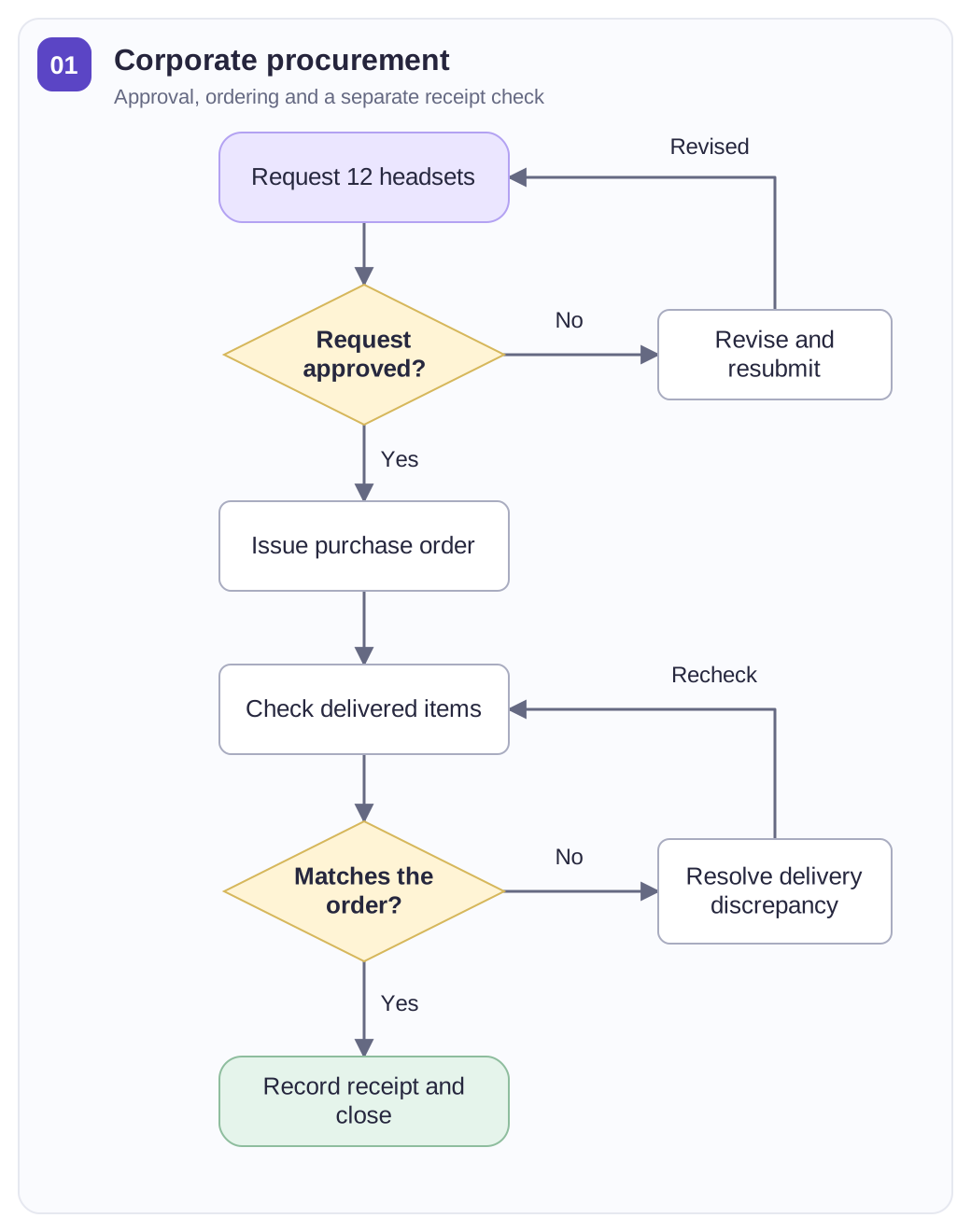
Use this chart to track:
- The requested items, quantity, purpose and required delivery date.
- The approver, decision and reason for returning a request.
- The purchase order, delivery count and owner of any receipt discrepancy.
Filled example: a team needs 12 headsets for new starters. The requester records the quantity and purpose; the approver accepts the request or returns it for revision. Purchasing issues the order, and the receiver compares the delivery with the purchase order. If only 11 headsets arrive, the receiver records the shortage and follows up with the supplier before closing the receipt. Keep the request reference, approval owner, ordered quantity and received quantity with the chart.
Use the approval branch to distinguish an accepted request from one that needs revision. Replace the requester, approver, purchasing owner and receipt check with the roles in your organization.
View the full-size general corporate procurement process chart · Download SVG
Bank Loan Approval Process Flow Template
The Bank Loan Approval Process Flowchart visually represents the steps and stages involved in processing a customer's loan application. This flowchart clearly outlines the sequence of the approval process for better understanding and control.
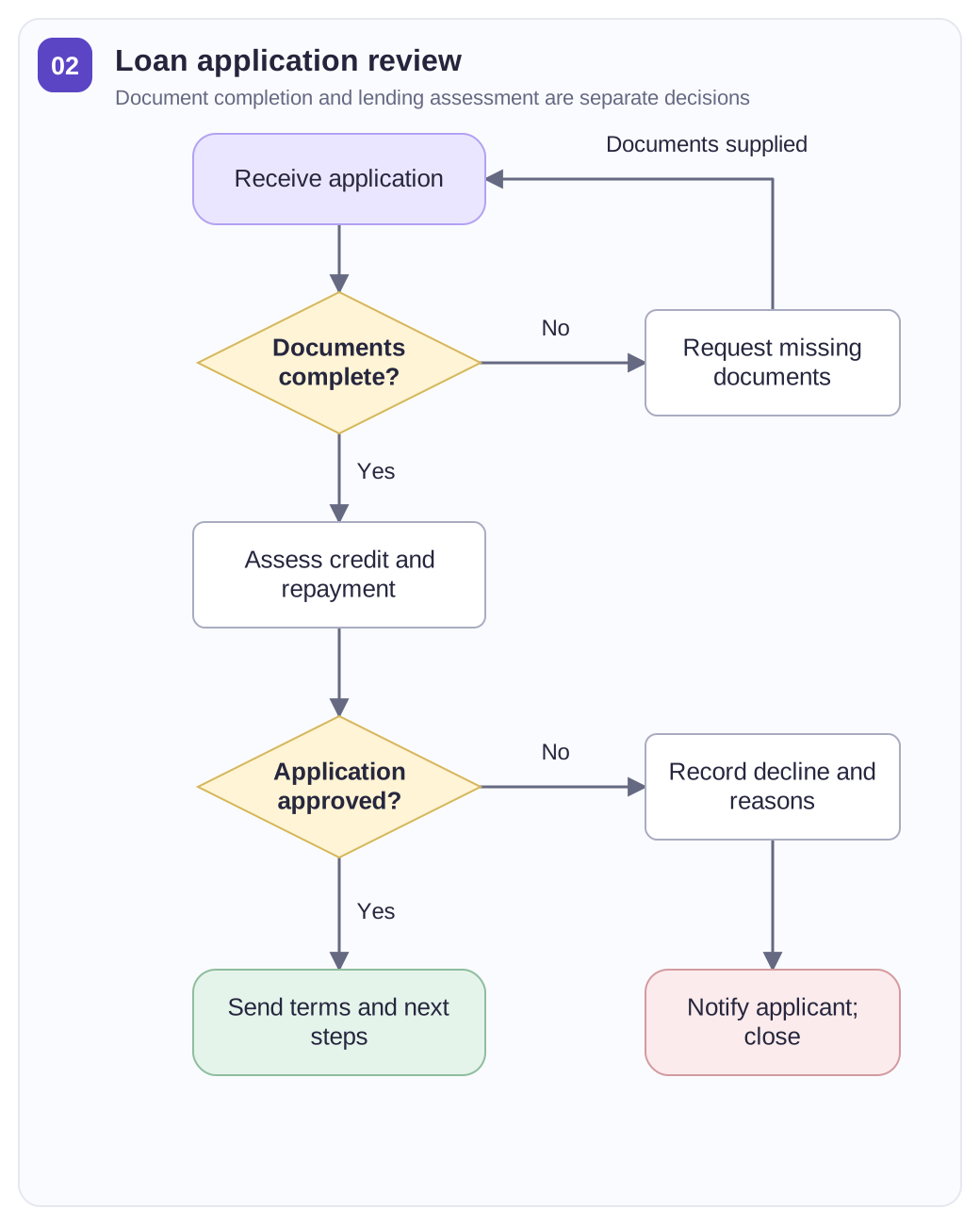
Details to keep with the application:
- The application reference and documents still required.
- The reviewer responsible for assessment and the separate approval decision.
- The applicant notification, decision date and next action.
Example: an applicant submits a loan request without income evidence. The document check returns it for completion; once the missing evidence arrives, the application proceeds to credit and repayment assessment. Approval leads to an offer of terms and next steps, while rejection leads to a decision notice. Fill in the application reference, missing documents, reviewer and notification owner. Keep document completeness separate from the lending decision: a complete file can still be declined.
View the full-size bank loan approval process flow template · Download SVG
Warehouse Management Process Flow Chart
The Warehouse Management Process Flowchart visually illustrates the flow of goods and processes within a warehouse. It outlines each step of inventory management, helping to optimize operations and reduce errors.
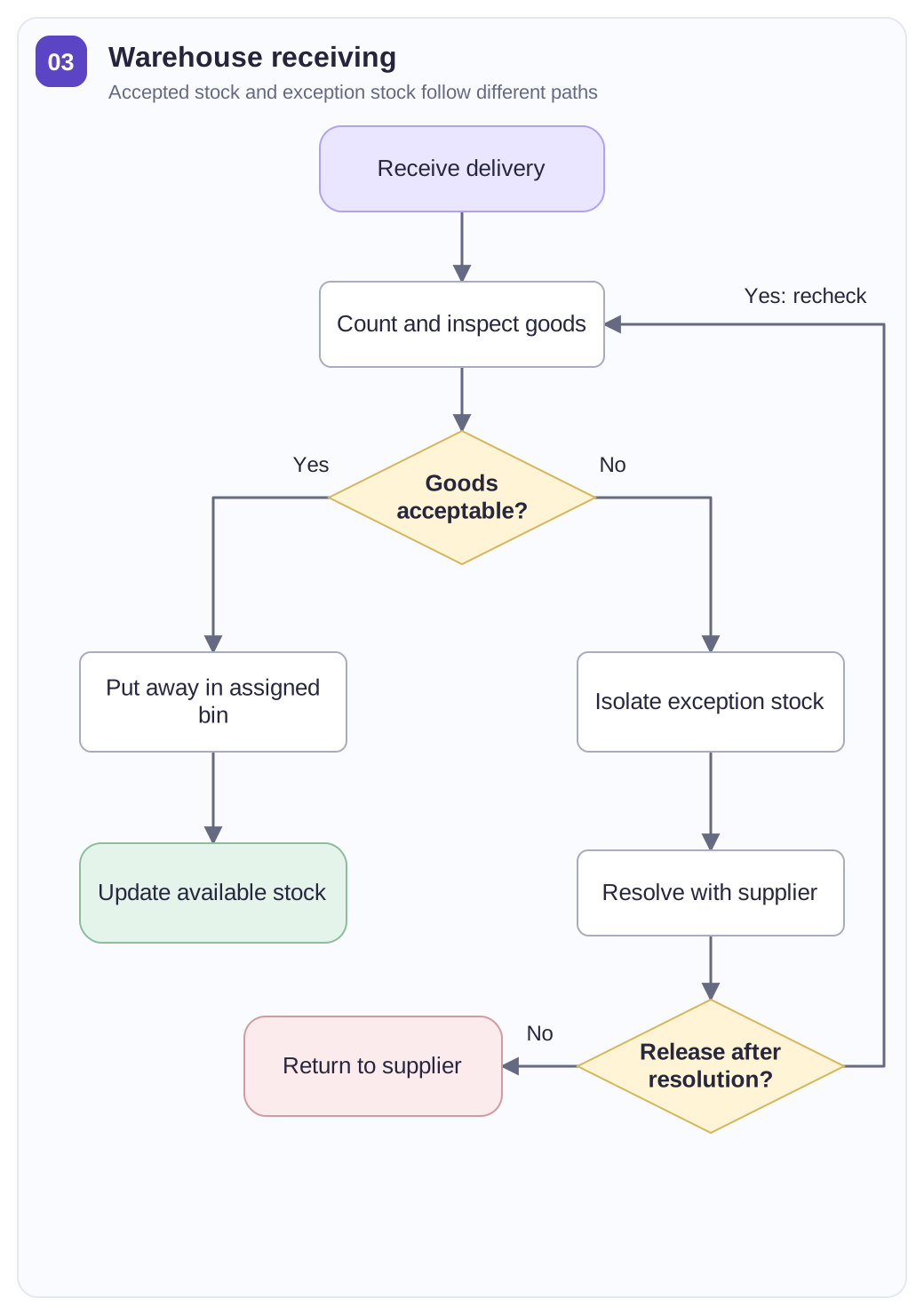
Receiving checks:
- Compare the delivery reference and expected quantities with the physical count.
- Record damage or mismatches and assign an exception owner.
- Confirm the storage location and accepted quantity before updating available stock.
Example: a delivery contains eight cartons, but one carton is damaged. Receiving records the delivery reference and inspection result, then separates the affected goods from stock available for use. The warehouse team resolves the discrepancy and either reinspects the goods or returns them to the supplier. Accepted goods move to an assigned storage location. Fill in the counted quantity, condition, exception owner and final disposition so a received delivery is not automatically treated as usable inventory.
View the full-size warehouse management process flow chart · Download SVG
Ordering/Inventory Transfer Process Chart
The Ordering/Inventory Transfer Process defines the steps involved in managing inventory orders and transferring goods between different locations. This process ensures inventory control and coordination across departments.
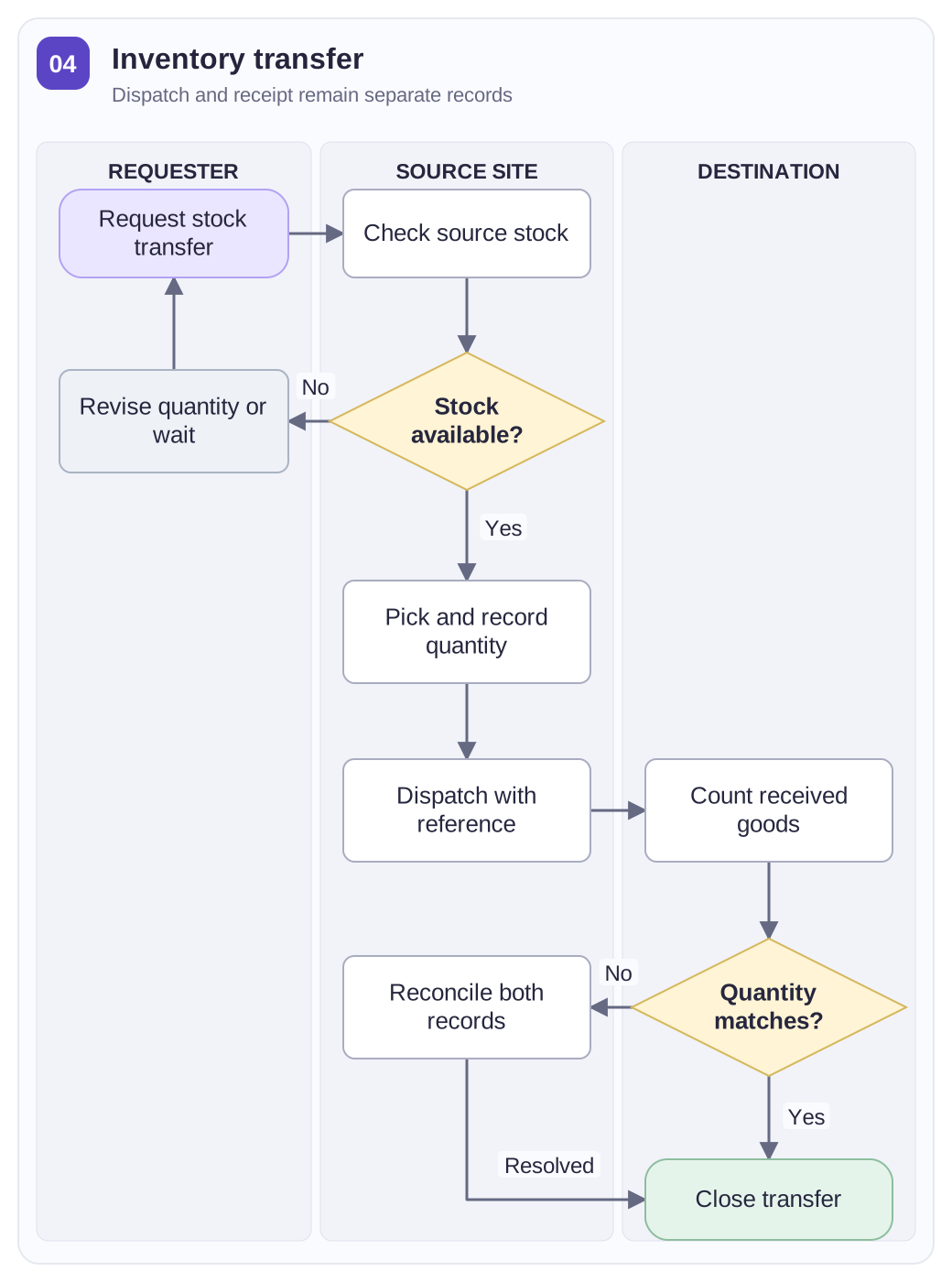
Handoff records:
- The requesting team, source location, destination and agreed quantity.
- The dispatch record and person releasing the goods.
- The destination count, receiving owner and resolution of any difference.
Example: Location B requests 20 keyboards from Location A. The source confirms availability, picks the keyboards and records the dispatch quantity; the destination signs for the actual count. If B receives only 18, both locations compare the packing and receipt records before closing the transfer. Keep the request reference, source, destination, quantities and handoff owners on the chart. The three lanes separate the request, physical dispatch and receipt confirmation.
View the full-size ordering/inventory transfer process chart · Download SVG
Key User Journey Flowchart Template
The Key User Journey Flowchart outlines the main steps a user takes when interacting with a system or application. This flowchart helps to visualize user interactions, making it easier to optimize the user experience.
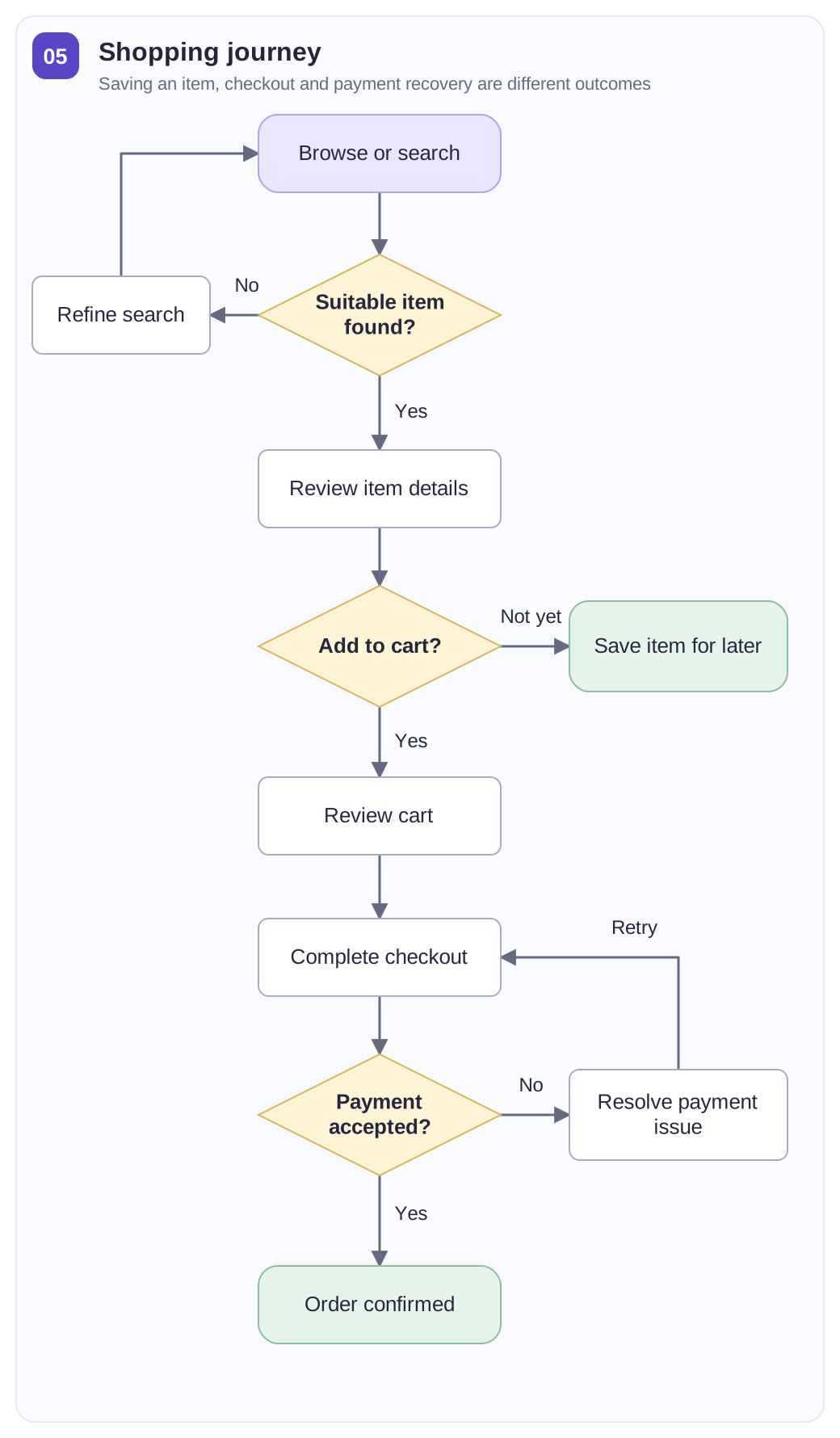
Questions the journey should answer:
- Where does the shopper enter the journey, and which item are they considering?
- What leads to adding an item to the cart or saving it for later?
- Which event marks completed checkout rather than continued browsing?
Example: a shopper finds headphones, opens the product page and decides whether to buy now. An unsuitable result sends them back to search; a saved item supports a later visit. Adding the headphones to the cart leads to checkout, where a failed payment returns to payment details and a successful one reaches order confirmation. Fill in the entry point, product-page touchpoint, decision question and completion event. The branches distinguish continued browsing, saved interest and an actual purchase.
View the full-size key user journey flowchart template · Download SVG
User Account Deletion Process Chart
The User Account Deletion Process defines the steps a user must take to deactivate and delete their account on a platform. It shows where identity checks, deletion steps, retention rules and customer notifications belong.
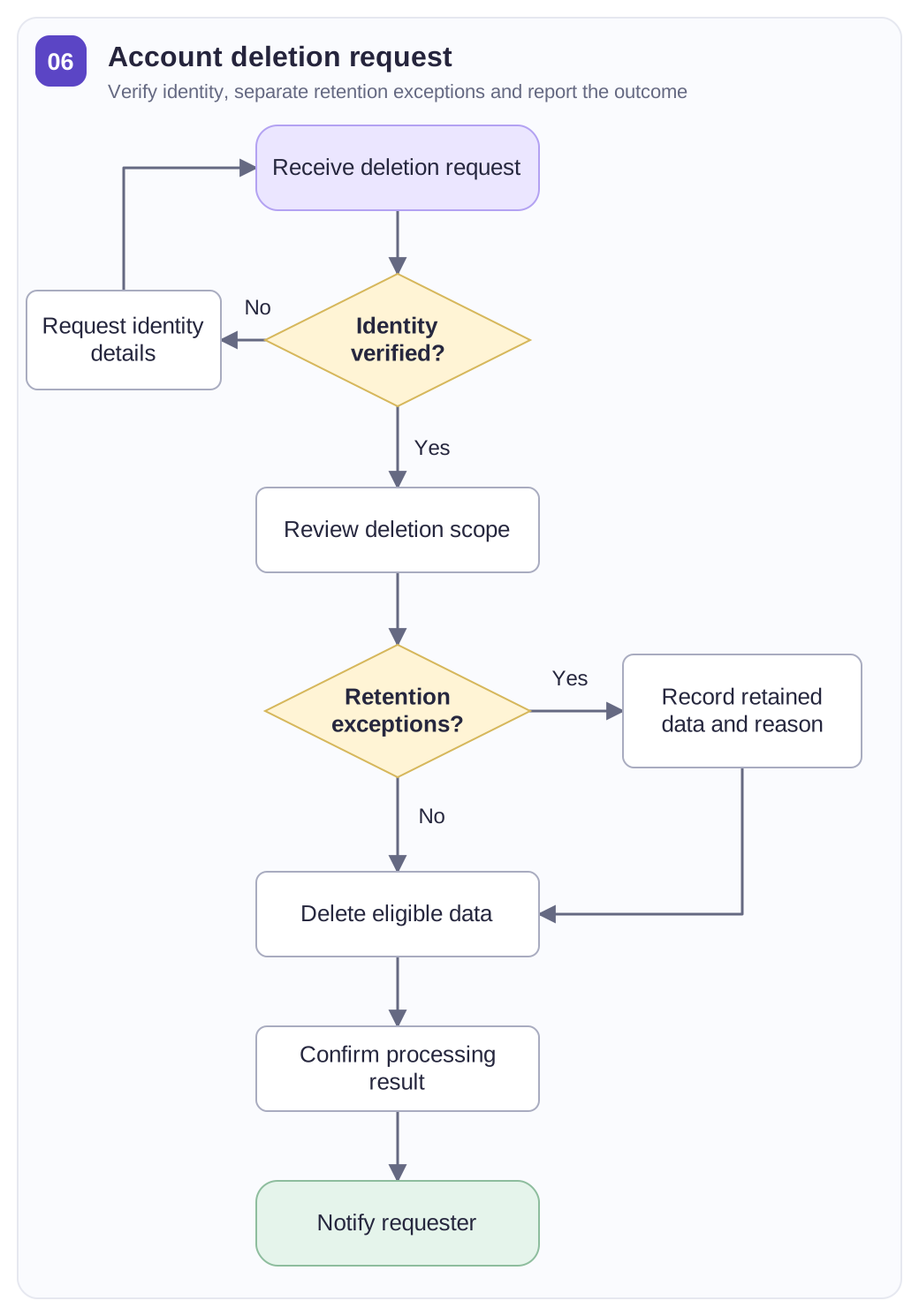
Information to carry through the request:
- The requester’s identity-check status and the account or data covered.
- Any retention exception, its documented basis and its responsible owner.
- The deletion outcome and the person who communicates it to the requester.
Example: a customer asks to remove an account. Support first verifies the requester, then identifies the account data covered by the request. If the applicable retention policy requires certain transaction records to be kept, those records take a separate documented path; the remaining approved data proceeds to deletion. Fill in the verification result, deletion scope, exception basis, responsible owner and notification status. The final message should describe the outcome, including any records retained under the applicable policy.
View the full-size user account deletion process chart · Download SVG
Management Recruitment Process Chart
The Management Recruitment Process outlines the steps taken during recruitment to hire the best candidates for a managerial position. A shared sequence makes screening, assessment and decision responsibilities easier to discuss.
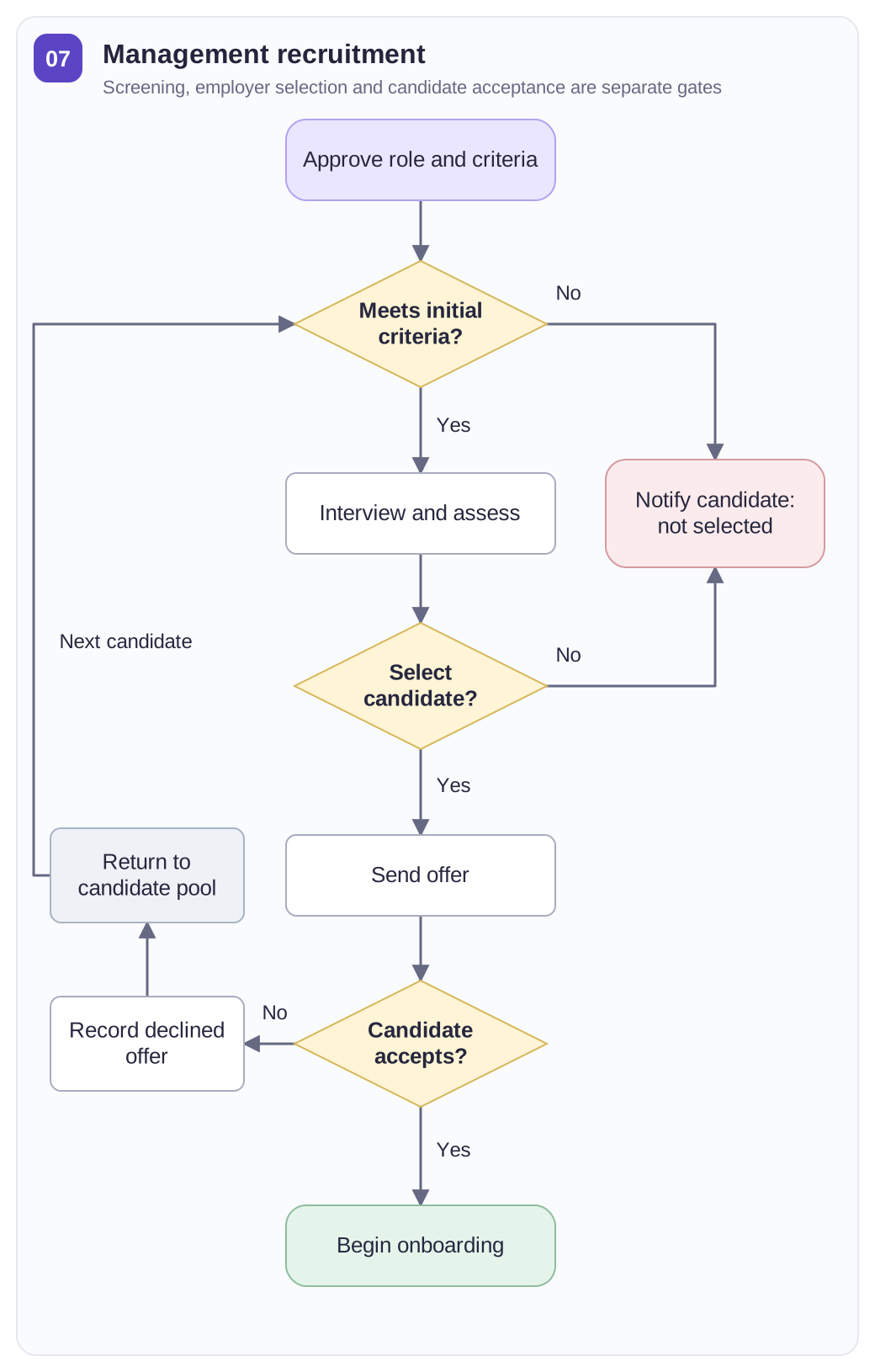
Hiring handoffs to make visible:
- Screening criteria and evidence from the candidate’s application.
- Interview participants, assessment outcome and hiring decision owner.
- Offer details, candidate response and the owner of onboarding or further recruitment.
Example: an operations-manager applicant passes the initial screen and completes an interview and assessment. The hiring team decides whether to make an offer. An accepted offer moves the candidate to onboarding; a declined offer returns the team to its candidate pool. Candidates not selected receive a separate notification. Fill in the role, screening criteria, interview owner, decision date and offer response. Keep the employer’s selection decision distinct from the candidate’s decision to accept.
View the full-size management recruitment process chart · Download SVG
Scholarship Confirmation Process Chart Template
The Scholarship Confirmation Process flowchart outlines the necessary steps for scholarship recipients to confirm and accept their awards. This process helps manage and execute the scholarship distribution efficiently.
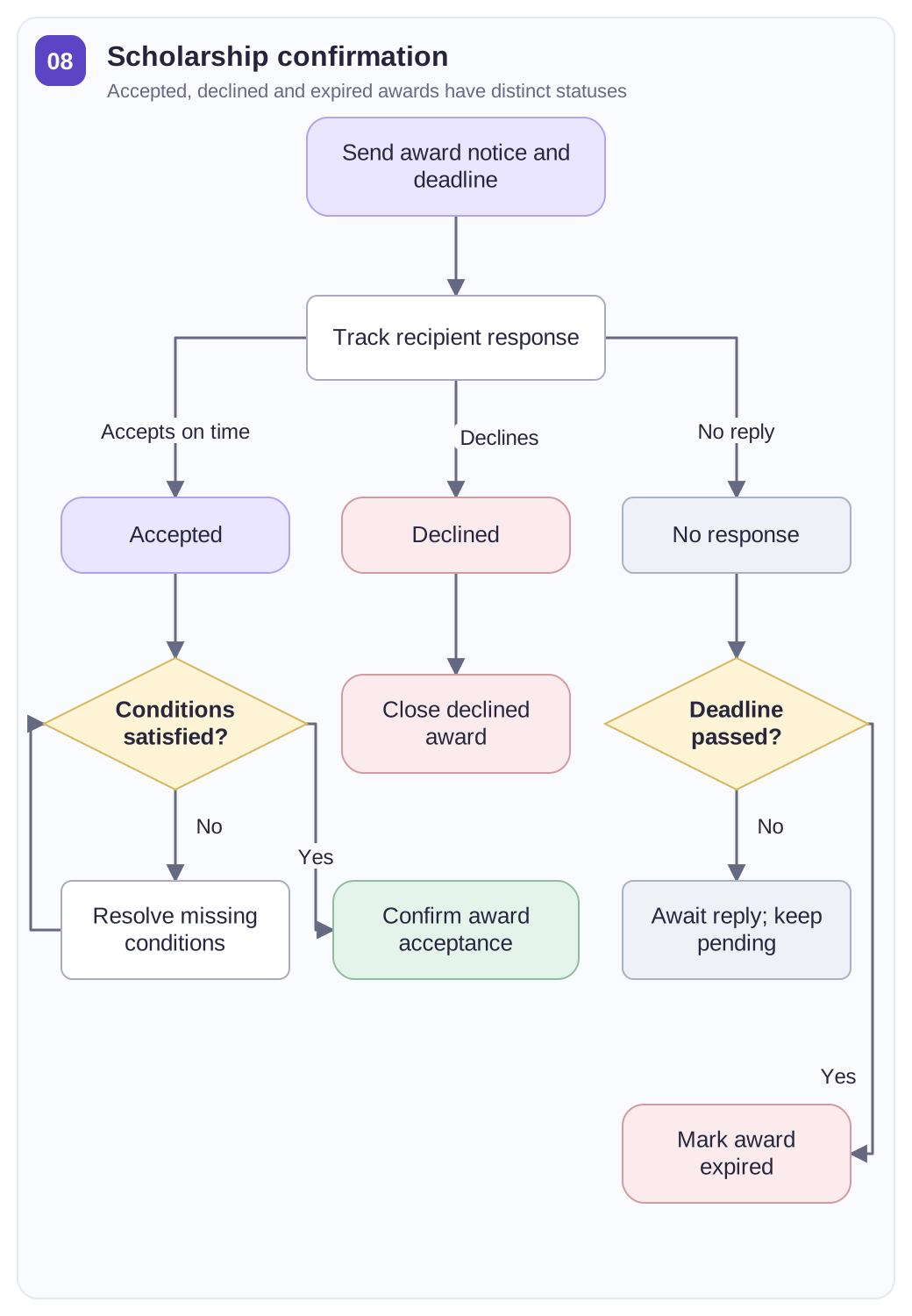
Confirmation fields:
- The award reference, recipient, acceptance deadline and response channel.
- The recipient’s response: accepted, declined or not received by the deadline.
- The conditions still to verify and the owner of the payment handoff.
Example: a scholarship recipient must respond by June 15. Acceptance before the deadline leads to a check of the award conditions, then confirmation for the payment team. A declined award closes that recipient’s case; no response by the deadline follows the expired-response path. Fill in the award reference, deadline, recipient response, outstanding conditions and confirmation owner. Keep confirmation and disbursement as separate stages so an accepted award is not mistaken for money already paid.
View the full-size scholarship confirmation process chart template · Download SVG
Product Requirement Process Flow Chart Template
The Product Requirement Process Flowchart details the stages from identifying product requirements to confirming and implementing them. It clarifies the relationship between each stage in the product management process.
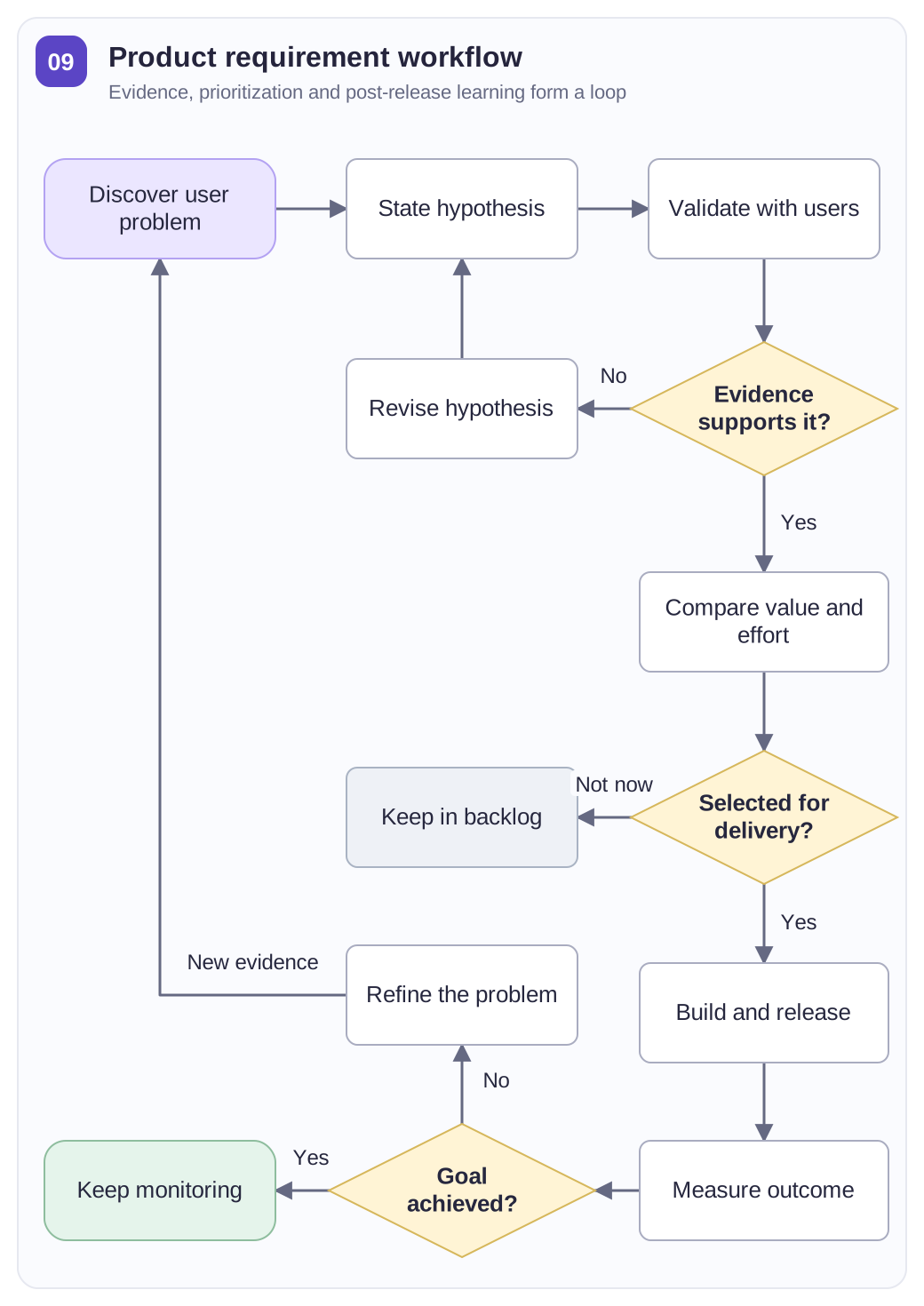
Work from these inputs:
- A specific user need and the evidence supporting it.
- Acceptance criteria, priority and a delivery owner.
- The released outcome and feedback used to revisit the requirement.
Example: users need to export a filtered order list as a CSV file. The product team tests that need and revises its hypothesis if the evidence does not support it. Supported requirements move to prioritization: selected work enters delivery, while deferred work stays in the backlog. After release, feedback shows whether the task is easier or the team should revisit the problem. Fill in the evidence, required columns and filters, acceptance criteria, owner and feedback source.
View the full-size product requirement process flow chart template · Download SVG
Healthcare Service System Process Flow Chart
The Healthcare Service System Process Flowchart shows how an administrative service moves from a request to scheduling, a handoff and follow-up. The example below focuses on appointment administration.
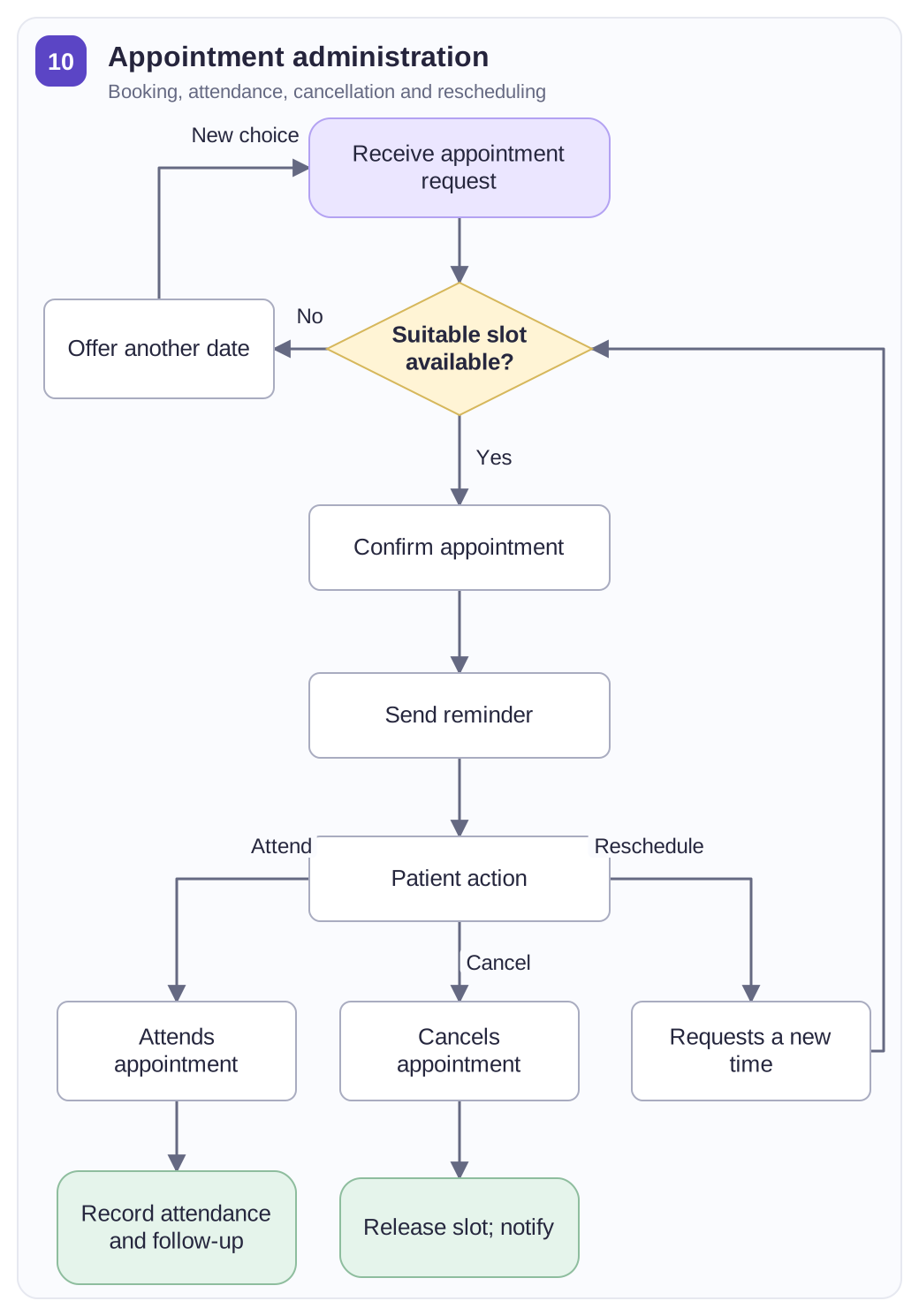
Scheduling details:
- The requested service, contact details and preferred appointment times.
- The booking owner, available slot and confirmation status.
- The administrative handoff and follow-up needed after booking.
Example: a patient requests a Tuesday-afternoon appointment, but no slot is available. The scheduling team offers other dates and confirms the patient’s choice before sending a reminder. Attendance leads to an administrative completion record; cancellation releases the slot, while rescheduling returns to date selection. Fill in the requested service, contact method, preferred time, booking reference and appointment status. The chart tracks booking and follow-up information, while clinical urgency and treatment decisions remain outside this administrative workflow.
View the full-size healthcare service system process flow chart · Download SVG
Business Workflow Process Chart Template
The Business Workflow Process Flowchart outlines the steps involved in executing business activities within a company. This flowchart improves task management, communication, and operational efficiency.
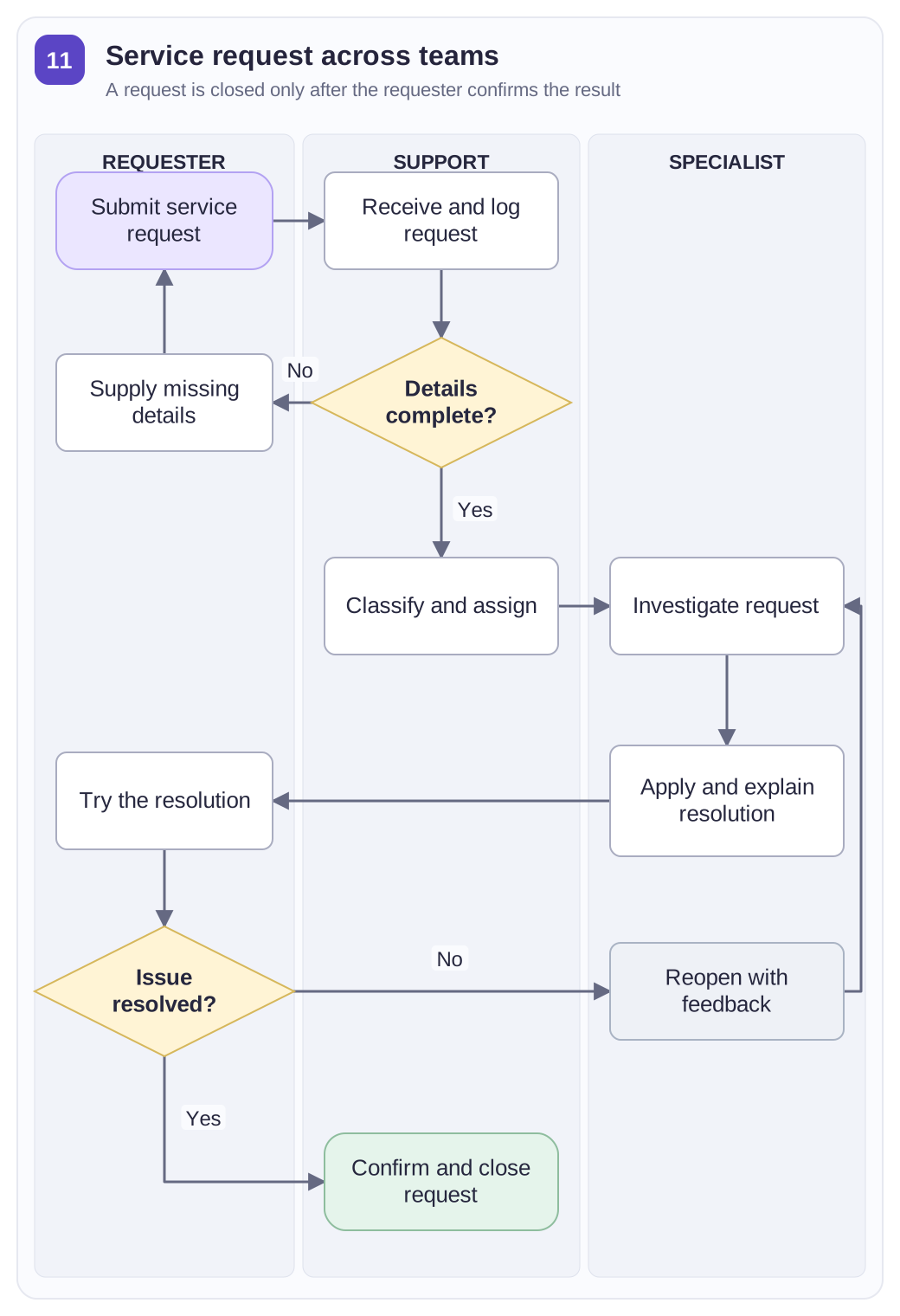
Assign the work by lane:
- Requester: describe the issue, supply missing details and confirm the result.
- Support: check the request, classify it and assign the next owner.
- Specialist: resolve the issue, record the outcome and handle reopened work.
Example: an employee reports that a shared folder is inaccessible. Support asks for the account and folder details before classifying the request and assigning a specialist. The specialist records the action taken, then the employee checks access. Confirmation closes the request; an unresolved result returns it to the specialist. Fill in the request reference, supplied details, assigned owner, resolution and acceptance result. The swimlanes show each handoff instead of treating several departments as one unnamed owner.
View the full-size business workflow process chart template · Download SVG