A purchase approval workflow takes a request from “we need this” to a recorded decision and a clear handoff to purchasing. The useful version shows three outcomes: approve, request more information, or decline. A missing delivery date should return to the requester; an approved request should reach the person who can place the order. Those are different paths.
Use the example below to map your own process in the Boardmix flowchart maker. It includes a completed equipment request, the decisions behind each route, and a worksheet you can copy onto a shared board. The example ends when purchasing receives an authorized request; receiving goods and paying invoices belong to the wider procurement process.

Start with the decision you need to authorize
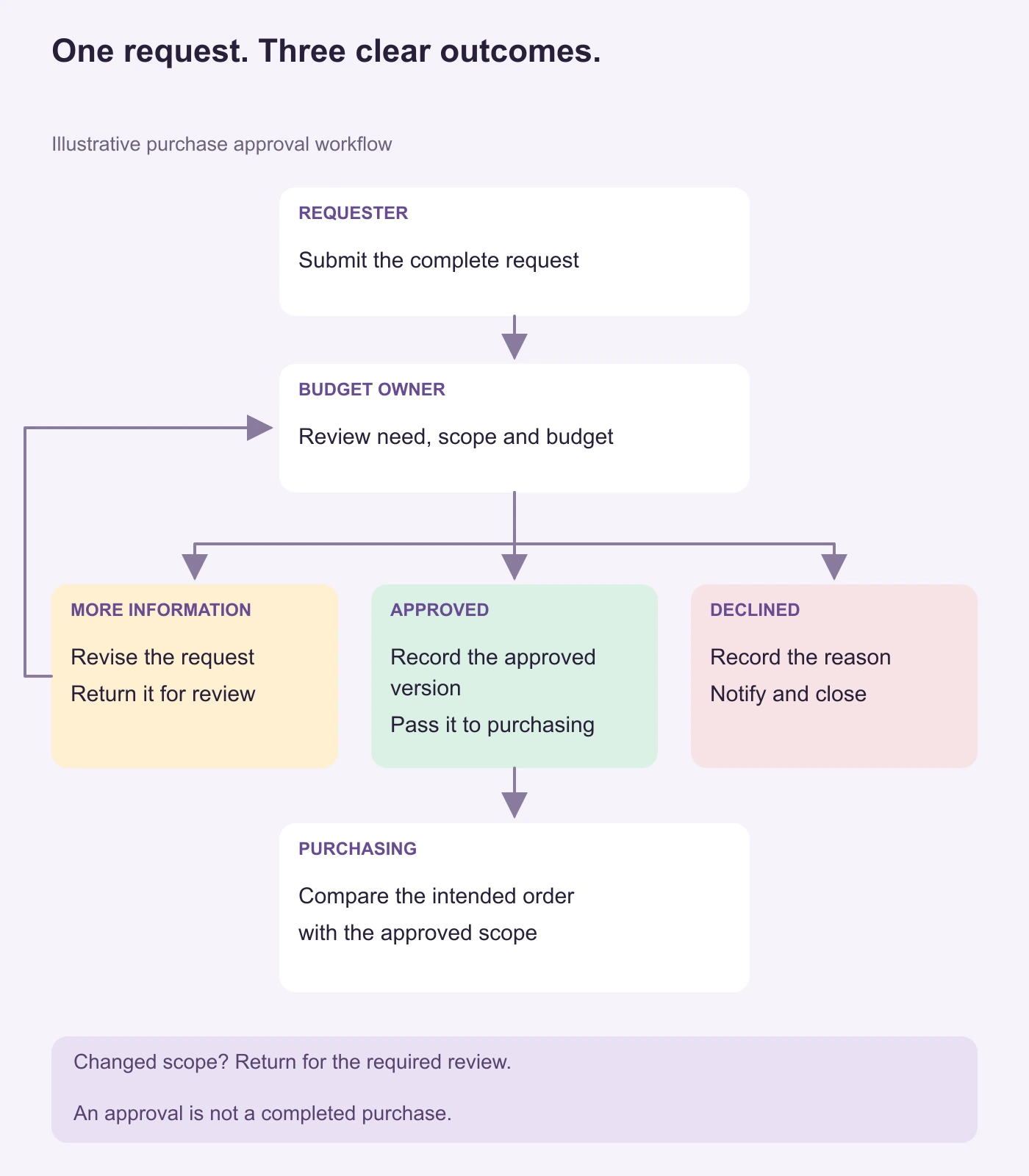
For this fictional example, an operations team wants four laptops for new starters. The requester explains the need, the budget owner decides whether to authorize the purchase, and purchasing checks that the order matches what was approved. These roles describe this example; your organization may assign them differently.
The boundary is request submitted → request declined or accepted by purchasing. “Approved” means permission to proceed within the recorded scope. It does not mean the supplier has accepted an order, the equipment has arrived, or an invoice is ready to pay.
- Requester: supplies the specification, quantity, business reason, needed-by date, and supporting quote.
- Budget owner: reviews the need, available budget, and their authority to decide.
- Purchasing: receives the approved version and checks the proposed supplier order against it.
Decide who covers an unavailable approver before drawing the flow. A reminder is not approval, and the absence of a response should not silently become a “Yes” arrow.
A completed purchase request
Below is PR-104, version 2, completed after the clarification described in the next section. The request, date, and supplier quote are fictional; the quoted amount is not a Boardmix price.
- Item and quantity
- Four laptops for new starters, each with 16 GB RAM and a 512 GB SSD.
- Reason
- Four new starters need equipment; the available loan devices are already assigned.
- Needed by
- 16 November 2026, before the new starters' induction.
- Cost and supplier information
- Supplier quote Q-204, revision 2: USD 4,000 total, including delivery and applicable taxes. Budget: operations equipment.
- Person requesting the decision
- The operations coordinator. The reviewer is the person authorized to approve this purchase from the operations equipment budget.
- Scope recorded on the approval route
- PR-104, version 2: four laptops with 16 GB RAM and a 512 GB SSD each, for USD 4,000 total under quote Q-204, revision 2. Delivery is required by 16 November 2026. Changes to the specification, total, or delivery date return for the review required by the organization's policy.
A statement such as “please approve some laptops” leaves the reviewer to reconstruct the purchase. Conversely, copying an entire contract into a diagram makes the map difficult to read. Keep the short task labels on the flowchart and link or attach the supporting material beside the relevant step.
Draw three routes through the approval decision
1. Return incomplete requests to their owner
In version 1 of PR-104, the needed-by date was missing. The budget owner returned it to the operations coordinator with the question “When must the laptops be available?” The coordinator confirmed 16 November 2026, added it to the request, and resubmitted the completed version 2 shown above.
Label this route More information, not “Rejected.” The request has not yet received a purchasing decision. Record what is missing so the requester can fix the problem without another round of guessing. The return arrow lands on “Revise request,” then rejoins review.
2. Pass the approved version to purchasing
On the approval route, the reviewer confirms their authority under the organization's policy and approves PR-104, version 2: four laptops with 16 GB RAM and a 512 GB SSD each, for USD 4,000 total under quote Q-204, revision 2, needed by 16 November 2026. Purchasing receives that version, the recorded decision, the actual approver's name, and the conditions. A detached message saying “looks good” is not enough to identify which quantity or quote was approved.
Purchasing compares the intended order with that scope. If the supplier can only offer a different specification or a changed total, the team returns the changed request for the review required by its own policy. The original decision should remain traceable; it should not silently authorize a materially different purchase.
3. Close a declined request with a reason
Suppose the budget owner instead decides that suitable devices can be reassigned internally. The decline route records that reason and notifies the requester. It ends at “Request closed,” rather than sending the request around an automatic resubmission loop.
The requester can propose a different solution later, but it needs the appropriate new or revised request. A decline is a decision about the current request; it is not the same state as a clarification question.
Copy this request and decision worksheet
Put the following fields next to the flowchart. They connect the compact diagram to the information each person needs.
- Request: identifier, version, requester, item or service, quantity, specification, business reason, needed-by date, quote, and budget.
- Decision: reviewer, date, outcome, approved scope or refusal reason, and any conditions.
- Clarification: missing information, who will supply it, and which review the revised request returns to.
- Purchasing handoff: recipient, request version received, supporting documents, and whether the proposed order still matches the approval.
- Changed scope: what changed, the version that replaces it, and the required review before proceeding.
For PR-104, “four laptops, 16 GB RAM / 512 GB SSD, needed by 16 November 2026” belongs in the request. “Version 2 approved for USD 4,000 under quote Q-204, revision 2, with changes returned for the required review” belongs in the decision. “Purchasing received PR-104, version 2, and quote Q-204, revision 2” belongs in the handoff. Keeping these separate makes it possible to tell whether a delay is waiting for information, waiting for a decision, or waiting for purchasing to accept the work.
Build the shared map in Boardmix
Open a board and arrange the three role names across the canvas. Place each action under the person who performs it. If you use swimlanes, the same principle applies: Microsoft's cross-functional flowchart guidance places a process step in the lane of its responsible function.
- Place the main actions. Add “Submit request,” “Review request,” “Record decision,” and “Accept approved request for purchasing.” Use rectangles for actions and a decision shape where the path branches.
- Name the outcomes on the connections. Write “More information,” “Approved,” and “Declined” on the respective routes. Color can reinforce these labels but should not replace them.
- Keep the worksheet beside the map. Fill it with PR-104 first. If your own team needs another review, such as a technical assessment, show its responsible role and the information it returns.
- Review one request together. Ask the requester to explain what they submitted, the approver to identify the version they reviewed, and purchasing to show what it received. Edit the map where their accounts differ.
The board documents and helps the team discuss the process. It does not, by itself, enforce spending authority or place orders. Use your organization's actual purchasing system and approval policy for those actions.
Open a Boardmix workspace to draw your process, or start with the layouts in the flowchart template collection.
Adapt the workflow without hiding exceptions
Several approvals are needed: show whether they happen in sequence or in parallel. If all are required, the path must wait for all required decisions; if only one authorized reviewer is sufficient, show that rule. Do not draw two arrows into purchasing and leave readers to guess.
An approver is unavailable: route the request to the authorized delegate or the agreed escalation point. Keep the request pending until a valid decision exists. Set timing expectations from the team's actual process, not from an arbitrary timer in the diagram.
A supplier changes the offer: compare the new scope with the approved version and route it to the review your policy requires. “Supplier unavailable” should not become permission to buy anything equivalent.
The request is urgent: draw the actual emergency procedure separately if one exists. Urgency is a reason to use an agreed route, not to omit the decision record.
Once the approval boundary works, connect its accepted output to the wider purchasing and procurement process. Keep receipt, invoice matching, and payment visible there, so the word “approved” has one clear meaning at each stage.
![[Full Guide] Cluster Diagram](https://cms.boardmix.com/images/image/article-images/cluster-diagram.png)