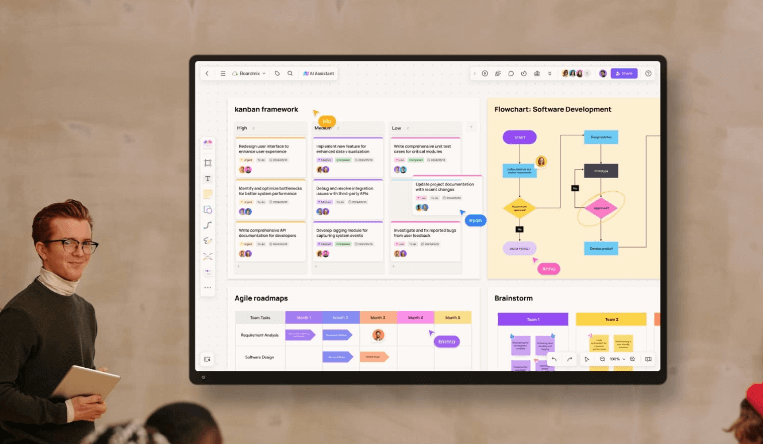
Every week, teams across product, engineering, and marketing pour hours of collective thinking into online whiteboards. Sprint retrospectives, go-to-market brainstorms, architecture deep dives — the ideas are sharp, the energy is real. Then the meeting ends. The canvas gets buried in a workspace no one revisits, and six months later, a new team starts from scratch solving the exact same problem.
This is the hidden cost of treating whiteboards as disposable. Building a whiteboard knowledge asset system is how forward-thinking enterprises stop that cycle — and start compounding the value of every session.
The Real Problem: Whiteboard Content Has a Half-Life of 24 Hours
Most teams assume their whiteboard content is “saved.” It technically is. But saved and usable are two very different things.
Think about what typically happens after a collaborative whiteboard session closes:
- The board lives in a personal workspace with no shared taxonomy
- No one tags it, titles it clearly, or links it to a project
- Institutional context evaporates when the facilitator changes roles
- Duplicate thinking happens across departments because no one can find what already exists
According to McKinsey research on knowledge worker productivity, employees spend nearly 20% of their workweek searching for information or tracking down colleagues who have it. Unstructured whiteboard content is a significant contributor to that drag.
The problem isn’t that teams think poorly on whiteboards. The problem is that no system exists to transform that thinking into retrievable, reusable organizational knowledge.
The Whiteboard Knowledge Asset System: A Framework That Actually Works
A whiteboard knowledge asset system is a structured approach to archiving, classifying, and templatizing online whiteboard output — so that creative and strategic work becomes a persistent enterprise resource rather than a one-time artifact.
It operates across three layers:
Layer 1: Capture with Intent
Most whiteboards are built for the moment. A knowledge-first approach builds them for the future. That means establishing consistent structural conventions before the session starts:
- Use named, color-coded zones (e.g., “Problem Space,” “Decision Log,” “Action Items”)
- Anchor every board to a project tag, team, and date
- Designate a five-minute close ritual where the team highlights the three most reusable insights
This isn’t overhead — it takes under ten minutes and dramatically increases downstream recoverability.
Layer 2: Classify and Archive into a Tiered Workspace
Once a session ends, content needs a home in a logical hierarchy, not a flat folder. A tiered workspace model works like this:
| Tier | Purpose | Example |
|---|---|---|
| Department Space | Top-level container by team | “Product Design — Q3 2026” |
| Project Space | Sub-level per initiative | “Mobile Checkout Redesign” |
| Session Board | Individual whiteboard artifact | “Sprint 12 Retrospective” |
| Template Archive | Extracted reusable frameworks | “Post-Mortem Template v2” |
The goal is to ensure any new team member can orient themselves within two clicks and locate relevant prior work in under three minutes.
Layer 3: Extract and Templatize
This is where the compound value kicks in. After any significant whiteboard session — a product strategy workshop, a risk assessment, a competitive analysis — ask one question: “What structural pattern here is worth repeating?”
That pattern becomes a template. The content is stripped out. The skeleton — the framework, the zones, the logical flow — is saved to a shared template library. The next team running a similar exercise starts from a proven structure, not a blank canvas.
Over 12 months, a single product team using this approach can build 15–30 reusable templates that accelerate every subsequent project.
Step-by-Step: How to Implement This System in Your Organization
Step 1: Audit Your Current Whiteboard Graveyard
Pull up your team’s whiteboard workspace and count how many boards have been accessed in the past 90 days. For most teams, the answer is sobering — often less than 20% of boards see any reuse. That baseline tells you the scale of the opportunity.
Step 2: Define a Naming and Tagging Convention
Standardize how boards are named. A simple formula: [Team] — [Project] — [Session Type] — [YYYY-MM]. Implement a mandatory tag set: project name, department, and content type (Brainstorm / Decision / Retrospective / Research / Template).
Step 3: Establish a Shared Template Library
Create a designated “Template Archive” space that all teams can access. Seed it with your five most-used session types. Assign one person per department as the template steward, responsible for reviewing new templates quarterly.
Step 4: Run a Monthly Knowledge Harvest
Once a month, schedule a 30-minute team review of the past month’s whiteboards. The agenda is simple:
- What did we produce that has lasting value?
- What frameworks from these boards could save another team time?
- What should be formally archived versus deleted?
This ritual transforms passive storage into active knowledge curation.
Step 5: Connect Whiteboards to Your Wider Knowledge Ecosystem
Templates and archived boards should link to your project management tools, document repositories, and decision logs. Cross-linking ensures that whiteboard artifacts aren’t siloed — they become part of the broader organizational memory. Boardmix’s private deployment environment supports API and SDK integration with existing enterprise systems, making this connection seamless.
Why Private Deployment Is Critical for Enterprise Knowledge Assets
For organizations operating in finance, healthcare, government contracting, or any sector with strict data governance requirements, there is a fundamental issue with storing strategic knowledge assets on third-party public cloud platforms: you don’t control the data.
Every sprint plan, competitive positioning map, and architecture diagram that lives on a public SaaS whiteboard is governed by someone else’s security posture. That’s an acceptable risk for a startup. It is not an acceptable risk for an enterprise holding sensitive IP.
Boardmix’s enterprise-grade private deployment solution addresses this directly:
- Full data sovereignty: All whiteboard data is deployed on your own servers or private cloud. Nothing leaves your firewall without authorization.
- Granular permission controls: Role-based access at the board, space, and organization level ensures the right people see the right content.
- Complete audit logs: Every edit, view, and export is logged — essential for compliance-heavy industries.
- API and SDK integration: Connects with existing OA, ERP, and project management tools so your knowledge asset system is part of your operational infrastructure, not a separate island.
- Full feature parity: Private deployment doesn’t mean reduced functionality. You get the same infinite canvas, AI capabilities, mind maps, and real-time collaboration as the cloud version.
The result is a whiteboard knowledge asset system that your legal, security, and compliance teams can actually approve — not just tolerate.
Real-World Use Case: How a Product Team Scaled Reusable Knowledge
Consider a mid-size SaaS company scaling from 80 to 300 employees. As the product team grew, new PMs kept running redundant discovery workshops — asking the same user interview questions, building the same competitive matrices, reinventing the same prioritization frameworks.
After implementing a structured whiteboard knowledge asset system on Boardmix’s private deployment, the team built a template library of 22 reusable boards over one quarter. New PMs onboarded in half the usual time. Recurring workshop preparation dropped from four hours to under one. Strategic context from two years of product decisions became instantly searchable.
That’s what turning session output into durable enterprise knowledge looks like in practice.
Frequently Asked Questions
What is a whiteboard knowledge asset system?
A whiteboard knowledge asset system is a structured methodology for capturing, classifying, and reusing the output from collaborative online whiteboard sessions — transforming ephemeral workshop content into searchable, retrievable enterprise knowledge.
How is this different from just saving whiteboards in a folder?
Saving creates storage. A knowledge asset system creates accessibility. The difference lies in consistent naming conventions, a tiered workspace hierarchy, an active template library, and regular knowledge harvest rituals that make content findable and reusable by anyone in the organization.
Does private deployment limit whiteboard features?
No. Boardmix’s private deployment maintains full feature parity with the cloud version, including AI-powered generation, real-time collaboration for 500+ simultaneous editors, and the complete template library.
How long does it take to build a meaningful template library?
Most teams can seed an initial library of 8–12 templates within the first month by extracting frameworks from recent high-value sessions. By the 90-day mark, teams typically have 20+ templates that cover their most common collaborative workflows.
What types of sessions are most worth templatizing?
Prioritize sessions that recur frequently and require significant setup time: sprint retrospectives, product discovery workshops, competitive analysis reviews, onboarding walkthroughs, and strategic planning sessions. These deliver the highest return on the templatization investment.
The Bottom Line
The competitive advantage in 2026 isn’t about having smarter people in the room. It’s about building systems that make every room smarter over time. A whiteboard knowledge asset system is one of the highest-leverage investments a knowledge-intensive organization can make — and it starts with a decision to treat your whiteboard sessions as the strategic output they actually are.
Explore Boardmix’s enterprise knowledge management capabilities and discover how private deployment can help your team unlock the institutional value you’ve already created — session by session, board by board.
![[2026] Top 12 Free Online Whiteboard Tools That Should Be on Your Radar](https://cms.boardmix.com/images/brainstorming/thoughts.png)