A flowchart connector marks where a flow continues when drawing one long arrow would make the diagram harder to read. Use a matched on-page reference for a jump within the same drawing, and an off-page reference for a continuation on another page. The reference changes where the reader looks; it does not add a decision, complete the process, or remove a step.
Start with an ordinary arrow whenever the next step is easy to see. If the line would cross several branches or leave the page, a short reference can make the route clearer. In the Boardmix flowchart maker, you can arrange the process in separate areas, add matching labels, and keep the full route together on one canvas.

A connector symbol is different from a flow line
The word connector has two common uses. Drawing tools use it for a line joining shapes. Flowchart notation also uses it for a small reference symbol that sends the reader to a matching location. Distinguish the two before changing your diagram.
- Flow line: an arrow shows the direction from one step to the next.
- On-page reference: a small labeled circle points to a matching circle elsewhere in the same drawing.
- Off-page reference: a labeled reference, commonly drawn as a pentagon, points to a continuation on another page. Add the destination page or diagram name so the label is useful outside its original context.
Microsoft’s basic flowchart guide describes the on-page reference as a small circle used when a long connecting line would be difficult to follow. Its flowchart teaching materials distinguish same-page and other-page continuations by matching labels. These are notation conventions: a drawn reference does not automatically create a clickable link.
Keep one continuous process underneath the layout
Consider this illustrative return-request process. It starts after the request details have been checked. A reviewer makes the decision, prepares the appropriate response, and notifies the requester. The example ends at notification, not at a refund or the physical return of an item.
Main sequence: Request checked → Review return → Approved?
- Yes: Prepare return details → Notify requester → End.
- No: Record decline reason → Notify requester → End.
The approval rule belongs to the organization using the process. Nothing in this diagram establishes eligibility, a deadline, or a refund promise. We will change only the long connection between “Review return” and “Approved?” The two outcomes and their actions stay exactly where the logic requires them.
On-page example: replace a long line with A → A
Suppose the review steps are on the left side of a large drawing and the decision paths are on the right. A direct arrow would pass through unrelated material in the middle. Put a small circle labeled A after “Review return,” then put another A before “Approved?” in the right-hand area.
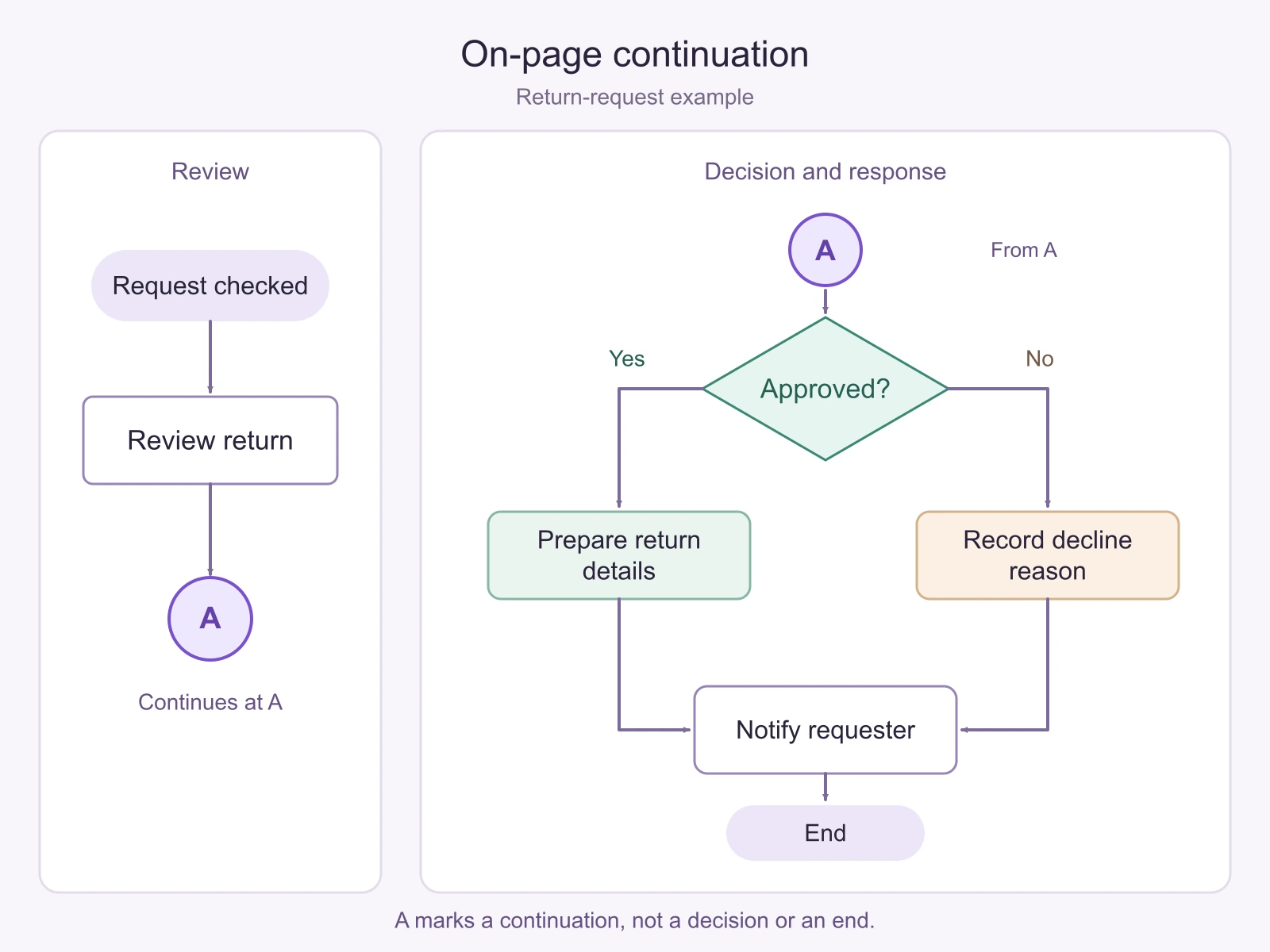
Draw the arrows so their direction is unambiguous: “Review return” points into the first A, and the second A points out to “Approved?” You do not need another long line between the circles; that would undo the reason for using the reference.
Keep Yes and No attached to the decision’s outgoing arrows. A is a location label, not a third outcome. Read the complete route aloud: request checked, review return, continue at A, make the approval decision, prepare the corresponding response, notify the requester, end.
Off-page example: use R1 and name the destination
If the same flow must continue on another page, replace the same-page pair with an off-page pair. Label the outgoing reference R1 and add “Continue on Page 2: Decision and response.” On Page 2, use the matching R1 with “From Page 1: Review.” The reference enters the approval decision, just as the uninterrupted arrow did.
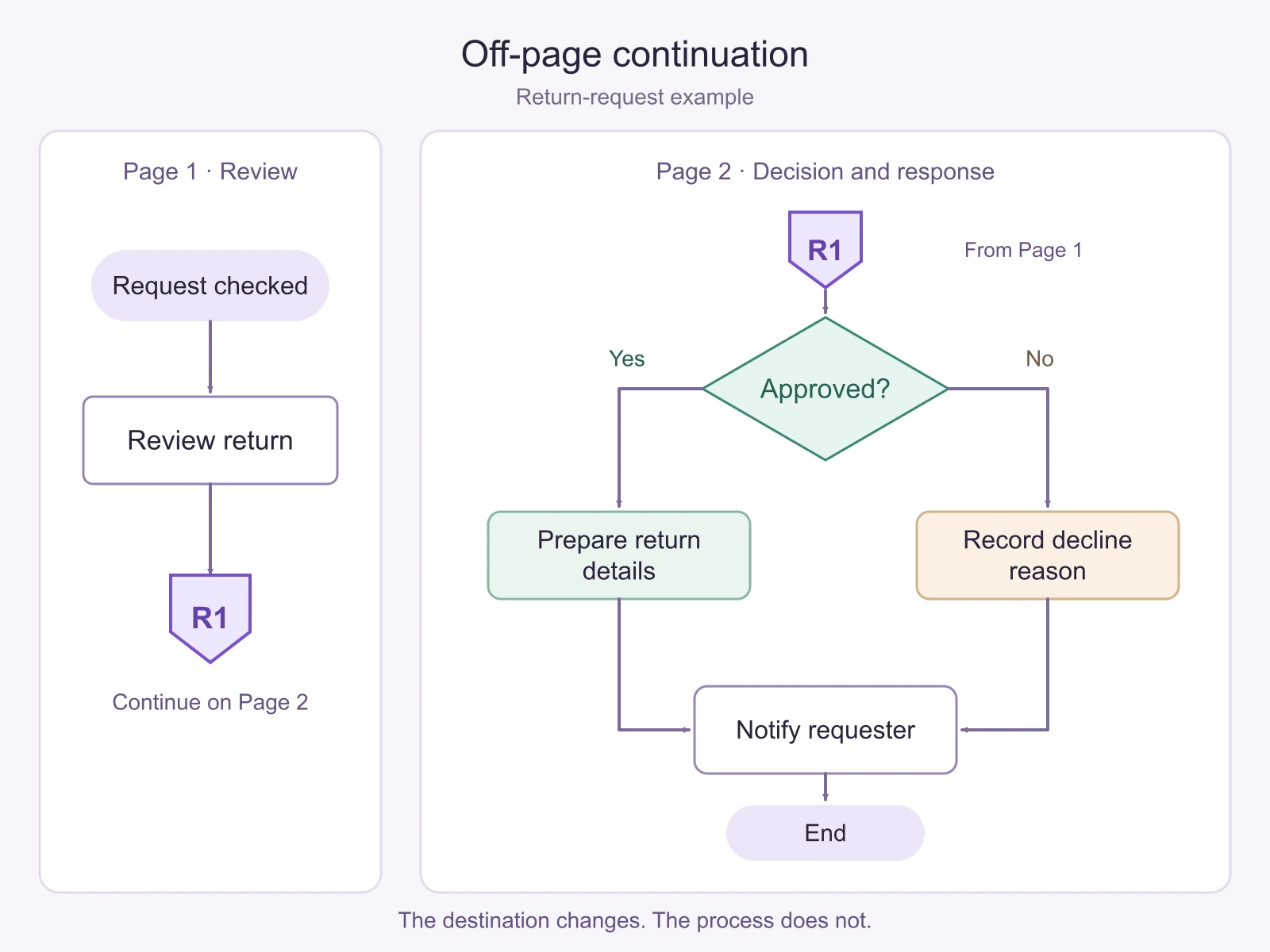
A label such as “See next page” is fragile: someone may reorder the pages or share only one of them. A stable diagram title and connection ID give the reader more to work with. In a printed handout, include both. In a digital document, a verified link can help navigation, but the visible reference should still make sense when exported as an image.
On an infinite whiteboard, two adjacent areas do not become separate pages merely because they have headings. Use the same-page convention for one continuous drawing. Use an explicit diagram or page reference when the destination is a separate document or a deliberately separated presentation of the process.
Four small mistakes that break the route
- A with no matching A. The reader reaches a continuation with nowhere to go. Find the intended next step and restore the pair rather than adding an End symbol.
- The same ID used for unrelated jumps. Two different A destinations make the next step uncertain. Give each distinct continuation its own ID, such as A and B.
- Both arrows point into the pair. The reader can arrive at either reference but cannot leave. For this example, the receiving reference must lead to “Approved?”
- The reference skips a required step. Sending R1 straight to “Notify requester” would omit the approval decision and the response preparation. Compare the split drawing with the continuous sequence before sharing it.
A page reference is also different from a subprocess. “Review return” can be expanded into its own detailed procedure, but doing so hides internal steps behind a named activity. A continuation simply resumes the existing flow elsewhere. If you need to separate levels of detail, use the worked example for simplifying a complex flowchart.
Build and review the paired version in Boardmix
Place the review area and the decision area on the canvas, with enough space to read each independently. Draw the ordinary steps and both approval outcomes first. Then replace only the awkward connection with the labeled pair, using shapes and text to make the reference clear.
Keep the short continuous sequence beside the diagram while arranging it. Ask a teammate to follow the approved route and then the declined route without an explanation from you. They should reach the same notification step through different response actions. If they have to guess which A or R1 to follow, improve the labels or placement.
Use the flowchart symbol guide when choosing the other shapes. A small process usually needs only a few symbols; readable arrows are preferable to a drawing filled with references. Open Boardmix and replace the one connection that is genuinely difficult to follow, leaving the rest of the process intact.